Timestamp Camera, Auto GPS Cam
- 291.00
- 4.0
- Installs
- 10.00M
- Price
- Free
Screenshots

Analysis by Reviewed
Ever found yourself wishing you could remember exactly where and when you took that perfect sunset photo or that quirky cafe snapshot? Well, let me introduce you to the Timestamp Camera, Auto GPS Cam. This app is a game changer for photography enthusiasts and casual snappers alike, giving you the ability to automatically add timestamps and GPS location to your photos and videos. Let’s dive into what makes this app a must-have for your mobile device.
Features That Stand Out
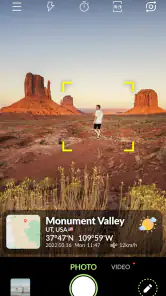
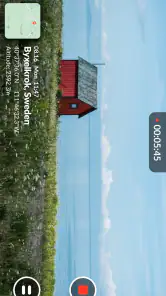
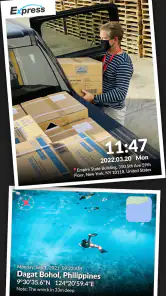
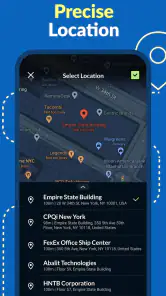
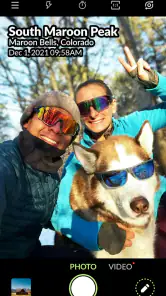
Right off the bat, the feature that caught my eye is the auto timestamp and GPS tagging. Imagine snapping photos during your travels and having all the details automatically embedded into your images. It’s like having a digital diary that logs your photographic journey without any extra effort.
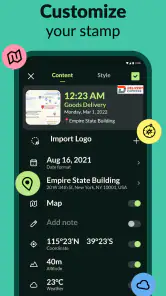
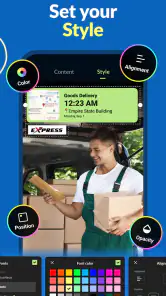
Another cool feature is the customization options. You can tweak the font size, position, and even the color of the timestamp to match your aesthetic. Plus, with various formats to choose from, you can decide how detailed you want the information to be – whether it’s just the date or a full-on location stamp with latitude and longitude.
User Experience
Using the Timestamp Camera, Auto GPS Cam is a breeze. The user interface is straightforward and intuitive, making it easy for anyone to navigate through the app’s features. The camera itself is responsive, with minimal lag time when capturing images or videos. I found that the app runs smoothly without draining the battery too quickly, which is always a plus for those long days out exploring.
One thing I particularly appreciate is the offline functionality. You don’t need an active internet connection for the GPS tagging to work. This is a lifesaver for those of us who love to wander off the beaten path where Wi-Fi isn’t always available.
Why You’ll Love It
Whether you’re a travel blogger, a nature enthusiast, or just someone who loves to document life’s moments, this app offers something valuable for everyone. The ability to automatically log the date and location of every photo adds a layer of context that can make memories even more vivid when you look back on them.
In a world where digital clutter is real, having organized and detailed photos can make a huge difference. The Timestamp Camera, Auto GPS Cam not only helps you keep track of where and when you’ve been but also helps you share those moments with others in a more meaningful way.
So, if you’re looking for an app that enhances your photo-taking experience while helping you capture life’s adventures with precision, this might just be the perfect addition to your app collection. Give it a try and see how it can transform the way you document your world!
Pros
- User-friendly interface with easy navigation
- Supports multiple video and photo formats
- Highly customizable timestamps options
- Efficient GPS location tagging
- Real-time date and time updates
Cons
- Some features require in-app purchases
- Consumes significant battery power
- Occasional GPS signal issues
- Limited cloud storage options
- Ads can be intrusive at times
- Category
- Photography
- Version
- 1.0.37











