Audio Editor, MP3 Cutter
- 378.00
- 4.2
- Installs
- 1.00M
- Price
- Free

Screenshots
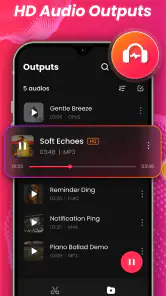

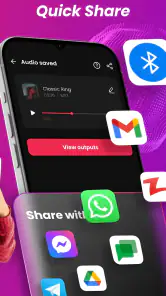
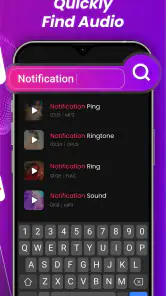
Analysis by Reviewed
If you’ve ever found yourself humming to a tune and wishing you could snip it into a ringtone or a notification sound, then you’re going to love the Audio Editor, MP3 Cutter app. It’s one of those nifty tools that makes you wonder how you ever got along without it. So, let’s dive into what makes this app a keeper.
Why it appeals in the first week
The first useful test is a small, familiar job: turning a section of a song or recording into a sound you can actually use. For that, a focused editor can be less intimidating than a full workstation. You do not need to learn a large timeline or a collection of production tools before trying a simple cut. I’d start with a copy of the source file, listen around the intended in and out points, then preview the clip before saving. That habit helps avoid trimming off the first beat or leaving an awkward fragment at the end.
Audio Editor, MP3 Cutter is a free music-and-audio app from Hitchhike Tech. Its 4.2 average from around 47,000 ratings suggests that many people find this kind of direct editing useful, while the 378 written reviews offer a smaller set of detailed experiences. The app has over 1 million installs, is rated for Everyone, and its current version is 1.6.1. It runs on Android 6.0 or later, with in-app purchases ranging from $3.49 to $26.99 per item. I’d treat those purchases as something to evaluate only if the free workflow becomes part of your routine.
For a first-week trial, I would give it a few different jobs rather than judge it from one quick ringtone. Try a short spoken recording as well as a music excerpt, and listen to each result from beginning to end. The difference matters: a musical phrase often needs to begin on a beat, while speech needs enough lead-in to make the first word understandable. Testing both reveals whether the editor fits the kind of material you actually handle, not just the example that made you install it.
A sensible first project is one where the original file is easy to replace and the finished clip has a clear purpose. I’d avoid making my only copy of an important recording the thing I experiment on. Keeping the source untouched gives me room to revise a boundary later, and makes it easier to create a second version for a different use. That is a small workflow choice, but it prevents a quick edit from becoming a frustrating recovery task.
Snip, Snip: The Beauty of Simplicity
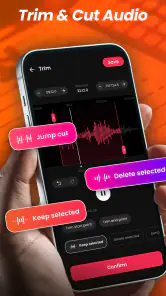
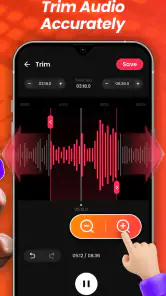
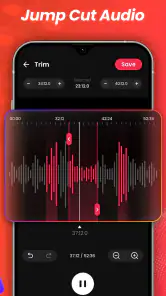
At first glance, the Audio Editor, MP3 Cutter may seem like a straightforward app. And you know what? It is! But that’s precisely its charm. The user interface is clean and intuitive, so even if you’re not tech-savvy, you can easily navigate through. You simply load an audio file, select the part you want to trim, and voilà—you have your custom clip ready in minutes. No need for lengthy tutorials or trial-and-error methods. It's as easy as pie!
That direct approach is especially handy when I am editing on a phone between other tasks. A complicated tool can make a tiny adjustment feel like a project, while a focused cutter lets me concentrate on the sound and the cut. The trade-off is that simplicity does not automatically mean precision: if a boundary is close to a quiet syllable or a soft musical attack, I still need to listen carefully and adjust rather than trust a quick visual selection.
More From Our News Desk

Clash of Clans Is Won Between the Battles

Android Auto Makes the Case for Quieter Car Software

MobiOffice: Transforming Mobile Productivity with Seamless Integration

EA SPORTS FC™ Mobile Soccer: Redefining Mobile Sports Gaming

How Microsoft OneDrive Became a Mobile Productivity Giant

How Google Translate Breaks Language Barriers Effortlessly
More Than Just Cutting
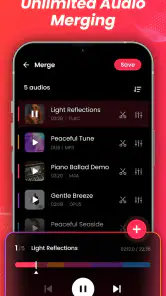
Now, you might think this app is just about snipping audio files, but it’s got a few more tricks up its sleeve. Whether you’re looking to merge audio files to create a mega-mix or adjust the volume for the perfect fade-out effect, this app has got you covered. Plus, the app supports a variety of audio formats, so you’re not limited to just MP3s. It’s like having a mini sound studio right in your pocket!
When joining clips, I’d think about the transition as much as the join itself. Two files can fit together in length but still feel jarring if one ends loudly and the next begins quietly. Listening to the combined result from the join onward is more useful than checking only the start and finish. For a casual personal mix, that extra check can make the difference between a usable sequence and one that sounds like two unrelated pieces pushed together.
Small edits that earn repeat use
The appeal month to month depends less on making a big project and more on whether little tasks keep coming up. I can imagine using it when a long recording contains one passage I want to keep, or when two short clips need joining for a personal playlist. A practical trick is to decide the purpose before editing: a ringtone needs a clean start and a natural ending, while a spoken snippet may need a little breathing room so it does not sound abruptly chopped. Saving a separate edited copy also keeps the original available if I later want a different cut.
That makes the app a better fit for repeated small chores than for elaborate creative sessions. I can see it earning space for someone who occasionally prepares a personal alert, cleans up a brief excerpt, or assembles a short sequence for private listening. If those needs happen only once, it may be easier to do the job with a tool already on hand. If they recur, having a dedicated editor can save the effort of relearning a broader program each time.
A realistic everyday use would be trimming a voice memo after a meeting or a class so I can keep the relevant passage for myself. I’d first find the sentence by listening, then leave a little silence before and after it; cutting too tightly can make the excerpt difficult to understand when played later without context. I would also give the saved clip a name that describes its contents instead of relying on memory. These are simple habits, but they make short edits easier to find and reuse weeks later.
For ringtones, the same principle applies in a different way. A short segment may sound fine when I am focused on it, yet become irritating if it repeats throughout the day. I’d choose a recognizable section that starts cleanly and is not needlessly loud, then live with it briefly before deciding it is the right alert. A notification sound should be distinct enough to notice, but making it aggressive just to ensure I hear it can become a source of fatigue.
Compared with the usual alternatives, this sits on the quick-edit side rather than the full digital audio workstation side. A desktop editor is a better choice for detailed multitrack arrangement, precise production work, or a project that needs repeated revisions across several layers. A basic file player, meanwhile, is enough if all you want is to listen. This app makes most sense in between: when I want to change a file itself without turning a one-minute task into a larger project.
There is also a middle ground between a dedicated phone editor and a desktop workstation: some people may already use a general-purpose audio app for recording, playback, and editing in one place. That can be more convenient if they work with the same files regularly. I would choose this cutter instead when the job is clearly limited to trimming, joining, or preparing a small sound and I want to avoid navigating a wider toolset. The right choice depends on whether convenience means fewer steps or keeping every part of an audio workflow together.
Performance and Usability
In terms of performance, the app is smooth and doesn’t bog down your device with unnecessary bloat. It’s lightweight, which means you won’t have to worry about it eating up your storage. The processing speed is quick too, so you won’t be left tapping your fingers while waiting for the app to do its thing. Whether you’re using an Android or iOS device, the experience is consistently stable and pleasant.
And let’s not forget the usability. The app is designed for both beginners and seasoned users, offering a simple yet effective solution for audio editing needs. You’ll find that the learning curve is practically non-existent, which is a breath of fresh air in today’s complex app market.
For an Android user deciding whether to keep it, the practical question is how often audio editing comes up on the phone itself. If I usually move recordings to a computer for careful work, a mobile cutter may be a convenient occasional helper rather than the center of my setup. If I regularly want to make a clip ready while I am away from my desk, the phone-first format is more compelling. The device requirement is also straightforward: it needs Android 6.0 or later, so checking the operating system before installing avoids an unnecessary detour.
I would not treat “easy to use” as a reason to skip listening checks. Editing a file is not the same as improving its recording quality, and a clean trim cannot fix background noise or a muffled source. If the original audio is hard to understand, I would look for a tool designed for more involved cleanup rather than expect a simple cutter to rescue it. This is one of the clearest boundaries between a convenient editor and a broader audio-processing setup.
What to consider before making it a habit
Simple editing also has a boundary. If you regularly need detailed control over several tracks, a broader audio workstation will suit you better; a compact cutter is not a replacement for production software. Even for short clips, careful listening matters more than tapping quickly: a cut that looks neat on a waveform can still sound unnatural, especially if it begins mid-word or mid-note. I would preview a ringtone at its intended volume and in context, rather than judging it only through headphones while editing.
Another useful check is where the finished audio will be played. A clip meant for a personal playlist can tolerate a different start and finish from one intended as an alert, and a spoken excerpt should remain intelligible on the speaker I am likely to use. I’d preview it in the actual situation when possible, because a detail that sounds minor through headphones can be distracting on a phone speaker or after repeated playback.
For an everyday scenario, imagine wanting a brief notification sound from a longer audio file. I’d locate a distinctive moment, trim with a little room around it, preview the result, and keep the source untouched. If the sound is meant for an important alert, I’d choose a clip that is recognizable without being startling; maximum loudness is not always the most comfortable choice. These small decisions make the result more useful than simply cutting the shortest possible piece.
The ongoing maintenance is mostly about keeping edited files understandable and not letting a pile of near-identical versions become confusing. I would use a consistent naming habit, such as noting the purpose or the source in the filename, and remove drafts once I know which version I want to keep. That organization is not glamorous, but it matters if the app becomes a regular part of handling recordings. Without it, the convenience of quick edits can be offset by searching through ambiguous clips later.
For people who are unsure about paying, I’d first use the free app for the exact tasks they expect to repeat. The in-app purchases range from $3.49 to $26.99 per item, so it is worth deciding whether an added purchase addresses a real need rather than paying simply because the app is useful once. Someone who only wants one ringtone may not get much lasting value from extra spending; a regular editor may judge that differently after seeing how often the workflow helps.
Final Thoughts
In a world filled with complicated audio editing tools, Audio Editor, MP3 Cutter stands out as a beacon of simplicity and efficiency. Whether you’re crafting a personalized ringtone or creating sound bites for your latest project, this app delivers without breaking a sweat. It’s the kind of app that earns a permanent spot on your home screen because once you start using it, there’s no going back.
Still, lasting value comes down to how often you have a real reason to edit. If you make occasional ringtones, trim a recording now and then, or join a couple of audio pieces, an approachable tool can justify keeping it installed. If you only edit once, a one-off desktop solution may be enough; if your needs grow into layered music production, choose something built for that depth. The free starting point is appealing, but the in-app purchase range is worth considering if you expect to rely on it regularly.
For me, the strongest reason to keep a small editor around is not novelty but reduced friction: when a useful excerpt appears, I can shape it into a separate, practical file without planning a larger session. The weakest reason is installing it with no recurring task in mind. Apps for occasional jobs can quietly become clutter, so I’d keep this one only if I find myself returning to trimming, joining, or preparing short sounds often enough to appreciate having the tool close by.
So, if you’re on the hunt for a reliable, easy-to-use audio editing tool, give Audio Editor, MP3 Cutter a try. Trust me, your playlist will thank you!
Audio Editor, MP3 Cutter Frequently Asked Questions
Can I edit a song without changing the original audio file?
Audio Editor, MP3 Cutter is designed for editing tasks such as cutting, trimming, mixing, and preparing audio for use as a ringtone. Before making changes, keep a separate copy of any track you want to preserve, especially if the audio is important to you. That simple precaution gives you an untouched original to return to while you experiment with edits.
Can I use the app to combine audio clips or make a simple mix?
The app’s editing tools include merging and mixing audio tracks, so it can be useful when you want to combine clips or make a straightforward mix. You can also trim sections and use fade-in or fade-out effects to shape transitions. These features make it suitable for more than just cutting a short ringtone, though the best fit depends on how involved your editing needs are.
Can I use Audio Editor, MP3 Cutter to prepare audio for a podcast or social post?
The app can help with basic audio preparation because it offers tools for trimming, cutting, merging, and mixing tracks. Those options can be useful for shortening a recording or joining audio segments before sharing them elsewhere. It is primarily presented as a practical mobile audio editor, so consider whether its editing features match the level of control you want for your podcast or social content.
Does Audio Editor, MP3 Cutter work on older Android devices?
Audio Editor, MP3 Cutter is available for Android devices running Android 6.0 or later, so it can suit many older phones and tablets that still meet that requirement. Before downloading, check your device’s Android version and make sure you have enough free storage for the app and the audio files you plan to edit. The app is in the Music & Audio category.
Who develops Audio Editor, MP3 Cutter, and is it intended for general audiences?
The app is developed by Hitchhike Tech and has an Everyone content rating, making it broadly suitable for general audiences. Its focus is practical audio editing, including cutting and preparing tracks for use as ringtones. If you are choosing an editor for a family member, the age rating may be useful context, while the simple editing tools can appeal to people who want to make straightforward changes to audio.
Pros
- Intuitive user interface for easy editing
- Supports a wide range of audio formats
- Allows precise cutting and trimming
- Includes effects to enhance audio quality
- Offers batch processing of files
Cons
- Contains ads that can be distracting
- Limited free version features
- Occasional app crashes reported
- No support for cloud integration
- Export options could be expanded
- Category
- Music & Audio
- Version
- 1.6.1













