Thermometer++ Room Temperature
- 1.77K
- 4.5
- Installs
- 10.00M
- Price
- Free

Screenshots
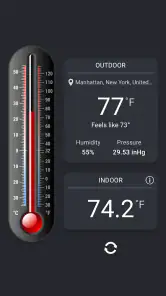
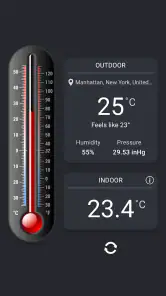

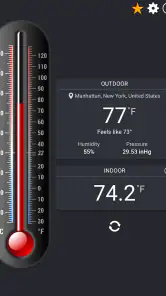
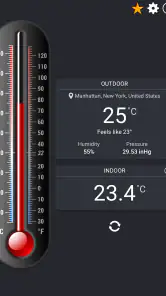

Analysis by Reviewed
My first question with any phone-based room reading is whether it can help me make a sensible decision without pretending to be lab equipment. That is the role I’d give Thermometer++ Room Temperature: a quick reference when a space feels warmer or cooler than expected, not a definitive measurement. It is a weather app from Singulario Apps, and its appeal is the short path from opening it to checking the conditions around me.
Start with the room, not the number
I get the most useful result when I decide what I’m trying to learn before I open the app. Am I checking whether the bedroom has warmed up, or wondering if the window has made the living room chilly? That small distinction helps me treat the reading as context for a practical choice rather than a verdict on the entire home.
For a fair comparison, I keep the phone in one place and give it time to settle. A reading taken just after charging, gaming, or sitting in direct sun may reflect the phone’s own warmth as much as the room. Moving it away from the charger and window, then checking again after a pause, is a more useful routine than repeatedly refreshing while holding it in my hand.
The Latest on Thermometer++ Room Temperature
A quick check, not a measuring instrument
The useful workflow is simple: open the app where you want a reading, glance at the result, then decide whether you need to do anything. If a bedroom feels stuffy before bed, for instance, I might check the temperature before opening a window or changing the heating. That gives me a point of reference instead of relying only on how the room feels after I’ve been in it for hours.
That distinction matters because a phone is not a dedicated room thermometer. The device itself can warm up from charging, sunlight, a case, or recent heavy use, and sensor availability and quality vary between phones. I’d let the phone rest away from direct sun and chargers before treating a reading as representative. For nursery checks, cooking, or any situation where a precise temperature matters, a purpose-built thermometer is the better handoff.
What happens after the reading
The app’s role is to help me make a small everyday decision, not to manage the whole home. I can use the temperature as a prompt to check ventilation or adjust a fan, then reassess how the room feels. If I’m planning a walk or deciding what to wear outside, a dedicated forecast app is more useful because the indoor reading does not answer questions about upcoming weather.
Thermometer++ also presents itself as covering humidity, pressure, and wind alongside temperature, which broadens the kind of weather context it can offer. I’d still separate a quick glance from a dependable outdoor forecast: local conditions and the way a phone obtains a reading can affect how useful those details are. For a simple indoor temperature check, the key advantage is having the reading in one place; for detailed planning, I’d compare it with a conventional weather service.
More From Our News Desk

Android Auto Makes the Case for Quieter Car Software

MobiOffice: Transforming Mobile Productivity with Seamless Integration

EA SPORTS FC™ Mobile Soccer: Redefining Mobile Sports Gaming

How Microsoft OneDrive Became a Mobile Productivity Giant

How Google Translate Breaks Language Barriers Effortlessly

Why Google Sheets Is the Ultimate Mobile Productivity Tool
Who will find it useful
I think it suits curious users who want a lightweight way to check room conditions, especially when they don’t already keep a thermometer nearby. It’s free to install, rated for Everyone, and has an average rating of 4.5 from around 222,000 ratings, with over 10 million installs. The current version is 6.6.2, and it runs on Android 8.0 or later. In-app purchases range from $0.99 to $4.99 per item, so I’d look at the available options before paying; a basic temperature check may be all some people need.
I’d skip it if you need verified precision, continuous monitoring, or a record you can rely on for health, storage, or equipment decisions. The same goes if you only want tomorrow’s forecast: a standard weather app is likely the more direct choice. Its release date is May 9, 2012, which gives it a long history, but the practical question is whether the current build works sensibly on your particular phone. If you’re comparing readings, use the same device in the same spot rather than switching phones and assuming they should match.
Getting Acquainted with Thermometer++
Firstly, let me tell you about the interface of Thermometer++ Room Temperature. It’s as straightforward as it gets. Upon launching the app, you’re greeted with a clean display that shows the current room temperature. This simplicity is a breath of fresh air, especially when you’re tired of cluttered screens. The app uses your device's internal sensors to determine the ambient temperature, which is pretty neat.
How Accurate Is It?
Now, the big question is how accurate can an app be when it uses your phone’s sensors? From my time using it, I’ve noticed that while it does a decent job, it’s not a replacement for a dedicated thermometer. However, it works well for quick checks. For example, if you’re debating whether to turn on the fan or heater, this app gives you a ballpark figure to base your decision on.
Moreover, it’s important to note that the app's accuracy can vary depending on your device’s sensor quality. So, if you’re using a high-end smartphone, you might get better readings compared to an older model.
Making the reading useful at home
A realistic use is checking a room before changing the thermostat, then checking again later from the same spot. I would not treat a single number as proof that a heating adjustment worked: doors opening, sunlight shifting, and the phone warming in my palm can all muddy the comparison. Instead, I’d set the phone down in a consistent place, leave the room alone as much as practical, and use the later reading as one clue alongside how the space feels.
That approach is especially handy when a room has uneven conditions. A sunny patch beside a window and a shaded corner can feel different even within the same room. If I want a rough sense of the space where I actually sit or sleep, I’d place the phone near that area rather than beside a radiator, window, or appliance. It is a small workflow choice, but it makes the result more relevant to the decision I’m making.
Where it fits beside other weather tools
Compared with a typical forecast app, this one is more focused on an immediate check around me than on helping me plan a day outdoors. A forecast app is the better first stop for rain timing, changing conditions, or deciding what to wear for a commute. A standalone digital thermometer is the better choice when dependable room measurement matters. Thermometer++ sits between those options: convenient when I want a quick point of reference without reaching for another device, but not a substitute for either specialized tool.
There is also a useful distinction between checking one room and understanding a whole home. A quick phone reading can tell me something about the spot where I set it down; it cannot, by itself, establish that every room has the same conditions. If one room repeatedly feels uncomfortable, I’d compare locations carefully and then use a proper thermometer if I need a more reliable assessment. The app is most convincing when the question is modest and local.
Handoffs, habits, and practical limits
Once I have a reading, the next step is usually outside the app: opening a window, changing a fan, or deciding to leave the heating alone. I find that more useful than chasing tiny changes on the screen. For a better comparison, I’d avoid switching devices halfway through the process, since different phones may not have equivalent sensors or behave alike. Keeping one phone in one place gives me a more coherent trend, even if it does not turn the app into a calibrated instrument.
Another trade-off is that convenience can encourage false confidence. A neat display may make a measurement look more exact than it really is, especially when I’m checking a sensitive situation. I would not use a phone reading to decide whether food, medication, or temperature-sensitive equipment has been stored safely. In those cases, the right handoff is to a thermometer designed for the job, and the app can remain a casual reference rather than the authority.
User Experience and Accessibility
One thing that stands out is the app’s accessibility. It’s available for both Android and iOS, which is great for reaching a wider audience. The user-friendly design ensures that even the least tech-savvy person can navigate it without any hiccups. Plus, there’s no unnecessary information—just the temperature reading you came for.
In terms of performance, the app runs smoothly without draining your battery, which is always a plus. It’s lightweight and doesn’t hog your phone’s resources, allowing you to keep it running in the background without a second thought.
Who should choose something else
I would recommend it to someone who likes checking a room out of curiosity, wants a quick prompt before adjusting comfort settings, or does not have a thermometer close at hand. It is less suitable for someone who expects a phone to provide a stable, instrument-grade measurement, needs ongoing observation, or wants a detailed weather-planning experience. The sensible question is not whether it replaces every tool, but whether a quick local reference is enough for the choice at hand.
If the reading seems surprising, I would first repeat the check after letting the phone rest in a more neutral spot. If it still conflicts with what I can feel, I would trust neither a single phone reading nor my intuition alone for an important decision; I’d bring in a dedicated thermometer. That simple fallback answers the practical question of what to do when the app and the room seem to disagree.
Final Thoughts
All in all, Thermometer++ Room Temperature is a nifty little app that does exactly what it promises. It’s not going to replace professional equipment, but it’s a fun and handy tool for everyday use. Whether you’re curious about your room’s climate or just want a quick temperature check, this app is worth trying out. So next time you’re feeling a bit unsure about the warmth or chill in your space, give this app a whirl and see how it measures up!
Thermometer++ Room Temperature Frequently Asked Questions
What information does Thermometer++ Room Temperature show besides temperature?
Thermometer++ Room Temperature is designed to show several kinds of weather information, not just a temperature reading. Its summary includes indoor and outdoor temperature, humidity, pressure, and wind. This broader set of readings may be useful if you want a quick overview of conditions in one app. Which readings are most useful will depend on whether you are checking your surroundings or looking at outdoor weather.
Is Thermometer++ Room Temperature intended for checking indoor conditions, outdoor weather, or both?
The app’s focus covers both indoor and outdoor temperature, along with other weather conditions such as humidity, pressure, and wind. That makes it relevant if you want to check more than the temperature inside a room. Keep in mind that readings and the way they are obtained can depend on your device and whether a particular feature relies on an internet connection.
What devices and operating systems can run Thermometer++ Room Temperature?
Thermometer++ Room Temperature is a weather app for Android, with support beginning at Android 8.0. Before downloading, check that your device meets this minimum requirement and that you have enough room for another app. Its straightforward purpose—viewing temperature and other weather conditions—makes it a practical option for users who want these readings on a compatible phone or tablet.
Who makes Thermometer++ Room Temperature, and is it suitable for all ages?
The app is developed by Singulario Apps and has an Everyone content rating, making it broadly suitable for users of different ages. Its focus is on displaying weather-related readings rather than entertainment or social interaction. If you are choosing an app for a family device, the age rating is a useful point to consider alongside the app’s features and the device’s operating-system compatibility.
What features does Thermometer++ Room Temperature offer?
Thermometer++ Room Temperature offers a range of features that allow users to accurately measure the ambient temperature of their surroundings. It provides real-time temperature readings, supports both Celsius and Fahrenheit units, and includes a user-friendly interface. Additionally, the app offers a historical data log, allowing users to track temperature changes over time. Its weather summary also describes indoor and outdoor temperature, humidity, pressure, and wind, so it covers more than temperature alone.
Pros
- Accurate temperature readings.
- User-friendly interface.
- Quick loading times.
- Minimal ads presence.
- Free to use.
Cons
- Requires internet connection.
- Ads can be intrusive at times.
- No offline mode available.
- Limited customization options.
- In-app purchases for advanced features.
- Category
- Weather
- Version
- 6.6.2











