T-Mobile® FamilyMode™
- 1.75K
- 4.3
- Installs
- 500.00K
- Price
- Free

Screenshots

Analysis by Reviewed
I look at T-Mobile® FamilyMode™ as a family-control tool rather than a magic fix for every screen-time argument. It is a free parenting app from T-Mobile USA, and its appeal is practical: it brings device rules, usage oversight, and ways to pause internet access together. I’d consider it when several family members use connected devices and parents want one place to manage routines, but I would not expect an app to replace a conversation about why the rules exist.
Where it fits today
The current release is version 3.7.2, and the app has been available since June 28, 2018. That history suggests an established product, but a version number by itself does not tell me which features changed or how every household’s setup will behave. I would treat the current tools as the useful evidence: screen-time limits, reports, filters, app and website controls, and a pause option. The app has an average rating of 4.3 from around 6,900 ratings, with over 500,000 installs, which gives a sense of its reach without guaranteeing the same experience on every device.
Who is likely to get the most from it
FamilyMode makes the most sense for a parent who wants repeatable household rules instead of having to negotiate each limit from scratch. For example, you might use a daily screen allowance for a child’s device, review app use together at the end of the week, and pause access during dinner. That workflow can turn a vague “you’ve been online too long” into a specific, visible rule. My practical tip is to agree on the limit before enforcing it; a control that arrives as a surprise can create more conflict than it solves.
It may be less suitable for families who only need a simple bedtime schedule or who already manage every device with built-in parental controls. Those options can be easier when the household uses one operating system and only needs basic limits. FamilyMode’s broader appeal is having controls and monitoring in one family-oriented app, but every extra rule takes time to configure and maintain. If your main need is a conversation-free way to stop all device use, no app can reliably provide that: a child may still have offline activities, and access rules do not teach judgment on their own.
A routine that makes the rules easier to use
One useful way to introduce FamilyMode is to build a small routine around it rather than turning setup into a long list of restrictions. Start with the moments that cause the most friction—perhaps homework, meals, or bedtime—and decide together what should happen at those times. Then use the app’s controls to support that agreement. A family that tries to regulate every app and every hour at once may spend more energy troubleshooting rules than building a sustainable habit.
Imagine a school night when a child is switching between a homework app and entertainment. A daily limit can help make recreational use visible, while a quick look at the report can open a conversation about how the evening went. If the schoolwork itself requires a device, the total time alone is not a useful measure of whether the rule worked. I would distinguish necessary use from leisure before deciding that a long screen session calls for a stricter limit.
That distinction also answers a practical question parents often have: should the app be used to watch activity constantly? I would use reports selectively, at an agreed check-in, rather than repeatedly inspecting them throughout the day. Regular review can help a parent spot a pattern and adjust a household rule; constant checking can make oversight feel like surveillance. FamilyMode is most helpful when everyone understands what is being monitored and why.
More From Our News Desk

Weather by Xiaomi Review: Clear at a Glance, Less Clear Up Close

X Under Pressure: Can It Recover When Posting Goes Wrong?

Clash of Clans Is Won Between the Battles

Android Auto Makes the Case for Quieter Car Software

MobiOffice: Transforming Mobile Productivity with Seamless Integration

EA SPORTS FC™ Mobile Soccer: Redefining Mobile Sports Gaming
Using its controls without turning them into a fight
So, I decided to give T-Mobile® FamilyMode™ a whirl, and the setup process was surprisingly smooth. You start by downloading the app from the Play Store or the App Store, depending on your device. Once installed, the app guides you through a simple setup process to connect all your family’s devices. The interface is user-friendly, even for those who might not be tech-savvy. You can easily add devices, assign them to family members, and set up profiles with specific rules.
Keeping Tabs on Screen Time
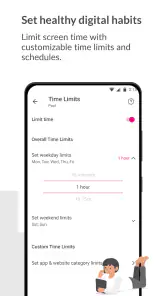
One of the standout features is the ability to monitor screen time. You can set daily limits for each device and view detailed reports on how much time was spent on specific apps. This function is a game-changer for parents looking to ensure their kids aren’t spending too much time glued to their screens. I particularly appreciated the real-time alerts that notify you when limits are reached—no more relying on trust alone!
Reports are most helpful when I use them as a prompt for a quick check-in, not as a scorecard. If a child has a school project or a long trip, a single day may look unusual; it is worth adjusting expectations for that situation rather than treating every spike as misbehavior. I would also review whether each device is assigned to the right family profile before drawing conclusions. Otherwise, one person’s activity could be mistaken for another’s, and a useful report becomes a source of confusion.
For households with shared tablets or devices that move between siblings, profile accuracy deserves special attention. If a device is used by more than one person, its activity may not tell the whole story of who was using it. I would treat the report as a record of device use, then ask a simple question before drawing conclusions about an individual child. This small habit keeps data from being mistaken for a complete account of someone’s day.
Customizable Filters and Controls
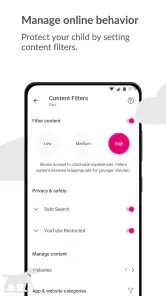
With FamilyMode, you can customize filters to block inappropriate content and set age-appropriate restrictions. The app offers a range of categories to choose from, ensuring that the internet remains a safe space for your young ones. You can block specific apps, websites, or categories entirely, giving you peace of mind knowing that your family is browsing safely.
Filters are a starting boundary, not a promise that every unsuitable page will be caught or that every blocked item will be a bad fit. I’d begin with a small set of restrictions that match a child’s age, then check together when something legitimate is blocked. That approach is less frustrating than applying every category at once and troubleshooting a stack of unintended restrictions. For older children, explaining what a filter does—and where it cannot make a judgment—helps keep the control from becoming a substitute for digital literacy.
When a child says a site or app is needed, I would check the specific situation before changing the entire filter setup. A school resource may be a reasonable exception, while a broad change made in a rush can weaken a rule that was working elsewhere. The more targeted the adjustment, the easier it is to explain and reverse if it does not suit the family. Filters work best as practical boundaries that parents revisit, not a once-and-for-all decision.
The Pause Button: A Parent’s Best Friend
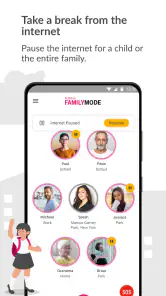
Ever wanted to just pause the internet for a bit? Well, now you can! The pause button is a fantastic feature that allows you to temporarily suspend internet access on all devices with just a tap. Whether it’s family dinner time or you just need everyone to unplug, this feature is incredibly handy. Trust me, it works like a charm!
A realistic use is a family meal when everyone has drifted onto a screen: set the expectation first, then use the pause as a clear shared cue rather than a surprise punishment. I would not make it the default response to every disagreement. A targeted screen-time limit or a calm conversation may fit better when only one device needs attention. Before relying on any control for an important routine, check how it behaves with your family’s actual devices and connectivity; a pause is useful only when it affects the devices you intended to manage.
There is a trade-off here: an all-device pause is quick, but it may be broader than the moment requires. If one child needs access for a legitimate task, a household-wide interruption can create needless frustration. I would save the pause for a clearly shared break, and use individual rules when the issue is limited to one person or one device. That choice keeps a convenient control from becoming a blunt tool.
How it compares with familiar alternatives
Compared with the parental controls built into phones and tablets, FamilyMode is appealing when a parent wants to bring several family devices into one management routine. Built-in controls may be the more straightforward choice for a household using a single platform, particularly if the only goal is a basic schedule or limit. FamilyMode makes more sense when monitoring, filtering, and pausing are all relevant to the family’s approach, though that wider scope also means more setup and ongoing attention.
It is not a replacement for every kind of family safety tool. A parent whose priority is to teach a child to make good choices online may get more lasting value from agreed rules and regular conversations than from adding more blocks. Likewise, if managing devices across different operating systems becomes confusing, the simplest controls already available on those devices may be preferable. I would choose FamilyMode for centralized oversight, not because every household needs another layer of control.
What to weigh before choosing it
In the parenting-app category, FamilyMode combines oversight and controls in a single place, while built-in phone controls may be a better fit for families who want fewer setup steps or only need basic schedules. The trade-off is that a centralized family tool asks you to keep profiles and rules organized as devices or routines change. I’d choose it for a household that values shared visibility and flexible restrictions, and skip it if tracking feels too intrusive for your family or if the rules would be applied inconsistently.
The app is rated for Everyone, but that age label describes the app, not a guarantee that every control suits every child. Parents still need to make age-appropriate choices and revisit them as children gain independence. It is also worth checking compatibility before setting aside time for setup: the minimum operating system is version 9, so an older device may not be suitable. The app’s free price is a useful point of entry, though the published description of a subscription fee in the earlier account conflicts with that; I would check the current in-app terms before making a spending decision rather than assume a charge or assume every service is included.
Before committing to a household routine, I would also ask whether the rules are realistic for every caregiver to follow. A well-configured limit is less useful if adults apply it differently from one day to the next. Agreeing on who can adjust profiles, when exceptions are reasonable, and how a child can ask for a change can prevent the app from becoming another source of mixed messages. Consistency matters more than having the strictest possible settings.
FamilyMode is a good fit for parents who want a single place to set expectations and review device activity, especially when a family has several connected devices and a shared approach to screen time. I would skip it if the household has little need for monitoring, if children are old enough that detailed oversight would undermine trust, or if existing device controls already solve the problem. The better choice is the one your family can explain and use consistently, not simply the one with the most controls.
What I would watch as a family’s needs change
The app’s release date and current version show that it has continued to a later release, but they do not establish which changes were made or what will be added next. For an existing user, I’d focus on whether the rules still match the family’s routines, whether profiles remain accurate, and whether reports are helping people make better choices. When a child gets a new device or moves into a different age group, review the setup instead of carrying old limits forward automatically. That small check can prevent stale rules from causing avoidable friction.
For families already using it, the most useful check is not whether the version number has changed but whether the everyday setup still works. When routines shift—such as a new school schedule, a device being passed to another child, or a change in how much independence a child needs—review the profiles and limits together. The product’s history makes it reasonable to treat it as an established option, but I would keep future expectations grounded in what the app currently does rather than assume a particular feature is coming.
Wrapping It Up
All in all, T-Mobile® FamilyMode™ offers a robust set of tools for managing your family’s digital life. It’s intuitive, packed with features, and designed with families in mind. Whether it’s setting screen time limits, filtering content, or just pausing the internet for a much-needed break, this app covers all bases. If you’re looking for a way to take back control and ensure a balanced digital lifestyle for your family, I’d say give it a go. You just might find it’s the solution you’ve been searching for!
My recommendation is to start with one clear household goal, such as a calmer dinner routine or a more transparent screen-time limit, and see whether FamilyMode makes that goal easier to manage. Give children a chance to understand the rule and raise reasonable exceptions, then adjust the setup if the first version creates unnecessary friction. That measured approach is where I see the app’s strongest value: it can make family rules easier to apply, while the conversations that give those rules meaning still belong to the people in the household.
T-Mobile® FamilyMode™ Frequently Asked Questions
Who is T-Mobile® FamilyMode™ intended for?
T-Mobile® FamilyMode™ is a parenting app for families who want to manage children’s digital lives at home or on the go. It brings parental-control tools together so parents can oversee device use and set boundaries. Before downloading, consider which controls matter most to your family and whether the app’s available features fit the devices you want to manage.
Is T-Mobile® FamilyMode™ free to download?
T-Mobile® FamilyMode™ is free to download. The app is developed by T-Mobile USA and is listed for everyone, so its age rating is not limited to a particular age group. Keep in mind that the download price and the cost of any optional services are separate questions; review the current terms shown by T-Mobile before deciding whether to use the service.
What is T-Mobile® FamilyMode™?
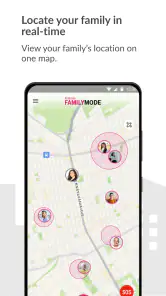
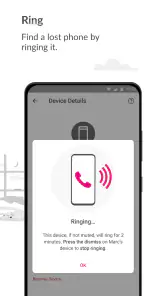
T-Mobile® FamilyMode™ is a comprehensive parental control application designed to help parents manage their children's online activities across multiple devices. It allows you to monitor usage, set time limits, filter content, and track the location of your family members' devices, ensuring a safe digital environment for your children.
How does T-Mobile® FamilyMode™ help in managing screen time?
With T-Mobile® FamilyMode™, parents can easily set daily screen time limits for their children’s devices. The app provides tools to pause the internet connection, set schedules for device usage, and receive reports on how much time is spent on different apps or websites, helping to encourage balanced screen time.
Is T-Mobile® FamilyMode™ compatible with all devices?
T-Mobile® FamilyMode™ is compatible with a wide range of devices, including smartphones, tablets, and computers. It works across both Android and iOS platforms, allowing for seamless integration and management regardless of the device your family members are using. However, certain features may vary based on the device type.
Pros
- Real-time location tracking.
- Customizable screen time limits.
- Simple setup process.
- Intuitive user interface.
- Works across multiple devices.
Cons
- Subscription required for full features.
- Occasional syncing issues.
- Limited social media monitoring.
- May slow down device performance.
- Some features can be bypassed by tech-savvy kids.
- Category
- Parenting
- Version
- 3.7.2













