T-Mobile Visual Voicemail
- 40.16K
- 3.0
- Installs
- 100.00M
- Price
- Free

Screenshots



Analysis by Reviewed
I’ve found voicemail easiest to manage when it doesn’t demand my full attention. With T-Mobile Visual Voicemail, I can scan messages on a screen instead of dialing in and listening from the beginning every time. That makes a difference on a busy day, especially when a call might be about a delivery, a work change, or something the rest of the household needs to know.
When one phone call affects the household
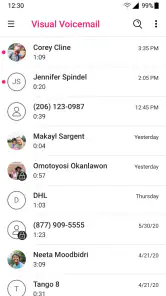
Imagine I’m making dinner while expecting a call about a family appointment. A quick look at the voicemail list lets me check who called and when, then decide whether to listen right away. If the message is useful to someone else at home, the option to share it by text or email gives me a practical way to pass it along without handing over my phone or asking someone to dial into my mailbox.
That’s a useful distinction for shared routines: the app can help people coordinate around a message, but it doesn’t turn one voicemail inbox into a shared family system. I’d keep the account holder in charge of checking messages and choose deliberately what to forward. A voicemail can contain personal details, so convenience shouldn’t mean automatically sending every message to a group.
Keeping setup and account access clear
The app is made by T-Mobile USA and is intended for T-Mobile voicemail, so it makes the most sense when the person using it already relies on that service. Setup should be treated as account-specific rather than as a way to combine several people’s mailboxes on one screen. If different household members have their own phone numbers, each person should use the voicemail arrangement tied to their own line instead of sharing account access just to simplify checking messages.
I’d also make sure the phone owner knows which mailbox is being opened before setting things up, particularly on a device used by more than one person. That small check prevents the awkward surprise of seeing someone else’s messages. The app’s main value is quick access to voicemail for the relevant user, not household-wide monitoring.
What the app is like in everyday use
Before relying on it, I’d think about where the phone is used and who can see its screen. A voicemail preview can reveal a caller’s name or hint at the subject, even when I don’t play the recording. That makes screen privacy part of the setup decision: on a shared device, I’d agree who uses the signed-in account and avoid leaving the inbox open where another person can casually browse it.
A second practical question is what to do when a message contains a detail that matters later. I’d listen to the recording, confirm the key information, and then add the appointment or task to the place I normally track commitments. The voicemail list helps me find the message; it doesn’t replace a calendar, a household task list, or a direct conversation about who is handling the next step.
You May Like

Clash of Clans Is Won Between the Battles

Android Auto Makes the Case for Quieter Car Software

MobiOffice: Transforming Mobile Productivity with Seamless Integration

EA SPORTS FC™ Mobile Soccer: Redefining Mobile Sports Gaming

How Microsoft OneDrive Became a Mobile Productivity Giant

How Google Translate Breaks Language Barriers Effortlessly
First things first, let’s dive into what T-Mobile Visual Voicemail actually is. It’s an app that allows you to manage your voicemails more efficiently by presenting them in a visual format. Instead of dialing into your voicemail box and listening to each message one by one, you get a list of your messages right on your screen. You can see who called, when they called, and listen to messages in any order you choose. It’s like having a playlist of voicemails!
Setting Up the App
Setting up the app was a breeze. Once I downloaded it from the app store, I followed a few simple prompts. The interface is straightforward, and it didn’t take long before I was scrolling through my voicemails like a pro. If you’re a T-Mobile user, the app syncs seamlessly with your account, pulling in all your voicemails with zero fuss.
For a household member helping someone else get started, I’d treat the first launch as a chance to confirm the correct line and mailbox, rather than assuming the phone’s owner and account holder are the same person. That is particularly useful when a device has changed hands or is used by more than one person. A short check at the beginning is less awkward than discovering later that the wrong person’s calls are showing up.
Key Features
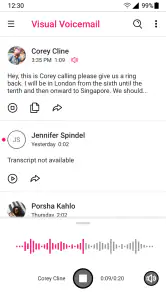
Now, onto the features. One of my favorites is the ability to read transcriptions of voicemails. I can’t stress enough how useful this is when you’re in a meeting or in a noisy environment. Just a quick glance, and you know if it’s something that needs immediate attention or can wait. The app also lets you share voicemails via email or text, which is super handy if you need to forward a message to someone else.
- Transcriptions: Read your voicemails without listening.
- Organization: Sort voicemails by date or sender.
- Sharing: Send voicemails to others with ease.
For a useful workflow, I’d scan the list first, listen to anything that sounds urgent, and leave less pressing messages for later. When a message needs action from another person, I’d share only that voicemail and add a short explanation by text or email. This keeps the audio available for context without making the recipient guess why I sent it.
That selective approach is more useful than forwarding every household-related call. For example, if a caller leaves a change to an appointment time, I can send that message to the person who needs it and keep unrelated personal or work messages private. The recipient still needs to know what action is expected, so I’d include the practical point in my accompanying note rather than assuming they will listen immediately.
User Experience
The user experience is smooth and intuitive. Navigating through the app is as simple as swiping and tapping. The design is clean, which I appreciate since it doesn’t distract from the task at hand. Everything is where you’d expect it to be, making the learning curve almost non-existent. Plus, the app is quick and responsive, which is always a plus.
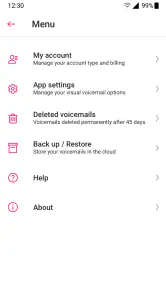
One thing I noticed is that the app does a great job of keeping your voicemail life organized. You can even archive messages, which I find incredibly useful for keeping track of important voicemails without cluttering the main list.
Archiving is especially handy for messages I may need to revisit, such as a caller’s instructions or details I don’t want to rely on memory for. I’d still treat it as inbox housekeeping rather than a substitute for a separate record: if a voicemail contains information I need to act on later, I make a note of the action as well. That way, an organized list doesn’t become a list of forgotten tasks.
I’d also avoid treating an archived message as a guaranteed long-term filing system. For something that could be difficult to reconstruct, I’d capture the relevant date, name, or instruction in a more suitable personal record while keeping the recording as context. This is a small habit, but it prevents the false comfort of thinking that a message is handled merely because it has been moved out of the main list.
Performance and Reliability
Performance-wise, the app is rock solid. I haven’t encountered any crashes or bugs, which is a relief. The voicemails load quickly, and the transcriptions, while not always perfect, are pretty accurate most of the time. It’s reliable enough that I’ve started relying on it for both personal and work calls.
One thing to note, though, is that the transcription feature requires an internet connection. So, if you’re in a spotty area, you might need to wait until you have a stable connection to read the transcriptions.
That limitation changes how I’d use it when traveling or moving between areas with weak reception. I wouldn’t depend on a transcription alone for a time-sensitive detail; when the wording matters, listening to the recording is the safer choice. And if I’m somewhere noisy, I can note the message for later rather than assuming a partial transcript tells the whole story.
There’s also a useful difference between convenience and certainty. A transcription is a quick triage aid, not something I’d trust blindly for names, numbers, or instructions where one misheard word could cause trouble. I’d use it to decide which message to open, then listen carefully before acting. If I can’t listen at that moment, I’d wait until I can rather than pass along a possibly misleading fragment.
Age, trust, and who should choose it
The app is free, carries an Everyone age rating, and has been available since November 22, 2010. Its current version is 10.7.0.784475, and it requires Android 8.0 or later. Those details make it approachable for a broad range of users, but an age rating isn’t a substitute for household judgment: voicemail can include private conversations, so I’d explain whose account is signed in and ask before sharing a message that involves someone else.
For younger users, I’d focus less on the label and more on whether they understand that voicemail is private communication. A parent or other adult can help with setup where appropriate, but I wouldn’t assume the app offers family supervision or a way to combine accounts. Clear expectations about who may listen, archive, or forward messages are more useful than leaving those boundaries unspoken.
It’s a sensible fit for T-Mobile customers who receive enough calls to benefit from scanning a list, especially people balancing work and personal messages or coordinating practical details with another household member. The app has a 3.0 average from around 94,000 ratings, with about 40,000 reviews, and has been installed over 100 million times. Those figures suggest broad use, but I’d judge it by whether visual access solves your own voicemail problem.
If you’re deciding whether to install it, the key question is how often you actually need to retrieve voicemail. Someone who gets occasional calls can still appreciate choosing a message from a list, but may not notice enough benefit to change their habits. Someone who regularly receives calls while unable to answer is more likely to value the faster scan, selective listening, and option to pass a relevant recording to another person.
If you rarely receive voicemail, prefer to listen to every message in sequence, or use another carrier, this may add little to your routine. Compared with the usual dial-in mailbox, its advantage is choosing messages from a visible list and checking a transcription at a glance. Compared with relying on texts or missed-call notifications, it preserves the caller’s recorded message rather than replacing it with a short alert. For people who need a more flexible cross-carrier inbox, a different voicemail service may be a better fit.
The alternatives each suit a different habit. Dial-in voicemail is a reasonable choice if you prefer listening in order and do not mind navigating the mailbox by phone. A missed-call alert or text from the caller is quicker when the only thing you need is a prompt to call back, but it cannot provide the full spoken message. A visual mailbox is the middle ground I’d choose when I want to scan, prioritize, and replay the original recording without turning voicemail into a general messaging system.
One realistic routine is checking the list after finishing a shift or arriving home, rather than interrupting a conversation every time the phone rings. I can identify a call that needs a same-day response, listen to it, and send a selected message to the household member who can act on it. Less urgent messages can wait, while personal ones stay in the account holder’s inbox. That balance is where the app feels most helpful: it supports coordination without requiring everyone to share one mailbox.
Final Thoughts
In a world where convenience is key, T-Mobile Visual Voicemail delivers exactly what it promises. It’s made managing my voicemails a lot less of a chore, and I can’t recommend it enough for anyone who finds themselves overwhelmed with messages. Whether you’re using it for business or personal use, it’s a tool that makes life just a little bit easier.
So, if you’re a T-Mobile user and haven’t tried it out yet, what are you waiting for? Give it a go and see how it can transform your voicemail experience. Trust me, once you go visual, you’ll never want to go back!
My household verdict
For a household, I see this as a personal inbox that can support coordination when the account holder chooses to share a relevant message. It isn’t a shared family organizer, and I wouldn’t use one person’s login as a shortcut for everyone’s voicemail. Used with clear boundaries, it’s a straightforward way to spot important calls, listen when convenient, and pass along selected details. If that’s the problem you want to solve and you use T-Mobile, it’s worth trying; if you need several lines managed together, look for an option built around that need instead.
My recommendation is strongest for the person who wants to stay reachable without repeatedly dialing in, and who is comfortable keeping their own mailbox separate while sharing only what matters. I’d skip it if your priority is one combined view of several household numbers, if you depend on transcription while offline, or if voicemail itself rarely plays a role in your day. For everyone else on T-Mobile, it offers a practical way to make missed calls easier to review while leaving the decision to listen, respond, or share firmly in the user’s hands.
T-Mobile Visual Voicemail Frequently Asked Questions
Is T-Mobile Visual Voicemail available on Android and iOS?
The listed minimum operating system is Android 8.0, so check your Android device’s software before downloading. The app is designed for T-Mobile voicemail, and the experience depends on using a compatible device with the T-Mobile line you want to manage. If you are using an iPhone, look for the app in the Apple App Store and review its compatibility details there before installing.
Who develops T-Mobile Visual Voicemail, and what does it do?
T-Mobile USA develops T-Mobile Visual Voicemail, a communication app for viewing and listening to voicemail messages. Its purpose is to make voicemail easier to browse than a traditional inbox that you access by calling in. You can see messages in a list and select one to play, which can be handy when you want to find a particular message without listening to everything in order.
Do I need to be a T-Mobile customer to use T-Mobile Visual Voicemail?
T-Mobile Visual Voicemail is designed for managing T-Mobile voicemail, so it is most relevant to people who use T-Mobile service. Before downloading, make sure your phone is set up with the T-Mobile line whose messages you want to manage. The app’s purpose is to let you view and listen to voicemails, rather than provide a general voicemail inbox for unrelated services.
What is T-Mobile Visual Voicemail?
T-Mobile Visual Voicemail is an app that allows users to manage their voicemails more efficiently. Instead of listening to each message sequentially, you can view a list of your voicemails and choose which ones to listen to or delete. This app enhances productivity by making voicemail management more intuitive and user-friendly.
How do I set up T-Mobile Visual Voicemail?
Setting up T-Mobile Visual Voicemail is straightforward. After downloading the app, open it and follow the on-screen instructions. You may need to enter your T-Mobile account details and grant necessary permissions for the app to access your voicemails. Once set up, you can start managing your messages immediately.
Pros
- User-friendly interface for easy navigation.
- Transcription of voicemails to text.
- Allows voicemail management without calling.
- Supports multiple accounts on one device.
- Quick setup and integration with contacts.
Cons
- Requires a stable internet connection.
- Limited features on non-T-Mobile networks.
- Occasional delay in voicemail updates.
- Transcriptions may have errors.
- Ads can be intrusive for some users.

- Category
- Communication
- Version
- 10.7.0.784475













