Qustodio Parental Control App
- 1.25K
- 3.6
- Installs
- 5.00M
- Price
- Free

Screenshots
Analysis by Reviewed
I think parental-control software works best when I treat it as a shared family boundary, not a secret way to watch a child. That distinction matters with Qustodio Parental Control App: its appeal is the chance to manage screen habits and check a child’s location, but those tools also call for clear conversations about what is being monitored and why. I’d agree on a few simple rules first, such as when devices should be put away and what location checks are for, then review those rules together as children grow.
Choosing the Right Kind of Oversight
For me, trust is not a feature I can switch on in a dashboard; it comes from making the purpose of each control understandable. A parent who wants help enforcing a bedtime routine is asking a different thing of a parental-control app than one who wants to check a child’s whereabouts. I’d decide which problem needs attention first, explain that choice, and avoid turning every available control on just because it exists.
This approach is especially useful with older children, who may reasonably want more privacy even while a parent remains responsible for safety. I’d tell them what kinds of activity are being managed, when I might check location, and what would lead me to revisit the arrangement. If a child can predict the rules, the app is less likely to feel like a hidden test they can never pass.
Start With a Small, Explainable Setup
A practical first setup is to write down two household rules before opening the controls: one about when recreational use should end, and one about the situations that justify a location check. Then I’d configure only the limits that directly support those agreements. This is a useful way to avoid a common trap with feature-rich tools: making a long list of restrictions before knowing which ones actually solve a family problem.
I’d also review the setup from the child’s point of view. If a restriction blocks something needed for a legitimate task, the parent should know how the family will handle that exception before it becomes urgent. A rule that cannot accommodate ordinary life—homework, a changed pickup plan, or a one-off schedule shift—can quickly lose credibility, even if the original intention was sensible.
Getting Started with Qustodio
Installing the Qustodio Parental Control App was a breeze. Whether you're on Android or iOS, setting up the app took me less than 10 minutes. It’s designed to be intuitive enough that even the least tech-savvy parents can dive right in. All you need is to download, register, and you’re ready to start monitoring.
Qustodio is a free parenting app from Qustodio LLC, with in-app purchases ranging from about $35 to $138 per item. Its average rating is 3.6 from around 21,000 ratings, and it has over 5 million installs. It is rated for Everyone, first appeared on September 30, 2020, and version 182.32.0 requires Android 7.0 or later. I’d think of the free starting point as a way to explore the app, not assume every control will be available without an in-app purchase.
More From Our News Desk

Clash of Clans Is Won Between the Battles

Android Auto Makes the Case for Quieter Car Software

MobiOffice: Transforming Mobile Productivity with Seamless Integration

EA SPORTS FC™ Mobile Soccer: Redefining Mobile Sports Gaming

How Microsoft OneDrive Became a Mobile Productivity Giant

How Google Translate Breaks Language Barriers Effortlessly
Features That Stand Out
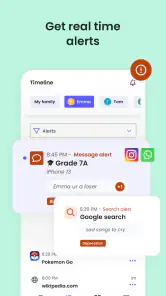
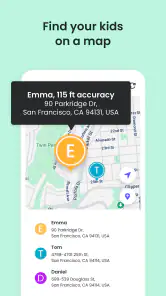
Qustodio offers a plethora of features, but a few really stood out to me. The real-time location tracking is fantastic. It gives me peace of mind knowing where my kids are at all times. Then there’s the ability to monitor social media activities. I can see what they’re posting and who they’re interacting with, which is crucial in today's online environment.
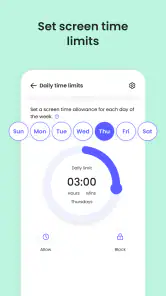
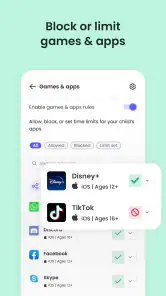
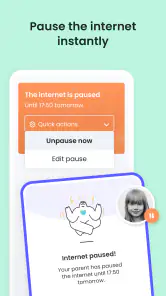
Another neat feature is the daily time limits. I can set how long my kids can use certain apps or the internet in general. This has proven to be a lifesaver for preventing endless screen time, especially during school nights. There’s also the option to block specific websites, which means I can ensure they’re not accessing anything inappropriate.
Making Limits Work on a School Night
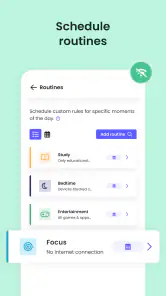
Imagine a child who usually finishes homework, has some time to relax on a phone, and then needs to put it aside before bed. I’d make the cutoff clear before the evening starts, rather than waiting until a video or game is in progress to announce that time is up. A limit can back up that routine, but a short warning and a consistent family agreement are still what make it feel fair.
The exception matters too. If the child uses the same device for schoolwork, I’d avoid treating every minute of use as leisure time without first checking how that affects the routine. When a schedule changes for a late assignment or a family event, I’d discuss the adjustment instead of letting an old setting decide the issue by default. That small habit can prevent a useful boundary from becoming a source of avoidable arguments.
Location Checks With a Clear Purpose
Location tools can be reassuring in a specific situation, such as checking that a child has arrived after walking home or confirming a pickup plan when family members are coordinating. I’d tell the child in advance that this is why I use the check, then put the phone away once I have the reassurance I needed. The practical benefit is strongest when location access supports a real safety need, rather than becoming a reflexive check throughout the day.
Families should also talk about what happens when a location does not match expectations. I would not treat a displayed location as a complete explanation of a child’s choices; I’d use it as a reason to ask a calm, direct question. That distinction matters because monitoring can provide context, but it cannot replace a conversation or tell a parent what a child intended.
Performance and Reliability
In terms of performance, the app runs smoothly without any noticeable lag. It doesn’t drain my phone’s battery, which is a huge plus. Reliability is key for any parental control app, and Qustodio doesn’t disappoint. The alerts are prompt, and the information provided is accurate. It’s like having a virtual assistant dedicated solely to your kids’ online safety.
Before relying on any monitoring tool for an important decision, I’d still treat an alert as a cue to check in, not proof of what happened. A child may have a reasonable explanation for a blocked site or a sudden change in device use, and a calm question is usually more useful than jumping to conclusions. I’d also make a habit of reviewing the rules after a change in routine, such as a new school schedule, so old limits don’t create unnecessary friction.
What to Review Before Paying
The free starting point is useful for working out whether this style of management suits a household, but I would not build a family routine around a control until I had checked that it is available on the plan I intend to use. Since in-app purchases are offered, I’d look closely at the purchase choices and decide what the family actually needs before spending. The key question is not whether a package contains more controls, but whether those controls solve a real problem for this child.
I’d also decide who will maintain the rules. If two adults share parenting duties, they should agree on the schedule and the meaning of alerts before using the app day to day. Otherwise, one parent may enforce a limit while the other makes an exception, leaving the child confused about which agreement counts. A brief shared review can prevent the technology from turning a disagreement between adults into a restriction imposed on the child.
Room for Improvement
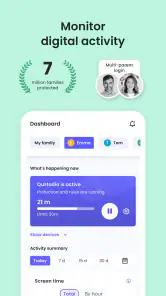
While I’m mostly happy with Qustodio, there are a couple of areas that could use some tweaking. The app could benefit from a more detailed dashboard that offers deeper insights into app usage patterns. Also, the pricing could be a bit steep for some, especially if you’re looking to monitor multiple devices.
There’s also a practical trade-off in choosing an all-in-one parental-control app: more oversight can mean more settings to maintain and more conversations about boundaries. I’d start with only the controls that solve a specific problem, such as bedtime limits or a small number of website blocks, and leave the rest alone until there’s a clear reason to use them. That keeps setup manageable and makes it easier to explain each rule to a child.
How It Fits Beside Built-In Controls
Compared with the basic screen-time tools built into a phone or tablet, Qustodio is appealing when a parent wants screen management and location checks considered together rather than handled as separate household tasks. Built-in controls can be a better fit if the only goal is a simple device schedule and the family does not need a broader parenting tool. They may also feel easier to maintain for someone who wants the fewest moving parts.
On the other hand, a dedicated parental-control app is more relevant when a parent wants to coordinate several kinds of oversight and is willing to review the settings as family needs change. The trade-off is that a broader tool asks for more attention: a parent needs to decide which controls matter, explain them, and check that they still fit. I would not choose Qustodio just because it offers more than a built-in setting; I’d choose it only if that added scope addresses a need the simpler option leaves unresolved.
Who Should Use It—and Who Might Pass
I can see Qustodio suiting a parent who wants a structured way to support screen-time boundaries, block selected websites, and use location checks for specific reassurance. It is particularly relevant when a family is ready to discuss its rules openly and one adult is prepared to keep those rules consistent. The app can help make an agreement easier to apply, but it cannot decide what a fair agreement looks like for a particular child.
I’d pass if the household wants a completely hands-off arrangement, if the child’s needs are better served by a direct conversation and a simple device routine, or if nobody has time to manage settings thoughtfully. I’d also pause if parents disagree about monitoring itself. Sorting out that difference first is more important than installing an app, because inconsistent or unexplained controls can damage trust instead of supporting safety.
Room for Improvement
There’s also a practical trade-off in choosing an all-in-one parental-control app: more oversight can mean more settings to maintain and more conversations about boundaries. I’d start with only the controls that solve a specific problem, such as bedtime limits or a small number of website blocks, and leave the rest alone until there’s a clear reason to use them. That keeps setup manageable and makes it easier to explain each rule to a child.
Room for Improvement
While I’m mostly happy with Qustodio, there are a couple of areas that could use some tweaking. The app could benefit from a more detailed dashboard that offers deeper insights into app usage patterns. Also, the pricing could be a bit steep for some, especially if you’re looking to monitor multiple devices.
For families comparing options, Qustodio makes sense when the priority is bringing screen-time management, app and web blocking, and location checks into one parenting tool. A built-in screen-time setting may be enough for a parent who only wants a basic schedule, while a household that wants several kinds of oversight may prefer a dedicated parental-control app. I’d skip Qustodio if the goal is completely hands-off parenting, or if a child’s needs call for a simple agreement rather than ongoing monitoring. The right choice depends less on the number of controls than on whether the family will use them consistently and openly.
That said, the peace of mind it provides is worth every penny in my opinion. For anyone serious about digital safety for their kids, Qustodio is definitely worth considering.
In conclusion, the Qustodio Parental Control App is an excellent tool for modern parents. It simplifies the daunting task of monitoring and controlling kids' online activities, all while offering robust features that make it stand out in a crowded market. If you’re keen on keeping your kids safe online, give Qustodio a try—it might just be the guardian angel you’ve been looking for.
Qustodio Parental Control App Frequently Asked Questions
Who is the developer of Qustodio Parental Control App?
Qustodio Parental Control App is developed by Qustodio LLC and is designed for parents who want tools for managing children’s digital activity. If you are comparing parental-control apps, consider whether its screen-time, app and web controls, and location features fit the way your family handles device use. It is a parenting app rather than a general-purpose monitoring tool.
What does Qustodio Parental Control App help parents monitor?
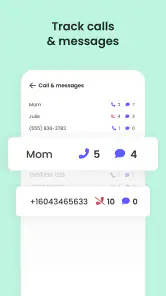
Qustodio’s store summary highlights screen time, app and web blocking and monitoring, and location tracking. These areas can help parents set boundaries around device use and keep an eye on a child’s digital activity. Before downloading, think about which controls matter most in your household and whether you want to manage screen time, access to apps and websites, or location.
Is Qustodio Parental Control App free to download, and are there in-app purchases?
Qustodio Parental Control App is free to download, so parents can get started without an upfront purchase. The app also offers in-app purchases, with options ranging from $34.99 to $137.95 per item. Consider what features and coverage your family needs before choosing a purchase, and review the available options in the app store before committing.
What age group is Qustodio Parental Control App intended for?
Qustodio is a parenting app intended to help adults manage children’s digital activities, including screen time, apps, websites, and location. Its content rating is Everyone, but that rating describes the app itself rather than setting a recommended age for children whose devices are monitored. Parents should choose settings and boundaries that fit each child’s age and maturity.
What features does Qustodio Parental Control App offer?
Qustodio Parental Control App provides a comprehensive suite of features designed to help parents monitor and manage their children's online activities effectively. Key features include screen time management, web filtering, location tracking, app monitoring, and social media tracking. These tools empower parents to set healthy digital boundaries and ensure their children's safety online.
Pros
- Comprehensive monitoring dashboard.
- Real-time alerts for suspicious activity.
- Customizable screen time limits.
- Cross-platform compatibility.
- User-friendly interface.
Cons
- Limited free version features.
- Can drain device battery quickly.
- Occasional syncing issues.
- Some privacy concerns.
- Subscription can be pricey.

- Category
- Parenting
- Version
- 182.32.0