Beauty Camera: Sweet Camera
- 227.00
- 4.5
- Installs
- 10.00M
- Price
- Free

Screenshots
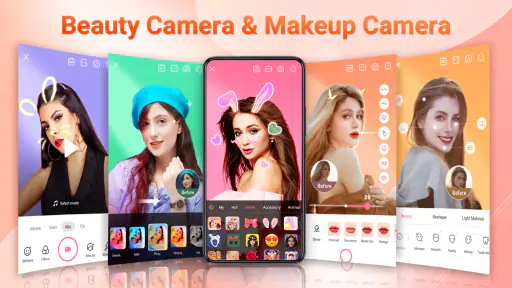
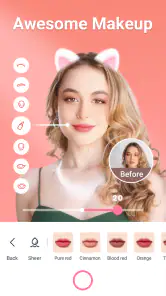

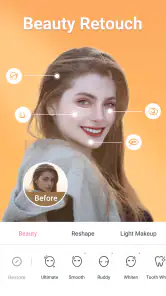


Analysis by Reviewed
I tend to judge a selfie app by a simple test: can I take a quick photo, make a small adjustment, and get back to my day without wrestling with menus? Beauty Camera: Sweet Camera is built around that casual, immediate kind of photography. It combines a camera with beautifying effects, filters, stickers, and basic editing, so the appeal is less about mastering a complicated photo workflow and more about making a familiar shot feel finished in a few steps.
That focus makes it easiest to recommend to someone who regularly takes selfies, shares informal pictures, or wants playful effects at hand. I would not treat it as a full replacement for a dedicated photo editor, though. Its strongest case is convenience: capture or adjust a picture, try a look, and decide whether the result feels right before sharing it. If your priority is detailed retouching, carefully controlled color work, or keeping an untouched record of every image, a more specialized camera or editor may suit you better.
What the app is like to use now
The app sits in the beauty side of mobile photography, where quick camera effects matter as much as editing after the shutter. Its listing describes a selfie camera with makeup, filters, stickers, and editing tools; in practical terms, those elements suggest a compact, all-in-one routine rather than a professional retouching suite. I find that distinction useful when deciding what to expect: this is aimed at approachable personal photos, not intricate image production.
Mobile_V5 develops the app, which is free to install and has optional in-app purchases ranging from $1.99 to $19.99 per item. It is rated for Everyone, and the current version is 2.0.7. The app has a 4.5 average from around 28,000 ratings and more than 10 million installs, signs that plenty of people have tried it, although popularity alone cannot tell you whether its particular look will suit your taste. I would use the free entry point to see how its effects feel before considering any optional purchase.
How the effects fit a real routine
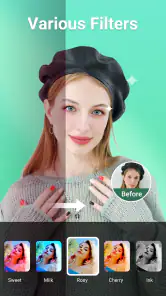
The most sensible way to use beauty filters is to treat them as adjustable finishing touches, not automatic improvements. A filter that looks appealing on one face or in one lighting situation may be too strong in another. I’d start with the lightest intensity that achieves the effect I want, then compare the result with the original before saving or sharing. That small pause helps keep skin texture and facial features looking like themselves.
Stickers and artistic effects serve a different purpose: they make a photo more expressive rather than more polished. They can be fun for a casual message, a silly group selfie, or a picture that is meant to feel playful. For a profile photo or a keepsake you expect to revisit years later, I would use them sparingly. A trend-driven overlay can date an image faster than a modest crop or brightness adjustment.
What to expect from editing
The app’s editing tools cover familiar adjustments such as brightness, contrast, cropping, and rotation. That is a useful set for fixing common small problems: a picture that looks a little dim, framing that leaves too much empty space, or an image that needs a simple orientation change. Having these options alongside the camera can save a trip to another app when the edit is straightforward.
More From Our News Desk

Weather by Xiaomi Review: Clear at a Glance, Less Clear Up Close

X Under Pressure: Can It Recover When Posting Goes Wrong?

Clash of Clans Is Won Between the Battles

Android Auto Makes the Case for Quieter Car Software

MobiOffice: Transforming Mobile Productivity with Seamless Integration

EA SPORTS FC™ Mobile Soccer: Redefining Mobile Sports Gaming
There is still a difference between having basic controls and having a deep editing workspace. If I needed precise color correction, layers, selective adjustments, or a careful series of revisions, I would reach for an editor built for that kind of work. Beauty Camera is more appealing when speed and accessibility matter more than fine-grained control. It also means I would check the finished image at its normal viewing size: a change that looks subtle in an editing preview can feel more obvious once the photo is viewed elsewhere.
Your New Selfie Sidekick
First things first, downloading the Beauty Camera: Sweet Camera app is a breeze. Available for both Android and iOS, it’s like having a mini photo studio in your pocket. As soon as I opened the app, I was greeted with a user-friendly interface that didn't leave me feeling like I needed a degree in photography just to snap a picture. With just a few taps, I was ready to dive into the world of filters and effects.
Features That Make You Go Wow!
Now, let’s talk about what makes this app stand out from the rest. The real-time beauty filters are nothing short of magic. You can say goodbye to those pesky blemishes and hello to a glowing complexion. Whether you’re looking for a subtle touch-up or a dramatic transformation, the app has got you covered. Plus, with options to adjust the intensity of each filter, you’re in full control of how much glam you want to add.
But wait, there's more! The Sweet Camera feature allows you to experiment with various fun stickers and artistic effects. I found myself giggling as I tried on virtual hats and glasses, and you can even add some sparkle with the glitter effects. It’s perfect for those moments when you want to inject a bit of fun into your photos or simply express your playful side.
Editing Made Easy
For those who love to tweak their photos post-capture, the app offers a robust set of editing tools. From adjusting brightness and contrast to cropping and rotating, it’s all there. The Beauty Camera: Sweet Camera makes it easy to enhance your photos without needing to switch between multiple apps. Everything is seamless and intuitive, which means less time fiddling and more time capturing those picture-perfect moments.
How it compares, and who will enjoy it
Compared with using the standard camera and then opening a separate editor, this app’s main advantage is keeping selfie effects and simple corrections in one place. A phone’s built-in camera is often the better choice when you want a neutral image with minimal processing, while a dedicated editing app is usually the better choice when you want more exact control. I see this one in the middle: more playful than a plain camera, less involved than a full editing suite.
That middle ground is handy in an everyday situation like getting ready to join a video call or meeting friends and wanting a quick photo before heading out. I can take a few shots, compare a light filter with the unaltered image, crop away a distracting edge, and add a sticker only if the picture is meant to be silly. The useful trick is to decide the photo’s purpose first. A casual chat image can handle a bolder effect; a picture for a work profile or family album usually benefits from restraint.
I think the app is especially suitable for people who enjoy experimenting but do not want to learn a complex editor. It can also work for someone who takes occasional selfies and wants approachable tools rather than a long list of technical controls. On the other hand, people who dislike face retouching, want a strictly natural capture, or need meticulous editing should probably stick with their phone’s standard camera or choose a specialist editor. Those alternatives are not inferior; they simply serve a different purpose.
Small choices that improve the result
A practical workflow is to make framing decisions before adding decoration. Crop first if the background is distracting, then adjust brightness or contrast, and leave the filter until last. That order makes it easier to tell whether the picture needed a beauty effect at all. I would also try one effect at a time rather than stacking several immediately; when a result feels too processed, removing the last change is simpler than trying to diagnose a pile of edits.
Lighting is another quiet factor. A filter cannot reliably rescue a badly lit or blurry photo, so I would move toward a window or a brighter spot before reaching for stronger smoothing or sparkle. For group selfies, check the whole frame rather than focusing only on the person holding the phone: an effect that flatters one face can make the overall image look uneven. These are small habits, but they help the app’s quick tools look intentional instead of like a preset applied without thought.
There are a few sensible questions to ask before making it part of a routine. Can it handle a quick edit without another app? For simple corrections and playful finishing touches, that is the point of keeping the camera and editor together. Is it suitable for every kind of photo? I would say no: images that need accurate color, extensive cleanup, or a natural documentary feel are better handled with a basic camera or a more controlled editor. Do the optional purchases matter? The app can be installed for free, and purchases are optional; I would first decide whether the available workflow meets my needs before paying for anything.
Evolution, limitations, and what to watch
The app was released on January 11, 2024, and version 2.0.7 is its current version. Those facts establish where the product stands today, but they do not by themselves show which tools changed between releases. For someone already using it, the practical point is to judge the current experience on its own merits rather than assume that a version number guarantees a particular improvement. If an update changes the way an effect looks or where a control appears, taking a moment to compare a familiar photo can help keep your preferred style consistent.
The remaining trade-off is familiar for beauty-camera apps: the faster the effect, the easier it is to overdo. A polished preview can encourage stronger smoothing than you would choose after looking at the saved image, and playful effects may not translate well to every subject or occasion. I would keep an original copy of pictures that matter and use this app’s edits for the shareable version. That gives you room to experiment without making a single stylized result your only copy.
For existing users, the best way to judge whether the app still earns a place on the phone is to notice how often its specific combination of live effects and basic editing saves a step. If you only need a filter once in a while, your regular camera may be enough. If you repeatedly want quick beauty adjustments and stickers in the same workflow, the convenience has a clearer payoff. As the app continues to evolve, I would watch for changes that improve control and consistency rather than simply adding more effects; predictable, subtle results are more useful to me than a larger collection of looks I rarely use.
Final Thoughts
In a world where capturing the perfect selfie can feel like a daunting task, the Beauty Camera: Sweet Camera swoops in like a superhero with a lens. It’s easy to use, packed with features, and most importantly, it’s fun! Whether you’re an avid selfie-taker or just someone who loves to document life’s little moments, this app is definitely worth a try. So go ahead, let your creativity run wild, and make every snap a memorable one!
Remember, the beauty of photography lies in its ability to capture not just images, but memories. Happy snapping!
Beauty Camera: Sweet Camera Frequently Asked Questions
What is the current version of Beauty Camera: Sweet Camera?
Beauty Camera: Sweet Camera is currently on version 2.0.7. If you are deciding whether to install it, checking the version shown for your device can help you make sure you are downloading the release you expect. The app is developed by Mobile_V5 and focuses on selfie photography and beauty-oriented editing tools.
Is Beauty Camera: Sweet Camera suitable for younger users?
Beauty Camera: Sweet Camera is rated Everyone, so its content rating is intended for a broad audience. It is a beauty-focused photo app with selfie effects, makeup options, filters, stickers, and editing tools. Younger users should still use good judgment when editing or sharing personal photos, and families can review the app’s permissions and privacy information together.
What devices can run Beauty Camera: Sweet Camera?
Beauty Camera: Sweet Camera is an Android app that requires Android 6.0 or later. Before downloading, check that your device meets this minimum requirement and has enough room for an additional photo-editing app. The app is free to download, while optional in-app purchases are available. It is rated for Everyone, making it suitable for a broad audience.
Who develops Beauty Camera: Sweet Camera, and what is it designed for?
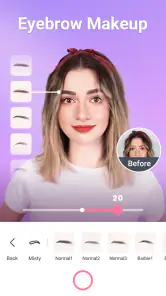
Beauty Camera: Sweet Camera is a beauty-focused app developed by Mobile_V5. Its short description is simply “Beauty Camera,” while its fuller summary presents it as a selfie camera with beauty effects, makeup, filters, stickers, and editing tools. It is intended for people who want to enhance selfies or add a playful finishing touch to photos, rather than serve as a general-purpose camera replacement.
What features does Beauty Camera: Sweet Camera offer for enhancing photos?
Beauty Camera: Sweet Camera offers a variety of photo enhancement features including real-time beauty effects, filters, and various editing tools. Users can smooth skin, brighten eyes, and even reshape facial features. The app provides makeup effects, such as lipstick and blush, to give your selfies a polished look. Additionally, it includes fun stickers and AR effects to add a creative touch to your photos.
Pros
- User-friendly interface and easy navigation.
- Variety of filters to enhance photos.
- Real-time beautification feature.
- Supports high-resolution images.
- Quick sharing to social media platforms.
Cons
- Contains ads that may disrupt usage.
- Limited free features
- premium needed.
- Occasional app crashes reported.
- Consumes significant battery power.
- Requires access to personal data.
- Category
- Beauty
- Version
- 2.0.7