Beauty Camera - Selfie Camera
- 198.00
- 4.7
- Installs
- 10.00M
- Price
- Free

Screenshots

Analysis by Reviewed
I like a selfie camera best when it helps me make a quick choice rather than turning a casual photo into a long editing session. That is the space Beauty Camera - Selfie Camera aims to fill: it puts beauty effects, filters, stickers, and makeup-style adjustments close to the moment of taking the picture. I’d consider it when I want a playful or polished selfie right away, while keeping in mind that a standard camera or a dedicated editor may suit other kinds of photography better.
Where it fits in a daily routine
One realistic use is getting ready to meet friends: I can open the camera, check how a filter looks in the preview, and take a photo without planning to edit it later. Another is making a lighthearted picture for a group chat, where a sticker or a more noticeable effect can be part of the joke. For either, I’d take a quick test image before committing to a look, especially if the lighting or background is different from what I usually shoot.
That workflow is different from taking a photo first and deciding what to do with it afterward. Choosing effects at capture time makes it easy to see the general mood immediately, but it also means I can get distracted by options when I only wanted one quick shot. My practical rule is to decide whether I want a natural, softened, or playful result before I start browsing effects.
Speed expectations and useful trade-offs
The appeal here is immediacy: the app is designed around framing a selfie and trying visual changes as part of that process. I wouldn’t treat that as a guarantee that every effect will feel equally quick on every phone, since camera performance can vary by device and shooting conditions. If a preview feels busy or less responsive, reducing the number of effects is a reasonable way to keep the shot simple.
There is also a useful distinction between a live preview and a final picture. A small screen can make strong smoothing, makeup, or facial adjustments seem more restrained than they look later. I recommend checking the result at normal viewing size before sharing it, and comparing it with an unfiltered version when I care about keeping the image close to how the moment looked.
First Impressions Matter
Right from the get-go, Beauty Camera - Selfie Camera dazzles with its user-friendly interface. It’s refreshingly straightforward, which is a relief because, let’s be honest, nobody has time to fiddle around with complicated settings when you’re just trying to capture a quick selfie. The app loads quickly and offers a neat layout, making navigation a breeze. Plus, it’s available for both Android and iOS, so everyone’s in on the fun!
Features That Stand Out
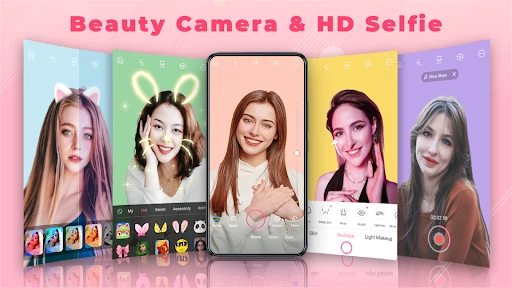
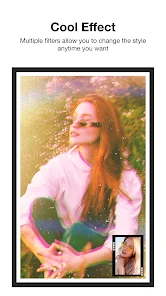
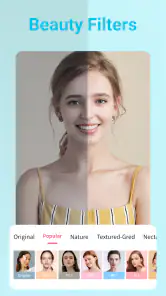
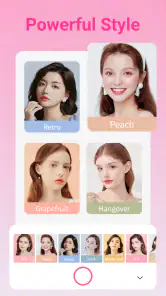
The app boasts a plethora of features that cater to all your selfie needs. From real-time beauty effects that smooth out your skin and add a touch of glam, to filters that rival those on Instagram, Beauty Camera has it all. One of my favorite features has to be the live stickers and AR effects, which are perfect for those moments when you want to add a bit of whimsy to your shots.
More From Our News Desk

Weather by Xiaomi Review: Clear at a Glance, Less Clear Up Close

X Under Pressure: Can It Recover When Posting Goes Wrong?

Clash of Clans Is Won Between the Battles

Android Auto Makes the Case for Quieter Car Software

MobiOffice: Transforming Mobile Productivity with Seamless Integration

EA SPORTS FC™ Mobile Soccer: Redefining Mobile Sports Gaming
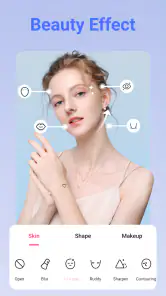
Another standout feature is the beauty editor, which allows you to tweak everything from skin tone to eye size. It’s like Photoshop, but without the steep learning curve. Whether you’re looking to enhance your natural features or go for a complete transformation, this app has got you covered.
Making adjustments with intention
For a profile picture or a family photo, I’d start with the least noticeable changes and stop once the image feels finished. Making one adjustment at a time helps me see what each control actually contributes; changing several things together makes it harder to tell whether the final look is flattering or simply unfamiliar. If I’m experimenting for fun, I can push the effects further, but I wouldn’t assume that the same settings suit every face or photo.
Lighting is another reason to avoid relying on a single preset. A look that feels balanced near a window may read differently under indoor lighting, so I’d treat presets as starting points rather than fixed answers. A useful workflow is to settle the framing first, choose one filter, then decide whether a beauty adjustment adds anything. This keeps the face and expression as the focus instead of letting the effects take over.
Choosing effects without overdoing them
A useful way to approach the editor is to make one change at a time, then pause and check whether the picture still looks like you. Adjusting skin tone or eye size can be fun, but those changes are easy to push too far when viewed only on a small screen. I’d treat the stronger edits as a playful option for a themed selfie rather than the default for every photo.
Stickers and AR effects make more sense when the goal is a lighthearted image to share with friends. For a work profile or a photo meant to look close to real life, I’d keep the frame simpler and use fewer effects. That distinction helps the app feel versatile without expecting every selfie to have the same polished, embellished style.
Performance and Usability
Performance-wise, the app is pretty solid. It doesn’t lag, and the real-time effects apply seamlessly, which is crucial when you’re trying to capture that perfect shot. The app also doesn’t hog your phone’s resources, so you won’t have to worry about it slowing down your device.
One thing that really sets this app apart is its ease of use. The developers clearly kept the user in mind, ensuring that even tech novices can navigate and use the features without feeling overwhelmed. The app also includes tutorials for those who want a little extra guidance, which I found incredibly helpful.
When the session gets longer
For a single selfie or a short round of experimenting, the simple layout keeps the process approachable. During a longer session, though, trying many filters, beauty adjustments, and stickers can turn a quick capture into a series of small decisions. I’d pick a general look first, take a test shot, and only then fine-tune it; that keeps the process focused and makes it easier to notice when an effect is doing more than I intended.
As with any camera app, the feel of live effects can depend on the phone and the conditions while shooting. I wouldn’t assume that a preview will look identical in every setting, especially if I’m taking pictures quickly or using a device that already struggles with camera tasks. If the app feels less responsive during a busy session, simplifying the effects is a sensible first step before deciding it is the right tool for that moment.
Device limits and practical expectations
The app is free, is rated for Everyone, and runs on Android devices starting with version 6.0. Those details make it accessible to many Android users, but the minimum system requirement alone cannot tell me how fluid live effects will feel on a particular handset. If my phone is older or tends to slow down when using its camera, I’d try a straightforward selfie first rather than building a complicated look immediately.
For everyday use, I’d also keep the capture conditions uncomplicated: frame the face clearly, avoid moving around while comparing effects, and make a test shot if I’m unsure how a look translates. These are small habits, but they help separate a limitation in the lighting or device from a problem with the effect itself. If the camera experience is already unreliable on my phone, the built-in camera is the safer option for an important moment.
Who will enjoy it, and who may prefer another camera
Beauty Camera is a natural fit for casual selfie-takers who want filters, makeup-style changes, and playful stickers close at hand. Mobile_V5’s beauty app is free, has an Everyone age rating, and its current version is 3.1.7; it has a 4.7 average from around 31 thousand ratings and over 10 million installs. Those figures suggest it has found a broad audience, but the choice still comes down to the kind of photos you like making.
If I were choosing a camera for landscapes, fast-moving scenes, or careful manual photography, I’d reach for a standard camera app instead. And if I wanted detailed retouching after the shot, a dedicated editor would give that workflow more room. This app’s appeal is narrower and clearer: it brings selfie-oriented effects into the capture process, so it is most rewarding when that is exactly what I want.
Comparing the usual options
Compared with a phone’s standard camera, this app is more focused on styling a selfie as I compose it. That can save a step when I already know I want a filter or a playful effect, but the built-in camera is generally the more straightforward pick when I value a clean, natural capture or need to photograph something other than myself. I wouldn’t replace a familiar everyday camera with it just because it offers more visual choices.
A separate photo editor makes more sense when I want to revisit a picture carefully, compare versions, or refine details after the moment has passed. Beauty Camera’s strength is the immediate, camera-first approach; its trade-off is that exploring options while shooting can interrupt a spontaneous moment. I’d choose based on the task: quick styled selfie here, flexible capture with the default camera, or deliberate finishing in an editor.
Reliability for the moments that matter
For a casual picture, I’m comfortable trying effects and retaking the shot if the first result misses the mark. For an occasion I cannot repeat, I’d use the camera I already trust and take a plain photo as a fallback before experimenting. That is not a criticism unique to this app; it is a sensible way to handle any camera workflow where live effects are part of the process.
If the app becomes less responsive during a session, I’d first simplify the preview and avoid switching through every effect while trying to capture a fleeting expression. If it still doesn’t feel right, taking the photo with the standard camera and editing later is the more dependable route. This gives me a practical recovery plan without expecting a beauty camera to be the best tool for every situation.
Final Thoughts
All in all, the Beauty Camera - Selfie Camera app is a fantastic tool for anyone looking to up their selfie game. Whether you’re a social media influencer or just someone who loves snapping pics with friends, this app is sure to impress. With its vast array of features and easy-to-use interface, you’ll be capturing stunning selfies in no time. So go ahead, give it a try and let your selfies do the talking!
Remember, the best camera is the one you have with you, and with this app, you’ll always be ready to capture your best angles.
My performance verdict
I see this as a convenient styling camera, not a universal replacement for the camera already on a phone. Its strongest case is a quick selfie where I want to preview beauty effects, filters, or stickers before taking the picture. For that narrow job, putting creative choices near the shutter is useful; for demanding photography, extensive retouching, or a moment where reliability matters more than styling, I’d use another tool.
My advice is to try a restrained look first, check the saved result at full viewing size, and keep a plain-camera option in mind for important photos. If that balance sounds right, the app offers an approachable way to add personality to everyday selfies without requiring a separate editing routine.
Beauty Camera - Selfie Camera Frequently Asked Questions
What does Beauty Camera - Selfie Camera help me do?
Beauty Camera - Selfie Camera is designed for taking and styling selfies. Its focus is beauty photography, with filters, stickers, and makeup effects to help give a photo a different look. It may suit someone who wants selfie tools in one app rather than a general-purpose camera, whether they are preparing a picture to save or share.
Who develops Beauty Camera - Selfie Camera?
The app is developed by Mobile_V5. It is a beauty app centered on selfie photography and styling, with the store description highlighting filters, stickers, and makeup. Knowing the developer and the app’s main purpose can help you decide whether it matches what you are looking for before installing it. Its age classification is Everyone.
What is Beauty Camera - Selfie Camera, and who makes it?
Beauty Camera - Selfie Camera is a beauty app from Mobile_V5 for taking and enhancing selfies. Its store summary describes a beauty camera and selfie camera with filters, stickers, and makeup. If you want a camera app focused on selfie styling, this gives you a quick idea of its purpose before installing.
What features does Beauty Camera - Selfie Camera offer to enhance selfies?
Beauty Camera - Selfie Camera comes equipped with a variety of features designed to enhance your selfies. Users can enjoy real-time beautification effects, including skin smoothing, blemish removal, and face reshaping. The app also offers a range of filters, stickers, and AR effects to give your photos a unique touch. Additionally, you can adjust brightness, contrast, and saturation for the perfect shot.
Is Beauty Camera - Selfie Camera free to use or does it require a subscription?
Beauty Camera - Selfie Camera is available for free download, offering a vast array of features at no cost. However, it also includes in-app purchases for advanced tools and additional content such as premium filters and effects. Users can opt for a subscription to unlock all features and remove ads, providing a seamless experience.
Pros
- Intuitive user interface for easy navigation.
- Wide range of filters for perfect selfies.
- Supports high-resolution photo outputs.
- Fast processing and photo editing features.
- Regular updates with new features.
Cons
- Requires in-app purchases for premium features.
- Contains ads that may interrupt usage.
- Limited free filter options available.
- May consume significant battery power.
- Occasional lags on older devices.
- Category
- Beauty
- Version
- 3.1.7