Beauty Camera - Sweet Camera
- 145.00
- 4.6
- Installs
- 10.00M
- Price
- Free

Screenshots

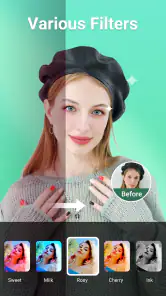
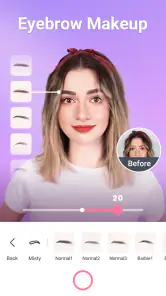


Analysis by Reviewed
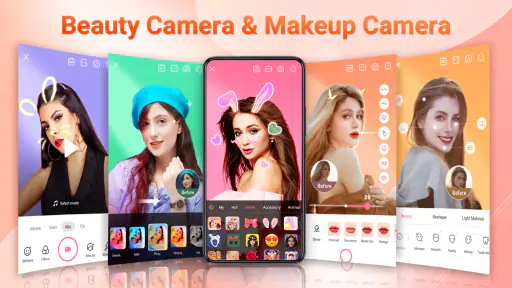
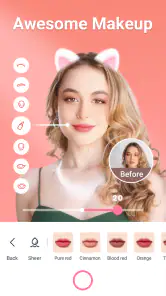
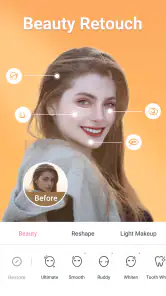
The part of Beauty Camera - Sweet Camera I’d focus on is its combination of selfie filters and makeup effects: it gives you a way to shape the look of a portrait while taking it, rather than treating the camera as a plain capture tool. That can be handy when I want a quick, polished photo for a profile or a message, but don’t want to open a separate editing app afterward. The key is to treat the effects as options to try, not as a promise that every result will look natural.
Choosing a look before you take the picture
A useful way to approach a beauty camera is to think about the photo’s purpose before trying effects. For a casual chat, I might be happy with a more playful look; for a profile, I’d favor a treatment that still resembles the way I look in person. This quick decision helps me avoid spending time testing styles that would not suit where the picture is going.
Lighting is worth considering, too. I’d take a moment to face a window or move away from a strong overhead light before comparing looks. That is not a special effect, but it can make the difference between judging the filter itself and reacting to shadows or glare. If the original selfie already looks balanced, I’m less tempted to compensate with several layers of styling.
Making the selfie look your own
This is a free beauty app from iMediaStar, designed around taking selfies with filters, makeup and stickers. Those tools serve different moods: a filter can shift the overall feel of a photo, makeup effects can change the face’s presentation, and stickers can make an image more playful. I like that these choices sit within a camera-oriented experience, because the intended use is clear: create a selfie, adjust its look, and decide whether it is worth keeping.
In practice, the strongest reason to use Beauty Camera - Sweet Camera is convenience. If I’m already holding my phone up for a quick photo, trying a couple of looks before settling on one is less work than taking a picture, switching apps, and rebuilding the same idea in an editor. The effect is especially useful for casual images, where a little styling is the point and speed matters more than precise retouching.
Filters, makeup and stickers are not interchangeable, so I’d use them in stages. I would first decide whether the photo needs a different overall mood, then see whether a makeup effect improves the face, and only add a sticker if it suits the image. This order helps prevent the common “everything at once” look, where several decorative choices compete for attention. A lighter touch usually makes a selfie feel more like a photo and less like a collection of effects.
How the effects fit into a real workflow
For a practical routine, I’d start by taking a selfie in the light I actually plan to use. Then I’d compare the available filter and makeup treatments on that same shot rather than changing several things at once. Keeping the framing and lighting constant makes it easier to judge whether an effect is helping. If I like the result, I can consider a sticker as a final accent; if the face already looks busy, leaving stickers out is the better choice.
More From Our News Desk

Weather by Xiaomi Review: Clear at a Glance, Less Clear Up Close

X Under Pressure: Can It Recover When Posting Goes Wrong?

Clash of Clans Is Won Between the Battles

Android Auto Makes the Case for Quieter Car Software

MobiOffice: Transforming Mobile Productivity with Seamless Integration

EA SPORTS FC™ Mobile Soccer: Redefining Mobile Sports Gaming
That small step of comparing like with like matters. A filter can make a photo feel warmer or more stylized, while makeup effects may draw attention to facial details. When both are changed together, it is harder to tell which choice improved the image. I find it more useful to make one adjustment, pause, and ask whether I’d still want the result as a profile picture tomorrow. That check can keep a spontaneous edit from becoming too strong.
A realistic everyday use is getting ready to send a quick selfie to a friend. I might take a photo near a window, try a restrained filter, and decide whether a makeup effect adds anything. If the image is meant to be funny or expressive, a sticker might fit; if it is for a work-related profile, I’d skip decorative elements and keep the treatment subtle. The same set of tools can suit different situations, but the context should guide how much of it I use.
One useful trade-off is that a live, camera-first approach encourages quick decisions. That is a benefit when I want a picture now, but it is less appealing if I prefer to make detailed edits later with careful control over individual parts of an image. I would use this app for fast styling and casual sharing, not as my only tool for a portrait that needs meticulous finishing.
When a quick selfie is the right use
The app makes the most sense when the photo itself is casual and the effects are part of the fun. For example, before a video call or while sending a spontaneous picture, I may want to try a cleaner look without turning the task into a full editing session. A few choices can be enough: a filter for tone, a makeup effect if it suits the lighting, and no sticker unless it adds something clear.
It is also a reasonable fit for experimenting with different styles before choosing a final image. I can compare a more natural-looking treatment with a more playful one and decide which matches the audience. That makes it useful for people who enjoy trying visual variations, even if they ultimately prefer to share an unedited photo. The app’s appeal is not that every picture needs an effect; it is that the choice is close at hand.
Beauty Camera - Sweet Camera is rated for Everyone, and it is available at no cost to start. It has a 4.6 average from around 36 thousand ratings and has passed 10 million installs, which suggests a broad audience for this kind of quick beauty-camera experience. Those figures are context, not a guarantee that the look or workflow will suit every person. I’d still judge it by whether its effects match the style I want.
Where the effects can get in the way
The main limitation of beauty effects is that they can make a photo feel less believable when pushed too far. A filter that looks appealing on one face or in one lighting setup may not work as well in another. Makeup effects can also become visually dominant if the photo already has strong lighting, a busy background or other decoration. My advice is to compare the edited result with the original and keep the version that still feels like you.
Stickers bring another trade-off: they can add personality, but they also make a portrait less versatile. A playful sticker may be perfect for a private chat and feel out of place on a professional profile. I would think about where the image will be used before adding one, especially if I might reuse the photo later. Keeping a simple version in mind can save the effort of recreating a more neutral look.
If I need precise controls, careful retouching or a reliable editing workflow for many photos, I’d choose a dedicated photo editor instead. A general camera app is also a better choice when I want to capture a scene without beauty styling. This app is most compelling when the goal is specifically a styled selfie; it is not the tool I’d reach for to correct a complex photograph or manage a larger collection of images.
There is also a difference between an app being free to begin with and every option being included at no cost. Beauty Camera - Sweet Camera is free, with in-app purchases ranging from $1.99 to $19.99 per item. I’d explore the core experience before paying for anything and decide whether a particular extra is genuinely useful to my routine. That is a sensible approach for any app where the appeal depends on trying visual treatments first.
Who will get the most from it
I’d recommend it to someone who regularly takes casual selfies, likes trying makeup-style effects, and wants stickers and filters close to the camera workflow. It is particularly suitable for quick social photos where a polished or playful appearance matters more than fine-grained editing. The current version is 3.7.8 and supports Android 6.0 and later, so it can also be considered by people using older Android software, provided their device meets that requirement.
I’d suggest skipping it if you dislike beauty filters, want edits that remain nearly invisible, or prefer to adjust every detail yourself. People who mostly photograph landscapes, food or events are unlikely to get as much from a selfie-focused tool as they would from a standard camera or a broader editor. The right choice depends less on how many effects are available and more on whether quick face-focused styling is something you actually do.
A quick check before sharing
Before sending or posting a finished selfie, I’d look at it once at its normal viewing size rather than only zoomed in. An effect that seems mild while I’m choosing it can feel more obvious in the final image, especially when the photo appears as a small profile thumbnail. I’d also check that a sticker does not cover an important expression or pull attention away from the face. These small checks take little time and help the image work in its intended setting.
If you are deciding between this app and your phone’s usual camera, the difference is mainly where you want to make the styling choices. A standard camera is the simpler pick for an unembellished shot or for photographing anything other than a selfie. A general editor is more suitable when you want to revisit an image and refine it carefully. I’d choose this beauty-focused option when trying filters, makeup effects and stickers as part of taking the portrait is the point, not a step I want to postpone.
My overall take is that Beauty Camera - Sweet Camera has a clear purpose: it makes trying filters, makeup effects and stickers part of taking a selfie. I’d use it for informal portraits and quick experiments, while keeping the edits modest and choosing decorations based on where the picture will go. If that matches how you take photos, the straightforward approach is appealing; if you want detailed editing or an unaltered camera experience, another kind of app will serve you better.
Beauty Camera - Sweet Camera Frequently Asked Questions
What is Beauty Camera - Sweet Camera used for?
Beauty Camera - Sweet Camera is a photo and selfie-editing app designed to help you enhance portraits and add playful effects. Depending on the tools available in your version, you may be able to adjust facial appearance, apply makeup or filters, decorate images with stickers, and edit photos before sharing them. Check the app’s current feature list, since tools can vary by release and device.
Is Beauty Camera - Sweet Camera free to download and use?
The app may be available to download at no cost, but that does not necessarily mean every feature is free. Some versions of camera and editing apps include advertisements, optional purchases, or premium tools. Before installing, review the store listing for pricing and in-app purchase details, and check whether any features you want to use are limited or require payment.
Does Beauty Camera - Sweet Camera need access to my photos or camera?
A camera app generally needs camera access to take pictures, and photo access may be needed to edit images already stored on your device. You can review or change these permissions in your phone’s settings. Grant only the access required for the features you plan to use, and consult the app’s privacy information to understand how images and related data may be handled.
Can I use Beauty Camera - Sweet Camera without an internet connection?
Taking a photo or using basic editing tools may work offline if those features and effects are already available on your device. However, downloading additional content, viewing advertisements, making purchases, or using any online services usually requires an internet connection. Because offline behavior can differ between versions, test the functions you need and check the app listing for current requirements.
Is Beauty Camera - Sweet Camera available for both Android and iOS?
Availability depends on the app’s current publisher listings and the country or region associated with your store account. Search for the exact app name in Google Play or the Apple App Store, and verify the developer, supported devices, and recent update information before downloading. If it does not appear in your store, it may not be supported for your platform or region.
Pros
- Real-time filters make it easy to preview different looks before taking a photo.
- Beauty effects can be adjusted for a more natural-looking result.
- Simple camera controls are approachable for first-time users.
- Works well for quick selfies and casual social-media photos.
- Includes editing options for touching up photos after capture.
Cons
- Some filters or effects may require an internet connection to load.
- Beauty adjustments can look exaggerated if settings are applied heavily.
- Photo quality may depend on your device’s camera and lighting conditions.
- Ads may interrupt use or appear alongside editing features.
- Results may look less natural than photos edited with manual controls.
- Category
- Beauty
- Version
- 3.7.8