Perfect365 Makeup Photo Editor
- 49.00K
- 3.6
- Installs
- 50.00M
- Price
- Free

Screenshots
Analysis by Reviewed
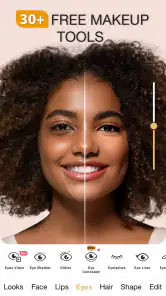
When I want to see how a makeup idea might look in a selfie before trying it on my face, Perfect365 Makeup Photo Editor gives me a quick way to experiment. Its beauty-focused editing is the main reason to open it: rather than treating a portrait like a general-purpose photo project, it lets me explore makeup effects and compare looks directly on a picture. That makes it useful for inspiration, though I keep in mind that a polished preview is not a promise of the same result in real life.
Makeup previews are the central appeal
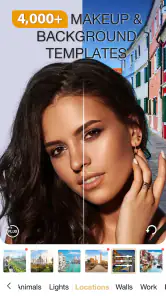
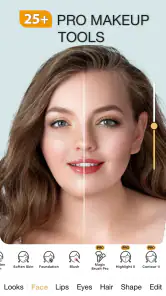
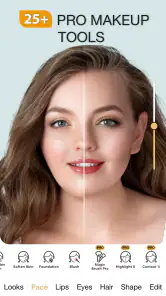
The most useful way to approach the app is as a virtual makeup playground. I can try a different look on a photo, adjust the strength of effects, and decide whether I prefer a light touch or a more noticeable change. That choice matters: reducing intensity can make an edit feel closer to something I would actually wear, while leaving every effect strong can quickly make a selfie look artificial. I get better results when I treat the preview as a starting point, not a finished beauty standard.
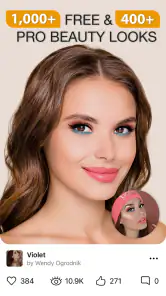
The app also brings tutorials into the same beauty-focused experience. That pairing gives the edits a practical purpose: I can use a look to work out what styles appeal to me, then turn to a tutorial for ideas I might try with real makeup. A useful habit is to save the original photo separately before experimenting, so I can judge the edited version against it and avoid losing sight of what I changed.
Unleashing Your Inner Glam
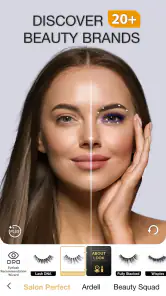
First things first, the user interface of the Perfect365 Makeup Photo Editor is as intuitive as it gets. You don't need to be a tech wizard to navigate through its extensive features. Whether you're a makeup newbie or a seasoned pro, this app is designed to cater to all. From subtle enhancements to bold transformations, the choices are endless. The app offers a plethora of makeup styles, ranging from everyday looks to party glam, and you can easily switch between them with just a tap.
Features That Wow
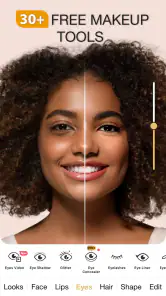
One of the standout features is the live makeup effects. This allows you to try on different looks in real-time, which is perfect for those who want to experiment with new styles before committing. The app also provides step-by-step tutorials, so you can learn how to recreate these looks in real life. And let's not forget about the skin smoothing tool that magically erases blemishes and evens out your skin tone, giving you that flawless finish.
The customization options are another aspect worth mentioning. You can adjust the intensity of each effect, ensuring that your final look is just the way you like it. Plus, the app supports a wide range of skin tones, making it inclusive and versatile for users worldwide. And if you're a fan of virtual try-ons, you'll love the hair color feature that lets you experiment with different shades without the commitment.
Getting a useful result from a quick experiment
For a realistic everyday use, I would open it before getting ready for a dinner or a video call, test a couple of makeup directions on a selfie, and use the result to decide what feels right. It is also handy when I am curious about a bolder color but do not want to apply and remove makeup just to find out whether the idea suits me. The important caveat is that a photo preview cannot reproduce every detail of applying makeup in person, so I would not rely on it to judge exact shades or technique.
More From Our News Desk

Weather by Xiaomi Review: Clear at a Glance, Less Clear Up Close

X Under Pressure: Can It Recover When Posting Goes Wrong?

Clash of Clans Is Won Between the Battles

Android Auto Makes the Case for Quieter Car Software

MobiOffice: Transforming Mobile Productivity with Seamless Integration

EA SPORTS FC™ Mobile Soccer: Redefining Mobile Sports Gaming
For a more informative comparison, I would use a photo with even lighting and a relaxed expression, then change one thing at a time. If I switch the overall look, lip color, and skin effect all at once, it becomes hard to tell which part actually works for me. Comparing a restrained version with a stronger one can reveal whether I like the makeup idea itself or only the extra polish. This is especially helpful when choosing a look for an occasion: I can focus on the overall impression without mistaking a heavily edited portrait for a realistic preview of cosmetics.
Where it fits among beauty and photo tools
Compared with a general photo editor, the appeal here is the beauty-specific focus: the tools are aimed at trying makeup looks rather than giving me a broad set of edits for landscapes, objects, and every other kind of image. A dedicated makeup tutorial or a real-world consultation is a better choice when I need detailed instruction tailored to my face, while a regular editor makes more sense when my goal is simply to crop, retouch, or adjust an image without trying on a beauty look.
That distinction helps me decide which tool to reach for. A general editor usually gives more control over the whole image, but it may take extra steps to imitate a makeup look. Perfect365 is more direct when the question is, “Would I like this style on a portrait?” It is not the tool I would choose to make a complete photo composition or carefully correct an image for professional use. Nor would I treat a digital result as a substitute for testing products in person, since screen appearance and real-life application are different things.
Sharing with a little restraint
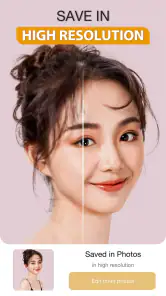
Once you've perfected your look, sharing it with the world is a breeze. The app seamlessly integrates with social media platforms, so you can upload your photos directly from the app. Plus, it supports high-resolution images, meaning your photos will look stunningly crisp and clear. And if you're feeling generous, you can even share your favorite makeup looks with your friends through the app!
Before sharing, I recommend checking the image at its normal viewing size and easing back any effects that draw attention away from the person in the photo. A strong smoothing or makeup edit may look appealing close up but less natural in a feed. If I am choosing between several versions, I compare them side by side and keep the one that still looks like me; that small pause is more useful than adding another effect just because it is available.
There is also a practical reason to keep the original outside the editing process: it gives me a reliable point of comparison if I revisit the picture later. I would make a copy before trying several directions, especially if the selfie is one I may want to use elsewhere. That small bit of organization keeps experimentation low-pressure and makes it easier to choose a final image without losing the unedited one.
Who will get the most from it
I would recommend it most to selfie-takers who enjoy testing makeup ideas, beginners looking for visual inspiration, and anyone who wants a quick preview before attempting a new style. It is less suited to someone who wants a full photography editor, expects a virtual preview to match real cosmetics exactly, or prefers not to alter their appearance in pictures. The app is free to start, but it includes optional in-app purchases ranging from $0.99 to $19.99 per item, so I would explore the experience before deciding whether any paid extras are worthwhile.
A useful way to assess whether it suits you is to begin with a familiar photo and a modest change, rather than judging it by the most dramatic transformation. If you mainly want an idea for your own makeup routine, focus on which colors and overall styles catch your eye; if you mainly want a finished social photo, pay closer attention to whether the retouching still feels like you. These are different goals, and the same edit can be helpful for one while feeling excessive for the other.
It is also a better fit for people who enjoy visual trial and error than for anyone seeking a precise lesson. The tutorials can provide inspiration, but a photo-based preview cannot show how a product feels on skin, how it wears over time, or exactly how to reproduce a technique on your own face. I would use the app to narrow down ideas, then rely on hands-on practice or more focused instruction when I want to learn the application itself.
Perfect365, Inc. develops this beauty app, which is rated for Everyone and has an average rating of 3.6 from around 774,000 ratings. It has been available since February 19, 2013, and has reached over 50 million installs. Version 10.11.12 requires iOS or Android 8.0 or later. Those details make it a widely used option, but popularity alone does not settle whether its editing style suits you; I would judge it by how natural you can make your own previews look.
That judgment is worth making before spending anything. Since the app is free to start and offers optional purchases, I would first see whether its basic editing approach answers the question I have in mind. If I only need a broad photo adjustment, a general editor is likely the more sensible choice; if I want a quick beauty-oriented comparison, the focused workflow is the reason to try this one. The age rating is Everyone, but the most important personal consideration is whether digitally changing a portrait feels comfortable to you.
In conclusion, the Perfect365 Makeup Photo Editor is a game-changer for anyone looking to elevate their selfie game. It's user-friendly, packed with features, and provides endless possibilities for creativity. So why wait? Download the app today and unleash your inner glam! Trust me, once you start using it, you'll wonder how you ever lived without it.
Perfect365 Makeup Photo Editor Frequently Asked Questions
Can I edit both photos and videos with Perfect365 Makeup Photo Editor?
Yes. Perfect365 is designed for editing photos and videos with beauty filters, and it also offers makeup looks to try on your images. If video editing is your main reason for downloading, consider whether the available beauty effects fit the kind of result you want. The app brings these editing options together with makeup artist tutorials, so it may appeal to users looking for both creative tools and beauty inspiration.
Do I need makeup experience to use Perfect365 Makeup Photo Editor?
No makeup experience is needed to explore the app. Its virtual makeup tools let you try different looks digitally, without applying makeup in real life, and the app includes makeup artist tutorials for guidance and inspiration. You can experiment with styles and colors at your own pace. The results are intended for editing and personal creativity, so you can try looks simply to see what suits your photo.
Can I share edited photos directly from Perfect365?
Yes. Perfect365 lets users share edited photos on social media platforms directly from the app. Before sharing, it is worth reviewing the finished image and checking the destination account’s privacy settings, especially if the photo includes other people. You can also keep an edited image for personal use rather than posting it, depending on how you want to use the results.
What devices can run Perfect365 Makeup Photo Editor?
Perfect365 Makeup Photo Editor is available for Android and iOS. Its minimum operating system requirement is version 8.0, so check your device’s software version before downloading. The app is a beauty editor for photos and videos, and its current version is 10.11.12. Keeping your device’s operating system up to date can also help you get the best experience with apps.
Who makes Perfect365 Makeup Photo Editor, and is it suitable for all ages?
Perfect365 Makeup Photo Editor is developed by Perfect365, Inc. and is rated Everyone, making it suitable for a broad audience. It is a beauty app for trying makeup looks and editing photos and videos, so younger users may still want a parent or guardian’s guidance when using its sharing features. The app has been available since February 19, 2013.
Pros
- User-friendly interface for easy navigation.
- Wide variety of makeup styles available.
- Real-time face detection feature.
- Customizable beauty options.
- High-quality photo editing tools.
Cons
- Requires in-app purchases for more features.
- May consume significant battery life.
- Occasional ads disrupt user experience.
- Limited free content availability.
- Heavy app size may slow down devices.
- Category
- Beauty
- Version
- 10.11.12