HD Camera for Android: 4K Cam
- 711.00
- 4.6
- Installs
- 5.00M
- Price
- Free

Screenshots
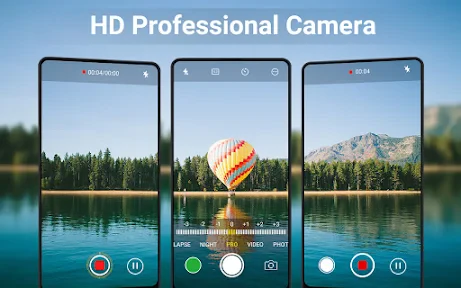
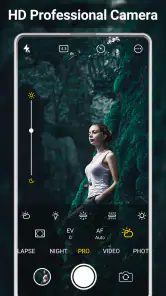
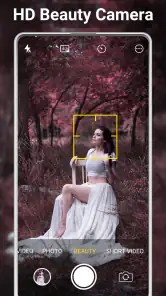
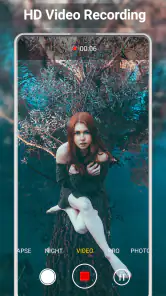
Analysis by Reviewed
I usually decide whether a camera app is useful before I take a single photo: can I open it quickly, frame the moment without hunting through menus, and get an image I can actually use afterward? HD Camera for Android: 4K Cam is aimed at that everyday gap between a phone’s built-in camera and a more deliberate shooting setup. It is a free beauty-category app from Easyelife, and its focus is capturing photos and video with a more feature-rich camera interface.
That makes it worth considering if you enjoy taking portraits, landscapes, or casual video and want extra shooting options close at hand. It is less compelling if your priority is extensive editing, professional manual controls, or a guaranteed improvement over the camera app already tuned for your particular phone. I would treat it as another way to capture a scene, then judge the results on your device rather than assuming that a different app alone will make every shot sharper.
Getting ready for a real moment
Imagine I’m outside with friends as the light starts to fade. I want to take a quick group photo, then record a short clip, without turning the moment into a long settings session. The useful question is not simply whether a camera app offers many modes; it is whether I can choose a sensible one, check the framing, and return to the scene without losing people’s patience.
Before relying on a new camera app for something important, I’d open it at home and try the rear and front cameras, a still photo, and a short video. That simple check helps me learn where the capture controls are and whether the options I care about are available on my phone. I’d also compare a few shots with the built-in camera in similar light. That is a practical way to see which app handles my device’s exposure and colors better, rather than trusting a feature label as a promise of superior results.
Unveiling the Features
Now, let's talk about what makes HD Camera for Android: 4K Cam a must-have tool in your mobile photography arsenal. This app is packed with features that rival even some of the most sophisticated standalone cameras out there. It offers a variety of shooting modes, including panorama, night mode, and portrait mode, which are perfect for any situation you might find yourself in.
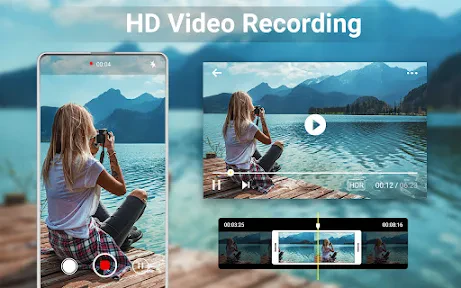
One of the standout features is the 4K video recording capability. Imagine being able to capture your child's birthday party or your best friend's wedding in ultra-high definition. It's like having a professional video camera right in your pocket. Plus, the app supports HDR, which means your photos will have the perfect balance of light and color.
Making the capture easier
Despite its advanced features, navigating the app is a breeze. The user interface is intuitive and user-friendly, so you won't find yourself fumbling through complicated menus. Everything is laid out clearly, from the settings to the different modes available.
More From Our News Desk

Weather by Xiaomi Review: Clear at a Glance, Less Clear Up Close

X Under Pressure: Can It Recover When Posting Goes Wrong?

Clash of Clans Is Won Between the Battles

Android Auto Makes the Case for Quieter Car Software

MobiOffice: Transforming Mobile Productivity with Seamless Integration

EA SPORTS FC™ Mobile Soccer: Redefining Mobile Sports Gaming
For a more reliable everyday workflow, I’d choose a mode before the moment arrives: portrait for a person, panorama for a wide view, or night mode when the scene is dim. Then I’d take one quick test frame and check faces and highlights before asking everyone to hold still. HDR can help balance a bright background with a darker subject, but it is not a substitute for good light or steady hands. For a moving child or pet, a fast, ordinary shot may be more useful than a mode that needs a more careful composition.
From camera roll to sharing
The app also includes a built-in gallery, allowing you to review your photos and videos instantly. You can easily organize your media, apply edits, or share them directly from the app. It's a comprehensive solution that fits right into your daily routine.
This review-and-share step is where a separate camera app either earns its place or adds friction. I’d check the result in the gallery while the scene is still available, then share or edit only the frames worth keeping. If you regularly finish pictures in a different editing app, the camera’s gallery is best viewed as a quick checkpoint rather than a replacement for your whole photo workflow. Before recording an event, it is also sensible to leave enough storage and battery for the clip; higher-resolution video can take more room and is not always the right choice for a long recording.
Easy User Interface
Although the controls are presented as approachable, the best setup still depends on the phone and the situation. I’d avoid changing several options at once: try one mode, take a test image, and compare it with a normal capture. That makes it easier to tell whether portrait separation, low-light handling, or HDR is helping, and it gives me a familiar fallback if the result looks unnatural or takes too long.
For someone who mainly wants to point, shoot, and send a photo, the phone’s default camera may be faster and more predictable because it is already part of the device’s routine. This app makes more sense for a curious casual photographer who wants to explore modes in one place. It is not the choice I’d make for a carefully controlled shoot where I need dependable, device-specific manual adjustments or a full editing pipeline.
Performance and Reliability
In terms of performance, the app runs smoothly without any noticeable lag. It's optimized to work on a variety of Android devices, ensuring that you get the best possible quality regardless of your phone's specs. Whether you're using a budget phone or a high-end model, the HD Camera for Android: 4K Cam adapts to give you top-notch performance.
On Android, it requires version 6.0 or later, and the current release is 3.6.7. I’d still test the specific modes I plan to use: camera processing and supported capture options can depend on the handset, so a 4K label should not be treated as a guarantee that every phone will record every scene in that format. For a quick portrait, that distinction may not matter. For a long event video, testing beforehand is the sensible choice.
Where it may not fit
One trade-off is that another camera app means another interface to learn and another place to review captures. If your built-in app already gives you the look and speed you want, switching adds little. Likewise, anyone expecting a camera app to rescue a shaky night shot or replace a dedicated editor may be disappointed. I’d use it for trying different capture approaches, not as a promise that every photo will look polished without further work.
The app is free to install, rated for Everyone, and has optional in-app purchases priced from $2.99 to $9.99 per item. It has an average rating of 4.6 from around 47,000 ratings and more than 5 million installs. Those figures suggest it has reached a broad audience, but they cannot tell me whether its controls suit my particular phone; a short personal test is still the best way to decide.
Choosing it for the right kind of photography
I see the strongest case for this app in situations where I want to choose a capture style deliberately but do not need a specialist camera rig. A weekend walk is a good example: I might use a wide panorama for a landscape, switch back to a regular frame for a friend, and keep a short clip of the same outing. Having those approaches in one camera interface can be convenient, especially when I want to experiment without opening a separate tool for each kind of shot.
There is a practical distinction between choosing a mode and expecting the mode to do all the work. For a panorama, I’d move steadily and keep the phone level rather than sweeping quickly; for a portrait, I’d check that the subject is separated clearly from the background; and for a dim scene, I’d look for a stable place to hold the phone. These small habits matter because a mode can guide the capture, but it cannot remove motion blur or make poor framing interesting.
Someone who mostly photographs receipts, quick notes, or spontaneous moments may prefer the default camera, where familiar controls are already easy to reach. A person who enjoys trying portrait, panorama, night, and HDR options is more likely to appreciate a second camera interface. I would also skip it as a primary tool if I needed dependable manual control for repeatable work, or if my main goal were retouching and arranging finished images rather than taking them.
A useful handoff after the shutter
For a realistic outing, I’d use the app to take a few versions of a group picture, check them in its gallery, and choose the frame where everyone is looking toward the camera. If the image needs more considered color or cropping, I’d move to the editor I already use instead of spending time trying to turn a capture app into a complete post-production setup. That division of labor keeps the camera step quick and makes it easier to decide whether the app is actually helping.
Sharing is another point where convenience depends on personal habits. If I send photos immediately, the in-app review and sharing route may shorten the process. If I sort images later in a separate photo library, I may prefer to leave them there and use this app only to capture. Either way, checking the selected image before sending it is worthwhile: a quick review can catch a missed expression or an unwanted bright patch in the background before the moment is gone.
Video calls for a similar handoff. I’d make a short test clip, play it back, and check whether the framing and sound suit the intended use before recording something I cannot repeat. For a brief memory, higher-resolution capture may be appealing; for a longer recording, I’d weigh the extra detail against storage and battery needs. That is a useful trade-off to settle in advance rather than discovering it halfway through an event.
Performance and Reliability
As for reliability, you can count on this app to deliver. It doesn't crash or freeze mid-use, which is crucial when you're trying to capture important moments. Plus, regular updates ensure that it stays compatible with the latest Android versions and devices.
Final Thoughts
At the end of the day, if you're looking for a way to enhance your mobile photography experience, this app is a solid choice. It combines professional-level features with ease of use, making it accessible for everyone from beginners to seasoned photographers. So next time you find yourself in a picture-perfect moment, whip out your phone and let the HD Camera for Android: 4K Cam do its magic. Trust me, you won't be disappointed.
My recommendation is more measured: try it if you want a dedicated place to explore camera modes and capture casual photos or short clips, but keep your standard camera handy until you know which one performs better on your device. If you value a familiar one-tap workflow above experimentation, stick with the built-in option. For everyone else, a few test shots in daylight and indoors should quickly show whether this app earns a place in the routine.
HD Camera for Android: 4K Cam Frequently Asked Questions
Can I use HD Camera for Android: 4K Cam for selfies and everyday photos?
Yes. HD Camera for Android: 4K Cam is presented as a camera app for both regular photography and selfies, making it an option to consider if you want these uses in one place. Its filters and effects can help you personalize images, while the camera tools are intended for everyday capture. Results and available options can vary with your phone’s camera hardware.
Is HD Camera for Android: 4K Cam suitable for recording videos?
The app is described as a fully featured 4K camera and includes video recording among its advertised camera uses. Whether you can record in 4K depends on your Android device’s camera hardware and capabilities, so the app alone cannot guarantee that resolution on every phone. It may be worth checking your device’s recording options before relying on it for high-resolution video.
What age group can download HD Camera for Android: 4K Cam?
HD Camera for Android: 4K Cam has an Everyone content rating, so it is intended for a general audience rather than a specific age group. That rating can help families decide whether the app is appropriate to consider, though parents may still want to review the app and its purchase options with younger users. The app focuses on camera and beauty-related features.
Is HD Camera for Android: 4K Cam free to download?
Yes, HD Camera for Android: 4K Cam is free to download, so you can try its camera tools without paying upfront. The app also offers optional in-app purchases, which may appeal if you want access to paid extras. Its free access makes it an easy option to consider if you are looking for a separate camera app for everyday photos and videos.
What Android version does HD Camera for Android: 4K Cam require?
The app requires Android 6.0 or later. Before downloading, check the Android version on your device to make sure it meets that requirement. Compatibility also depends on the phone’s camera hardware: even when the app installs, available camera functions and recording quality can vary between devices, so the experience may not be identical on every Android phone.
Pros
- High-quality 4K resolution support.
- User-friendly interface
- easy to navigate.
- Wide range of camera modes available.
- Fast and responsive performance.
- Frequent updates with new features.
Cons
- Limited compatibility with older devices.
- Contains in-app advertisements.
- Some features require in-app purchases.
- Can drain battery quickly on high settings.
- Occasional bugs in HDR mode.
- Category
- Beauty
- Version
- 3.6.7













