Smarty Men Jacket Photo Editor
- 70.00
- 3.5
- Installs
- 10.00M
- Price
- Free

Screenshots
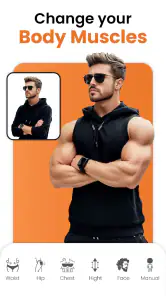
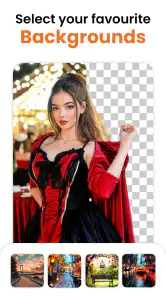
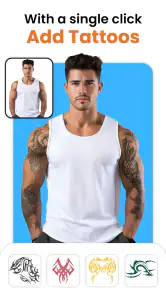
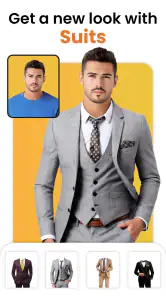
Analysis by Reviewed
For me, a jacket-photo editor is worth trying when I want a quick change of style in a portrait, not when I need a dependable preview of a real outfit. Smarty Men Jacket Photo Editor has a specific appeal: it focuses on adding men’s jackets to photos, so I can experiment with a dressed-up look without opening a full editing suite. The key question is whether a playful, convenient makeover is enough for what you have in mind.
Deciding what you want from a fashion edit
Before downloading a fashion editor, I’d ask what I actually want from it: a quick visual joke, a more polished profile picture, or a realistic preview of how a different look might suit me. This app is aimed at the first two more than the last. It belongs to the beauty and photo-editing corner of the app world, and its focus on men’s jackets gives it a narrower purpose than a general editor. That focus can be useful when I want to experiment with an outfit without learning a complicated editing suite.
A practical test is to start with a front-facing photo in which the shoulders and upper body are easy to see. A jacket overlay has less chance of looking convincing if the person is turned sharply, hidden by another object, or photographed from an unusual angle. I’d also choose an image with a similar crop to the clothing template rather than trying to force a full-body look onto a close-up portrait. That small bit of preparation can save time and makes the result easier to judge.
Matching the photo to the app’s purpose
I’d also decide in advance what a successful edit means. For a joke shared among friends, an imperfect edge may not matter; for a profile image, the edit needs to hold up at the size people will actually see it. That distinction helps avoid wasting time polishing an image that is only meant to be a quick laugh. If you need a headshot for work or a formal profile, I’d use a real jacket or a more controlled portrait session instead of relying on an overlay.
One useful way to choose a source photo is to look for unobstructed shoulders and even lighting. A dark jacket on a dim portrait can merge into the background, while a sharply lit image may make a flat overlay stand out. I would take a few ordinary photos in the same spot and pick the one whose pose best matches the clothing shape, rather than trying to rescue a difficult image with repeated adjustments. The app’s main value is speed, and a suitable starting picture keeps that advantage intact.
Style Up Your Photos
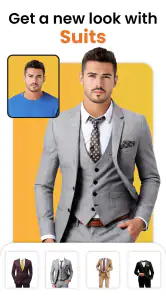
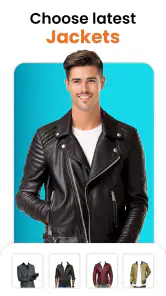
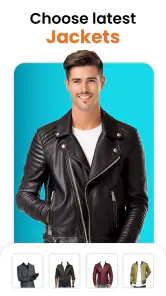
First off, let's talk about what this app does. The Smarty Men Jacket Photo Editor is essentially your digital wardrobe that lets you try on a variety of jackets without stepping into a store. I was a bit skeptical at first—like, really, how good could virtual jackets look? But oh boy, was I surprised! The app offers a plethora of jackets, from casual leather ones to classy blazers, and it feels like you have an entire boutique at your fingertips.
How the editing flow feels
Downloading the app was a breeze, and the interface? Slick and straightforward. It’s super user-friendly, which is a big win. You just upload a photo, pick a jacket, adjust it with a simple pinch and zoom, and voila! You’ve got yourself a new look. The app even lets you adjust the color and size of the jackets to fit your style. I mean, who knew playing dress-up could be this much fun in the digital age?
More From Our News Desk

Weather by Xiaomi Review: Clear at a Glance, Less Clear Up Close

X Under Pressure: Can It Recover When Posting Goes Wrong?

Clash of Clans Is Won Between the Battles

Android Auto Makes the Case for Quieter Car Software

MobiOffice: Transforming Mobile Productivity with Seamless Integration

EA SPORTS FC™ Mobile Soccer: Redefining Mobile Sports Gaming
For an everyday use, I can imagine opening it while getting ready for a profile update: I’d take a clear portrait, test a couple of jacket styles, and compare the saved results before choosing one to share. I would treat the edits as playful styling ideas, not as a reliable way to check how a real jacket will fit. A digital overlay cannot tell me how fabric hangs, whether a cut suits my proportions, or how a color looks in person, so anyone shopping for clothes should still use real product photos and try-ons to make the decision.
A realistic way to use it in a busy day
Imagine I have a casual photo ready for a messaging profile, but the picture feels a little too relaxed. I could try a jacket overlay, compare a couple of looks, and save the version that feels most like me. The sensible stopping point is when the edit looks coherent at normal viewing size. If it only looks convincing after close inspection or depends on an awkward crop, I’d keep the original rather than turn a small experiment into a long editing session.
For a group chat or a lighthearted post, I’d take a different approach: choose a jacket that makes the transformation obvious and treat the result as entertainment. That is a better fit for an imperfect cutout than presenting it as a genuine outfit photo. I would also keep an untouched copy of the portrait so the edit remains reversible; then I can try another style without losing the source image or confusing the edited version with the original.
What makes an overlay convincing
Now, let’s chat about the quality of these edits. Sometimes, apps like these can leave you looking like a poorly cut-out magazine collage. But here, the jacket fits are surprisingly realistic. The app uses some kind of magic (or maybe just really good programming) to ensure the jackets blend well with the photos. It’s like having a professional tailor fit you, digitally.
Even with a good source photo, I’d inspect the edges around the neck and shoulders before posting. Those areas reveal most clearly when an overlay does not match the original pose or lighting. A useful trick is to compare the edit with the untouched image at the same size, rather than judging only from a zoomed-in view; that helps me decide whether the whole picture feels coherent. If a template needs lots of resizing to cover the body, I’d try another one instead of spending ages adjusting a poor match.
Small choices that save editing time
I’d make the first pass quickly: select a jacket that broadly matches the person’s angle, position it, and check the neckline and shoulder line before fine-tuning. If those landmarks are wrong, adjusting size alone is unlikely to fix the mismatch. Starting with the closest template is more effective than choosing a favorite style first and forcing it to fit. This is a simple but important trade-off: the best-looking option in isolation may not be the one that works best on your actual portrait.
Color changes are most useful when they help the overlay sit naturally with the photo, not just when they make the jacket brighter or more eye-catching. I’d compare the result against the background and the shirt already in the image, then stop once the outfit reads clearly. A dramatic color can be fun for a joke; for a restrained profile picture, a subtler choice may look less like a sticker. In either case, I’d judge the whole image rather than the jacket alone.
Where a specialist editor wins
One of my favorite features is the versatility of the app. Whether you want to see how you’d look in something trendy for Instagram or just having a laugh with friends, it’s got you covered. Plus, sharing on social media is a snap, so you can easily flaunt your new look to the world. And let’s not forget, it’s quite the conversation starter!
The trade-off is that a specialist jacket editor is not a substitute for a full photo app. If I wanted precise retouching, detailed layer control, or to combine clothing changes with broader image work, I’d reach for a general-purpose editor instead. If I wanted a realistic haircut or beard preview, I’d choose an app centered on those edits rather than expect this one to cover every grooming need. This is best when the jacket itself is the point, not when I need complete control over a portrait.
Which alternative makes more sense?
Compared with a broad photo editor, this app’s focused job can be an advantage: I can go straight to jacket styling instead of navigating a large collection of unrelated tools. But a general editor is the better choice when I need to blend several changes, refine a background, or make a portrait suitable for a specific professional purpose. Those tools may ask for more patience, yet the extra control matters when a single clothing overlay is only one part of a finished image.
There is also a difference between a jacket overlay and a virtual try-on made for shopping. The former can help me imagine a playful change in a picture; the latter is the more appropriate route when I’m deciding whether to buy a particular garment. Neither a color adjustment nor a well-positioned template can reproduce the way fabric fits or moves. If the real decision is about style ideas, this app can be a quick starting point; if it is about fit, I’d use actual garment information and an in-person try-on.
Someone looking mainly for grooming edits should compare it with apps devoted to hair or facial hair rather than assume a jacket-focused tool will offer the same depth. The same goes for users who want a complete outfit transformation: changing one visible clothing item may not make the rest of a portrait match. I’d pick the narrow tool when its narrow task is exactly what I want, and move on when the goal becomes a full makeover.
Who should try it, and what to expect
One Logix Studio’s app is free to install, with optional in-app purchases listed from $1.99 to $69.99 per item. It’s rated for Everyone, and the current version is 2.6.4, with Android 7.0 as the minimum operating system. Its average rating is 3.5 from around 13,000 ratings, and it has passed 10 million installs. Those figures suggest a widely tried app, though they don’t guarantee that every template or edit will suit your particular photo.
I’d recommend trying the free experience before spending anything. The app makes sense for someone who wants a quick, lighthearted jacket makeover and is comfortable with photo overlays. If you only need one edit, there’s little reason to pay before checking whether the available choices work with your picture. If you expect professional-looking compositing or realistic clothing advice, it’s better to use a more capable editor or a real fitting room.
Before committing to a paid option
The free starting point makes it easier to judge the core idea before deciding whether any purchase is worthwhile. I’d first test the app with the kind of photo I expect to use regularly, not just the easiest portrait in my gallery. If the jacket choices and adjustment flow work well for that picture, I can decide whether further spending has a clear purpose. If the edit already feels limiting, paying is unlikely to turn it into a full photo-compositing tool.
It is also worth separating the cost of trying the app from the cost of getting a result you are happy to share. A free install does not guarantee that every style or option you may want is included without purchase, so I would check the available choices before building a workflow around a particular look. For occasional experiments, keeping the process simple is the safer approach. Anyone who edits portraits often may get more value from a broader editor that supports several kinds of changes in one place.
My recommendation
In conclusion, if you’re looking to spice up your photos or just have a bit of fun with fashion, the Smarty Men Jacket Photo Editor is definitely worth a download. It combines creativity with ease of use, making it a must-try app for fashion enthusiasts and casual users alike. So go ahead, give it a whirl, and let your virtual fashion journey begin!
My recommendation is strongest for someone who wants a quick, low-pressure way to test a jacket look on a portrait and is happy to treat the result as an edit rather than evidence of how real clothing will fit. It is less suitable when accuracy, detailed image control, or a complete grooming makeover matters more than speed. I’d start with a well-lit, front-facing photo, try a small number of styles, and judge the finished image at the size it will be shared. If the overlay works naturally, the app has done its job; if it needs constant correction, a real outfit or a more capable editor is the better choice.
Smarty Men Jacket Photo Editor Frequently Asked Questions
Can I preview different looks before saving an edited photo?
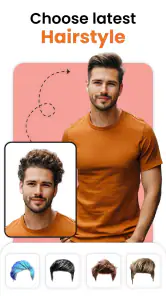
Yes. The app is built around applying men’s jackets, hairstyles, and beard styles to a photo, so you can explore a changed appearance before deciding whether to keep the result. The edits are visual overlays, not a physical fitting or a guarantee that clothing will look the same in person. How convincing the preview appears depends on the original image and how well the selected elements align with it.
Can I use my own photos with Smarty Men Jacket Photo Editor?
Smarty Men Jacket Photo Editor is a photo-editing app intended for creating makeover images, so using a suitable picture of the person you want to edit is central to the experience. A clear image can make it easier to position jackets, hair, or beard styles naturally. Before starting, choose a photo that you are comfortable editing and sharing or saving on your device.
Can I try on hairstyles and beard styles as well as jackets?
Yes. Smarty Men Jacket Photo Editor is a beauty app for creating a changed look in a photo, with options for men’s hairstyles and beard styles alongside jackets. Its background-removal feature can help separate the subject from the original setting when preparing an edit. The result is a photo edit rather than a physical try-on, so the appearance depends on how well the selected elements fit your picture.
What features does the Smarty Men Jacket Photo Editor offer?
The Smarty Men Jacket Photo Editor offers a variety of features including a wide selection of jacket styles and designs for men. Users can easily overlay jackets onto their photos, adjust the size and orientation to fit perfectly, and even add effects or filters to enhance the overall look. The app is designed to be user-friendly, making it simple for anyone to use. It also includes men’s hair and beard styles, along with a background remover, for creating a more complete makeover.
Is the Smarty Men Jacket Photo Editor free to download and use?
Yes, Smarty Men Jacket Photo Editor is free to download. The app also offers in-app purchases, with listed prices ranging from $1.99 to $69.99 per item, so some optional content or features may involve a charge. You can begin with the free app and review any purchase details shown in the app before deciding whether to buy anything.
Pros
- User-friendly interface for easy navigation
- Wide variety of jacket styles and designs
- High-quality photo editing tools
- Fast and responsive application performance
- No intrusive ads during editing process
Cons
- Limited free version features
- Occasional app crashes on older devices
- Some jackets look unrealistic
- In-app purchases can be expensive
- Requires internet connection for full functionality
- Category
- Beauty
- Version
- 2.6.4