Storm Shield
- 1.75K
- 3.0
- Installs
- 100.00K
- Price
- Free

Screenshots
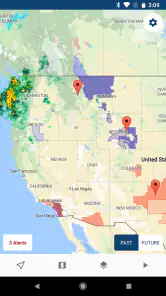
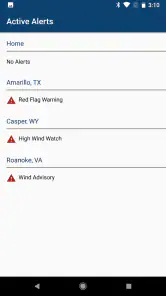
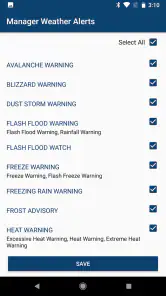
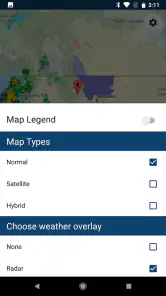
Analysis by Reviewed
Storm Shield is the kind of weather app I would keep installed for one specific reason: when severe weather is possible, I want alerts tied to where I actually am rather than a general forecast for a whole city. Developed by Mosaic Srl, this free weather app focuses on NOAA severe weather alerts for your exact location. That narrow purpose makes it more useful than a basic forecast app in some situations, but less satisfying if you want a complete daily weather dashboard.
I approached it as a practical warning tool rather than a replacement for every weather service on my phone. The experience is best when I set it up before storm season, check that the location behavior suits my routine, and treat each notification as a prompt to verify conditions and act sensibly. The real value is not constant weather browsing; it is reducing the chance that an important warning gets lost in a general forecast.
How I use Storm Shield as a dependable warning layer
Starting with the right expectation
The first thing I would tell a friend is not to install Storm Shield expecting a richly designed hourly forecast, long-range planning suite, or replacement for a local television weather report. Its identity is much more focused. It is a weather app built around serious alerts, with the store summary describing NOAA severe weather alerts for your exact location. That wording matters because a warning tool and a normal forecast app answer different questions.
A conventional weather app helps me decide whether to carry an umbrella, what jacket to wear, or whether a weekend outing looks comfortable. Storm Shield is more relevant when the question becomes, “Could dangerous weather affect where I am?” I find that distinction useful because it prevents me from judging the app by features it is not primarily trying to provide.
My baseline workflow would be simple. I install it, allow the location access needed for its location-based purpose, review how the app identifies my position, and then leave it available in the background. I do not open it repeatedly throughout the day. Instead, I use ordinary forecast tools for routine planning and rely on this app as an additional layer for severe-weather awareness.
That approach also makes the app easier to evaluate. If I am traveling, commuting, working outdoors, or caring for someone who needs extra preparation time, location-specific alerts can be more useful than manually searching for a warning every few hours. The benefit comes from matching the alert to the place where I may actually be, not from filling the screen with weather graphics.
A realistic day-to-day example
Imagine I am spending the afternoon away from home and a line of severe storms develops. A city-level forecast may mention storms generally, but a location-focused alert can be more meaningful if it is connected to where I am at that moment. I can move indoors, delay a drive, contact family, or avoid an exposed area instead of discovering the situation only after opening a forecast app.
More From Our News Desk

Clash of Clans Is Won Between the Battles

Android Auto Makes the Case for Quieter Car Software

MobiOffice: Transforming Mobile Productivity with Seamless Integration

EA SPORTS FC™ Mobile Soccer: Redefining Mobile Sports Gaming

How Microsoft OneDrive Became a Mobile Productivity Giant

How Google Translate Breaks Language Barriers Effortlessly
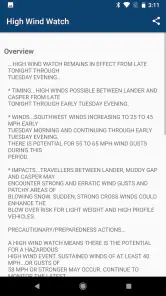
I would still use common sense. An alert is not a guarantee that dangerous conditions will pass directly over my street, and no phone notification should replace local emergency instructions. I use the notification as an early decision point: pause, read the details, check the surrounding conditions, and decide what action makes sense.
This is also where the app can help people who do not enjoy monitoring weather maps. Some users want to follow radar constantly; others simply want a clear signal when conditions become serious. Storm Shield is better suited to the second group. It reduces the need to remember to check manually, although it cannot remove the need to keep notifications and location behavior working correctly.
Who gets the most from it
I see the strongest fit for people who spend time outside, drive through changing areas, live in regions where severe storms are a regular concern, or need extra time to move children, pets, equipment, or vulnerable family members indoors. It can also make sense for travelers who do not know which local weather source to follow in every place they visit.
The app is less compelling for someone who only wants attractive forecast cards, detailed pollen information, minute-by-minute rain timing, or a broad collection of lifestyle weather tools. A general-purpose weather app may be a better single installation for that person. Storm Shield makes more sense as a focused companion, especially if alerts matter more than visual forecast depth.
Checking the essentials before relying on notifications
Because the app’s usefulness depends on timely alerts, I would not stop at installation. I would check the phone’s notification settings, make sure alerts are allowed, and confirm that battery-saving behavior is not interfering with background activity. The exact menus vary by Android or iOS version, so this is less about a special Storm Shield trick and more about treating alert apps differently from apps I open only when convenient.
I would also review the location setting offered by the phone. If the app is meant to follow my exact location, a setting that only grants access while the app is open may not match my intended use. On the other hand, users who are uncomfortable with continuous location access should think carefully about whether the location-based benefit justifies that choice. This is a genuine trade-off: more automatic relevance can require more trust in location handling.
When I change phones, travel for a long period, or alter system battery settings, I would repeat this check. Many notification problems are not visible during a quick test at home. A warning app should be part of a small routine: verify notifications, verify location behavior, and occasionally open the app so I know it still behaves as expected.
Settings I would review first
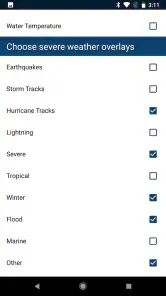
I would begin with alert permissions and sound behavior. A warning that arrives silently may be easy to miss during work, driving preparation, or sleep. I would choose a notification style that stands out without becoming so disruptive that I instinctively dismiss every message. The best setting is the one I will notice and take seriously.
Next, I would check whether the app is using my current position or another location concept. This matters for people who travel between home, work, school, and temporary destinations. I would not assume that a saved home location automatically represents the place where I am now. If the app offers a way to manage locations, I would keep that arrangement simple and remove anything I no longer need.
I would also look at the app’s general behavior after a system update. The current version is 6.0.0, and it requires at least iOS 9. That makes compatibility worth checking before depending on it, particularly on an older device. A user with an aging phone should confirm that the app installs and that notifications behave normally rather than assuming that an old operating system will provide the same experience as a newer one.
Storm Shield is free to install, but in-app purchases are listed at $5.99 per item. I would review any upgrade screen carefully before confirming a purchase and decide whether the available free experience already covers my needs. That is especially important for a focused app: if I only need basic severe-weather awareness, I want to understand exactly what extra value a paid item adds before spending money.
The Everyone content rating is reassuring for households that want a weather warning tool available on a shared family device. It does not mean every family member will find the interface equally easy to interpret, however. I would show younger users what an alert means and what action the family expects them to take rather than treating the notification itself as a complete safety plan.
Building a repeatable habit instead of chasing every alert
Experienced users usually get better results from repeatable habits than from endlessly adjusting settings. I would open the app before outdoor plans, confirm that my location is sensible, and check whether any active alerts affect the route or destination. After that, I would let notifications handle the monitoring instead of refreshing constantly.
For a family, I would agree on one response routine: who checks the alert, where everyone goes, and how updates are shared. For outdoor work, I would make the check part of the start-of-shift process. For travel, I would review the destination before leaving and then rely on location-aware behavior while moving. These habits turn Storm Shield from an icon on the phone into a practical part of preparation.
A useful tip is to avoid testing the app only when the sky already looks threatening. Set it up on an ordinary day, observe how notifications appear, and learn where the important information is displayed. That reduces hesitation when a real warning arrives. It also gives me a chance to notice a muted notification, blocked background activity, or an incorrect location before the situation becomes urgent.
Faster patterns for people who move around
My fastest routine would be to keep the app in a predictable place on the phone and open it only for three checks: current location, active warning details, and the next practical decision. I would not spend time browsing unrelated forecast information if my immediate concern is whether to remain outdoors or change a route.
When traveling, I would check the app after crossing into a new area instead of assuming that a warning relevant to my previous location remains relevant. Location-based tools are powerful precisely because they follow context, but that also means I should pay attention when the context changes. A commuter, delivery driver, camper, or field worker benefits from thinking in terms of current exposure rather than home address alone.
Another efficient pattern is to pair the notification with an independent source when the stakes are high. I might use local emergency guidance, a trusted radar view, or official instructions to understand the wider situation. Storm Shield can alert me to pay attention; another source may help me judge road conditions, timing, or the safest route. This is not a weakness unique to the app. It is the sensible way to use a focused warning service.
Where the focused design becomes a limitation
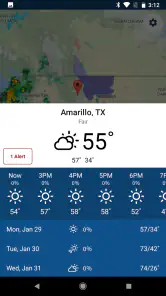
The same narrow focus that makes Storm Shield useful can make it feel incomplete. If I want a single app for temperature trends, detailed hourly planning, radar animation, widgets, air quality, and outdoor comfort, I would compare it with a full-featured weather service before making it my only option. A severe-alert specialist is not automatically the best all-in-one weather companion.
The average rating is 3.0 from around 3.5 thousand ratings, with about 1.7 thousand written reviews. I read that as a reason to keep expectations measured rather than as a final verdict. A focused alert app can be highly useful when its central workflow fits someone’s needs, yet frustrating when a user expects a broader forecast experience or encounters notification and location friction.
The install base is over 100 thousand, which suggests that the app has found an audience, but popularity alone does not answer whether it suits my routine. I would judge it by the consequences of missed alerts, the importance of location-aware warnings in my area, and whether I am willing to maintain the phone settings that make background notifications dependable.
I would also avoid treating any one app as a complete emergency system. Severe weather can develop quickly, alerts can be misunderstood, and phones can lose power or connectivity. A charged device, a basic household plan, and attention to local authorities still matter. Storm Shield is most valuable as one layer in that preparation, not as a substitute for it.
My verdict after fitting it into a real routine
I recommend Storm Shield to readers who want a dedicated severe-weather alert tool and are comfortable doing a little setup work. Its strongest quality is focus: it is designed around NOAA alerts connected to an exact location, which can be more actionable than a broad forecast when I am deciding whether to stay outside, change a trip, or warn someone at home.
I would skip it as my only weather app if my priorities are detailed daily forecasts, visual radar exploration, or lifestyle information. In that case, a more comprehensive weather application will probably feel more complete, while Storm Shield may still be worth keeping as a second layer. I would also be cautious about relying on it without checking notification, location, and battery settings first.
For me, the best setup is deliberately modest: use a general forecast app for ordinary planning, keep Storm Shield ready for severe-weather awareness, and follow a clear response habit when an alert appears. That combination respects both the app’s strengths and its limits. With Mosaic Srl behind it, a free price, and an Everyone rating, it is accessible to try, but the in-app purchase price of $5.99 per item means I would examine any optional upgrade rather than buying automatically.
Storm Shield is not exciting in the usual weather-app sense, and that is partly the point. I value it when I need a focused warning signal more than another screen full of forecast details. If exact-location severe-weather alerts are central to your routine, it deserves a practical trial. If they are not, your everyday weather app will likely serve you better.
Storm Shield Frequently Asked Questions
Is Storm Shield available for my phone, and what should I check before installing it?
Storm Shield is a weather app from Mosaic Srl, with a current version of 6.0.0 and a minimum operating-system requirement of version 9. Before downloading, check that your phone meets that requirement and that you are choosing the appropriate Android or iOS store version. The app is rated for Everyone, and its main purpose is to deliver severe-weather alerts for your location.
What is Storm Shield, and what does the app do?
Storm Shield is a severe-weather alert app designed to help users monitor dangerous conditions near their current location. It can provide notifications for threats such as thunderstorms, tornadoes, hurricanes, flash floods, winter storms, and other emergency weather events, depending on regional coverage. The app is intended as an additional warning tool and should be used alongside official government alerts and local emergency instructions.
Does Storm Shield provide alerts for my exact location?
Storm Shield can use your device’s location to send warnings relevant to where you are, and it may also allow you to save additional locations, such as your home, workplace, or a family member’s address. Accuracy and availability depend on location permissions, network connectivity, regional weather authorities, and the alert data supplied in your area. Keeping location services enabled is important for timely notifications.
Does Storm Shield work without an internet connection?
Storm Shield generally requires an internet or mobile-data connection to retrieve updated weather information and receive many of its alerts. If your connection is unavailable, notifications may be delayed or unavailable, although some previously downloaded information could remain visible temporarily. For serious weather situations, keep other warning methods active, including emergency broadcasts, local sirens, weather radios, and official public-safety notifications.
Is Storm Shield free to download, and are there in-app purchases?
Storm Shield is free to download, and in-app purchases are offered at $5.99 per item. What is included can vary between Android and iOS and may change over time, so check the current store details before making a purchase. Review any purchase terms carefully to understand which features you are selecting and whether they suit the way you plan to use the app.
Pros
- Provides timely severe-weather alerts for your selected locations.
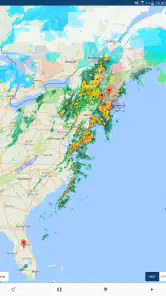
- Useful radar and storm tracking help you monitor changing conditions.
- Customizable notifications can reduce unnecessary alerts.
- Covers multiple hazards
- including tornadoes
- hurricanes
- and lightning.
- Clear maps make weather threats easier to understand at a glance.
Cons
- Some advanced alerts or features may require a paid subscription.
- Location coverage and warning speed can vary by region.
- Frequent notifications may feel excessive during active storm systems.
- The app depends on internet access for maps and updated warnings.
- Battery and data use may increase when location tracking is enabled.
- Category
- Weather
- Version
- 6.0.0











