Clime: NOAA Weather Radar Live
- 45.97K
- 4.2
- Installs
- 10.00M
- Price
- Free
Screenshots
Analysis by Reviewed
I often check the sky before deciding whether to walk, drive, or postpone an outdoor plan, and the radar is the part of a weather app I find most useful for those choices. Clime: NOAA Weather Radar Live is built around that visual view of changing conditions. Rather than relying only on a brief forecast, I can look at where weather is moving and judge whether it might affect my plans. That makes it most appealing to people who want to follow conditions as they develop, not just check a temperature and move on.
Why a moving weather map changes the decision
A radar map answers a different question from a temperature tile. Instead of only telling me what conditions are expected at one location, it helps me see the wider pattern and consider how that pattern might affect the next part of my day. That distinction matters when I am choosing whether to walk to an appointment, take a longer route, or wait before setting out. The map is most valuable as context for a decision, not as a substitute for one.
I find this especially helpful when the weather looks unsettled but the sky outside has not changed yet. A glance at a static forecast can leave me wondering whether rain is a brief possibility or part of a broader system moving through. Watching the radar gives me another way to think about timing. I still leave room for uncertainty, because what appears on a map cannot promise exactly what will happen at every street corner.
That visual emphasis is the main reason to choose this app over a bare-bones weather screen. If I only want to know whether it is warm, a basic forecast is quicker. If I want to understand whether conditions seem to be approaching my area, the map makes the question easier to explore. The practical value is seeing a pattern, then using it alongside the forecast rather than treating it as a guarantee.
Reading the Radar in Everyday Use
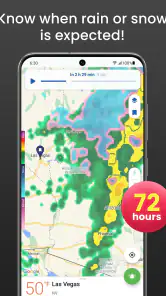
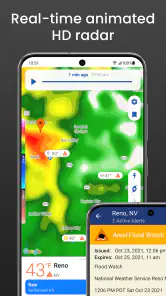
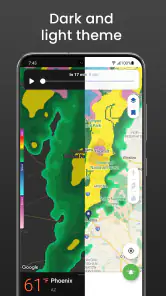
When I first opened Clime: NOAA Weather Radar Live, I was immediately impressed by its sleek and user-friendly interface. You know how some apps just look cluttered with too much information thrown at you? Well, this isn’t one of those. It’s clean, intuitive, and packed with all the right features. The main page greets you with a live radar that’s quite mesmerizing to watch as it updates in real-time. It’s like having a personal weather station right in your pocket!
The key benefit of a radar-centered view is that it gives context to a forecast. A chance of rain can feel abstract; seeing a weather area approach your location gives me a more practical reason to reconsider when to leave. Radar is still a snapshot of conditions, though, not a promise about exactly what will happen at my street or at a particular minute. I use it to inform a decision, not to treat the map as a guarantee.
Live Radar and Alerts
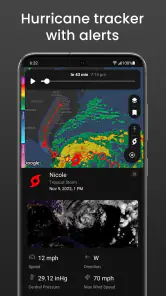
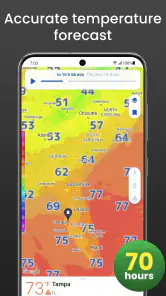
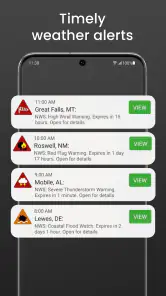
One of the standout features has to be its live radar. You can see what's happening around your area or zoom out to get a broader view of the weather across the country. It’s pretty nifty, especially when you’re planning a trip and need to check multiple locations. Moreover, the app sends out real-time alerts for severe weather conditions, which is super handy. Imagine getting a heads-up about a storm while you’re out—definitely a lifesaver!
More From Our News Desk

Weather by Xiaomi Review: Clear at a Glance, Less Clear Up Close

X Under Pressure: Can It Recover When Posting Goes Wrong?

Clash of Clans Is Won Between the Battles

Android Auto Makes the Case for Quieter Car Software

MobiOffice: Transforming Mobile Productivity with Seamless Integration

EA SPORTS FC™ Mobile Soccer: Redefining Mobile Sports Gaming
For a realistic use, I’d check the radar before starting a drive across town, then look again before heading back. If the weather pattern is moving toward the route, that may be a good reason to leave earlier or choose an indoor stop. For a longer trip, comparing the departure point with the destination can help me notice a developing weather concern instead of assuming the conditions at home will hold all day. Alerts add another layer, but I would not rely on a phone notification as my only source of information when severe weather requires immediate action.
Compared with a basic phone weather screen, which is convenient for a quick temperature check, Clime’s radar is more useful when location and timing matter. A forecast-focused alternative may be easier if all I want is a simple daily outlook; this app makes more sense when I want to inspect the weather visually. The trade-off is that a moving map can invite overconfidence: radar helps me understand a broad pattern, but it cannot make every local outdoor decision for me.
A practical routine for checking conditions
One useful habit is to compare the radar with the plan rather than opening the map without a question in mind. Before leaving, I might ask whether a walk can start now or whether waiting would make more sense; before a drive, I might check both ends of the trip rather than assuming the weather will match from start to finish. This keeps the map from becoming a stream of motion that is interesting to watch but hard to act on.
For a day with several errands, I would check once while planning and again before the part of the day that depends most on being outdoors. That second look can be more useful than repeatedly refreshing the map without a clear reason. If conditions appear to be changing, I can adjust the order of errands or move an outdoor task earlier. If the map is not giving me a clear answer, I treat that as a reason to keep a flexible plan instead of forcing certainty from it.
Detailed Weather Reports
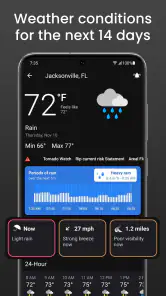
The app doesn’t just stop at radar and alerts; it provides detailed weather reports including temperature, wind speed, humidity, and even the UV index. I found this particularly useful when planning my weekend hikes. It’s like having a mini meteorologist in your pocket!
Those details are useful because outdoor plans rarely depend on rain alone. Before a hike, I’d consider the wind as well as the temperature, and use the UV index as a prompt to think about sun protection. A practical habit is to check the report alongside the radar rather than letting one reading make the decision: the map can show a changing weather picture, while the report gives me other conditions to factor into comfort. That combination is more helpful than opening the app only after I’m already on the trail.
For an outdoor outing, I would check the report before packing, not just at the door. A cooler temperature or stronger wind can change what I bring even if the radar does not suggest rain. The UV reading can also be relevant on a bright day when the map is not the main concern. These checks do not turn the app into a hiking safety system; they simply help me avoid treating “no rain” as the same thing as “comfortable conditions.”
Clime is a weather app from Mobile Heroes. It is free to install and rated for Everyone, with optional in-app purchases ranging from $0.99 to $81.99 per item. The app has a 4.2 average from around 419,000 ratings and over 10 million installs. Those figures suggest it has reached a broad audience, but they don’t tell me whether its radar-led approach suits every person. I’d especially recommend trying the free experience first and deciding whether its map and reports fit your routine before considering any purchase.
Customization and Widgets
Another thing I love is how customizable the app is. You can set your preferences for the type of notifications you want, and there are even widgets available for your home screen. These widgets are a game changer, giving you a quick glance at the weather without having to open the app. It’s little things like these that make the app so convenient to use.
For day-to-day use, I’d keep notifications focused on the conditions I actually want to hear about. Too many alerts can become noise, while a small, relevant set is more likely to be noticed when I’m busy. A widget is useful for a quick glance before leaving home, but I’d still open the app when I need to inspect the radar or compare locations. That division—widget for a quick check, full app for planning—keeps the home screen useful without pretending a compact view can replace the map.
When another weather app may be a better fit
Weather apps often lean toward one of two habits: a quick glance at the day’s outlook or a closer look at changing conditions. Clime’s radar makes it better suited to the second. If I need a fast answer while getting dressed, a simple forecast view can be less distracting. If I am trying to decide whether an outdoor plan can fit between changing conditions, the radar and broader view give me more to work with. I would not switch to a map-centered app expecting it to remove uncertainty; its advantage is helping me see more context, not making weather perfectly predictable.
There is also a difference between checking weather for a familiar neighborhood and following it across several places. For a routine that rarely changes, a small widget or default phone forecast may be enough. For a day that involves a destination, a return trip, or time outdoors, opening the map and comparing locations can be worth the extra step. I would choose the tool based on the decision at hand rather than assuming one weather app is best for every check.
Who Benefits Most—and What to Keep in Mind
I think Clime suits people who regularly make plans around changing weather: commuters, hikers, people arranging outdoor errands, or anyone who likes to see a storm’s broader movement. It is less compelling if you only want a minimal forecast and rarely need radar; a simpler weather app may get you to the answer faster with less to explore. It is also not a substitute for official emergency guidance. In threatening conditions, I’d treat the app as one useful signal and follow local instructions rather than making safety decisions from a map alone.
It can be especially handy for someone whose day includes a fixed outdoor commitment but some flexibility around the edges. A person walking to work may not be able to avoid every shower, but a quick look can help them decide whether to leave earlier or carry rain gear. Someone planning a picnic might use the map to decide whether to keep the plan tentative and choose a backup indoor option. In both cases, the value is not a perfect prediction; it is having a clearer basis for making a small adjustment.
On the other hand, I would skip it if I know I will only ever check the current temperature and a one-line forecast. A radar interface is useful only when I am willing to interpret it, and extra detail can become friction when I want a single quick answer. People who need to make serious safety decisions should also consult appropriate local emergency information instead of treating a consumer weather app as an authority. Clime can support ordinary planning, but it should not carry that responsibility by itself.
The app’s current version is 1.72.7, and it supports devices running Android 8.0 or later. That makes the system requirement worth checking before installing on an older Android phone. On a compatible device, the main question is not whether you need every available weather detail, but whether watching radar and checking several conditions changes what you do. If it does, the extra visual context can earn its place in your routine.
Cost, setup, and the choice to keep using it
Because it is free to install but offers optional purchases, I would begin by using the parts available without paying and see whether the radar-led approach actually changes my decisions. The listed purchase range runs from $0.99 to $81.99 per item, so I would check what an option includes before buying rather than assuming every paid choice is a small one-time add-on. For a casual user, there may be no reason to spend anything if the basic checks already meet their needs.
Setup is most useful when it reflects how I really use weather information. I would choose a sensible location, keep only the notifications I would act on, and place a widget where I can glance at it without opening the app. Then I would reserve the full radar view for decisions that need more context. This avoids turning weather checking into a constant habit and makes alerts more noticeable when they matter to my plans.
Final Thoughts
In conclusion, Clime: NOAA Weather Radar Live is a must-have for anyone who wants to stay ahead of the weather. It’s packed with features that are not only useful but also easy to navigate. Whether you’re planning a trip or just curious about the weather, this app has got you covered. And honestly, it’s kind of fun to check the radar and feel like a weather expert!
So, if you’re looking for a reliable and comprehensive weather app, give this one a try. It might just become your go-to weather source. Stay dry and happy weather watching!
Clime: NOAA Weather Radar Live Frequently Asked Questions
Is Clime: NOAA Weather Radar Live suitable for everyday weather checks?
Clime: NOAA Weather Radar Live is designed as an all-in-one weather app with real-time NOAA radar, so it can be useful for checking conditions before you leave home or following weather as it changes. Its combination of radar and weather information makes it relevant for both quick daily checks and closer monitoring when the forecast matters to your plans.
Who develops Clime: NOAA Weather Radar Live, and what kind of app is it?
Clime: NOAA Weather Radar Live is a weather app developed by Mobile Heroes. Its focus is bringing radar and weather information together in one place, making it useful for people who want to check conditions before heading out or keep an eye on changing weather. It is rated for Everyone, so it is intended for a general audience.
What features does Clime: NOAA Weather Radar Live offer?
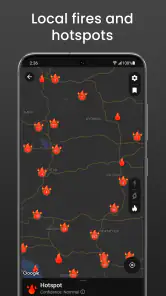
Clime: NOAA Weather Radar Live provides a comprehensive set of weather tracking features. Users can access real-time radar images, weather forecasts, severe weather alerts, and a detailed precipitation map. The app also offers customizable weather widgets and radar overlays for personalized weather tracking. These features help users stay informed about current and upcoming weather conditions.
Is Clime: NOAA Weather Radar Live free to use?
Clime: NOAA Weather Radar Live is free to download and offers both free and premium versions. The free version provides basic weather information, while in-app purchases unlock additional features such as detailed radar images, an ad-free experience, and extended weather forecasts. Users can choose the version that best suits their needs; listed in-app purchases range from $0.99 to $81.99 per item.
How accurate is the weather data provided by Clime: NOAA Weather Radar Live?
The app sources its data from NOAA, the National Oceanic and Atmospheric Administration, ensuring a high level of accuracy and reliability. Users can trust the app for precise weather forecasts and radar imagery. However, like all weather services, there can be occasional discrepancies due to rapidly changing weather conditions or data updates.
Pros
- Accurate real-time weather updates.
- User-friendly interface and design.
- Customizable weather alerts.
- Detailed radar maps and forecasts.
- Supports multiple locations tracking.
Cons
- Ads can be intrusive at times.
- Some features require a subscription.
- Occasional app crashes reported.
- Radar maps may load slowly.
- Limited offline functionality.
- Category
- Weather
- Version
- 1.72.7













