Planes Live - Flight Tracker
- 710.00
- 4.1
- Installs
- 5.00M
- Price
- Free

Screenshots

Analysis by Reviewed
I like flight-tracking apps most when they answer a practical question quickly: has the plane left, is it still moving, and what should I expect at the airport? Planes Live - Flight Tracker is aimed at that everyday mix of travel planning and sky-watching. It is a free Travel & Local app from Mobile Heroes, and its 4.1 average from around 71,000 ratings suggests plenty of people use it, though that alone cannot tell you whether its style suits you.
What to expect from the first screen
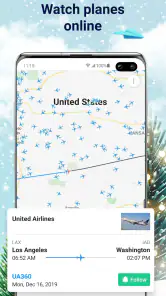
The main appeal is having flight activity and airport details in one place, with a radar map for following aircraft. If you are new to this kind of app, think of the map as a visual way to orient yourself, not necessarily the fastest route to every answer. For a specific arrival, searching by a flight identifier or airport is more direct than scanning a crowded map. The app has passed 5 million installs, but its basic idea is still straightforward: look up a flight, check its progress, or explore what is moving overhead.
Getting from install to a useful result
I would start with a real question rather than browsing at random. If someone is flying in, use the flight details you already have and check the status before leaving for the airport. If you are simply curious about a plane outside, open the map and use the aircraft’s position as a starting point for exploring nearby traffic. That gives the first session a clear purpose and helps you learn which view is most useful to you.
One practical habit is to check the flight again closer to the time you need to act. A status check can help you decide when to leave home, but it is not a substitute for the airline’s own instructions or airport announcements. I treat a tracker as a helpful second screen: good for context and awareness, while the airline remains the place I would verify a change that affects my plans.
Unveiling the Sky with Ease
Let me tell you, the first time I launched the Planes Live - Flight Tracker app, I felt like I had my own personal control tower. The app is designed to provide real-time updates on flights all around the world, and it does so with striking precision. You can literally track any flight, anywhere, anytime. The interface is clean and intuitive, making it easy for even the least tech-savvy among us to navigate.
Features That Soar
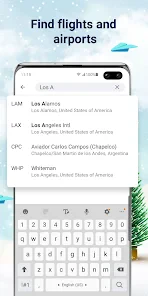
What really caught my attention were the nifty features packed into this little app. For starters, you can search for flights by flight number, airport, or airline. It's like having a superpower, being able to pinpoint exactly where a plane is at any given moment. And the map view? Absolutely stunning. You can watch planes move across the globe in real time, and it's strangely mesmerizing.
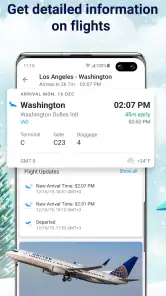
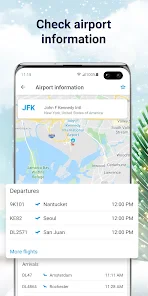
The app also offers airport information, flight status updates, and even weather forecasts. It’s like having a Swiss Army knife for aviation in your pocket. And if you're waiting for a loved one to arrive, you can set up notifications to alert you when their flight is on its way, landing, or delayed. No more endless waiting at the airport!
More From Our News Desk

Weather by Xiaomi Review: Clear at a Glance, Less Clear Up Close

X Under Pressure: Can It Recover When Posting Goes Wrong?

Clash of Clans Is Won Between the Battles

Android Auto Makes the Case for Quieter Car Software

MobiOffice: Transforming Mobile Productivity with Seamless Integration

EA SPORTS FC™ Mobile Soccer: Redefining Mobile Sports Gaming
A small workflow choice makes the experience more useful: keep the flight number handy before you search, especially when several aircraft are visible or an airport is busy. Once you find the right flight, use its status as a prompt to check your pickup timing rather than repeatedly watching the map. For a less familiar airport, the airport information can help you orient yourself, while the map adds a broader picture of nearby traffic. Those two views answer different questions, so I would switch between them instead of expecting the radar alone to explain every travel detail.
Who gets the most from it
I think this is best for people who enjoy seeing the route unfold, meet friends or family at airports, or want a quick overview of flight movement without opening several travel tools. Picture a relative texting that their plane is delayed while you are preparing to drive across town: checking the status first can help you avoid setting off too early, then a notification can make it easier to keep an eye on progress while you get ready.
There is a trade-off, though. A live-looking map is engaging, but it can invite you to watch movement when all you really need is a dependable decision about a gate, a connection, or a changed itinerary. For those details, I would favor the airline’s app or airport displays, which are more directly tied to the passenger’s journey. A general flight tracker is more useful for broad awareness and curiosity than as the sole authority for time-sensitive travel arrangements.
Why You'll Love It
Now, I know what you're thinking: "Do I really need another app on my phone?" But hear me out. If you travel frequently, or if you're just a curious soul like me, Planes Live - Flight Tracker is a game-changer. It's not just about tracking flights; it's about connecting with the world in a way that feels both personal and expansive.
And let's not forget the thrill of following a flight's journey from takeoff to landing. It's like being part of the adventure, even if you're just sitting in your living room. Plus, there's something oddly satisfying about knowing exactly where a plane is amid the clouds.
The app is free to install and rated for Everyone, which makes it easy to try with a family member who is also curious about aviation. There are in-app purchases, ranging from $0.99 to $99.99 per item, so I would look carefully at any optional purchase before confirming it; the core reason to try the app is the flight-tracking experience, not a need to buy something immediately. It is currently at version 1.44.4 and supports Android 7.0 or later, useful details to check if you are installing it on an older phone.
If you mainly want a simple departure reminder, or you rarely follow aircraft beyond checking one journey, the airline’s own app may be enough and can keep passenger-specific updates together. I would skip this one if you do not enjoy map-based exploration or do not want another travel tool to manage. But for someone who likes turning a flight number into a moving picture of a journey, the balance of airport context and radar viewing is appealing.
For a first try, I would make the goal small: find one flight you care about and establish whether it is still airborne or has reached the next stage of its journey. That is a more useful test than opening the radar with no destination in mind. If the result helps you make a decision—when to start driving, whether to stay home a little longer, or when to message the person travelling—you have already found the app’s practical value.
A calmer way to follow a pickup
Suppose I am collecting a friend after work and their flight is due in the evening. I would ask for the flight number before they board, look it up when I have a quiet moment, and then check again before leaving. The key is not to treat every movement on the map as a reason to change plans. I would use the status to decide whether it is worth checking the airline’s own updates, then use the airport information to get a broader sense of the destination airport. This workflow keeps the app useful without turning the trip into constant screen-watching.
That approach also helps when the person travelling is not comfortable with tracking apps. They do not need to learn the map or send you screenshots; a flight number is enough to get you started. If the number is mistyped or the result does not look like the journey you expect, I would verify the airline and destination before relying on it. Flight numbers can be easy to mix up when someone has a connection or when family members are travelling on different itineraries.
What the map is good at, and what it is not
The radar view is most rewarding when the question is spatial: what is flying near this airport, which way is a visible aircraft heading, or how does one route sit in the wider flow of air traffic? It is less efficient when you only need a passenger-specific instruction. A plane icon moving across the screen is an engaging visual cue, but it does not by itself tell you whether a gate has changed or what a traveller should do next. I find the map works best as context alongside a flight search, not as a replacement for one.
There is a useful distinction between checking a flight and watching aviation. For a single family pickup, I would search directly and leave the map in the background. On a quiet afternoon, exploring the map can be the point in itself. Recognizing which of those two jobs I am doing stops the app from feeling cluttered: the same screen can be a quick travel tool or a casual window into aircraft movement, depending on the question I bring to it.
Airport information adds another layer, but I would not assume that a general airport view contains every detail a passenger needs. It can help me place a flight in context, while an airline or airport source is still the sensible choice for operational decisions. If you are coordinating a connection, responding to a disruption, or arranging assistance, verify the details through the channels that serve that itinerary directly.
Choosing it over familiar travel tools
Compared with an airline app, this one has a broader, more visual purpose. The airline’s app is usually the natural first stop for a passenger checking their own booking, instructions, or journey-specific changes. Planes Live is more attractive when you want to follow aircraft activity beyond your own reservation, or when you are meeting someone and want a quick view of the flight’s progress. I would not replace one with the other; I would use each for the question it answers best.
Compared with simply checking an airport display, a flight tracker is convenient before you arrive and can be more interesting when you want to see movement on a map. But a display at the airport is directly useful once you are there, especially for information tied to the terminal experience. If your only need is a reminder or a basic arrival time, adding another app may be unnecessary. The strongest reason to keep this one is that you value both flight status and the visual overview.
It also differs from a general maps app. A standard map is designed to help you navigate roads and places; this app’s point is to make flights and airport context the subject. That focus is a plus for aviation curiosity, but it does not make it a complete travel planner. I would still use my usual navigation tool for the drive to the airport and the airline for the trip itself, rather than expecting one flight tracker to coordinate everything.
Small habits that make the first session easier
Before searching, copy the flight identifier from the traveller’s itinerary or message instead of trying to remember it. If you do not have it, searching by an airport or airline can be another way into the information, but confirm that the result matches the right route. This is especially helpful when you are checking around a busy airport, where a map full of aircraft can make visual guessing slower than a direct lookup.
I would also decide in advance whether a notification is genuinely useful. For a pickup, an alert can reduce the urge to reopen the app repeatedly; for a flight you are casually watching, notifications may add more interruption than value. Set them with a specific purpose, then let them support your plan rather than letting every update dictate your attention. If the timing matters, still check the airline’s current guidance before acting.
Because optional purchases are available, I would take a moment to read the purchase screen carefully before confirming anything. The free install gives you a chance to see whether the map, searches, and airport context fit your habits first. There is no reason to buy something simply because you have opened the app; try the basic workflow for the situation you actually care about, and decide afterward whether any paid option is worthwhile to you.
Who may prefer something else
I would recommend trying it if you often collect people from airports, enjoy following routes, or like seeing how a busy airport’s traffic looks from a wider perspective. It can also be a pleasant fit for a curious family member who wants to explore what is overhead without needing to plan a trip. The Everyone content rating makes it approachable to share, although I would still help a younger user understand that a map view is for interest and context, not a guarantee of passenger instructions.
On the other hand, people who want the fewest possible apps may be happier with the airline’s own tool, especially if they only check their personal booking. Someone who dislikes maps or finds flight details distracting may get little from the visual side. And if a missed connection, gate change, or airline decision could affect your next action, I would not depend on a general tracker alone. It is a useful companion, not a substitute for the sources responsible for the journey.
So, if you're up for a little sky-high adventure from the comfort of your phone, give this app a whirl. Who knows, it might just inspire your next travel escapade or at least satisfy your inner aviation geek. Happy tracking, folks!
Planes Live - Flight Tracker Frequently Asked Questions
How can I use Planes Live to check a flight before heading to the airport?
Planes Live - Flight Tracker is designed to help users follow flights on a radar map and look up airport information. You can use it to check a flight’s status and review the flight details shown in the app before setting off. For important travel decisions, it is sensible to compare the information with updates from the airline or airport.
Who develops Planes Live, and what kind of app is it?
Planes Live - Flight Tracker is a Travel & Local app developed by Mobile Heroes. Its focus is flight tracking and airport information, making it relevant to travelers, people meeting arriving passengers, and anyone interested in aircraft activity. The app is free to download, though optional in-app purchases are available, so review the purchase choices displayed in the app before buying anything.
Is Planes Live - Flight Tracker suitable for casual travelers as well as aviation enthusiasts?
Planes Live - Flight Tracker is a travel app for people who want to follow flights on a radar map or check airport information. It can be useful when planning a trip, keeping an eye on a flight, or simply watching aircraft activity. The app is free to download, and its content rating is Everyone, so it is designed for a broad audience.
What features does Planes Live - Flight Tracker offer to users?
Planes Live - Flight Tracker provides real-time flight tracking information, allowing users to view live planes on a world map. Additional features include arrival and departure schedules, detailed flight information, airport and airline information, and weather updates. The app also offers notifications for flight status changes, ensuring travelers stay informed about any delays or schedule adjustments.
Is Planes Live - Flight Tracker free to use, or does it require a subscription?
Planes Live - Flight Tracker offers both free and premium versions. The free version provides basic flight tracking features, while the premium subscription unlocks additional functionalities such as more detailed flight data, ad-free experience, and advanced notifications. Users can choose a subscription plan that suits their needs and budget, with monthly and annual options available. The app also offers in-app purchases, so check the options shown in the app before choosing to buy.
Pros
- Real-time flight updates.
- Intuitive and user-friendly interface.
- Detailed airport and aircraft info.
- Customizable notifications.
- Global flight coverage.
Cons
- Requires internet connection.
- Limited free features.
- Ads in free version.
- Occasional data refresh delays.
- Some features need premium.
- Category
- Travel & Local
- Version
- 1.44.4