Robokiller - Spam Call Blocker
- 50.75K
- 4.0
- Installs
- 5.00M
- Price
- Free

Screenshots
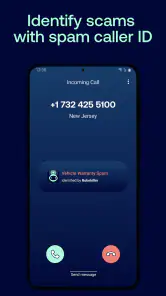
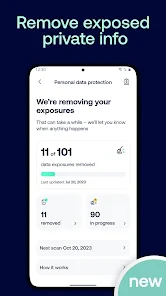

Analysis by Reviewed
I judge a call blocker by what it changes during an ordinary day: whether I can leave my phone on, answer people I know, and spend less time second-guessing unfamiliar numbers. Robokiller - Spam Call Blocker is a free communication app from Mobile Heroes built around screening unwanted calls, with text blocking also part of the experience. Its central idea is practical: reduce interruptions without making every unknown caller your problem to handle yourself.
Why a calmer call routine matters
Spam protection is most useful when it changes your routine, not just when it produces a list of blocked numbers. For me, the appeal of Robokiller is that its call handling gives you another option besides answering immediately or letting every unfamiliar number ring through. That distinction matters if you use your phone for work, deliveries, appointments, or family members whose numbers may not already be saved.
The app’s summary describes protection against spam calls and scam texts, but I would treat any such protection as a filter rather than a guarantee. Unwanted callers can change numbers and tactics, while legitimate calls can come from numbers you do not recognize. The sensible approach is to use screening to cut down interruptions, then check any blocked-call information when you are expecting something important.
A useful filter, not a substitute for judgment
The main question is not whether an app can make unknown calls disappear; it is whether its approach suits the way you use your phone. If you often need to hear from people whose numbers are not saved, you will want to stay alert to screening results. If most unfamiliar calls are interruptions, a dedicated filter can make it easier to ignore the obvious noise without treating every new number as suspicious.
I would also separate call problems from text problems before installing. Someone overwhelmed by both may appreciate having call and message screening in one place. Someone who only gets the occasional unwanted text may find that the phone’s own message controls are enough. Choosing a blocker based on the nuisance you actually experience is more useful than turning on every available protection by default.
What Makes Robokiller Stand Out?
First things first, let's talk about the user interface. When I first launched the app, I was greeted with a clean and intuitive design. Everything is just where you expect it to be, making navigation a breeze. Now, I’m no tech wizard, but even my grandma could use this app without batting an eyelash! The setup process was straightforward, and in just a few taps, I was ready to block those annoying calls.
Answer Bots change the feel of call screening
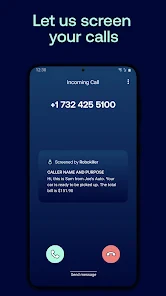
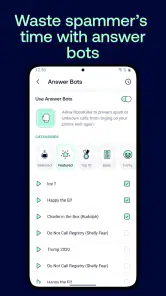
What I absolutely love about Robokiller - Spam Call Blocker is its ability to not only block spam calls but also make it fun. The app offers Answer Bots, which are pre-recorded messages that can answer spam calls for you. Imagine the satisfaction of knowing that while you’re sipping your morning coffee, a spammer is being entertained by a bot! It’s a small victory, but a victory nonetheless.
You May Like

Clash of Clans Is Won Between the Battles

Android Auto Makes the Case for Quieter Car Software

MobiOffice: Transforming Mobile Productivity with Seamless Integration

EA SPORTS FC™ Mobile Soccer: Redefining Mobile Sports Gaming

How Microsoft OneDrive Became a Mobile Productivity Giant

How Google Translate Breaks Language Barriers Effortlessly
The app uses a predictive algorithm to identify spam calls, and it’s surprisingly accurate. Since installing Robokiller, I’ve noticed a significant decrease in spam calls. It feels like I’ve finally regained control over my phone.
What happens during an ordinary day
A realistic test is a day when you are waiting for a courier, a clinic, or a callback from someone whose number you have never saved. In that situation, I would not rely on a blocker to make every decision for me. I would keep an eye on the app’s blocked-call information and use my judgment before dismissing an unfamiliar number as junk. That small habit helps balance fewer interruptions with the chance of catching a legitimate call.
This is also where Robokiller differs from simply silencing unknown callers through a phone’s built-in settings. A blanket silence rule is straightforward, but it can hide useful calls along with nuisance ones. A dedicated screening app is more appealing if you want spam-focused handling and a way to review what was stopped. If you rarely receive unwanted calls, though, your phone’s existing controls may be enough and involve less setup.
Getting more value from its screening tools
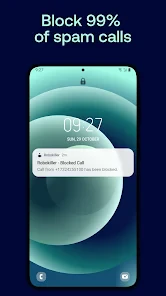
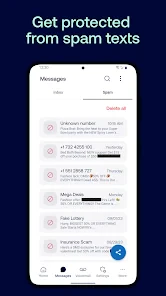
Beyond blocking calls, Robokiller offers a feature to block text messages from unknown senders. This is a game-changer for anyone tired of those unsolicited promotional messages. The app also provides detailed reports of blocked calls, giving you insight into who’s trying to reach you and how often.
Another cool feature is the ability to create your own Answer Bots. You can personalize these messages to suit your style, adding a touch of personal flair to the app.
One practical way to approach the tools is to make one change at a time. Start by paying attention to call screening, then decide whether message blocking or a customized bot addresses a separate annoyance you actually have. That makes it easier to tell which part of the experience is helping, rather than changing several habits at once and being unsure what made the difference.
Answer Bots are a distinctive part of the experience, but they are not the main reason everyone should use a blocker. If you would rather handle calls quietly and avoid any playful interaction with unwanted callers, focus on whether the screening itself meets your needs. The bot option is best seen as an extra way to deal with nuisance calls, not a replacement for checking on a number you recognize as potentially important.
How to check results without missing a real call
Because call screening can affect how you notice incoming calls, I would give the app a short trial period while paying attention to calls you were expecting. If you see a number in a blocked-call report that might belong to a real contact, use that information to decide how to handle future calls rather than assuming every unfamiliar number is harmless or every block is correct. Reports are most valuable as a review tool, not as a reason to stop checking your phone altogether.
A useful habit is to review a report after a stretch when you were expecting callbacks, rather than checking it constantly. If a delivery or appointment has not followed up, that is a good moment to see whether an unfamiliar call was screened. This simple check is especially worthwhile during the first days of use, when you are still learning how the app’s filtering fits your own mix of known and unknown callers.
Text filtering is a separate benefit for people whose main annoyance is unsolicited messages rather than ringing calls. If your problem is only one of those, consider whether you will actually use the other part before making Robokiller your regular choice. It is also worth checking the app’s current billing details before choosing any paid option: the app is free to download, while optional in-app purchases range from $0.99 to $129.99 per item.
Where it sits beside built-in phone controls
The usual alternative is to rely on the phone’s own call and message settings. That can be the better choice if you want a basic way to limit interruptions and do not need a separate screening app. Robokiller’s appeal is more specific: it brings spam-oriented call handling together with text filtering, reports, and Answer Bots. The trade-off is that a dedicated tool asks you to spend time learning its results and deciding how much filtering you are comfortable with.
There is no universally best setting for unfamiliar calls. A person who gets many nuisance calls but few legitimate calls from new numbers may reasonably prefer stronger screening. A freelancer waiting for first-time clients, or someone coordinating a repair, may choose a lighter approach and check reports more carefully. In either case, the point is to make the phone less disruptive without assuming that every unknown number is disposable.
Who gets the most from it—and who may not
I see the strongest fit for someone who gets frequent unwanted calls, is comfortable reviewing a screening app’s results, and wants text filtering in the same general tool. It may be less suitable if you depend on frequent calls from new clients or services and prefer every unknown number to ring normally. In that case, a lighter built-in filter—or no additional blocker—may give you more control with fewer chances of missing a call.
Robokiller is rated for Everyone, has an average rating of 4.0 from around 124,000 ratings, and has been installed over 5 million times. It was released on June 21, 2018; version 24.7.7 requires Android 10 or later. Those details make it a well-established option, but the right choice still comes down to how often spam interrupts you and how carefully you want to manage unfamiliar calls.
The app’s free entry point makes it easy to consider, but I would not treat that as a reason to buy an optional item before understanding what you need. Check the current purchase details in the app and decide whether its paid options address a problem you genuinely have. If your main goal is simply to silence a handful of nuisance numbers, a built-in setting may be all you need.
It is also worth thinking about how your phone is used by other people in your household. Someone who shares responsibility for answering calls may need a clear routine for checking screened activity, especially when expecting a school, medical, or service callback. A blocker works best as part of that routine, not as an invisible guarantee that every important call will always get through.
A practical choice for people tired of interruptions
In a world where spam calls are becoming increasingly intrusive, an app like Robokiller is essential. It not only blocks unwanted calls but does so in a way that’s both effective and entertaining. The user-friendly interface, coupled with its innovative features, makes it a must-have for anyone looking to reclaim their phone from the clutches of spam callers.
To wrap it up, if you’re tired of dodging spam calls and missing important ones because you’re unsure of who’s calling, give Robokiller a try. It might just be the solution you’ve been looking for. And hey, who doesn’t want a little extra peace of mind?
My recommendation comes with one condition: treat the first stretch as a chance to learn how screening fits your day. If you frequently wait for calls from new people, check the blocked-call information and keep your expectations in mind. If the nuisance is mostly repeated spam and you like having a way to review what was filtered, Robokiller offers a more targeted option than simply ignoring every unfamiliar number.
Robokiller - Spam Call Blocker Frequently Asked Questions
Can I use Robokiller as my default SMS app, and what does that change?
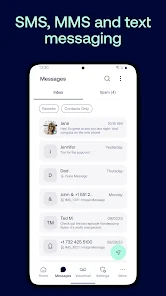
Robokiller can be used as the default SMS app, as its store summary indicates. That option may appeal if you want to manage text messages alongside spam-call protection, but changing your default messaging app affects which app handles incoming and outgoing texts. Consider whether you are comfortable using Robokiller for that role before changing the setting.
What age group is Robokiller suitable for?
Robokiller has an Everyone content rating, so its content rating is suitable for a broad audience. It is a communication app focused on screening unwanted calls and messages, which may be useful for people who want fewer interruptions. As with any app, parents and caregivers can decide whether its functions suit a particular user and how it should be configured.
Is Robokiller free to download, and are there in-app purchases?
Robokiller is free to download, so you can try the app without paying an upfront download price. It also offers in-app purchases, with items ranging from $0.99 to $129.99. Review the available purchase details in the app before choosing one, especially if you plan to continue using features after any trial period.
How long has Robokiller been available, and is it actively installed?
Robokiller was released on June 21, 2018, and has since reached more than 5 million installs. That gives prospective users a sense of its presence among communication apps, while its 4.0 average rating across around 124,000 ratings offers another point of reference. Individual experiences with spam filtering can still vary depending on calls and messages received.
What is Robokiller and how does it work?
Robokiller is a spam call blocker app designed to filter out unwanted calls using advanced spam detection technology. It uses a combination of AI and machine learning to identify and block spam calls before they reach you. The app employs an extensive database of known spam numbers and continuously updates to ensure protection against the latest threats. Robokiller can also answer spam calls with pre-recorded responses to waste the caller’s time.
Pros
- Effectively blocks spam calls
- Easy-to-use interface
- Customizable block settings
- Reduces unwanted interruptions
- Good caller ID feature
Cons
- May block wanted calls
- Subscription required
- Occasional false positives
- Limited free features
- App can lag sometimes

- Category
- Communication
- Version
- 24.7.7













