Smart Home Manager
- 28.14K
- 4.4
- Installs
- 5.00M
- Price
- Free
Screenshots

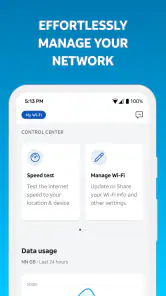
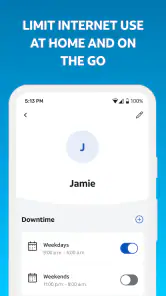
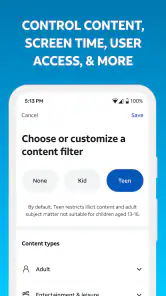
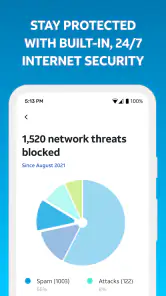
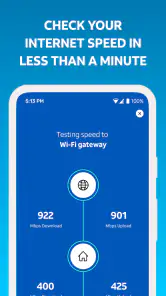
Analysis by Reviewed
I think Smart Home Manager makes the most sense when the problem starts with the Wi-Fi itself: a room where the connection feels unreliable, a new device that needs joining, or a household where everyone wants a clearer way to manage the network. Smart Home Manager is a free productivity app from AT&T Services, Inc., intended for AT&T Internet customers. Its focus is personalizing a Wi-Fi network, so I’d approach it as a companion to that service rather than a general control center for every smart device in a home.
Getting Started with Smart Home Manager
First things first, downloading and setting up the Smart Home Manager is a breeze. I was pleasantly surprised by how intuitive the initial setup was. All you need is a decent internet connection and a few minutes of your time. The app guides you through connecting your smart devices with clear instructions. No need to be a tech wizard here; it’s designed for everyone, from novices to tech-savvy users.
Start with the connection, then decide what to change
In an ordinary household workflow, I’d open the app when a Wi-Fi issue becomes noticeable, check the network, and then make only the changes that address the actual problem. That order matters: a slow video call in one room may call for checking the connection before changing network settings or reconnecting devices. Keeping a note of which devices are affected can also help distinguish a household-wide issue from one device that needs attention.
This is especially useful when someone else in the home handles the router or account. Rather than passing around a password or asking one person to troubleshoot every time, the app can give AT&T Internet customers a shared starting point for network management. I would still agree on who is allowed to make changes, though; a well-meant adjustment can interrupt another person’s work or a device that is already connected.
User Interface and Ease of Use
Now, let’s talk about the interface. It’s sleek, modern, and incredibly user-friendly. The dashboard is my favorite part; it gives you a bird’s-eye view of all your connected devices. You can easily control everything from lights and thermostats to security cameras with just a few taps. The app layout is clean, with all the features neatly organized, so there’s no fumbling around trying to find what you need. It’s like having a universal remote for your home, right on your smartphone.
For a practical handoff, I’d use the app to identify the connection problem and then explain what I found to the person who manages the home internet account, rather than asking a less technical family member to change settings blindly. If the issue follows one device, checking that device’s own Wi-Fi settings may be the better next step. The app is most useful when it helps narrow down the task, not when it becomes another place to tap at random.
Features That Make Life Easier
The Smart Home Manager app comes packed with features that genuinely simplify home management. One standout feature is the ability to set up routines. Imagine waking up to your coffee machine starting automatically, lights gradually brightening, and your favorite morning playlist kicking off. You can customize these routines to fit your lifestyle perfectly. Plus, the app’s compatibility with a wide range of devices means you’re not limited in your smart home ecosystem choices.
More From Our News Desk

Clash of Clans Is Won Between the Battles

Android Auto Makes the Case for Quieter Car Software

MobiOffice: Transforming Mobile Productivity with Seamless Integration

EA SPORTS FC™ Mobile Soccer: Redefining Mobile Sports Gaming

How Microsoft OneDrive Became a Mobile Productivity Giant

How Google Translate Breaks Language Barriers Effortlessly
One useful habit is to make network changes in a quiet moment, rather than just before a call, a school deadline, or a streaming session. After a change, I’d check the devices that matter most—such as a work laptop or a television—before assuming the whole household is settled. This simple check-and-confirm approach limits the inconvenience if a device needs to reconnect or a setting has an unexpected effect.
Another cool feature is the energy usage tracker. It’s like having a personal energy consultant. The app shows you how much power each device is using, helping you figure out where you can save on your electricity bill. Who doesn’t love saving a few bucks while being eco-friendly?
Making the app part of a household routine
The most helpful way to use a network-management app is to treat it as a shared reference point, not as a magic repair button. I’d keep the person who normally manages the internet account in the loop, especially if a change could affect everyone at home. A short handoff—what went wrong, which devices are affected, and what was already checked—can prevent two people from making the same adjustment or undoing each other’s work.
That approach also helps when a household has mixed levels of technical confidence. One person can notice that a particular room or device is having trouble, while another can investigate the connection. If the app helps make the issue easier to describe, that is useful even when the eventual fix happens elsewhere. I would avoid handing someone access with no explanation of what they can change; basic coordination matters more than having every family member explore settings independently.
There is a practical trade-off here: centralizing network tasks can save time, but it can also create a single point of confusion if nobody knows who manages the account. Before relying on the app during a problem, I’d make sure the household knows which person can sign in and where to turn if the app does not resolve the issue. This is particularly worthwhile in a home where work calls, schoolwork, and streaming overlap, since an unnecessary network change can affect more than the person holding the phone.
Where it fits—and where it doesn’t
Compared with a router’s built-in settings page, a provider’s app can feel like a more approachable place to begin, especially for someone who rarely adjusts home networking. It may also be more convenient than searching through separate device menus when the issue is specifically the AT&T Wi-Fi connection. But I wouldn’t treat it as a replacement for every smart-home platform: if your main goal is building elaborate automations across devices from different brands, a dedicated smart-home hub or the manufacturers’ own apps may be a better fit.
That distinction is important because the store description for this app centers on Wi-Fi personalization for AT&T Internet customers. The earlier examples of controlling lights, thermostats, cameras, routines, and energy use should not be taken as a promise that those are features of this app. I’d choose it for managing the supported home network, and use the relevant device or automation app for tasks outside that job.
For someone comparing their options, the choice is less about finding one app that can manage every connected product and more about matching the tool to the task. A router’s own settings page may offer a more direct route for a person who is already comfortable with networking controls. Individual smart-device apps make more sense for changing how a camera, speaker, or thermostat behaves. Smart Home Manager is most relevant when the starting point is the AT&T home Wi-Fi service itself and the user wants a less technical way to approach it.
I also wouldn’t install it simply because the household owns connected lights or speakers. If the Wi-Fi is working well and nobody needs to personalize the network, another app may add little to daily life. Conversely, if a household regularly needs to check or adjust its AT&T network, having a provider-focused place to begin may be more useful than relying on a browser bookmark or asking one technically minded person to do every small task. That distinction is the real test of whether the app belongs on your phone.
Security and Support
We can’t overlook the importance of security, and the Smart Home Manager doesn’t disappoint. The app offers robust security features to ensure your data and privacy are well-protected. The support team is also top-notch. I reached out with a couple of questions, and their response was prompt and helpful. It’s comforting to know you’re not alone in navigating the smart home landscape.
For day-to-day troubleshooting, I’d first make sure I’m signed in with the account associated with the AT&T Internet service, then check whether the problem is limited to one device or affects several. If a setting change does not help, I’d avoid repeating it and move to the provider’s support route. That keeps the process understandable and gives support a clearer account of what has already been tried.
A good support handoff is specific. Instead of saying only that the Wi-Fi is bad, I’d describe whether the trouble affects one device or several, where it happens, and whether anything changed just before it began. I’d also mention any steps already taken. That simple record keeps troubleshooting focused and reduces the temptation to keep changing settings without knowing what each change was meant to test.
For a new device joining the home network, I’d handle it at a calm time rather than during a rushed setup before guests arrive or a meeting begins. First, I’d check that the phone is using the account tied to the internet service, then follow the app’s instructions and confirm that the device is actually connected. If the device still fails to join, I’d move to its own setup guidance instead of repeating the same network step. This prevents a common source of frustration: mistaking a device-specific setup problem for a problem with the entire connection.
Who should install it, and what to expect
This is a sensible choice if you already have AT&T Internet and want a straightforward way to personalize your Wi-Fi without starting from a technical router interface. It is less compelling if you use another internet provider, want a general-purpose smart-home controller, or rarely need to manage your network. The app is free and rated for Everyone; its average rating is 4.4 from around 83,000 ratings, with over 5 million installs. Those figures suggest broad use, but they don’t guarantee that every household’s setup will behave the same way.
The app was released on August 21, 2017, and its current version is 2.2509.465, with Android 7.0 as the minimum OS. If you’re deciding whether it will work for you, the practical questions are whether you’re an AT&T Internet customer, whether your phone meets that system requirement, and whether your goal is Wi-Fi management rather than broader automation. Checking those points first can save the frustration of installing an app that doesn’t match your service or needs.
For a realistic example, imagine that a video call drops in a back room while other devices seem fine. I’d use the app as a first place to review the home network, note whether the problem appears isolated, and then test the laptop again. If the issue persists only on that laptop, its own settings or location may be the next things to investigate; if several devices struggle, contacting the internet provider is more sensible than repeatedly changing settings. The value is in making the next step clearer, not promising that one app can fix every cause of poor Wi-Fi.
On a busy evening, for instance, I’d avoid making a network adjustment while someone is presenting in a video meeting and another person is submitting schoolwork. I’d first ask whether the trouble is affecting several devices, then wait until the household can tolerate a brief interruption before testing a change. Afterward, I’d verify the devices that were having trouble and let everyone know what was changed. That small bit of timing and communication is easy to overlook, but it can make network management feel much less disruptive.
For a household with a frequent stream of visitors, I’d also think about the difference between managing the home connection and managing each guest’s devices. The app’s role is the former; it should not be assumed to replace a dedicated guest-network workflow or provide every control a family might want. If guest access is the main reason you are looking for an app, check the available network options for your service before making this the center of your plan. The same caution applies to parental controls or detailed device scheduling: choose a tool only when it clearly supports the task you need.
One non-obvious benefit of keeping a simple troubleshooting note is that it helps separate recurring patterns from one-off glitches. I’d record the room, affected device, and approximate time in everyday terms, then compare the next incident rather than relying on memory. If the same laptop is always affected while the rest of the home works, that points toward a narrower investigation. If several devices are affected together, the provider connection becomes a more reasonable focus. The app can be one part of that process, but careful observation is what keeps the process useful.
There are also cases where I’d skip the app entirely. If you are not an AT&T Internet customer, its central purpose does not match your connection. If you already prefer managing your router through its own interface and understand the controls, a second route may add needless steps. And if your priority is coordinating devices from several brands into complex automations, I’d start with the platform built for that job rather than expecting a Wi-Fi-focused tool to replace it.
In conclusion, the Smart Home Manager app is a solid choice for anyone looking to step up their smart home game. It’s user-friendly, packed with features, and backed by excellent support. Whether you’re just getting started with smart devices or you’re a seasoned pro, this app has something for everyone. If you’re ready to take control of your home and enjoy the convenience of automation, this app is definitely worth checking out. Happy automating!
Smart Home Manager Frequently Asked Questions
Do I need an AT&T Internet account to get started with Smart Home Manager?
Smart Home Manager is intended for AT&T Internet customers who want to personalize their Wi-Fi network, so it is most useful when you have that service. Downloading the app by itself does not provide an internet connection or replace your existing service. Before installing, consider whether you are looking to manage an AT&T home network, rather than seeking a general-purpose app for every internet provider.
What kind of app is Smart Home Manager, and who developed it?
Smart Home Manager is a productivity app developed by AT&T Services, Inc. Its focus is helping AT&T Internet customers personalize their Wi-Fi network, making it most relevant to people who want to handle that task through an app. It is not presented as a universal smart-home hub, so it is worth keeping its Wi-Fi-centered purpose in mind when deciding whether it fits your needs.
Is Smart Home Manager free to download, and who can use it?
Smart Home Manager is free to download, but its main purpose is to help AT&T Internet customers personalize their Wi-Fi network. That makes it most relevant if you already use AT&T Internet and want to manage your home network through an app. It is listed for everyone, though the service context matters: downloading it alone does not replace an AT&T Internet connection.
What devices and operating systems does Smart Home Manager support?
Smart Home Manager is an app for Android, with a minimum operating system requirement of Android 7.0. Before installing, check that your device meets this requirement and that you are downloading the official app from your device’s app store. The app is designed around AT&T Internet customers’ Wi-Fi networks, rather than serving as a universal controller for smart-home devices from every brand.
What is Smart Home Manager and what does it do?
Smart Home Manager is an intuitive application designed to help users manage and control their smart home devices from a single interface. The app allows you to monitor device usage, set up routines, and receive notifications about your smart home system. It supports various brands and device types, ensuring comprehensive control over your smart home ecosystem. Its stated focus is helping AT&T Internet customers personalize their Wi-Fi network, so its usefulness depends on your connection and the features available to your account.
Pros
- User-friendly interface
- Real-time device monitoring
- Energy consumption insights
- Customizable alerts
- Remote device control
Cons
- Requires stable internet connection
- Limited device compatibility
- Subscription needed for advanced features
- Occasional app crashes
- Complex setup process

- Category
- Productivity
- Version
- 2.2509.465













