AT&T Visual Voicemail
- 7.16K
- 3.0
- Installs
- 10.00M
- Price
- Free

Screenshots

Analysis by Reviewed
In a shared household, voicemail can be a small but important link between people who are out during the day and those waiting at home. I can see the appeal of checking a caller’s message quickly rather than passing a phone around or trying to remember what was said after a call. AT&T Visual Voicemail is built around managing voicemail on an AT&T line, so its usefulness depends on whose line is being checked and who has access to that device. It is not a household inbox: I’d treat it as personal communication, even when the phone is used around family.
One phone, one line, and clear boundaries
Before relying on the app, I’d make sure the person setting it up is using the intended AT&T voicemail account and understands that messages belong to that line. On a shared phone, a message preview may reveal private details before anyone opens the app; keeping the device’s notifications and access in mind is a practical part of setup. I wouldn’t assume the app creates separate household profiles or permissions. If several people need voicemail access, each person should use the appropriate line and device rather than treating one account as a shared family mailbox.
That distinction matters during setup because installing an app and choosing who can see the phone are separate decisions. I would first confirm whose line is active on the device, then decide whether the phone itself is genuinely private to that person. If it is a communal handset, the safer routine is to avoid leaving sensitive previews in view and to keep the passcode and physical access arrangements consistent with the account owner’s expectations. These are household choices, not a substitute for account-specific controls.
Useful for coordination, but not a substitute for a conversation
A realistic example is a caregiver or household member receiving a message about a changed pickup time while the phone owner is occupied. A quick glance at the message can help the owner decide whether to call back immediately or pass along the key detail, and the app’s message-management tools can make it easier to keep track of what still needs attention. For anything sensitive, ambiguous, or time-critical, I’d listen to the audio or contact the caller rather than rely on a transcription alone. Text can save time, but it can also miss a name, number, or crucial word.
For household coordination, I’d use the voicemail as a prompt to follow up, not as a task assignment system. If someone leaves a change to a plan, the line owner can confirm it and then send the relevant detail through the family’s usual conversation channel. That small extra step prevents a half-read preview from becoming the only record of a change. It also keeps the caller’s original message and the household’s decision-making from getting mixed together.
Where it fits among voicemail options
Compared with traditional dial-in voicemail, a visual inbox is easier to scan because you can choose which message to open instead of listening through them in sequence. That is most helpful when you have several messages or can’t listen at that moment. A phone’s built-in voicemail screen may be a more natural choice for someone who already uses it comfortably, while a normal call or text is better when the conversation needs a quick back-and-forth. This app’s particular value is its role in managing AT&T voicemail, not as a replacement for every communication tool.
The trade-off is that visual organization is useful only if you actually check the inbox and act on what matters. Someone who prefers a short call-back routine may find dialing voicemail just as simple, while a person who already relies on the phone’s own voicemail interface may not gain much from adding another app. I’d choose this when scanning a list helps me prioritize, and stick with direct calls or texts when the next step is an immediate exchange rather than reviewing stored messages.
You May Like

Clash of Clans Is Won Between the Battles

Android Auto Makes the Case for Quieter Car Software

MobiOffice: Transforming Mobile Productivity with Seamless Integration

EA SPORTS FC™ Mobile Soccer: Redefining Mobile Sports Gaming

How Microsoft OneDrive Became a Mobile Productivity Giant

How Google Translate Breaks Language Barriers Effortlessly
Who will find it worthwhile
I’d recommend it to an AT&T customer who regularly receives voicemail, wants a visual way to review messages, and is comfortable keeping voicemail tied to their own line. It is less compelling for someone who rarely checks voicemail, prefers to listen to every message, or wants one shared inbox for multiple household members. The app is free, is rated for Everyone, and is developed by AT&T Services, Inc.; those details make it easy to consider, but they don’t change the basic account boundary. Its average rating is 3.0 from around 22,000 ratings, so I’d approach it as a practical carrier-specific utility rather than assume every person will have the same experience.
It is also a poor fit if the main goal is to let several relatives manage one another’s messages from a common device. The app is centered on voicemail for an AT&T line, and a household may be better served by each person using their own line and preferred voicemail method. On the other hand, someone who often receives calls while working, commuting, or caring for others may appreciate being able to decide which message deserves attention before finding a quiet moment to listen.
Have you ever missed an important voicemail because you just didn’t have the time to listen to all the messages? Well, let me introduce you to AT&T Visual Voicemail. This app is like a breath of fresh air for those of us who want to manage our voicemails without the hassle of dialing in and listening to each message sequentially. It’s like having your email inbox, but for voicemails!
What Makes AT&T Visual Voicemail Stand Out?
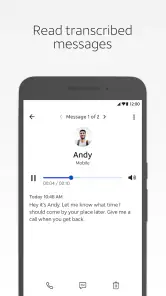
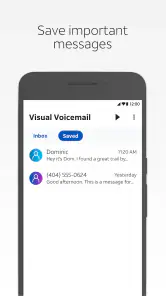
Imagine receiving a voicemail and being able to read it as a text message. That’s exactly what AT&T Visual Voicemail offers. The app transcribes your voicemails into readable text, which is perfect for when you're in a meeting or in a noisy environment where listening isn’t an option. Plus, you can manage your messages with a few taps, making it a breeze to delete, save, or organize them.
User Experience and Interface
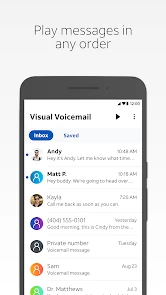
The user interface is straightforward and intuitive, which is awesome because nobody wants to spend hours figuring out how to use an app. Upon opening, you’re greeted with a clean and simple layout. The voicemails are listed in a way that resembles an email list, with the name of the caller, time of call, and a short excerpt of the message. It’s all there at a glance.
One feature that I really appreciate is the ability to respond to a voicemail with a call, text, or even an email directly from the app. It’s these little conveniences that make the app feel like it’s designed with the user in mind.
Performance and Reliability
Performance-wise, the app runs smoothly without hiccups. The transcription service is fairly accurate, though it might miss a word or two if the caller is speaking too fast or in a noisy environment. Still, it’s usually enough to get the gist of the message without having to listen to it. The app also sends notifications promptly so you’re always in the loop with new messages.
Reliability is key when it comes to handling voicemails, and I’m happy to report that this app doesn’t disappoint. During my time using it, I didn’t encounter any crashes or bugs, which is always a relief.
The best practical habit is to separate quick sorting from final decisions. I’d use the text to spot a routine update or recognize that a caller needs a reply, then play the recording before acting on anything that could cause confusion. Names, addresses, dates, and phone numbers are exactly the details I would verify. This workflow still saves time, but it avoids treating speech recognition as a guaranteed transcript.
Should You Download It?
If you’re an AT&T user and find yourself swamped with voicemails, this app is definitely worth checking out. It simplifies voicemail management to an extent I didn’t think was possible. Whether you’re a busy professional, a student, or just someone who prefers reading over listening, this app caters to a wide range of needs.
Before making it part of a routine, I’d ask one simple question: do missed calls regularly turn into messages that I need to sort? If the answer is yes, the visual list can help distinguish a callback from a message that can wait. If the answer is no, installing another communication app may add little value. A person who needs a dependable shared record for several household members should also look elsewhere in their everyday workflow rather than expect voicemail to provide that coordination.
In conclusion, AT&T Visual Voicemail is a great tool for anyone looking to modernize their voicemail experience. It's user-friendly, efficient, and just makes life a little easier. So, why not give it a try and see how it fits into your daily routine?
Compatibility and expectations
The app has been available since October 13, 2011, and its current version is 4.19.0.10243, with Android 10 as the minimum operating system requirement. It has passed 10 million installs, which suggests that visual voicemail is a familiar way for many AT&T customers to handle calls they can’t answer. I’d still check that the specific phone and line are suitable before making it the household’s default routine: a download alone does not turn voicemail into a shared service.
For someone deciding whether to try it, the basic expectation is a more visible way to handle voicemail associated with an AT&T line—not a general messaging hub. It is a communication app, but it does not replace texting, live calls, or the phone’s broader contact tools. I’d also distinguish between seeing an app’s minimum operating system requirement and knowing whether a particular line is ready to use it; checking the device and service setup first is a sensible step.
For a busy day, the most useful workflow is to scan the message list, identify which calls need attention, and listen to the ones where the text is unclear before responding. That keeps transcription in its proper role: a shortcut for triage, not a perfect record of what someone said. If a caller leaves a number or an appointment detail, I’d verify it in the audio or call back rather than trust a possibly imperfect text excerpt.
Age, privacy, and household fit
Everyone is the app’s content age rating, but that is not the same as a recommendation to share a voicemail account with children or other household members. Voicemails can contain personal information, so I’d keep access aligned with the person who owns the line and explain that message previews may be visible on a shared device. There is no reason to treat it as a family coordination dashboard; it works best when one account holder manages their own messages and chooses what to relay.
For younger users, the important household conversation is less about the app’s age label and more about who owns the phone line and who may see incoming messages. A parent might help a child manage a line, but I would not assume that the app supplies family supervision or separate access for relatives. Agreeing on whether voicemail notifications can appear on a shared screen, and who is responsible for returning a call, is more useful than treating the content rating as a privacy guarantee.
My household verdict is straightforward: this is a convenient option for an AT&T customer who wants to screen and organize their own voicemail, especially when listening right away is awkward. I would skip it as a solution for coordinating multiple people through one mailbox, or if voicemail itself is rarely part of the household’s routine. Used with sensible account boundaries, it can make missed calls easier to handle without blurring whose messages they are.
AT&T Visual Voicemail Frequently Asked Questions
Can I listen to voicemail without opening the app?
AT&T Visual Voicemail is designed to put voicemail messages in a viewable list, so you can choose a message rather than listening through them in sequence. You can still use your phone’s regular voicemail access if that is available on your line, but the app’s main benefit is browsing and managing messages from its interface. You’ll need an eligible AT&T service to use it.
Does AT&T Visual Voicemail let me choose which message to play first?
Yes. The app presents voicemail as a list, allowing you to select a message and listen in the order you prefer instead of playing every message in sequence. This can be useful when you want to check an important message first or return to a particular one. Its purpose is to make AT&T voicemail easier to view and manage on a smartphone.
Can I use AT&T Visual Voicemail with a tablet or a phone from another carrier?
AT&T Visual Voicemail is intended for voicemail associated with AT&T service, so it is not a general-purpose voicemail app for any carrier. The published minimum operating-system requirement is Android 10, and the app is designed for smartphones. Before installing it on another kind of device, make sure your AT&T line and device are eligible for the service.
Will AT&T Visual Voicemail show who left a message and when it arrived?
The app displays voicemail messages in a list similar to an email inbox, including who left a message and the date and time it was left. That view makes it easier to scan messages and decide which ones to play first, rather than relying only on listening to them in sequence. You still need an eligible AT&T service to access the associated voicemail.
Do I need AT&T service to use AT&T Visual Voicemail?
AT&T Visual Voicemail is designed to manage voicemail associated with AT&T service, so it is intended for AT&T customers rather than as a standalone voicemail app for any carrier. Before downloading, make sure your phone number and plan are eligible for the service. The app is free to download, but voicemail availability and any related service charges depend on your AT&T plan.
Pros
- Intuitive user interface
- Easy voicemail organization
- Supports voicemail transcription
- Works with multiple devices
- Secure data encryption
Cons
- Requires AT&T service
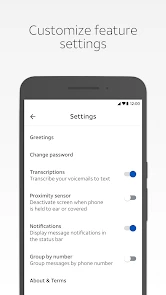
- Limited customization options
- May not support older devices
- Dependent on internet connection
- Occasional transcription errors

- Category
- Communication
- Version
- 4.19.0.10243













