AT&T ActiveArmor®
- 28.01K
- 4.2
- Installs
- 50.00M
- Price
- Free

Screenshots

Analysis by Reviewed
I judge a phone security app by what it helps me do in ordinary moments, not by how reassuring its dashboard looks. AT&T ActiveArmor℠ is most useful as a place to check call-spam protection, security alerts, and identity-related warnings. I see it as an extra set of signals, not a shield that makes every call, link, or account safe. That distinction matters: the app can help me notice a reason to pause, but I still have to decide what to do next.
A baseline routine that stays manageable
I find it most useful to treat a security app as part of a repeatable phone-check routine, rather than something I install and forget. With AT&T ActiveArmor℠, I’d start by opening the app after setup, reviewing the protection options it presents, and then checking back when an alert appears. That makes it easier to understand what the app is asking me to do instead of tapping through notifications automatically.
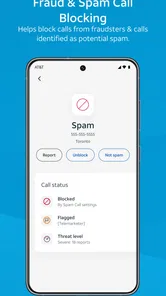
A realistic example is a day when several unfamiliar numbers call while I’m busy. The app’s spam-call protection can help reduce that interruption, while an alert about a possible risk gives me a reason to pause before responding to an unexpected message or call. I still wouldn’t treat a blocked call or warning as proof that every other contact is safe; the practical benefit is having another signal to consider before I act.
Getting Started with Confidence
First off, let’s talk about the setup. Getting AT&T ActiveArmor℠ up and running is a breeze. You simply download the app from your app store, and with a few taps here and there, you're all set. The interface is intuitive and user-friendly, making it accessible even if you’re not particularly tech-savvy.
Settings worth checking before relying on alerts
I’d make a habit of reading an alert before dismissing it, then deciding whether it calls for a change in what I do. If a warning concerns a call, I can avoid calling back immediately and verify the number another way. If a breach notice appears, the useful next step is to review the affected account and change its password through the service itself. ActiveArmor can surface a concern, but it cannot make that follow-up decision for me.
It is also worth checking the app’s available settings occasionally, especially after an update or a change in how I use my phone. I’d confirm that the protections I care about remain enabled and that notifications are set at a level I’ll actually notice. Too many interruptions can lead me to ignore useful alerts, while switching everything off defeats the point of having a security tool. The best balance is the one that keeps important warnings visible without turning every phone check into a security chore.
Features that shape the everyday experience
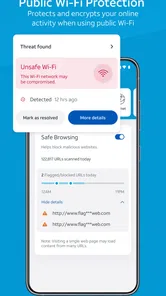
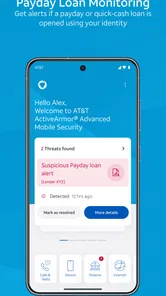
Now, onto the features. The app offers a range of tools to keep your device safer from threats. Think of it as having a digital bodyguard with you 24/7. The app provides real-time alerts for potential threats, so you can respond when something looks suspicious. There’s also a nifty feature that identifies and blocks spam calls—something we can all appreciate.
More From Our News Desk

Weather by Xiaomi Review: Clear at a Glance, Less Clear Up Close

X Under Pressure: Can It Recover When Posting Goes Wrong?

Clash of Clans Is Won Between the Battles

Android Auto Makes the Case for Quieter Car Software

MobiOffice: Transforming Mobile Productivity with Seamless Integration

EA SPORTS FC™ Mobile Soccer: Redefining Mobile Sports Gaming
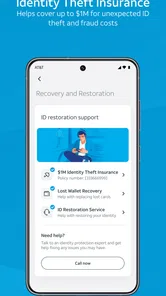
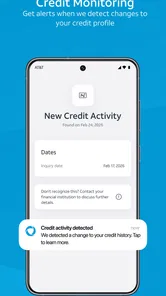
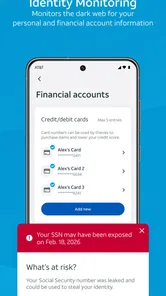
One of my favorite features is the personal ID monitoring. It scans the dark web for any signs that your personal info might have been compromised. In today's digital age, this kind of peace of mind is invaluable. The app also lets you know about data breaches that could affect you, keeping you one step ahead of cybercriminals.
Faster patterns for common interruptions
For a quicker workflow, I’d separate the moment of interruption from the moment of investigation. When a suspicious call comes in, I can let the app’s call handling do its job and avoid making a rushed decision while I’m in the middle of something else. Later, I can look at the alert with more attention. A useful personal rule is not to call an unfamiliar number back just because it tried to reach me; if the call may be legitimate, I can look for a trusted way to contact the person or organization.
The same idea works for an identity or breach warning. I wouldn’t try to solve the issue from the notification itself. I’d note which account or information needs attention, then go directly to that account’s official app or website and review its security there. This keeps the app in its strongest role—helping me notice and prioritize—without treating it as the place where every account problem can be fixed.
Performance, notifications, and the limits of a quick glance
In terms of performance, the app runs smoothly without any noticeable lag or crashes. The notifications are timely and don’t feel intrusive, which is a big plus for me. It strikes a good balance between being informative and overwhelming.
The design is sleek and modern, with an interface that is easy on the eyes. I appreciate how the app doesn’t bombard you with unnecessary information; everything is laid out clearly and logically.
Still, a clean screen can make a warning feel more conclusive than it is. I treat an alert as a lead, not a verdict: a call marked as spam can be avoided, but a caller that is not flagged is not automatically trustworthy. Likewise, a breach notice is a reason to secure the relevant account, not evidence that changing one password will address every possible risk. That small bit of skepticism makes the app more useful rather than less.
Where it fits among other security tools
Compared with relying only on a phone’s built-in protections, ActiveArmor brings call-spam handling and identity-related alerts together with security warnings in one place. That combination suits someone who wants a straightforward extra layer without building a routine around several separate tools. It is also a different choice from a dedicated call-filtering app: those may be preferable if the main problem is unwanted calls and you want to focus narrowly on that task.
I wouldn’t expect it to replace cautious habits, account-specific security settings, or a separate tool chosen for a particular need. Its alerts are prompts to investigate, not guarantees that every threat will be caught. People who prefer to manage each protection independently, or who do not want another app sending security notifications, may be happier with their phone’s existing safeguards and a more focused alternative.
Who benefits from the combined approach
AT&T Services, Inc. develops this free tools app, which is rated for Everyone. It has a 4.4 average from around 84,000 ratings and more than 10 million installs, so it has clearly reached a broad audience. I’d consider it most useful for someone who regularly receives suspicious calls, wants alerts about potential threats, and would value being notified about possible exposure of personal information. The app is free to start with, while in-app purchases are listed at $3.99 per item; I’d check the options shown in the app before deciding whether any paid item is relevant to my needs.
For someone comparing choices, the key question is whether the combined set of protections is more convenient than separate, specialized apps. If spam calls and breach awareness are both concerns, one place to check can make a sensible everyday routine. If you only want one narrow function, or you expect any mobile security app to prevent every scam without your judgment, this may not be the right fit.
Trade-offs for experienced users
People who already have a deliberate security routine may value ActiveArmor less as a complete solution and more as a convenient extra checkpoint. If you use account-specific security controls consistently and already have a call filter that suits you, installing another tool may add overlap rather than meaningful coverage. I’d compare the jobs each tool actually handles before keeping several in rotation; overlapping alerts can make it harder to tell which one needs attention.
On the other hand, someone who is not comfortable tracking multiple security apps may appreciate having call concerns and identity-related notices in one place. The trade-off is convenience versus specialization. A focused call app may offer a better fit for a person whose only recurring problem is unwanted calls, while ActiveArmor makes more sense if a broader set of warnings is useful. I would choose based on the interruptions I actually face, not on the assumption that adding more apps automatically improves protection.
There is also a useful boundary to keep in mind when deciding whether to pay for anything. The app is free to download, and in-app purchases are listed at $3.99 per item. I’d first use the protections that fit my needs and inspect any paid option carefully before buying; a price attached to an item does not by itself tell me whether it addresses a problem I have. If the basic experience already covers my routine, there is no reason to treat a purchase as a necessary step.
Small habits that make the alerts actionable
One practical habit is to avoid making a security decision while distracted. If an unknown caller leaves me uncertain, I can wait until I have a moment to check the context rather than responding from the notification. If an alert points to a possible exposure, I can make a short to-do note and handle the account through its own trusted channel. The value is not just seeing more warnings; it is turning the relevant ones into calm, specific next steps.
I’d also review the app after changing my phone routine, rather than assuming yesterday’s notification preferences still suit me. For example, if I begin relying on calls for work or family logistics, I may want to be especially attentive to how call alerts fit into that day. The goal is not to silence every interruption or investigate every unknown number. It is to keep the warnings I care about noticeable without letting them take over ordinary phone use.
Final thoughts on making it part of a routine
Overall, AT&T ActiveArmor℠ is a solid choice if you’re in the market for a security app. It covers useful ground, from threat alerts to identity monitoring. While no app can offer 100% protection against all digital threats, this one can add a helpful layer of awareness to your everyday phone use.
So, would I recommend it? Yes, for someone who wants accessible security and call-spam tools in one app and is willing to respond thoughtfully to alerts. The current version is 7.6.1-b8be8cb, and the app requires Android 10 or later. If that fits your device and you want a practical companion rather than a substitute for careful online habits, it is worth considering.
AT&T ActiveArmor® Frequently Asked Questions
Does AT&T ActiveArmor℠ work with a carrier other than AT&T?
AT&T ActiveArmor℠ is designed as a mobile security companion for AT&T service, and access to its features may depend on your AT&T account and setup. If you use another carrier, check the app’s availability and requirements before downloading rather than assuming every protection will work. The app’s main purpose is to help stop spam and scams on mobile devices.
What permissions or access might AT&T ActiveArmor℠ need?
Security and call-management features can require access to parts of your device, such as call information or network-related settings. The permissions you see may vary by operating system and by the features you choose to use. Review each request when it appears and allow only what you are comfortable with; you can also check your device settings to manage app permissions later.
Can I use AT&T ActiveArmor℠ without creating an account?
Some features may rely on your AT&T service or account, so the setup experience can depend on your existing relationship with AT&T. Before installing, consider whether you have the service details needed to get started. Once the app is open, follow its prompts and review the available options to see which protections are enabled for your device and account.
Will AT&T ActiveArmor℠ replace my phone’s built-in security tools?
AT&T ActiveArmor℠ is an additional mobile security app intended to help stop spam and scams, rather than a reason to turn off your device’s built-in protections. Keeping your operating system updated and using its existing security settings remains useful alongside any app-based protection. Think of ActiveArmor as a companion tool, and review its features to decide how it fits your current setup.
Can I remove AT&T ActiveArmor℠ if I decide it is not right for me?
You can uninstall an app from your device if you no longer want to use it. Before removing AT&T ActiveArmor℠, check whether you rely on any of its protections or settings, since those may no longer be available through the app afterward. You can also review any optional purchases and your AT&T service separately, as uninstalling an app does not necessarily change other account arrangements.
Pros
- User-friendly interface.
- Comprehensive security features.
- Real-time threat alerts.
- Identity monitoring included.
- Wi-Fi security scanning.
Cons
- Requires AT&T account.
- Limited to U.S. users.
- Some features need premium.
- Occasional false positives.
- May impact battery life.