AT&T Secure Family® parent app
- 9.86K
- 4.5
- Installs
- 10.00M
- Price
- Free

Screenshots



Analysis by Reviewed
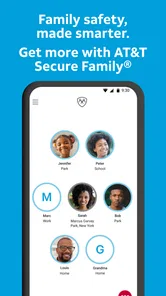
Keeping track of a family’s phones is rarely about watching every movement. In my experience, the harder part is coordination: knowing whether a child has arrived, making sure screen-time rules are understood, and having a simple way to reduce access to distracting apps when the situation calls for it. AT&T Secure Family® is built around that household problem, combining family location tracking with parental controls in one lifestyle app.
I tested it with that practical mindset rather than treating it as a surveillance tool. The app is most useful when everyone understands what it does, who manages it, and why it is being used. When those boundaries are clear, it can make everyday routines less stressful. When they are not, even a well-designed family app can create arguments instead of solving them.
How it fits a shared household routine
A realistic use case is a household where a parent needs to coordinate school, activities, and travel with a child who carries a phone. Instead of sending several messages asking where someone is, the parent can use the family location function as a shared reference point. That does not replace a conversation, but it can remove some of the uncertainty around ordinary arrivals and departures.
I also found the combination of location and device rules more useful than either feature by itself. A location tracker answers “where is the phone?” while screen-time limits and app blocking address “what is happening on the phone?” Those are separate concerns, but families often deal with both at the same time. Bringing them together makes the parent’s routine easier to manage than switching between unrelated tools.
The app comes from AT&T Services, Inc. and sits in the lifestyle category rather than presenting itself as a general-purpose security utility. That distinction matters. Its focus is household organization and parental oversight, not a broad collection of privacy, antivirus, password, or home-automation tools. If you want one place for family location and basic digital boundaries, the focus feels appropriate.
One detail I appreciate is that the app can support coordination without requiring every interaction to become a formal check-in. A parent might look at the family view before leaving work, then use the result to decide whether to call or simply continue with the planned pickup. That small reduction in unnecessary messages is where the app feels most natural.
There is also a useful distinction between urgent and routine situations. For a genuine emergency, I would not rely on this app as a replacement for calling emergency services or contacting the person directly. For ordinary household questions, however, it can provide context before anyone starts worrying. That is a sensible role for a family tracker.
More From Our News Desk

Weather by Xiaomi Review: Clear at a Glance, Less Clear Up Close

X Under Pressure: Can It Recover When Posting Goes Wrong?

Clash of Clans Is Won Between the Battles

Android Auto Makes the Case for Quieter Car Software

MobiOffice: Transforming Mobile Productivity with Seamless Integration

EA SPORTS FC™ Mobile Soccer: Redefining Mobile Sports Gaming
What the location side is good at
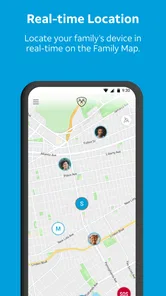
The location feature is most convincing when the household treats it as a coordination aid. Parents can use it to make sure a child’s phone appears to be at school, home, or another expected place, while older children may benefit from not having to answer repeated “where are you?” messages. The value is less about constant observation and more about having a shared point of reference.
That approach also exposes an important limitation: the app follows the phone, not necessarily the person. A phone left in a backpack, car, or bedroom can give a misleading impression. I would explain that clearly to younger users and avoid treating the map as unquestionable proof. A quick call or message remains the right answer when the location seems inconsistent with the plan.
For shared-device households, this distinction becomes even more important. If siblings use the same phone at different times, or a parent temporarily carries a child’s device, the displayed location can be interpreted incorrectly. The app works best when each device has a clear owner and the family knows which device is being represented.
Setting boundaries before installing it
The smoothest setup starts with a household agreement, not with tapping through screens. I would decide who will manage the family account, which devices belong to which people, and what location sharing is intended to cover. This prevents the common mistake of installing a parental-control app first and discussing trust only after a disagreement.
Age matters here. The content rating is Everyone, but that does not mean every family should use the same rules for every child. A young child may need firm limits and simple explanations. A teenager may reasonably expect more privacy and a conversation about when location information will be checked. The app can support a family policy, but it cannot create mutual trust by itself.
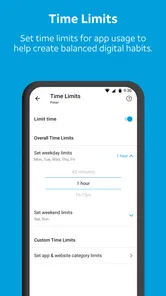
I would also explain the difference between limiting screen time and blocking a particular app. Those controls solve different problems. A time limit can help create a predictable routine, while blocking is more direct when a specific application is causing trouble. Using the strongest restriction for every situation may be easy for the parent, but it can make the rules feel arbitrary to the child.
The current version is 12.1.2, and the app supports operating systems from version 9 onward. That broad compatibility is helpful for households with older phones, although I would still check every device before planning a family rollout. A family system is only as dependable as the least compatible or least consistently configured device in it.
Another practical consideration is account ownership. The adult who manages the controls should be someone who can maintain the arrangement consistently. If several adults share responsibility, agree in advance about who changes limits and how exceptions are handled. Otherwise, a child may receive conflicting instructions, or one parent may undo a setting without realizing why it was there.
Making screen rules usable rather than punitive
Screen-time controls work better when they are connected to a routine. For example, a family might agree that entertainment apps are restricted during homework or bedtime, while still allowing the phone to remain available for necessary communication. I would introduce the rule before activating it, then review whether it matches real life. A control that blocks something needed for school or family coordination will quickly lose credibility.
App blocking also deserves a measured approach. It can be useful when a particular game or social app repeatedly interrupts sleep, study, or family time. But blocking every distracting application can turn the phone into a battleground. I prefer starting with the narrowest rule that addresses the problem, then widening it only if the household agrees that the first step was not enough.
A less obvious benefit is that these controls can make expectations visible. Instead of relying on a parent to remember every verbal agreement, the household has a practical setting that reflects the rule. That can reduce repeated negotiations, but only if the setting is explained and applied consistently. Silent changes are likely to feel like punishment.
Using it for coordination, not constant checking
Once the household is set up, I would use the app in short, purposeful moments. Before a pickup, I might check whether a child’s device is where we expected it to be. During a busy afternoon, I might use the information to decide whether a reminder is needed. The goal is to support a plan, not to stare at the map throughout the day.
This approach preserves some independence for older children. They can move through ordinary activities without answering a message for every small change, while parents still have a way to resolve uncertainty. In my view, that is a healthier use of family tracking than treating it as a live feed that demands constant attention.
Location information can also help with household logistics. If a parent is already on the way home and sees that a child is still at an expected activity, the family may avoid an unnecessary call. If the location does not match the plan, the right next step is to ask calmly what changed. The app supplies context; the family still supplies judgment.
It is worth creating a simple response plan for unusual results. I would first refresh my understanding of the schedule, then contact the person directly, and only afterward treat the mismatch as a serious concern. Phones can be misplaced, carried by someone else, or shown at a location that does not reflect the person’s current situation. A responsible workflow prevents a map discrepancy from escalating too quickly.
The same principle applies to screen controls. A parent should know how to explain an exception, such as a late school project or a family trip, before the exception is needed. If settings are changed unpredictably, the child may focus on defeating the rule rather than understanding it. Predictability is a quiet strength in household technology.
Where coordination can become awkward
The app is not a substitute for a shared family calendar, a messaging app, or a direct phone call. Those tools handle plans and conversation better. Secure Family is more specialized: it adds location awareness and parental controls to the household routine. I would use it alongside normal communication rather than expecting it to become the family’s only organizational system.
There can also be friction when a family member’s phone is offline, unavailable, or not being carried. I would avoid promising children that the app makes them permanently reachable. The household should still have a backup plan for pickups, schedule changes, and urgent contact. That is especially important when a child is traveling without an adult.
Another trade-off is attention. A parent who checks too often may become more anxious, not less. The app can make information available, but availability does not mean every update deserves action. I found it more useful when paired with agreed check-in moments or specific situations, rather than open-ended monitoring.
Age, trust, and the meaning of parental control
The Everyone age rating describes the app’s store-facing suitability, not the ideal family policy. A child’s age, maturity, and circumstances should shape how it is introduced. Younger children may need a straightforward explanation that the phone’s location and app use are part of a safety and routine plan. Older children deserve a more detailed conversation about privacy, purpose, and when a parent will look at the information.
I would avoid presenting the app as a secret tool. Hidden monitoring may produce short-term information, but it damages the relationship that makes family safety work. A child who knows the boundaries is more likely to discuss a problem, explain an unusual location, or ask for a reasonable exception. The app should reinforce that conversation rather than replace it.
Trust does not require parents to remove every safeguard. It means the safeguards are proportionate and understandable. A parent may reasonably want stronger limits for a child who is struggling with sleep or schoolwork, while another child in the same household may need fewer restrictions. Applying identical controls simply because the devices are managed together can be convenient, but it may not be fair.
There is also a question of when to loosen control. I would review the rules as a child becomes more independent instead of leaving them unchanged indefinitely. The app is more valuable when it supports a gradual move from direct management toward shared responsibility. If a teenager has no path to greater autonomy, even useful controls can feel like permanent surveillance.
For adults sharing a household, the situation is different. This is a parental-control product, not something I would use to monitor a partner or another adult without clear consent. Family technology should be based on informed agreement. If the intended use is adult-to-adult tracking, a different solution designed around voluntary location sharing may be a better fit.
Cost, reach, and the practical choice
The app is free to download, with optional in-app purchases listed at $7.99 per item. I would look carefully at which functions are available without payment and which household members need access before setting expectations. A free starting point makes it easier to test the basic experience, but families should still decide whether the controls they actually need fit their budget.
Its popularity suggests that the concept has broad appeal: the app has passed ten million installs, with an average rating of 4.5 from around forty thousand ratings. Those figures are useful context, but they do not replace testing it on the specific phones and routines in your home. A high rating cannot tell you whether your family will agree with the monitoring approach.
Compared with using a phone’s built-in location sharing alone, this app is more focused on the parent’s need to combine location with screen-time and app restrictions. Built-in tools may be preferable for adults or families who want only voluntary location sharing and minimal management. Secure Family makes more sense when a parent wants those two areas—where the device is and how it is used—handled within one household-oriented system.
Compared with a dedicated parental-control product, its appeal is the family-location angle. A specialist screen-time tool may offer a deeper focus on digital habits, while this app is attractive when physical coordination is equally important. I would choose based on the main problem: if the household mostly needs app limits, a dedicated control tool may be clearer; if it needs both location awareness and basic restrictions, this combined approach is more convenient.
The developer’s connection to AT&T may also influence a household’s decision, particularly for families already comfortable with that ecosystem. Still, I would not choose it solely because of the developer name. The real test is whether the account structure, device compatibility, and family agreement work in practice.
Who should use it and who should skip it
I would recommend it to parents coordinating children’s school runs, activities, and phone habits, especially when the household wants location tracking and basic digital boundaries in one place. It is also a reasonable choice for families that need a more organized alternative to repeated messages and informal screen-time promises.
I would be more cautious if the family has not agreed on privacy expectations. The app cannot resolve a disagreement about whether tracking is appropriate. I would also look elsewhere if you need highly specialized digital-wellbeing analysis, adult-to-adult location sharing, or a complete home safety platform. Those needs fall outside the app’s central purpose.
Families with frequently shared phones should think carefully before relying on the location view. Clear device ownership is important, and a shared device can blur who is actually represented. In that situation, direct communication and a shared calendar may be more reliable for coordination, with the app used only where its controls genuinely help.
My household verdict
After using it as a family-coordination tool, I see AT&T Secure Family® as a practical middle ground. It is more focused than a general phone-management suite, but broader than a simple location-sharing feature. Its strongest idea is bringing family location and parental controls together without making the household maintain several unrelated systems.
The app works best when parents use it deliberately: explain the rules, assign clear account responsibility, choose proportionate limits, and treat location results as information rather than absolute proof. Those habits matter as much as the settings themselves. Without them, the same features can create confusion, resentment, or unnecessary checking.
For a household that wants help coordinating children’s devices and setting reasonable limits, the free entry point makes it worth evaluating. I would begin with one concrete need, such as reducing late-night app use or making pickup coordination easier, then expand only when the family understands the arrangement. That keeps the technology in its proper role.
My final view is positive, with a clear condition: the best results come when parental controls support a family agreement instead of replacing one. If that matches your household, this lifestyle app is a useful option. If your priority is private, voluntary location sharing among adults or advanced device analysis, a different category of tool will likely serve you better.
AT&T Secure Family® parent app Frequently Asked Questions
Will AT&T Secure Family® work with my family’s phones and wireless service?
The service is designed to pair a parent device running the Secure Family parent app with a compatible child smartphone and the required companion experience or permissions. An eligible AT&T wireless account or Secure Family subscription may also be needed. Before downloading, check the current app-store listing and AT&T requirements so you can confirm that your devices and service meet the setup requirements.
What information and permissions should I consider before setting up the app?
Location tracking and parental controls rely on the child device being paired and having the necessary permissions enabled. The app’s location features may show a device’s approximate or current position, while its controls can manage screen time and access. Before setup, talk with your child about what information is shared and how you plan to use these tools as part of your family’s phone rules.
Does AT&T Secure Family® work when a child’s phone is offline or has no signal?
Location updates depend on the child device being powered on, connected, and able to obtain a reliable signal, as well as having the necessary permissions enabled. If the phone is offline, switched off, or unable to determine its position, the app may not show a current location. Treat location features as a helpful tool, not a guarantee that you can always reach or locate a child.
Can the app manage Wi-Fi use and activity inside every app?
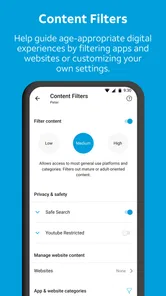
AT&T Secure Family® offers controls for schedules, internet access, and available content filters, but how well they apply can vary by device, operating system, subscription, and app version. Some controls may be more effective with cellular data than with Wi-Fi, and the app may not manage activity inside every individual app. Check the available controls on your devices before relying on them for every online situation.
Does AT&T Secure Family® provide antivirus protection or replace other phone-security tools?
AT&T Secure Family® is a family-management app focused on location features and parental controls, including screen-time management and content restrictions. It is not intended as general-purpose device security or antivirus protection. Parents looking for protection against malware or other device threats should consider those needs separately, while using Secure Family for the family controls it is designed to provide.
Pros
- Locate family members with real-time GPS and location history.
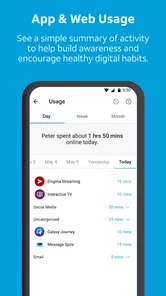
- Set customizable screen-time limits for individual children.
- Create trusted places and receive arrival or departure alerts.
- Pause a child’s internet access remotely when needed.
- Manage multiple children from one parent dashboard.
Cons
- Requires compatible AT&T wireless service for full functionality.
- Location tracking can reduce a child’s privacy and independence.
- GPS accuracy may vary indoors or in areas with weak coverage.
- Some controls may depend on the child’s device and operating system.
- Battery usage can increase when location sharing stays enabled.













