AT&T
- 155.90K
- 4.6
- Installs
- 100.00M
- Price
- Free

Screenshots


Analysis by Reviewed
I’d judge the AT&T Mobile App by one practical question: do you want a single place to handle your AT&T account, or do you mainly need a general phone-bill tracker? In my view, it makes the most sense for people who already use AT&T and regularly check charges, data use, or account details. It is a free productivity app from AT&T Services, Inc., and its broad appeal shows in its 4.6 average from around 403,000 ratings and over 100 million installs.
Start with the jobs you need to do
Before installing it, I’d think about the account tasks that actually come up in an ordinary month. Do you check data usage, want to pay a bill from your phone, or sometimes need help with a service question? If those are recurring needs, a carrier account app can be more convenient than keeping a web page, a bill reminder, and a separate support route in your mental checklist.
The useful distinction is between managing service and managing money. AT&T’s app is designed around the carrier account, so it makes sense when the question is “What is happening with my AT&T service?” A general finance app is a better starting point for “How much am I spending across all my bills?” Those jobs overlap a little, but they are not interchangeable.
Choosing an account app that fits your routine
The useful test is whether the tasks you do most often are tied to AT&T. If they are, having account management, billing, usage checks, offers, and support together can save the small but repeated effort of moving between separate tools. If you only want a neutral view of spending across several providers, a carrier-specific app is less likely to be the right center of your routine.
First Impressions
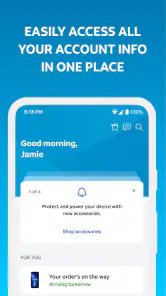
When I first launched the app, I was pleasantly surprised by its sleek and intuitive interface. Everything is laid out in a way that feels both modern and user-friendly. The color scheme is easy on the eyes, and the icons are intuitive, making navigation a breeze.
For me, the most useful way to approach the home screen is as a starting point, not as a reason to explore every corner of the app. If I opened it to check a charge, I would go straight to billing, answer that question, and leave. That focused habit keeps a practical account tool from turning into another app I browse without a clear purpose.
Streamlined Account Management
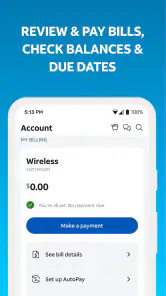
The standout feature for me has to be the account management capabilities. With just a few taps, I could view my current plan, check data usage, and even pay my bill. No more waiting in line or on hold with customer service – everything is right there in the app!
More From Our News Desk

Clash of Clans Is Won Between the Battles

Android Auto Makes the Case for Quieter Car Software

MobiOffice: Transforming Mobile Productivity with Seamless Integration

EA SPORTS FC™ Mobile Soccer: Redefining Mobile Sports Gaming

How Microsoft OneDrive Became a Mobile Productivity Giant

How Google Translate Breaks Language Barriers Effortlessly
One thing I particularly appreciated was the breakdown of charges. The app provides a detailed view of where your money is going, which is perfect for those of us who like to keep an eye on our expenses.
A helpful habit is to check usage before a busy stretch of travel or streaming rather than waiting until the end of the billing period. That turns the app from a place you visit only to pay into a quick planning tool. For a household account, agree on who will review the shared account and discuss changes before making them; a convenient control panel can make adjustments easier, but it does not replace clear communication between the people using the lines.
Make billing checks more useful
I find it helpful to separate a quick payment check from a proper bill review. If I’m confirming that a payment is due, I can use the app for that immediate task. If I notice a charge I don’t recognize, I’d take a moment to compare the details with the account activity I already understand, rather than paying in a rush and trying to reconstruct the question later.
That distinction matters for shared accounts. The person paying the bill may not be the person who knows why a line’s usage changed, so the app can make information easier to access without answering every household question by itself. A simple routine—review the charge, ask the relevant line user if needed, then decide what to do—can prevent a quick glance from becoming a mistaken assumption.
For people who keep a separate budget, I would use the account view as the source for carrier-specific charges and put the amount into their usual budgeting system. That avoids expecting this app to replace a broader view of rent, subscriptions, utilities, and other bills. Its strength is the service account, not a complete picture of personal finances.
Customer Support at Your Fingertips
Another nifty feature is the built-in customer support chat. If you run into any issues, help is literally just a message away. I tried it out and was impressed by the quick response time and the helpfulness of the support staff. It's like having your personal AT&T assistant in your pocket!
Support inside the same app is most useful when your question concerns an account detail you are already viewing. It keeps the help request close to the billing or usage task that prompted it. For a complex issue, I would still keep a brief note of the problem and any steps already tried, so I can explain the situation clearly if it needs more than a quick exchange.
When an account question needs more than a quick chat
For a straightforward question, in-app support is a natural first stop. If the issue involves several lines or a confusing sequence of charges, I’d write down which line and billing detail I’m asking about before starting the conversation. That small bit of preparation makes it easier to describe the problem precisely and keeps the exchange focused.
I would also treat a support message as a way to get help, not as a substitute for keeping my own notes about an important account issue. If I’m trying to resolve something that may take more than one conversation, a short record of what I asked and what I still need to check can save me from repeating the same explanation.
Extras and Perks
If you're someone who loves getting a little extra, the AT&T app delivers. The rewards section offers various deals and discounts exclusive to app users. From discounts on accessories to special offers on other AT&T services, there's often something worth checking out.
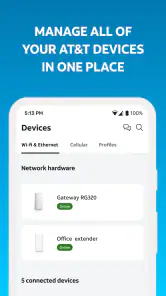
Plus, the app allows you to manage multiple lines from a single account, which is super handy for families or businesses. You can keep tabs on everyone's usage and adjust plans as needed without any hassle.
I would treat offers as a useful extra, not the reason to install the app. If a deal catches your eye, check that it suits something you actually need before letting it steer a purchase. The stronger everyday benefit is having line details and account tasks in one place, especially when you help another person in the household keep track of their service.
Shared accounts need a little coordination
When several people use lines on one account, the convenience of a shared view comes with a small responsibility: decide who is meant to act on billing or account changes. I would not assume that everyone needs to make adjustments just because they can see account information. Agreeing on a main person for payments and a simple way to discuss changes helps avoid duplicated effort or a surprise decision.
That setup can be especially useful for a parent keeping an eye on family usage or for someone helping a relative with their phone account. The app makes the account more accessible from a phone, but the person who understands the household arrangement still needs to interpret what a change in usage means. A line’s activity is information to discuss, not automatically a problem to fix.
Performance and Reliability
Now, let's talk about how the app performs. During my time using it, I found it to be pretty reliable. There were no significant bugs or crashes, and everything loaded smoothly. The developers have clearly put a lot of effort into ensuring a seamless user experience.
Even when I was out and about, the app's functionality remained consistent. It's definitely designed to work well on the go, which is great for those of us who are always moving.
For a realistic use case, imagine getting a bill reminder during a lunch break and wanting to confirm the amount before paying. I’d open the account, review the charge details, and then decide whether to pay immediately or look more closely later. That small sequence is where a carrier app earns its place: it brings the relevant account task together without requiring a call or a desktop visit. I would still save longer comparisons or careful household budgeting for a larger screen if that is how I prefer to review expenses.
A practical routine for busy weeks
Usage checks are most valuable when they can still inform a decision. If I know a week will involve more travel or streaming than usual, I’d check the account beforehand and again if my habits change, rather than waiting until the bill arrives. It gives me a chance to notice a trend while there is still time to adjust how I use the service.
For a household, it can help to make that check part of an existing routine, such as a quick look when reviewing the bill. I would avoid turning it into constant monitoring; the point is to catch something useful, not to refresh the account without a reason. This is a small but practical difference between an app that supports a decision and one that simply adds another notification-shaped task to the day.
Where other tools make more sense
The usual alternatives fall into two groups: a carrier’s own account app and general finance or bill-management tools. The first may suit you better if your service is with another provider; the second can be a better fit if your priority is tracking spending across several companies in one view. Neither approach is automatically better. For AT&T customers who want to handle service-specific tasks, this app has the advantage of being tied directly to that account; for people who want provider-neutral budgeting, a broader tool may feel more relevant.
The trade-off is that a carrier-focused app is only valuable while you have a reason to manage that carrier account. If you switch providers, a general budgeting tool may remain useful, while this app’s role naturally shrinks. Before changing services, I’d review any account tasks or details I may need and avoid treating one app as a permanent archive for household finances.
Choosing between the app and a browser
If you only check the account occasionally, using a browser may be enough for you; installing an app is not automatically an improvement. I’d choose the mobile app if I expect to check usage or handle a bill while away from a computer, or if I want support and account details close together. If I’m doing a careful comparison or organizing several household expenses, I may prefer a larger screen and a separate budgeting tool.
There is also a simple test for deciding whether to keep it: after using it for the account task that prompted the download, ask whether the convenience genuinely saved a step. If your answer is yes, it has a clear role. If you still prefer your existing browser or bill routine and rarely open the app, there is little reason to make it part of your daily phone setup.
Cost, compatibility, and the value of switching
The app is free, so the decision is less about paying for access and more about whether you want another place for account tasks. Its age rating is Everyone, and it has been available since April 28, 2010. The current version is 2026.5.2, and Android support starts at OS 9, which gives Android users a useful compatibility check before they install.
Moving from a browser-based routine to the app should not require changing how you budget or how your household shares responsibility. I’d switch only the tasks that benefit from being on a phone—such as a quick usage check or bill payment—and keep broader records wherever they already work well. That low-commitment approach lets you see whether the app fits without rebuilding your whole system around it.
Who should install it—and who can skip it
I’d recommend it to current AT&T customers who pay bills, monitor usage, manage several lines, or prefer to contact support from their phone. It is rated for Everyone, first released on April 28, 2010, and its current version is 2026.5.2, with Android support starting at OS 9. Those details make it easy to assess basic compatibility, but the more important question is whether you have an AT&T account to manage.
If you are not an AT&T customer, or you rarely need to check anything beyond a bill that arrives through another channel, you can probably skip it. Likewise, anyone looking for a cross-provider spending dashboard should start with a tool designed for that broader job. For existing customers, the app’s value is less about using every section and more about having the relevant account actions available when needed.
Final Thoughts
All in all, the AT&T Mobile App is a robust tool for managing your mobile services. It combines functionality with ease of use in a way that makes it a must-have for any AT&T customer. Whether you want to check your data usage, pay your bill, or simply explore the latest offers, this app has you covered.
If you haven't already, give it a download and see for yourself. It's free, it's handy, and it might just save you time and effort. Let me know how it works for you!
AT&T Frequently Asked Questions
Can I use the AT&T app without an AT&T account?
The app is designed for people who use AT&T services and want to handle account-related tasks on a phone. Its core uses include paying bills, checking data usage, finding deals, and getting support. If you do not have an AT&T account, those account tools may not be relevant to you, though you can still review the app’s details before deciding whether to install it.
What operating system version does my phone need to run the AT&T app?
The AT&T app requires Android or iOS version 9 or later. Before downloading, check your device’s software version in its settings and make sure it meets that requirement. Keeping your phone’s operating system current can also help with app compatibility. The app is free to download, so the main consideration is whether your device meets the minimum requirement.
Is the AT&T app free to download, and what devices can install it?
The AT&T app is free to download and is available for Android and iOS devices. It is a productivity app for customers who want to connect with AT&T services from their phone. Check that your device meets the platform’s minimum operating system requirement before installing, then download the app through the relevant app store.
Who is the AT&T app intended for, and what can I use it to do?
The app is intended for people who use AT&T services and want a mobile way to handle common account tasks. Its short description is simply “AT&T,” while its purpose is to connect you with AT&T services, including bill payment, data-usage checks, deals, and support. It can be useful if you prefer managing these tasks from one app.
What features does the AT&T app offer?
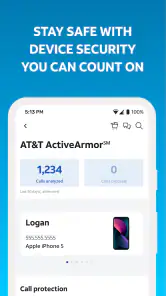
The AT&T app provides a comprehensive suite of features designed to manage your AT&T account efficiently. You can pay bills, check data usage, manage devices, and even shop for new products. Additional features include troubleshooting tools and personalized support, making it a convenient one-stop solution for AT&T customers.
Pros
- User-friendly interface for easy navigation.
- Extensive network coverage across the U.S.
- Seamless integration with smart devices.
- Reliable customer support service.
- Flexible data plans for various needs.
Cons
- Limited international roaming options.
- Occasional app performance issues.
- Some features locked behind paywalls.
- Data speed may vary by location.
- Complex billing structure for new users.

- Category
- Productivity
- Version
- 2026.5.2













