StayFree - Screen Time
- 4.61K
- 4.6
- Installs
- 10.00M
- Price
- Free

Screenshots
Analysis by Reviewed
My first useful step with a screen-time app is not trying to change everything at once; it is finding out what my phone use actually looks like. StayFree - Screen Time is built for that kind of check-in, then lets you put limits and reminders around habits you want to change. I’d approach it as a practical aid rather than a strict digital detox: it can make a pattern easier to notice, but the choices still have to be yours.
What to expect from a screen-time tracker
StayFree is a free productivity app from ST Pulse, available to everyone. It has been around since August 25, 2017, and its broad purpose is to help people pay attention to how they use their devices and reduce time spent in distracting apps and sites. Its average rating is 4.6 from around 250,000 ratings, and it has more than 10 million installs. Those figures suggest that screen-time management is a familiar need, though they don’t tell me whether its particular approach will suit every person.
In everyday use, the value is less about seeing a large number on a screen and more about connecting that number to a moment in your day. A usage report can reveal that a short break has repeatedly turned into a long social-media session, or that checking a particular app has become automatic. That observation is useful only if it leads to a realistic adjustment. I would not begin by expecting the app to make me more disciplined on its own.
The app’s focus on app and site blocking makes it different from a tracker that only reports activity. Many phones already offer built-in screen-time summaries and basic limits, which are convenient if you want one simple control and prefer not to install another app. StayFree is more relevant if you want a dedicated place to review habits and use interventions such as limits or reminders. A built-in tool may be enough for someone who only wants an occasional glance; someone who wants to work deliberately on repeated distractions may appreciate a separate routine.
Getting Started with StayFree
First things first, downloading and setting up StayFree - Screen Time was a breeze. Available for both Android and iOS, it's super easy to find on your respective app stores. Once installed, the app walks you through a simple setup process, allowing you to sync all your devices. I loved how intuitive it was; even a tech newbie could navigate it without a hitch!
For a first-time user, I’d keep the initial setup focused. Decide what you want to understand first: overall phone use, one distracting app, or a stretch of time when you need fewer interruptions. Then look at the usage information before setting several limits. Starting with a baseline helps prevent an arbitrary target from making the app feel like a scolding tool. If your concern is checking a social app while studying, for example, focus on that pattern rather than trying to redesign every part of your phone routine at once.
It is also worth thinking through what a useful limit would mean in practice. A strict cap can be motivating if you tend to lose track of time, but it can be frustrating if you rely on the same app for messages, work, or family coordination. I’d choose a boundary that distinguishes unplanned browsing from necessary use as much as possible, and treat the first few days as an experiment. If a limit repeatedly interrupts something important, adjust the plan rather than assuming that more restriction is automatically better.
More From Our News Desk

Weather by Xiaomi Review: Clear at a Glance, Less Clear Up Close

X Under Pressure: Can It Recover When Posting Goes Wrong?

Clash of Clans Is Won Between the Battles

Android Auto Makes the Case for Quieter Car Software

MobiOffice: Transforming Mobile Productivity with Seamless Integration

EA SPORTS FC™ Mobile Soccer: Redefining Mobile Sports Gaming
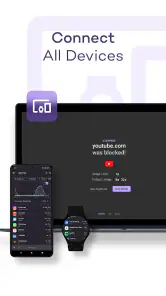
People often wonder whether they need to set up every device before the app can be useful. My advice is to begin with the device that most often pulls you away from what you meant to do. The original setup describes syncing devices, which may help if you use more than one, but you can still make the first meaningful decision around a single everyday habit. A smaller starting point is easier to understand and gives you a clearer sense of whether the tool fits your routine.
Features That Stand Out
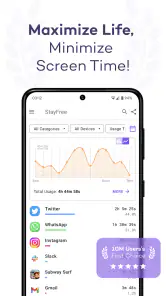
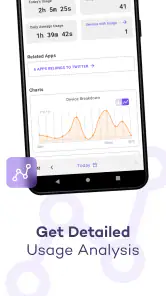
Okay, so let’s dive into what makes this app tick. StayFree offers a comprehensive set of features aimed at helping you understand and manage your screen time. You get detailed reports of your app usage, complete with charts that make it easy to visualize where your time is going. It's like having a personal screen time coach in your pocket!
The most useful way I’ve found to read a chart is to ask a specific question before opening it. Did I reach for my phone more during breaks than I expected? Which app tends to extend a quick check into a longer session? Is my screen use concentrated at a time when I planned to focus? Looking at one question at a time turns a report into a decision aid instead of a guilt-inducing pile of numbers. It also makes comparisons from one week to the next more meaningful, because I can tell what behaviour I was trying to change.
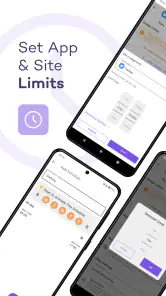
One feature I found particularly useful is the "App Usage Limit" option. This allows you to set daily limits on how much time you spend on specific apps. Once you hit your limit, StayFree sends you a friendly reminder to take a break. It’s like the nudge we all need to put down our phones and maybe, just maybe, go outside for a bit.
A realistic first test might be a student who intends to read for an hour but keeps opening a short-video or social app between paragraphs. Rather than blocking every source of entertainment, they could use a limit on the one app that most often derails the session and see whether the reminder helps them return to the book. Someone working from home might try the same idea during a planned focus block, while leaving essential communication available. In both cases, the useful question is not simply “Did I use my phone less?” but “Did the limit protect the activity I cared about?”
There is a trade-off here: a reminder arrives after a threshold, but it cannot decide whether that moment is a good time to stop. A person using a messaging app for a time-sensitive conversation may need to continue, while someone casually browsing might welcome the prompt. I’d treat the alert as a cue to pause and make a conscious choice, not as proof that every minute beyond a limit is wasted. That makes the feature less adversarial and more likely to remain useful.
For a more deliberate workflow, I’d review the usage report at a calm time rather than immediately after a frustrating session. Pick one recurring distraction, set a modest boundary, and check later whether the reminder changed what happened next. If it did, keep the arrangement. If it only made you dismiss alerts automatically, change the limit or choose a different app to focus on. This small review loop is more actionable than repeatedly changing settings without knowing which change helped.
Real-Time Notifications
Another cool feature is the real-time notifications. You can set alerts for when you’re about to reach your screen time limit or if you've been using your phone continuously for too long. It's a gentle, yet effective way to encourage healthier phone habits without feeling like Big Brother is watching.
Notifications can be helpful for people who lose track of time while immersed in an app, but they can also become background noise. I’d start with only the alerts tied to a behaviour I genuinely want to notice. If I receive too many prompts, I’m likely to swipe them away without thinking, which defeats the point. The aim is a timely interruption that gives me a chance to choose, not a steady stream of messages that competes with everything else on the phone.
One non-obvious use is to make an alert a transition cue rather than a punishment. When a prompt appears, I can ask whether I opened the app for a reason, whether that reason is finished, and what I meant to do next. That brief pause can be worthwhile even if I decide to keep using the phone. It separates intentional use from the automatic “one more minute” habit that a chart alone might reveal but not interrupt.
If your phone use is tied to work or caregiving, keep that context in mind when you choose what to monitor. A high-use day may reflect necessary coordination rather than distraction, and continuous use can sometimes be part of a task. I would not use a single alert as a judgement about the quality of a day. The feature is best for habits where a nudge is welcome, and less suitable when interruptions themselves would create a problem.
Customization and Insights
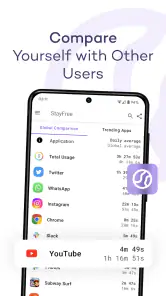
One thing I appreciate about StayFree is how customizable it is. You can tailor notifications, reports, and even the app interface to suit your preferences. Plus, the app provides weekly insights and trends about your usage patterns. It's fascinating to see just how much time I’ve been spending on social media versus productivity apps. A real eye-opener!
Customization matters because a screen-time routine has to fit the person using it. Some people want an alert before they cross a limit; others would rather inspect a summary later and make adjustments themselves. I’d avoid turning on every option just because it exists. A simple setup makes it easier to tell which prompt or report is genuinely helping, and you can add more structure after you understand your own pattern.
Weekly trends are most useful when read alongside what was happening that week. A change might reflect a busy project, travel, a different schedule, or a real shift in habit. I try not to treat one unusual week as a permanent verdict. Instead, I look for repeated patterns and pair them with a practical adjustment—for instance, keeping a distracting app out of a study period or choosing a stopping point before opening it during a break.
There is also a privacy-minded reason to keep the review purposeful: usage reports are personal, so I would open them to answer a question, make a decision, and move on rather than checking them compulsively. The app’s role is to help me reflect on my own device habits. It should not turn tracking into another reason to stare at the screen. If checking the dashboard begins to feel like a new habit in itself, I’d reduce how often I review it.
Compared with relying on willpower alone, a visible record and a reminder can make an intention harder to forget. Compared with simply uninstalling a distracting app, this approach lets you keep access while adding some friction around casual use. Neither method is universally better: removing an app can be the clearest answer when it is not needed, while a limit is more practical when you want to retain it for particular reasons. Built-in phone controls remain a sensible alternative if you prefer fewer apps and need only basic oversight.
I would also skip this kind of tool if I already feel anxious about monitoring my phone use or if strict limits are likely to make me fixate on the numbers. In that situation, a softer boundary—such as putting the phone away during one planned activity—may be healthier than adding more tracking. StayFree is aimed at making usage visible and offering prompts; it is not a substitute for personal judgement or support when phone habits are tied to a deeper difficulty.
Ending Thoughts
So, what's the verdict on StayFree - Screen Time? In my opinion, it’s a must-have for anyone looking to take control of their digital life. It’s user-friendly, packed with useful features, and genuinely helps in cutting down unnecessary screen time. Whether you're trying to be more productive or just want to be more mindful of your phone use, StayFree has got you covered.
I’d put it on the shortlist for someone who wants a clearer picture of app habits and would respond well to a reminder or a daily boundary. It is less compelling for someone who already gets everything they need from their phone’s built-in controls, dislikes notifications, or needs a strict system that removes the temptation entirely. Its strongest use is as a manageable middle ground: enough structure to make a habit visible, without requiring you to abandon every app that can distract you.
For a first meaningful success, I’d choose one recurring distraction, review its usage, set a realistic limit, and notice what I do when the reminder arrives. If that small change protects a study session, a meal, or the first part of the evening, I’d count it as progress. If it does not, I’d adjust the approach instead of blaming myself. The app works best when it supports a goal I chose, rather than supplying a goal for me.
In a world where our phones are almost like an extension of ourselves, apps like StayFree are essential. They remind us to disconnect, recharge, and live in the moment. So why not give it a try and see how it can make a difference in your daily routine?
StayFree - Screen Time Frequently Asked Questions
Does StayFree work without an internet connection?
StayFree focuses on managing app and website distractions on your device, so its core purpose is personal screen-time awareness and focus. Whether every feature works offline can depend on the specific tool you use, but the app is intended to help you understand and manage device use rather than serve as an online service. Check its behavior after installation if offline access matters to your routine.
Can I use StayFree to set limits for specific apps?
StayFree is built to help users manage screen time and reduce distractions, making app-use limits a natural part of its purpose. You can use its tracking and management tools to identify which apps take up attention and set boundaries around your habits. This can be useful if you want to focus on particular distractions instead of making broad changes to how you use your device.
Is StayFree suitable for children and families?
StayFree is rated for a general audience and is intended to support more mindful device use. Families may find screen-time awareness useful when discussing routines and distractions, but the app should not be treated as a substitute for family agreements or supervision. Its main role is to help users understand and manage their own app and website use.
Can StayFree - Screen Time block distracting apps and websites?
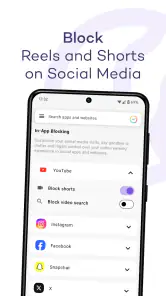
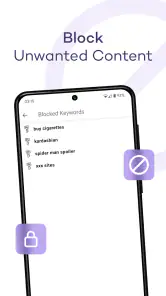
Yes. StayFree is designed to block distracting apps and sites, helping you stay focused and be more productive. It can complement its screen-time tools by making it harder to drift into apps or websites that interrupt your plans. If you want to reduce distractions rather than only observe your habits, this blocking feature is one of the app’s most relevant reasons to try it.
Who develops StayFree, and what kind of app is it?
StayFree is a productivity app developed by ST Pulse. Its focus is helping people understand and manage the time they spend on their devices, with features intended to support more focused use. It is free to download and is suitable for a general audience. If you are looking for a tool to encourage better digital habits, its straightforward purpose is easy to understand before installing.
Pros
- Tracks usage across all apps
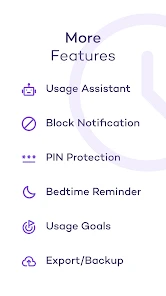
- Customizable alerts and reminders
- Easy to navigate interface
- Daily and weekly usage reports
- Minimal impact on battery life
Cons
- May not block apps completely
- Limited features in free version
- Ads can be intrusive
- Requires multiple permissions
- Data privacy concerns for some users
- Category
- Productivity
- Version
- Varies with device