Samsung Internet Browser
- 188.27K
- 3.6
- Installs
- 1.00B
- Price
- Free

Screenshots




Analysis by Reviewed
I judge a mobile browser by how comfortably it handles ordinary routines: checking a message link, looking up a detail while out, and reading for longer than a minute without making the screen feel crowded. Samsung Internet Browser is Samsung Electronics Co., Ltd.’s free communication app, and its appeal is strongest for people who want practical controls close at hand rather than a bare address bar. It is rated for Everyone, has been available since August 24, 2015, and its broad reach—over a billion installs—makes it a familiar option for many Android users. Its average rating is 3.6 from around 5.9 million ratings, a useful reminder that a popular browser still may not suit every preference.
Choose by the way you browse
Before switching, I’d ask what currently slows you down. If intrusive page clutter, bright screens at night, or a lack of control over browsing data bothers you, Samsung Internet has tools aimed at those specific irritations. If your priority is keeping bookmarks, passwords, and open tabs in step across several devices or services, compare how your current browser handles that workflow before moving. A browser can feel excellent on one phone and inconvenient as soon as you reach for a different device.
For a practical test, install it and use it for a few days on the sites you actually visit: a news page, a shopping page, and a site where you sign in. Check whether pages behave as expected with your chosen extensions and ad-blocking setup. That small trial tells you more than a quick speed test, because pages can vary and the most important question is whether your regular routine feels easier.
Articles Related to Samsung Internet Browser
I’d also consider how you use a phone when choosing between browsers. Someone who mostly opens links, checks a few pages, and reads on one device may care more about comfortable controls and page appearance than about a large syncing setup. Someone who moves constantly between a phone, tablet, and computer should test the whole handoff, not just the phone experience. The right choice depends on which inconvenience you notice most often.
A closer look at Samsung’s mobile browser
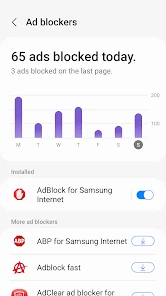
First off, let’s talk about the features that make Samsung Internet Browser stand out. This isn't your average browser; it's packed with goodies that make browsing not just a task, but a pleasant experience. One of my favorite features is the built-in ad blocker. We all know how annoying those pesky ads can be, right? With Samsung's ad blocker, you get a cleaner, more streamlined browsing experience.
Make reading more comfortable
Another cool feature is the night mode. As someone who’s guilty of late-night scrolling, having a darker interface is a blessing for my eyes and my sleep schedule. Plus, the browser supports extensions, which is pretty rare for mobile browsers. Whether you want to enhance your security or add a bit more functionality, the available extensions have got you covered.
One useful habit is to treat the ad blocker and extensions as adjustable tools, not a set-and-forget promise that every page will look identical. A page may rely on elements that a blocker changes, so if a checkout, sign-in, or embedded feature looks broken, temporarily reviewing the blocker settings can help isolate the cause. I also find night mode most useful for evening reading, but it is not a substitute for changing the brightness of a very bright screen.
You May Like

MobiOffice: Transforming Mobile Productivity with Seamless Integration

EA SPORTS FC™ Mobile Soccer: Redefining Mobile Sports Gaming

How Microsoft OneDrive Became a Mobile Productivity Giant

How Google Translate Breaks Language Barriers Effortlessly

Why Google Sheets Is the Ultimate Mobile Productivity Tool

Unveiling the Dynamic World of My Talking Tom Friends
A realistic day-to-day example is opening a link from a family chat while waiting for a bus, then returning to it later when you have time to read. A less cluttered page can make the first glance easier, while extensions give you a way to shape the browser around your preferences. For research, I’d still keep track of important pages with the browser’s ordinary tab and bookmark habits rather than assuming a private session is meant to preserve them.
There is a small but useful distinction between making a page look calmer and making it easier to use. Blocking clutter can help when you are reading an article, but it can also change what appears on a page that depends on scripts or embedded content. If something seems missing, I’d check whether the issue is limited to that one site before deciding the browser itself is at fault. That approach avoids disabling a setting everywhere just to fix one page.
One more practical point: extensions are most useful when you add them to solve a specific annoyance, rather than installing several at once and guessing which one changed a page. I’d start with the browser’s built-in options, then add only what supports a habit I actually have. This makes troubleshooting easier if a site stops behaving as expected and keeps customization from becoming another thing to manage.
Performance: Fast and Reliable
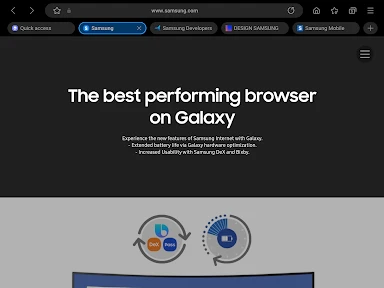
Now, onto performance. In my experience, the Samsung Internet Browser is super fast. Pages load quickly, and I rarely experience any lag, even with multiple tabs open. It supports the latest web technologies, which means it's ready to handle whatever modern websites throw at it. It’s like having a powerful engine under the hood of a sleek car.
Another point worth mentioning is the browser’s reliability. It's stable and doesn’t crash, which is crucial when you’re in the middle of something important. Samsung has done a great job optimizing it for both Android and iOS, making it a versatile choice for all users.
My advice is to judge responsiveness using your own connection and a few demanding pages, not by expecting every site to feel equally quick. Keeping many tabs open is convenient, but it can make it harder to find the one you need; closing finished pages is a simple way to keep a research session tidy. If a particular site behaves differently from your usual browser, trying it without extensions is a sensible first troubleshooting step.
For a practical comparison, I would use the same pages in Samsung Internet and the browser already on the phone, under similar conditions. Notice not only how fast the first page appears, but also whether returning to a tab, opening a sign-in page, or finding a saved page feels natural. A short personal test is more useful than treating a single fast load as proof that one browser will always be quicker.
That comparison is also a good way to decide whether a browser’s extra controls are worth learning. If you mostly open one-off links, you may barely notice differences beyond the page itself. If you revisit the same sites throughout the day, the feel of switching tabs and returning to a page matters more. I’d base the decision on those repeat actions rather than on a single impressive first impression.
Privacy and Security: Keeping You Safe
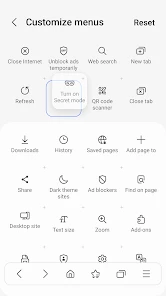
Let’s not forget about privacy and security. In today’s digital age, this is more important than ever. Samsung Internet Browser excels here by offering robust privacy settings. You have control over what data you share and with whom. There's also a secret mode that doesn’t track your history, perfect for those times you need a bit more privacy.
Moreover, Samsung has integrated useful security features like anti-tracking and secure browsing alerts, which warn you of potentially harmful sites. It’s like having a vigilant guardian watching over you as you surf the web.
Secret mode is helpful when you want a browsing session kept separate from your usual history, but I wouldn’t treat it as complete anonymity or a replacement for careful choices online. For everyday privacy, it is worth taking a moment to review the controls and decide which protections you want active. Alerts can provide a useful warning, yet I still avoid entering sensitive details on a site whose address or identity seems questionable.
Compared with a minimal browser, this one puts more emphasis on built-in privacy controls and customization. A browser tied closely to another ecosystem may be the better fit if your main goal is seamless continuity across that ecosystem’s devices. There is no universal winner: I’d choose based on whether the controls here matter more to me than the familiar syncing and habits I already have elsewhere.
One sensible way to use those controls is to separate routine browsing from occasional sensitive tasks. For example, secret mode can keep a one-off search from appearing in the ordinary history, while your regular tabs remain available for everyday reading. I would still check what information a website itself asks for and make a deliberate choice about sharing it; a browser’s privacy tools do not make every online interaction private by default.
If your phone is shared with another person, think about the difference between keeping a session out of the ordinary browsing history and protecting access to the device itself. A private window can be useful for a temporary search, but it does not replace your phone’s own lock or good judgment about what you enter on a website. I find that distinction more helpful than treating any browser setting as a blanket privacy guarantee.
Switching without losing your routine
Changing browsers has a small but real cost: you need to get used to a different layout, revisit saved pages, and check how your preferred sites handle sign-ins. I’d make the change gradually rather than deleting the old browser immediately. Keep the old one available while you test the new setup, especially if you rely on particular saved links or site-specific workflows. If those daily tasks feel natural after the trial, switching becomes much less of a chore.
This app is a strong candidate for someone who browses mainly on an Android phone and wants ad blocking, night-friendly reading, extensions, and privacy options in one place. I’d hesitate to recommend it to someone who is already happy with a cross-device browser routine and does not want to rebuild it, or to anyone who prefers the fewest possible settings. Its large audience and long presence do not remove the need to check whether its particular tools fit your habits.
To make a trial low-risk, keep your existing browser installed and choose a few representative tasks: open a link from a message, revisit a page you saved, sign in to a site you use often, and read something at night. Those steps reveal the everyday friction that a list of features cannot. If you decide not to switch, you can simply return to your previous setup without having reorganized your whole browsing life.
The main trade-off is not whether one browser is universally better; it is whether the controls are worth adapting to. A person who wants to adjust page clutter and browsing privacy may appreciate the extra choices. A person who values a familiar cross-device routine above all may find that learning a different browser is effort without enough payoff. Neither preference is wrong, so I’d make the call based on the task I repeat most.
For someone who uses a browser mainly on a Samsung phone, the choice may feel especially straightforward: try the controls that appeal to you and see if they improve the way you read and manage pages. If you use a mix of devices, make the trial more demanding. Check whether you can comfortably find the same saved pages and continue your usual tasks, rather than assuming that a pleasant phone experience automatically solves cross-device needs.
I would also avoid switching in the middle of a time-sensitive task, such as preparing a form or relying on a familiar sign-in flow. Try those sites when you have time to recover if a page looks different or asks you to sign in again. This is a modest precaution, but it makes the comparison fair: you can judge the browser without the pressure of needing a particular page to work immediately.
Final Thoughts
So, is the Samsung Internet Browser worth your time? I’d say absolutely. It combines a sleek design, fast performance, and robust security features to deliver a top-notch browsing experience. Whether you’re casually surfing or diving deep into research, this browser is more than capable of meeting your needs. Give it a try, and you might just find it becoming your go-to browser for Android or iOS.
My recommendation is to try it when you want more control over how mobile pages look and feel, then decide after using your own everyday sites. If your priority is a familiar browser ecosystem across multiple devices, compare that convenience before committing. For a reader who values a customizable phone-first browsing experience, Samsung’s offering is worth testing; for everyone else, the best choice is simply the one that makes regular browsing straightforward without adding friction.
Samsung Internet Browser Frequently Asked Questions
Will Samsung Internet Browser work on my Android device?
Samsung Internet Browser is intended for Android devices and is available for phones from Samsung and other manufacturers. Its mobile focus makes it an option if you want to browse websites on an Android phone. Before downloading, check that the app is compatible with your particular device and Android setup, then consider whether its privacy tools and customization options match the way you browse.
Can I make Samsung Internet Browser my default browser?
Samsung Internet Browser is a mobile web browser, so you can consider it for opening websites and links on your Android device. If you want it to handle links by default, look in your device’s settings for the option to choose a default browser. The exact steps can vary by device, so you may prefer to install and try the app before changing that setting.
Does Samsung Internet Browser offer accessibility or readability options?
The browser includes a high-contrast mode intended to improve readability, which may be useful if you prefer stronger contrast while reading webpages. It also offers customization options and extensions that can add tools such as translators. These features can help tailor the browsing experience, although what feels comfortable will depend on your preferences and the websites you visit.
Can I use Samsung Internet Browser without a Samsung account?
Samsung Internet Browser is available on Android devices from Samsung and other manufacturers, so it is not limited to owners of Samsung phones. A Samsung account is used for syncing bookmarks, open tabs, and saved pages across devices. If you mainly browse on one device, you can consider using the browser without relying on synchronization; the account-linked features are most relevant when you want a connected experience.
Does Samsung Internet Browser save passwords or help with logins?
Samsung Internet Browser integrates with Samsung Pass for secure login and supports biometric authentication as part of its security features. These options may be useful if you already use Samsung services and want a more connected way to handle sign-ins. Consider how you prefer to manage account access on your device, and review the available security settings to make sure they fit your needs.
Pros
- Fast browsing speed
- Highly customizable interface
- Built-in ad blocker
- Enhanced security features
- Sync across Samsung devices
Cons
- Limited to Samsung devices
- Occasional compatibility issues
- Not widely supported by all sites
- Lacks some advanced features
- Can be resource-intensive on older devices

- Category
- Communication
- Version
- Varies with device













