WhatsApp Messenger
- 1.97M
- 4.7
- Installs
- 10.00B
- Price
- Free

Screenshots




Analysis by Reviewed
When I need to coordinate with someone quickly, I usually start with a message rather than a phone call. That might mean checking whether a friend has left yet, sending a photo to family, or asking a group to settle on a meeting place. WhatsApp Messenger is useful in those moments because the same conversation can move from text to audio, a call, or shared media without making everyone switch apps.
From a quick message to a plan
A typical plan starts simply: I message one person, then bring the relevant people into a group chat if the decision affects everyone. That handoff is convenient, but it can also create noise. I mute busy groups when I need to focus and check them later, rather than letting every reaction interrupt the day. For a short-lived plan, I try to keep the key details in a clear message so people joining the conversation can find the address or time without scrolling through a stream of jokes.
This is where WhatsApp works especially well for families, friend groups, and people whose contacts already use it. It is a communication app from WhatsApp LLC, and its familiar phone-number setup makes it straightforward to start a conversation. It is free to download and use, rated for Everyone, and has an average rating of 4.7 from around 236 million ratings. Its reach—over 10 billion installs—also means it is often the practical choice when I need to include people with different phones.
The Latest on WhatsApp Messenger
Choosing the right handoff
Text is best when the information needs to be reread; a voice note is handy when I am walking or have more to explain than I want to type. If a plan is getting tangled in back-and-forth messages, a voice or video call can settle it faster. I like that these options sit alongside one another, though calls depend on a steady internet connection. When the Wi-Fi or mobile signal is weak, I switch back to text rather than assuming a call will be clear.
For an everyday example, imagine friends meeting after work. I can send the location in the group, share my live location while travelling if it helps them find me, and message when I arrive. That is a useful chain from planning to meeting, not just a collection of features. I would still avoid treating live location as something to share casually: it makes sense for a specific journey or meetup, and I stop sharing when the practical need is over.
Keeping a busy conversation usable
One practical habit I rely on is separating decisions from the chat around them. If a group is debating where to meet, I send the final place and time in one clear message once we agree. That gives latecomers a single point to check instead of asking everyone to reconstruct the plan. It is a small workaround rather than a formal planning system, but it helps keep a casual group useful without moving the whole conversation elsewhere.
When several people are sending photos or replies at once, I also try to quote or answer the message I mean rather than adding a vague “yes” to the end of the thread. In a one-to-one chat, context is usually obvious; in a lively group, it can disappear quickly. This is one reason I would use a group for shared decisions but take sensitive or individual follow-up into a direct chat. The handoff keeps the group focused and avoids making everyone part of a private exchange.
More From Our News Desk

Weather by Xiaomi Review: Clear at a Glance, Less Clear Up Close

X Under Pressure: Can It Recover When Posting Goes Wrong?

Clash of Clans Is Won Between the Battles

Android Auto Makes the Case for Quieter Car Software

MobiOffice: Transforming Mobile Productivity with Seamless Integration

EA SPORTS FC™ Mobile Soccer: Redefining Mobile Sports Gaming
Why WhatsApp Messenger is a Must-Have
First off, let’s chat about the basic stuff. WhatsApp Messenger is a free messaging app that lets you send texts, make voice and video calls, and share photos and videos. It’s available on both Android and iOS, and it’s super easy to set up. Just download the app, verify your phone number, and you’re good to go.
Seamless Communication
What I love about WhatsApp is how seamless it makes communication. Whether you’re texting your best friend or video calling a family member halfway across the world, the app keeps things smooth. The call quality is generally great, unless you’re somewhere with dodgy Wi-Fi, but even then, it holds up pretty well.
Group Chats Galore
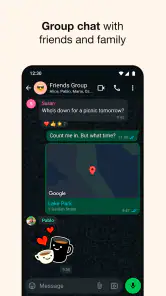
Now, if you’re like me and love being part of a group chat, WhatsApp is perfect. You can create groups with up to 256 people! That’s a lot of memes and birthday wishes flying around. Plus, you can mute the group if things get a bit too noisy—trust me, it’s a lifesaver during those late-night chat sprees.
Security and Privacy
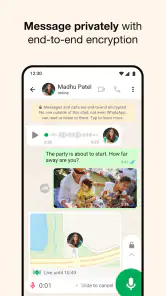
One of the standout features of WhatsApp is its end-to-end encryption. This means your messages, calls, and shared media are secure and can only be seen by you and the person you’re communicating with. It’s like having a private chat room that no one else can peek into. So, you can dish out all the gossip without worrying about prying eyes.
I still treat privacy as a set of habits, not a reason to share anything carelessly. Before sending a sensitive photo or message, I check that I am in the right conversation and that the intended person is on the other end. In group chats, the audience is larger than it feels during a quick exchange, so I keep personal details out of casual threads. Encryption is reassuring for message and call contents, but it does not prevent someone from saving or forwarding material they receive.
Sharing is Caring
Sharing photos and videos is a breeze. You can send media without having to compress it, which keeps the quality intact. I also appreciate the ability to share my live location with friends—super handy when meeting up or if you’re walking home late at night and want someone to keep an eye on you.
For a useful workflow, I send a photo directly to the person who needs it instead of dropping it into a crowded group where it may get buried. If the image is part of a decision—say, choosing an item or confirming a meeting point—I add a short explanation so the recipient knows what to look at. This small habit makes a busy chat easier to follow. If someone mainly needs a document archive, searchable project history, or formal task tracking, though, a dedicated work platform is usually a better fit than relying on message threads.
Customization Features
WhatsApp also lets you customize chats with wallpapers and notification sounds. It might seem minor, but having a unique look for each chat makes the experience a bit more personal. Plus, who doesn’t love a bit of customization?
Those small choices can also help me distinguish a family conversation from a noisy social group at a glance. I keep notifications quieter for chats that do not need an immediate response, then leave important one-to-one conversations easier to notice. That is more useful than trying to keep up with every message as it arrives. The trade-off is that muting a group can mean missing a time-sensitive detail, so I check it before a planned meetup rather than assuming someone will repeat the information privately.
Everyday handoffs between people and devices
For a family errand, the app can serve as a simple relay: one person sends a photo of what needs buying, another confirms they are on the way, and the person at home can clarify a detail without interrupting a call. I find this more reliable than splitting the exchange across a text-message thread and a separate calling app, particularly when everyone already checks the same chat. The limitation is that the conversation itself does not assign responsibility; I make the next step explicit, such as asking one person to pick something up, rather than assuming a message has been understood as a task.
For people moving between Android and iOS, that shared availability is often more useful than choosing an app for a particular phone brand. It is also a reason WhatsApp tends to work well for extended families or friend groups with mixed devices. Still, a contact needs to be reachable there for this convenience to matter. If someone prefers ordinary SMS or uses another service, I keep an alternative route available instead of making the app a requirement for joining a plan.
Who benefits most—and who may prefer another app
If most of the people I need to reach already use WhatsApp, it is an easy default for personal messaging, family coordination, and quick calls across Android and iOS. Compared with standard SMS, it brings media, group conversations, and internet-based calls into the same place. Compared with a video-call-first service, it is better for ongoing everyday chat than for a meeting that needs a formal agenda or work controls. The best alternative depends on the people involved: a messaging app is only convenient when the intended contacts are willing and able to use it.
I would not recommend making it the centre of every kind of communication. People who want a separate work and personal setup, or who need structured project discussions, may be happier with a tool designed around those needs. There is also a learning curve for anyone unfamiliar with phone-based messaging, even though getting started is simple. The app is free, but it offers in-app purchases ranging from about forty cents to nearly two hundred dollars per item, so I would check purchase details before confirming anything rather than assume every optional item is free.
Where the smooth flow can break
The app is strongest when a conversation is informal and the people involved are already comfortable using it. It is less convincing as a place to store decisions that must remain easy to find months later. A long-running group can bury a useful detail beneath newer messages, and muting it reduces interruptions at the cost of making me responsible for checking back. For plans with many dependencies, or work that needs clear ownership and a persistent record, I would move the important information to a purpose-built tool and use chat only for quick coordination.
There is also a social trade-off: when messaging is so easy, people may expect an immediate reply. I find it healthier to treat the app as a channel rather than a promise of constant availability. Muting a busy thread, responding when I have time, and making urgent requests explicit helps prevent routine messages from feeling like alarms. If a conversation is emotionally complicated, text can also make tone easy to misread; a call or an in-person conversation may be kinder and clearer than adding another paragraph to the chat.
Making the choice fit your routine
With around 2 million written reviews and a release date of October 18, 2010, WhatsApp has been around long enough to become part of many people’s daily routines. That does not make it the right choice for every conversation, but its combination of chats, calls, groups, and media makes it a practical one for keeping in touch. My advice is to use it for the people and plans it handles well, keep group notifications under control, and switch to a more specialized option when a conversation needs more structure.
In conclusion, WhatsApp Messenger is more than just a messaging app; it’s a platform that keeps you connected with your world. Whether you’re catching up with old friends, organizing a family reunion, or just sharing a funny meme, WhatsApp has got you covered. So, if you’re not on the WhatsApp train yet, hop on and see what you’re missing. Trust me, you won’t regret it!
WhatsApp Messenger Frequently Asked Questions
Can I use WhatsApp Messenger without sharing my phone number with other users?
WhatsApp Messenger accounts are linked to a phone number, which is an important part of setting up and using the service. That does not mean you should overlook how your information appears to others: review the privacy settings and consider who you want to communicate with before getting started. If keeping your number separate from messaging is essential to you, this account requirement may affect whether the app is a good fit.
How much storage space should I expect WhatsApp Messenger to use?
The storage WhatsApp Messenger uses can depend on how much you chat and how many photos, videos, documents, and other media you receive or keep. If you expect to use it for busy group conversations or frequent sharing, it is worth checking your device’s available storage from time to time. You can also be selective about the media you save, so your conversations do not become a source of files you no longer need.
Can I mute WhatsApp Messenger notifications or control when they appear?
You can review notification preferences as you set up WhatsApp Messenger and adjust them to suit your routine. This is especially useful if group chats become active or you do not want every incoming message to interrupt you. Your phone’s notification controls can also help manage alerts. Take a moment to explore these options rather than assuming the default settings will match how you prefer to stay connected.
Can I use WhatsApp Messenger while traveling or contacting people abroad?
WhatsApp Messenger can be useful for communicating with people in other places, provided both sides use the app and have an internet connection. When traveling, access to Wi-Fi or mobile data will affect whether you can send messages or make calls, so consider your connectivity options before relying on it. The app is a way to communicate over the internet, not a substitute for checking your own phone or data arrangements.
Is WhatsApp Messenger free to download on Android and iOS?
WhatsApp Messenger is free to download and is available for Android and iOS. Before installing, make sure you choose the version intended for your device and that your phone can install it. The app’s core purpose is communication through messages and calls, while optional in-app purchases may also be listed. Review any purchase details shown in the app store before confirming a transaction.
Pros
- User-friendly interface
- End-to-end encryption
- Wide user base
- Free voice and video calls
- Supports various media formats
Cons
- Requires phone number
- Limited cloud backup
- Data usage can be high
- Group chat limits
- No built-in GIF creator
- Category
- Communication
- Version
- Varies with device