Samsung Smart Switch Mobile
- 22.27K
- 3.8
- Installs
- 1.00B
- Price
- Free

Screenshots
Analysis by Reviewed
Moving to a new phone is less about the hardware than the small details you don’t want to lose: familiar contacts, old messages, photos, and the setup that makes a device feel like yours. I see Samsung Smart Switch Mobile as a practical bridge for that one-time job, especially when the destination is a Samsung phone. It is a free tools app from Samsung Electronics Co., Ltd., and its appeal is straightforward: make a phone change feel less like starting over. That convenience is useful, but it is not a reason to assume every item will move exactly as it did on the old device.
Effortless Data Transfer Experience
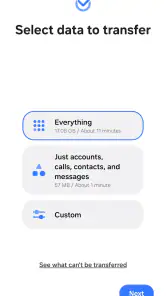
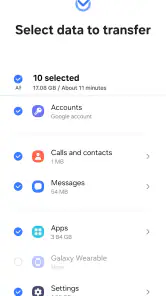
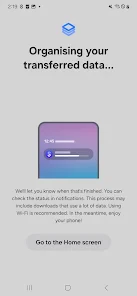
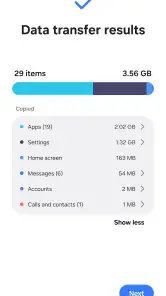
Switching phones can be as stressful as moving to a new apartment, but Samsung Smart Switch Mobile transforms this ordeal into a breeze. The app supports transferring a wide range of data types, including contacts, messages, photos, and even apps. Yes, you heard that right! You can transfer your beloved apps without redownloading them from scratch. It’s like magic, only better because it’s real. In practice, I would treat the transfer as a head start rather than a perfect clone: some apps may need you to sign in again or set preferences back up, so keep account details handy and check the important apps on the new phone before wiping or giving away the old one.
Setting Up Your New Device
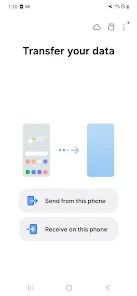
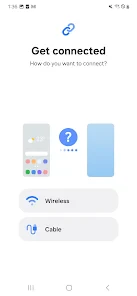
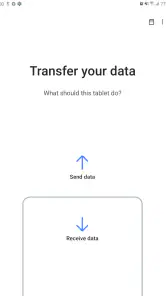
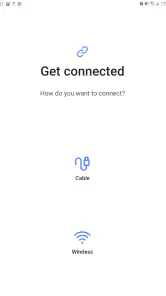
Setting up the app is as easy as pie. You begin by installing the app on both your old and new devices. The app guides you through the process with easy-to-follow instructions. You can choose between a wired transfer or a wireless one. Personally, I opted for the wireless transfer because who wants extra cables lying around, right? With just a few taps, the app works its magic, and voila! Your new phone is ready to go with all your data intact. For a less stressful run, I’d charge both phones first, keep them close together, and avoid relying on either one while the transfer is underway. A cable can be the more reassuring choice if you prefer a direct connection; wireless is tidier, but it leaves both devices occupied until the job finishes.
The Latest on Samsung Smart Switch Mobile
Compatibility and Speed
One of the standout features is the compatibility of the app. It works not just with Samsung phones but also with other Android and iOS devices. So, no matter what you’re switching from, this app has got your back. The speed of the transfer was surprisingly fast. I managed to transfer over 10GB of data in under 30 minutes. That’s quicker than my morning coffee run! The bigger advantage is avoiding the slow, piecemeal alternative of manually copying photos, contacts, and other items one at a time. Still, I wouldn’t plan a rushed departure around a transfer estimate: a large photo library or a weak connection can make the process feel longer, so start when you have time to let both phones finish without interruption.
Security and Peace of Mind
Now, let’s talk about security. In today’s world, data security is a top priority for everyone. Samsung Smart Switch Mobile uses secure encryption methods to ensure your data is safe during the transfer. Knowing that my data was protected gave me the peace of mind I needed during the switch. Plus, the app doesn’t store any of your data, which is always a good thing in my book. I still recommend checking what you select before starting, especially if you’re moving personal photos or messages, and keeping the old phone unchanged until you have confirmed that the files you care about are available on the Samsung. A transfer tool can reduce hassle, but it cannot replace a careful final check.
When Smart Switch Is the Right Tool
The clearest fit is someone setting up a Samsung phone from an older Android or iPhone and wanting familiar information in place quickly. Imagine receiving a new Galaxy before work: moving contacts and recent photos first can make the phone usable right away, while less urgent items can wait until you have time to review them. I’d also use it when helping a family member upgrade, because a guided transfer is easier to follow than manually explaining several separate export and import steps.
It is less compelling if you are keeping the same phone, moving only a handful of files, or switching to a non-Samsung destination. For a few documents, ordinary file sharing or cloud storage is often simpler; for an ongoing backup habit, a backup service is a better match than a migration app. Smart Switch is built around changing devices, not managing files every day, so I would install it when a move is planned rather than expect it to be a general-purpose organizer.
More From Our News Desk

Clash of Clans Is Won Between the Battles

Android Auto Makes the Case for Quieter Car Software

MobiOffice: Transforming Mobile Productivity with Seamless Integration

EA SPORTS FC™ Mobile Soccer: Redefining Mobile Sports Gaming

How Microsoft OneDrive Became a Mobile Productivity Giant

How Google Translate Breaks Language Barriers Effortlessly
Useful Checks Before You Start
One detail worth planning is what “apps transferred” means for your own setup. An app appearing on the new phone does not necessarily mean its sessions, locally saved content, or preferences have all followed it. I would open essential apps—particularly messaging, banking, and work tools—before resetting the old device, then confirm that any account-specific recovery steps are complete. This small check is more valuable than judging success by the progress screen alone.
If the app is not easy to find or download on a Samsung phone, the device’s Settings menu offers another route to open Smart Switch. That is a useful fallback during setup, when you may be focused on getting the phone ready and do not want to search through app screens. Samsung’s support for the app is also reflected in its broad reach: it has over a billion installs, with a 3.8 average from around 514,000 ratings. Those numbers show that it is widely used, though they do not guarantee a trouble-free transfer on every pair of phones.
What to Expect From the App
The app has been available since April 17, 2013, and its current version is 3.7.71.16; it runs on Android 6.0 or later. Its Everyone content rating makes it suitable for a broad audience, and there is no charge to use it. I would not let the rating or long availability replace practical preparation, though: compatibility and the items that can move depend on the devices and the data involved. Think of it as a guided migration option, then verify the result yourself.
Compared with copying items manually, Smart Switch is more convenient when there is a lot to move and the new phone is Samsung. Compared with cloud syncing, it is focused on getting information across during the change rather than keeping multiple devices continuously in step. That distinction matters: if your main goal is an ongoing copy of selected files, use the method designed for that routine; if your goal is to make a new Samsung feel familiar without rebuilding everything by hand, this app is the more natural starting point.
In conclusion, Samsung Smart Switch Mobile is a lifesaver for anyone looking to switch phones without the headache of data loss. It’s user-friendly, fast, and ensures your data is secure throughout the process. If you’re planning to get a new phone anytime soon, this app should definitely be on your radar. Trust me, it’s worth every megabyte! My recommendation is strongest for people moving to Samsung who value convenience and are willing to verify the essentials afterward. If you only need to move a few files, or want ongoing backup rather than a one-time migration, another approach may suit you better.
Samsung Smart Switch Mobile Frequently Asked Questions
Can I use Smart Switch to prepare a Samsung phone before setting it up?
Yes. Samsung Smart Switch Mobile is designed to help move information when you are changing phones or preparing a Samsung device. You can choose what to transfer and follow the app’s prompts to guide the process. It is a practical option to consider before completing setup, particularly if you want important information from your current device to be available on the new one.
Can I use Smart Switch when switching from an iPhone to a Samsung phone?
Yes. Smart Switch supports transfers from iOS devices to Samsung devices. The transfer options include using a USB cable or importing data from iCloud. Follow the instructions shown in the app and review the items available for transfer before proceeding. This can make the move to a Samsung phone more convenient, while letting you decide which information you want to bring along.
Can I open Smart Switch if I can’t download it from the app store?
Yes. If you can’t download Samsung Smart Switch Mobile, you can open Smart Switch from your Samsung device’s Settings menu. This can be a useful alternative when you are preparing a new phone and cannot install the app in the usual way. Smart Switch is a free app from Samsung Electronics Co., Ltd., and is intended to make moving information to a Samsung device easier.
Is Samsung Smart Switch Mobile free, and who develops it?
Samsung Smart Switch Mobile is a free application developed by Samsung Electronics Co., Ltd. You can use it to help move information when setting up a Samsung device, without paying for the app itself. It is listed in the Tools category, and its content rating is Everyone, so it is suitable for a general audience. As with any transfer, review the items selected before starting.
What is Samsung Smart Switch Mobile used for?
Samsung Smart Switch Mobile is a versatile app designed to help users transfer data seamlessly between devices. Whether you're upgrading to a new Samsung device or switching from a different brand, this app facilitates the transfer of contacts, photos, music, messages, and other essential data. It supports both Android and iOS devices, making the transition to a new phone smooth and hassle-free.
Pros
- Easy to use interface
- Fast data transfer
- Supports multiple file types
- Secure transfer process
- Compatible with most devices
Cons
- Requires both devices to be Samsung
- Needs stable internet connection
- Limited features on iOS
- May not transfer all app data
- Some users report occasional crashes
- Category
- Tools
- Version
- 3.7.71.16







