Contacts
- 30.05K
- 4.3
- Installs
- 5.00B
- Price
- Free

Screenshots
Analysis by Reviewed
I rely on my address book most when I’m trying to reach someone quickly, not when I’m thinking about contact management. That is where Contacts from Google LLC makes sense: it is a free communication app built around keeping names and details usable across devices. Its appeal is practical rather than flashy, though the experience depends on how you save and access your information.
Choosing where your address book lives
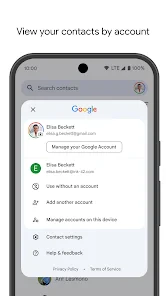
Before moving a large address book into any account-based system, I recommend checking a handful of entries that matter: a close relative, a work contact, and someone you call only occasionally. Confirm which account each belongs to and whether the details you expect are visible. This small trial can reveal a mismatch between the account you normally use and the one selected for contact storage before it becomes a problem across your whole list.
That distinction matters if you share a phone, use a work-managed device, or keep personal and professional accounts on the same screen. Seeing a contact in the app does not automatically tell you which account is responsible for it. I find it useful to treat account choice as part of organizing the address book, not as a setup detail to forget once the app is open.
The Latest on Contacts
Where connectivity makes the difference
The main benefit becomes clear when your contact list needs to follow you between devices. Google account syncing can help keep changes consistent, so correcting a number on one device is less likely to leave you with an outdated entry elsewhere. That convenience depends on the account and sync setup you use; I would check that the right account is selected before relying on a change being available everywhere.
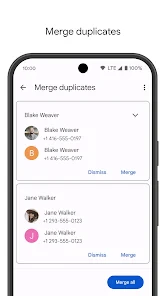
For example, if I update a family member’s number while arranging a pickup, having that correction carry over to another device can save an awkward call later. If a change does not appear where expected, I would first check the account being used and whether syncing is functioning, rather than entering the same person again. Duplicate entries can make a simple search more confusing.
For people with patchy connectivity, the practical question is not just whether a contact is visible at one moment, but whether the current version of a detail has reached the account and devices they rely on. I would avoid making a critical correction on one device and immediately assuming it has appeared everywhere. When timing matters, check the entry on the device you will actually use to place the call.
How it fits into everyday mobile use
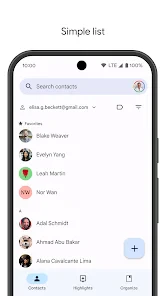
On a phone, a contact list is most useful when it reduces small delays: finding a colleague during a busy day, calling a school, or locating the right person in a family group. Search is more practical than scrolling once the list grows, while favorites can make frequent contacts quicker to reach. Labels also help separate work and personal connections, provided you take the time to apply them consistently.
More From Our News Desk

Clash of Clans Is Won Between the Battles

Android Auto Makes the Case for Quieter Car Software

MobiOffice: Transforming Mobile Productivity with Seamless Integration

EA SPORTS FC™ Mobile Soccer: Redefining Mobile Sports Gaming

How Microsoft OneDrive Became a Mobile Productivity Giant

How Google Translate Breaks Language Barriers Effortlessly
I would use labels for relationships that have a clear purpose, such as a project or a volunteer group, instead of creating a label for every passing situation. That keeps organization helpful rather than turning it into another task. If you mainly need a simple list and rarely edit it, the phone’s built-in contacts tool may already be enough.
A useful routine for busy days
Imagine leaving work and needing to coordinate a last-minute change to a family pickup. You can search for the person rather than scan a long list, use a favorite if they are someone you contact often, and check that the number shown is the current one. If you regularly speak with people in different parts of your life, labels can help you narrow the list without requiring you to remember exactly where you saved each person.
The trade-off is that these shortcuts depend on habits you build. Favorites need occasional attention when relationships or routines change, and labels are only useful if you apply them in a way you will remember. I would start with a few reliable categories and a short favorites list, then expand only if the list genuinely saves time. Over-organizing an address book can create more maintenance than the search problem it was meant to solve.
When something goes wrong
A contact app is only reassuring when you know where your saved information lives. Before changing phones or removing an account, I would confirm which account holds the contacts I care about and make sure the relevant entries are visible there. This small check is more useful than assuming every contact on a screen is automatically backed up.
If a name seems missing, try searching by a different detail you remember, such as part of the name or a number, and check whether you are viewing the expected account. A messy entry can also be harder to find than a missing one; taking a moment to correct the name or remove an obsolete number can prevent repeat frustration. I would avoid making several duplicate entries as a quick fix.
When a correction appears on one device but not another, I would work through the simple checks in order: confirm the selected account, check that the entry is saved where intended, and give syncing a chance to catch up before editing it again. Repeatedly changing the same contact on different devices can make it harder to tell which version is current. If a phone is being replaced, I would verify important entries on the account or device I plan to keep using before wiping or handing over the old one.
Keeping the data manageable
Contacts contains personal information, so I would be deliberate about which account I use and what details I add. A phone number and name may be all I need; extra notes or details are worth including only when they make the person easier to identify or reach. This is especially useful on a shared or work-managed device, where account choice can affect which contacts appear.
Google Contacts is a strong fit if you already use a Google account and want your address book organized around it. It is less compelling if you prefer to keep contacts entirely within a device or use another ecosystem as your main source of truth. Compared with a basic local address book, its account-based approach can make device changes easier, but it also asks you to pay attention to account selection and sync.
How it compares with other address books
The usual alternative is the contacts app already built into a phone. For someone who uses one device, wants a short list, and rarely changes entries, that simpler option may feel more direct: there is less to organize and no reason to build a routine around labels or account selection. Contacts makes more sense when a Google account is already central to how you move between devices and you want the address book to fit into that setup.
There is also a middle ground: keep your existing system as the main address book and use Google’s app only if its account-based organization is genuinely useful to you. I would not import or duplicate a whole list just to try a different interface. Test with a few entries first, then decide whether the added search and organization are worth changing your source of truth. Two competing copies can create uncertainty about which number is current.
A Fresh Experience in Contact Management
First things first, the user interface of Contacts is a breath of fresh air. It's intuitive, and even if you're not tech-savvy, navigating through it feels like a breeze. The design is sleek, with a minimalistic approach that emphasizes functionality over flashy features. You won't find unnecessary clutter here, just pure, unadulterated efficiency.
Effortless Synchronization
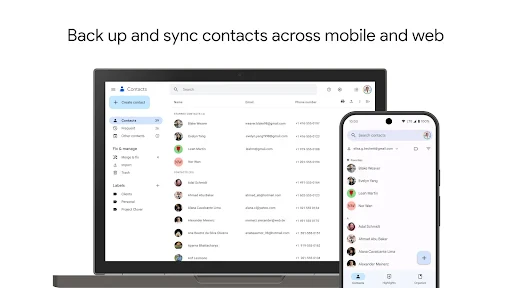
One of the standout features of this app is its synchronization capabilities. Whether you're switching phones or using multiple devices, Contacts ensures that your information is consistently updated across platforms. The app syncs with your Google account seamlessly, ensuring that you never lose any important details.
Imagine this: you save a contact on your Android device, and voila, it's already updated on your iOS device. It's like having a personal assistant who’s always got your back!
Smart Organization
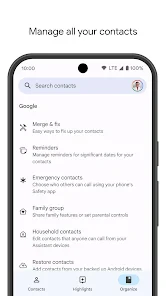
Gone are the days of scrolling endlessly to find a contact. With Contacts, you can categorize your connections with labels and groups. Want to keep your work contacts separate from personal ones? Easy peasy. Plus, the search function is incredibly robust, allowing you to find anyone with just a few keystrokes.
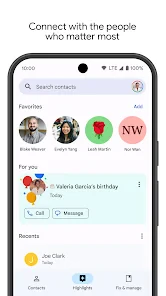
Additionally, the app offers a favorites section where you can pin your most important contacts for quick access. It's small touches like these that make using the app a delightful experience.
Privacy and Security
In today's world, privacy is paramount, and the Contacts app takes this seriously. Your data is encrypted, ensuring that your information remains secure. Plus, the app gives you control over who sees your information, with customizable privacy settings that let you decide how much you want to share.
So, rest easy knowing that your contacts are safe and sound.
The practical test is whether the app fits the way you already manage your address book. I would start by checking a few important entries, confirming their account, and adding a useful label or two before moving a whole list into a new routine. That gives you a clearer sense of whether its organization suits you without turning setup into a project.
Who will get the most from it
Contacts is a sensible choice for people who switch between devices, keep separate circles of work and personal connections, or want a searchable list that is tied to a Google account. It can also help in an ordinary situation like coordinating a family visit: pin the people you call most, search for the relative you need, and keep an updated number available when you move to another device.
By contrast, someone who wants a fully local address book, avoids account-based syncing, or already has a well-organized system in another service may not gain much. The app’s strength is connected organization, not a reason to move everything if your current setup works reliably.
What to expect from a widely used app
Contacts is a free app for everyone, developed by Google LLC. It has a 4.3 average from around 1.9 million ratings, with over 5 billion installs. That scale suggests it is a familiar option, but it does not remove the need to check your own account and contact sources. I would treat syncing as a convenience to verify, not as a substitute for knowing where important entries are saved.
It has been available since December 7, 2015, and its Everyone age rating makes it suitable for a broad audience. The large number of people who use and rate it can be reassuring when choosing a familiar tool, but popularity is not a replacement for a careful setup. I would still check that its approach matches how you want personal details stored and accessed.
Where I would draw the line
I would skip Contacts if keeping an address book separate from a Google account is a firm preference, or if your existing phone-based list already does everything you need. I would also be cautious about making it the only place you check during a device change until you have confirmed that the contacts you care about are associated with the account you intend to keep. The app is most convincing when its connected workflow solves a real problem, not simply because it is widely used.
My overall view is that Contacts is most useful when you want a straightforward address book that can work across your Google-connected devices. Its labels, search, and favorites make a large list easier to handle, while account dependence is the key trade-off. If that fits your habits, it is an easy app to recommend; if you want contacts kept apart from an online account, a device-first alternative may suit you better.
My connectivity verdict
For me, the strongest reason to choose this app is the chance to keep a well-organized address book available across the devices and accounts I actually use. That convenience is not magic: it relies on selecting the right account, keeping entries tidy, and checking that changes have reached the place I need them. A little attention at setup makes the day-to-day experience more dependable.
In conclusion, the Contacts app is a must-have for anyone looking to streamline their communication. It's not just about storing numbers; it's about managing them smartly and securely. Give it a try, and you might just wonder how you ever managed without it!
Contacts Frequently Asked Questions
Does Contacts back up my address book so I can reach it elsewhere?
Contacts is designed to back up your contacts and make them accessible wherever you use the app. That can be useful if you want your address book available beyond a single device, rather than relying only on information stored locally. Before downloading, consider whether this backup-and-access purpose matches the way you want to manage your contacts.
What kind of app is Contacts, and is it intended for everyday communication?
Contacts is a communication app for keeping contact information organized and accessible. Its focus is the people and details you need to reach, making it relevant for everyday personal or work connections. It is a focused address-book app rather than a general messaging service, so its usefulness depends on whether you want a dedicated place to manage your contacts.
Is Contacts free to download, and who makes the app?
Contacts is a free communication app developed by Google LLC. Its straightforward purpose is reflected in its short description, “Contacts,” while its summary highlights backing up contacts and accessing them anywhere. That makes it worth considering if you want a Google app for keeping contact information organized and available across your devices.
What features does the Contacts app offer?
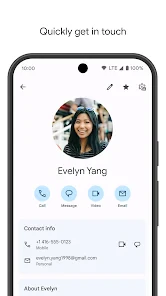
The Contacts app provides a comprehensive platform for managing your personal and professional connections. Users can store and organize contact information such as names, phone numbers, emails, and addresses. The app also allows for easy synchronization across devices, integration with social media profiles, and options to categorize contacts into groups for better organization.
Is the Contacts app secure and how does it protect my data?
Yes, the Contacts app employs robust security measures to protect your data. It uses encryption to safeguard your contact information both in transit and at rest. Additionally, the app requires user authentication to access sensitive information, ensuring that only authorized users can view or modify your contacts. Regular updates ensure that security protocols are up-to-date.
Pros
- User-friendly interface
- Efficient contact organization
- Seamless integration with other apps
- Quick search functionality
- Customizable contact fields
Cons
- Limited advanced features
- Occasional syncing issues
- Ads can be intrusive
- Requires internet for full functionality
- Lacks comprehensive backup options

- Category
- Communication
- Version
- Varies with device