Remote Control for Onn Roku TV
- 50.00
- 4.6
- Installs
- 100.00K
- Price
- Free
Screenshots
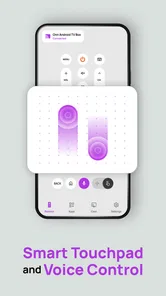
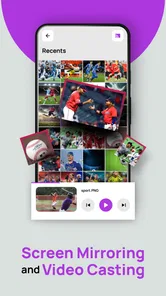
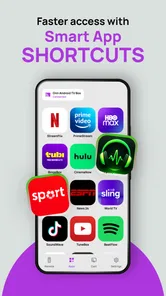
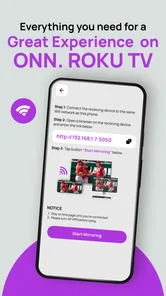
Analysis by Reviewed
Living with a Roku TV is easy until the physical remote disappears under a cushion, stays in another room, or becomes a source of minor household arguments. I tested Remote Control for Onn Roku TV with that everyday problem in mind, rather than treating it as a novelty. The app is designed for Onn Roku televisions, and its most useful quality is simple: it puts the basic remote experience on a phone that is usually much easier to find.
That makes it especially practical in a shared home. One person can be watching a film while another needs the television moved to a different input, the volume adjusted, or playback paused. Instead of searching the sofa or asking who last used the remote, the phone becomes an alternative control surface. My overall impression is positive, but it depends heavily on whether your television and phone are ready to communicate on the same network and whether you are comfortable with the trade-offs of using a phone instead of dedicated buttons.
How it feels in a real shared household
The clearest use case is a busy living room. Imagine someone cooking while listening to a program on the Onn Roku TV, another person sitting across the room, and the original remote nowhere in sight. Opening the app can be quicker than interrupting the room to search for it. The phone is already in a pocket or on a nearby table, so changing channels, navigating menus, or controlling playback feels less disruptive.
I also found the phone-based approach useful when the television is used by several people with different habits. A guest may not know which physical remote belongs to the TV, while a clearly labeled remote-control app is more self-explanatory. A teenager can use it without taking the household remote to another room, and an adult can regain control when the handset has been left beside a bed or in a backpack.
There is a small but important distinction here: this is not a replacement for household coordination. It gives another person a way to operate the television, but it does not automatically decide who should be in control. If two people open the app and try to navigate at the same time, the experience can become confusing. I would treat it as a convenient backup and shared tool, not as a system for assigning authority over the screen.
Why the phone can be better than the missing remote
The advantage is not that a phone has more satisfying buttons. A physical remote is usually faster for people who know it well, especially when they need repeated directional presses or quick volume changes. The advantage is availability. A phone is personal, visible, and less likely to remain permanently attached to the sofa.
That difference matters in homes where the remote is constantly moved. I would keep this app installed on the phones that are most likely to be used near the television, rather than expecting every visitor to configure it from scratch. It is also sensible to agree on a simple household rule: use the app when the physical remote is unavailable, then return the physical remote to one consistent place.
More From Our News Desk

Weather by Xiaomi Review: Clear at a Glance, Less Clear Up Close

X Under Pressure: Can It Recover When Posting Goes Wrong?

Clash of Clans Is Won Between the Battles

Android Auto Makes the Case for Quieter Car Software

MobiOffice: Transforming Mobile Productivity with Seamless Integration

EA SPORTS FC™ Mobile Soccer: Redefining Mobile Sports Gaming
The app’s stated focus is narrow, which I consider a strength. It is not trying to become a general smart-home dashboard. Its purpose is to control an Onn Roku TV, with casting and mirroring included in its positioning. That focused design makes the decision easier: if your main problem is operating that television from a phone, it is relevant; if you want to control lights, speakers, or several brands from one place, you will probably need a broader alternative.
Setup, connection boundaries, and daily reliability
The first thing I would check before relying on it is the television model. The app is specifically aimed at Onn Roku TVs, so owning a Roku device from another manufacturer is not the same situation. Roku software may look familiar across devices, but compatibility should be treated as a device-specific question rather than assumed from the word “Roku” alone.
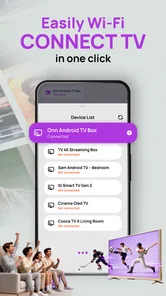
Network conditions are the next practical boundary. A phone remote normally needs a path to the television, so the phone and TV should be connected in a way that allows them to see each other. Guest networks, separated Wi-Fi bands, workplace restrictions, or a television connected through a different network can make discovery fail even when both devices appear to have internet access. If the app cannot find the TV, I would first check the network arrangement before blaming the app.
This is one of the less obvious trade-offs compared with an infrared handset. A traditional remote can often operate the television without depending on Wi-Fi discovery. A phone-based remote is more flexible in some ways, but it is also more sensitive to network isolation. That means it is excellent as a convenient household backup when the home network is uncomplicated, but less dependable as the only control method in a technically segmented setup.
During setup, I would keep the physical remote close by. If the television needs a confirmation step, a pairing action, or a change in network settings, the phone cannot always solve the initial problem by itself. Once the connection is established, the app becomes much more useful, but the original remote remains valuable for first-time configuration and recovery.
Another practical question is whether the app can wake the television or control it when the TV is in a deeper standby state. I would not build a household routine around that assumption without testing the specific television. The safest workflow is to confirm that the app can perform the actions you use most often, such as navigation, volume adjustment, and playback control, while the TV is on and connected.
The application comes from MONIQ TAP., CO LTD and is currently at version 1.3. It supports Android from version 8.0 onward, which keeps it accessible to many older phones, although the experience will still depend on the phone’s own speed, battery condition, and network behavior. I like that the minimum operating-system requirement is not especially demanding, but an older phone with aggressive battery saving may interrupt an app that needs to remain available for quick access.
How I would make the connection less frustrating
I would begin with both devices on the same ordinary home network, close the app completely if the television is not discovered, and reopen it after checking the TV’s connection. I would also avoid testing for the first time during a live sports match or a family movie night. A quiet setup session gives you time to identify whether the problem is compatibility, network visibility, or a simple selection mistake.
For shared use, I would not install it on every phone automatically. Choose the phones that genuinely need control, test them one at a time, and keep the household’s physical remote in its usual place. This reduces the chance of several people attempting to manage the same screen without warning.
The app is free to install, with optional in-app purchases listed from $4.99 to $39.99 per item. That makes trying the basic experience relatively low-risk, but I would still examine what an offered purchase unlocks before paying. A free download does not mean every function is necessarily available without an upgrade, and the value of any paid option depends on whether you need more than straightforward remote access.
Coordinating control without turning the room into a tug-of-war
Shared-device use is where this app needs a little discipline. A phone remote is personal, so it can feel private even when it controls a communal television. If one person changes the program while another is watching, the technical ability to do so does not make it considerate. I recommend agreeing on when remote control from a phone is acceptable, especially in homes with roommates or several adults.
A useful arrangement is to assign the app a clear role. For example, the person closest to the kitchen can pause playback when dinner is ready, while the person watching can continue navigating normally. Another option is to use the app only when the physical remote is missing. These simple boundaries make the tool feel helpful rather than intrusive.
The app can also reduce unnecessary handoffs. In a household where one person is learning how the Roku interface works, another person can make a quick adjustment from their own phone without taking over the entire viewing session. That is a subtle benefit: the app is not only a remote replacement, but also a way to coordinate small actions while leaving the main viewer in control.
On the other hand, I would avoid treating a phone as a universal emergency remote during a network outage. If the home Wi-Fi is down or the television is no longer reachable, the app may not be able to help. Keep the physical remote accessible, and do not store it in a place that requires the phone app to retrieve it. That sounds obvious, but it is exactly the kind of circular problem that can make a convenient backup useless at the worst moment.
Casting and mirroring add another layer to the household conversation. These functions can be useful when one person wants to show content from a phone on the larger screen, but shared screens need consent. Before sending anything to the TV, I would check who is watching and whether the screen is being used for something important. The technical convenience is real, but the social rule matters just as much.
Where it fits beside the usual alternatives
The most direct alternative is the original Roku remote. That remains the better choice for fast tactile control, batteries that are easy to replace, and operation without relying on a phone screen. If your physical remote is always available and your household prefers buttons, this app may feel unnecessary.
A second alternative is the remote function built into a broader Roku ecosystem or another general remote application. Those options may make more sense if you regularly manage several compatible devices. Their advantage is breadth; their drawback can be extra menus, more complicated setup, or less focus on the Onn Roku television you actually use.
This app is most appealing in the middle ground. It is more convenient than searching for a lost handset, but more focused than a large smart-home controller. I would choose it for a single Onn Roku TV in a home where phones are always nearby. I would look elsewhere if I needed reliable control across multiple television brands, wanted physical buttons, or expected the remote to work independently of the home network.
Age, trust, and sensible access in a family setting
The content rating is Everyone, which makes the app suitable in an age context for general household use. That rating describes the app’s audience, not a set of family-control rules. I would not assume it provides screen-time management, viewing restrictions, or a way to approve every command. Those responsibilities still belong with the adults managing the television and the streaming services connected to it.
For younger users, the app can be convenient because a phone may be easier to hold than a small remote, but convenience should be balanced with trust. A child who can control the TV from a phone may also be able to interrupt other people’s viewing. In my view, the best approach is to teach when the app may be used and keep the primary household remote available for adults, rather than relying on the app to enforce behavior.
Account boundaries deserve similar attention. The app’s purpose is controlling the television; it should not be confused with ownership of the streaming accounts shown on that television. If several people share the device, decide who is allowed to open apps, change profiles, or cast content. The phone remote can make those actions quicker, but it does not separate household identities for you.
Guests are another case. I would be comfortable letting a trusted guest use the app for basic volume or playback help after showing them the correct TV. I would be more cautious about setting it up on a visitor’s phone if the household is not comfortable with that person having ongoing control. Removing the app later may be simple, but the decision should be made before granting access, not after an awkward interruption.
Privacy is also worth considering in ordinary terms. A phone remote is personal equipment, and the person holding it can see what they are doing on their own screen while operating the TV. That can be preferable to passing a shared handset around, but it also means each user should understand which television they are controlling. In a home with more than one compatible screen, clear naming and careful selection become more important than they would be with a single physical remote.
Small workflows that make the app more useful
My first practical tip is to keep the app near other everyday utilities rather than burying it in a large folder. A remote is most valuable when it can be opened immediately. I would also test the connection from the usual viewing area, because a setup that works beside the router may not behave the same way from a bedroom or kitchen.
My second tip is to use it for short interventions, not necessarily for an entire evening. A phone screen can lock, rotate, dim, or become occupied by another task. For long viewing sessions, the physical remote is often less tiring. For pausing a program while answering the door or adjusting volume during cooking, the app is much more compelling.
My third tip is to establish one “known good” phone in the household. If the app works reliably there, that phone can serve as the first troubleshooting reference when another device fails to connect. This avoids changing several variables at once and helps distinguish a television or network issue from a phone-specific issue.
A fourth useful trade-off concerns battery life and attention. Using a phone as a remote means the device is occupied, and frequent screen use can be inconvenient when the phone is needed for calls, navigation, or another task. I would not choose this app for a person who dislikes unlocking a phone repeatedly or who wants a remote that can be operated by feel in a dark room.
Who should install it and who should skip it
I would recommend Remote Control for Onn Roku TV to someone with a compatible Onn Roku television who often misplaces the physical remote, shares the screen with other people, or wants a quick way to handle playback and volume from a phone. It is also a sensible backup for a guest room or a common area where the remote is frequently carried away.
The app is less suitable for someone who owns a different television brand, has a complicated network that isolates devices, or expects a phone remote to replace every function of the original handset. It is also not my first choice for people who need tactile buttons, instant operation after a power or network problem, or one controller for a mixed collection of smart-home products.
The audience response is encouraging: the app holds a 4.6 average from around 883 ratings and has passed 50K installs. Those figures suggest that the basic idea is resonating with a meaningful group of users, while the relatively focused purpose makes the result easy to understand. I would still judge it by your own Onn Roku TV and network, because remote apps can feel excellent in one household and inconvenient in another.
Its release date is Mar 20, 2026, and the current version is 1.3, so I would keep expectations realistic about a young product. The important question is not whether it replaces the original remote in every situation, but whether it solves the specific moments when the original is unavailable. In my experience, that is where its value is clearest.
My household verdict
I see this as a practical companion for an Onn Roku TV rather than a complete replacement for dedicated hardware. It makes shared living-room routines smoother, gives trusted household members another way to help with playback, and turns a nearby phone into a useful fallback. Its strongest benefit is availability; its main weakness is dependence on compatible devices and a cooperative network.
The best way to use it is with clear boundaries: confirm the TV model, test the connection before you need it, keep the physical remote somewhere known, and agree on who should control a shared screen. Those steps matter more than any extra convenience because they prevent a simple remote app from becoming another source of confusion.
For a single compatible Onn Roku television, I think the free installation is worth trying. Just remember that the app is a phone-based tool, not a substitute for household judgment, account separation, or a backup plan when Wi-Fi fails. If that matches your needs, it is a focused and useful addition to the living room, especially in a home where the question is not “Can the TV be controlled?” but “Who has the remote right now?”
Remote Control for Onn Roku TV Frequently Asked Questions
What devices and operating systems can run Remote Control for Onn Roku TV?
Remote Control for Onn Roku TV is an app for controlling an Onn Roku television with a mobile device. It is available for Android and iOS, and the Android version requires Android 8.0 or later. Before downloading, check that your phone’s operating system is compatible and that you can connect it to the same Wi-Fi network as your television.
What is Remote Control for Onn Roku TV, and how does it work?
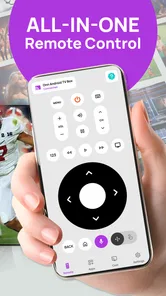
Remote Control for Onn Roku TV is a mobile application designed to let you control a compatible Onn Roku television from an Android or iOS device. After opening the app, your phone generally searches for Roku TVs connected to the same Wi-Fi network. Once you select your television, you can use virtual navigation buttons, volume controls, playback commands, and other available remote functions.
Does my phone need to be connected to the same Wi-Fi network as my Onn Roku TV?
Yes, in most cases your smartphone and Onn Roku TV must be connected to the same wireless network for the application to discover and communicate with the television. If the TV does not appear, check that both devices are using the same Wi-Fi connection, disable mobile data temporarily, and restart the app. Guest networks, VPNs, or router isolation may also prevent pairing.
Can this app replace the original Onn Roku remote completely?
The application can replace many everyday functions of the physical remote, including directional navigation, selecting channels or apps, playback control, volume adjustment, and text entry through the phone keyboard. However, available features may vary by TV model and app version. Some functions, such as powering the television on from standby, may not work unless the TV supports the required network settings.
Is Remote Control for Onn Roku TV free to download and use?
The app is free to download, though it offers in-app purchases ranging from about five dollars to forty dollars per item. Check the purchase options in the app before choosing any paid features. Remote-control basics may be enough for everyday use, while optional purchases can affect the overall experience depending on what you want from the app.
Pros
- Simple pairing process with compatible Onn Roku TVs
- Convenient keyboard for faster text entry and searches
- Works over Wi-Fi without requiring a separate physical remote
- Includes quick access to common Roku navigation controls
- Useful backup when the original remote is lost or unavailable
Cons
- Requires the phone and TV to share the same Wi-Fi network
- May not work with every Onn Roku TV model or software version
- Ads may interrupt use or clutter parts of the interface
- Connection can drop when the Wi-Fi signal is weak or unstable
- Some features may require extra permissions or in-app purchases









