Air Tag Detector: Find & Track
- 241.00
- 4.5
- Installs
- 100.00K
- Price
- Free

Screenshots
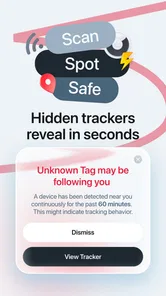
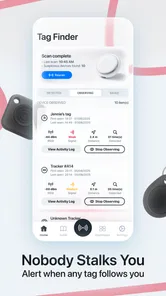
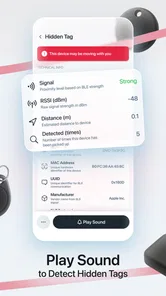
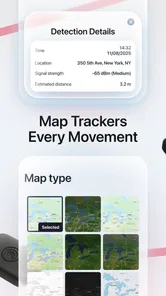
Analysis by Reviewed
I approached Air Tag Detector: Find & Track as a practical privacy tool rather than something I would leave open for entertainment. Its purpose is straightforward: help me notice unknown AirTag tracking nearby. That makes it most useful in situations where I need a second check around my belongings, home, car, or travel routine. My overall view is positive, but with an important qualification: an app like this can support awareness, not replace careful judgment or the built-in safety systems already available on a phone.
What makes this app worth considering is its narrow focus. Instead of presenting itself as a general security suite, it concentrates on the uncomfortable possibility that an unfamiliar tracker may be moving with me. I like that clarity. When a tool has one job, it is easier to understand what I should do with it and when I should not rely on it for something else.
How the detector fits into real privacy checks
In everyday use, I would treat the app as part of a simple routine. If I had borrowed a vehicle, stayed in a hotel, picked up second-hand luggage, or noticed an unfamiliar item among my belongings, I would run a check and then investigate any result calmly. The important point is not to react to every detection as proof of malicious tracking. A family member’s AirTag, a shared bag, or a nearby traveler’s device can create an innocent explanation.
That distinction is one of the most useful lessons with this type of tool. A detector can point my attention toward something, but it cannot automatically tell me why the tracker is there. I still need to inspect the area, think about who may own the item, and decide whether the finding matches my circumstances. Used this way, the app becomes a practical prompt for further checking instead of a source of unnecessary panic.
The app comes from MONIQ TAP., CO LTD and sits in the tools category. It is free to install, which lowers the barrier for someone who wants to try a privacy check without committing to a subscription immediately. The age rating is Everyone, so its presentation is intended to be accessible to a broad audience. It supports Android 8.0 and later, while the current release is version 3.4.
Its public reception is encouraging: the app holds a 4.5 average from around 6.5 thousand ratings and has passed 100 thousand installs. Those figures suggest that it has reached a meaningful group of people, although popularity alone does not prove that every detection will be equally useful in every environment. I would still judge it by how clearly it helps me interpret a situation, not just by its rating.
Why a focused detector can be more useful than a broad security app
Many people already have general security tools installed, but those apps often cover unrelated concerns such as malware, suspicious links, or account protection. That does not necessarily help when the worry is a physical Bluetooth tracker hidden in a bag or vehicle. Air Tag Detector: Find & Track addresses a more specific concern, which makes it easier to remember during the moments when it matters.
More From Our News Desk

Weather by Xiaomi Review: Clear at a Glance, Less Clear Up Close

X Under Pressure: Can It Recover When Posting Goes Wrong?

Clash of Clans Is Won Between the Battles

Android Auto Makes the Case for Quieter Car Software

MobiOffice: Transforming Mobile Productivity with Seamless Integration

EA SPORTS FC™ Mobile Soccer: Redefining Mobile Sports Gaming
I also see value in using it before and after a change of environment. A quick check after arriving at temporary accommodation can provide reassurance, while another check after leaving a shared car or borrowed item can help separate what was already present from what appeared later. This is not a substitute for inspecting a room or contacting someone I trust, but it gives the process a clear starting point.
A less obvious use is creating a personal baseline. If I regularly carry several devices or share space with people who use trackers, I can learn what normal activity looks like around me. That helps prevent overreacting to familiar equipment. The trade-off is that a baseline only works if I record the context mentally and avoid assuming that every future result is harmless simply because a similar signal appeared before.
Another sensible workflow is to run the detector away from crowded public places when possible. Airports, cafés, public transport, and busy apartment buildings contain many nearby devices, so a result may be harder to interpret. Moving to a quieter area and checking again can make the situation easier to understand. This is a practical limitation of the environment rather than a flaw unique to this app, but it affects how much confidence I would place in any scan.
The strength is accessibility, not forensic certainty
The free entry point matters. Someone who has never thought about unwanted tracking can install the app and explore the idea without first buying specialized equipment. That makes it suitable for a friend who wants a simple first step after hearing about AirTag misuse, or for a traveler who wants an additional privacy check while away from home.
I would describe the app as an awareness layer. It can make a hidden concern visible enough to investigate, which is valuable because physical trackers are easy to overlook. At the same time, I would not present a scan result as courtroom-level evidence or as a complete explanation of what is happening. A good privacy tool should encourage sensible follow-up, and the user has to supply that judgment.
The app is also more useful when I define the question before scanning. Am I checking a backpack, a car, a room, or a group of personal items? Having a specific target reduces the chance that I will treat every nearby signal as equally important. This small habit is one of the best ways to get more value from a focused detector without expecting it to solve the whole problem automatically.
The main limitation: detection is only the beginning
The meaningful weakness is that finding a possible tracker does not finish the investigation. I may still need to locate the physical object, identify its owner, decide whether its presence is legitimate, and choose what to do next. That can feel unsatisfying if I expect a single tap to deliver a complete answer. The app is helpful at the alert stage, but the difficult human decisions remain mine.
False concern is another realistic risk. In a busy building or shared vehicle, nearby AirTags can belong to other people. A detection may be technically accurate while still being irrelevant to me. I would therefore avoid using the app as a reason to confront someone immediately. I would repeat the check in a quieter setting, inspect my own possessions, and involve a trusted person if the situation felt threatening.
There is also a practical difference between privacy awareness and emergency response. If I believed someone was actively stalking me, I would not rely on repeated scans alone. I would preserve relevant details, seek help from someone I trust, and contact appropriate local services when necessary. The app can support that process, but it should not delay it.
The free model deserves a close look as well. Optional in-app purchases range from $1.99 to $34.99 per item. That does not make the initial download costly, but it means I would check what is included before paying for anything. For a casual user who only wants occasional reassurance, the free experience may be enough; for someone considering frequent use, understanding the paid boundaries becomes part of the decision.
This pricing structure is especially important because a detector is not the kind of app I necessarily need every day. I would be cautious about purchasing extras simply because I felt anxious after one unusual result. First I would repeat the check, eliminate obvious innocent explanations, and decide whether the added functionality genuinely changes my privacy routine.
What I would do after an unexpected result
My first step would be to stay calm and repeat the check in a less crowded location. I would then look through bags, coat pockets, luggage compartments, and the interior of a vehicle without damaging anything. If the tracker seemed connected to someone I know, I would ask directly rather than assume bad intent.
If I found an unfamiliar device and could not explain it, I would document the circumstances and ask another person to be present. That second opinion is valuable because anxiety can make ordinary details look suspicious. If I felt unsafe, I would prioritize leaving the location and seeking help instead of spending a long time trying to solve the issue alone.
This workflow shows where the app is strongest and where it stops. It gives me a structured reason to check, but it does not remove the need for common sense, physical inspection, or personal safety planning. The best result is not simply a detection; it is a clearer and calmer decision about what to do next.
Who will get the most from it
I think the best audience is people who want an accessible way to add AirTag awareness to their normal privacy habits. Travelers, rideshare users, students living in shared housing, people buying used bags or vehicles, and anyone who occasionally borrows personal items may appreciate having a dedicated detector available.
It can also suit relatives who are not comfortable with complicated security software. The app’s focused purpose is easier to explain than a large privacy suite: use it when you have a reasonable concern about an unknown tracker, then investigate the result carefully. That simplicity can make someone more willing to perform a check instead of ignoring the concern altogether.
I would be more hesitant to recommend it as the sole protection for someone facing a serious, ongoing safety threat. In that situation, the app should be only one small part of a wider plan involving trusted contacts, documentation, device security, and professional assistance. A person who wants a complete anti-stalking service, broad network monitoring, or general phone protection should compare it with tools built specifically for those purposes.
It is also not the right choice for someone who expects perfect certainty from every scan. Wireless signals exist in busy surroundings, and the meaning of a detection depends on context. If a user is likely to interpret every nearby tracker as proof of deliberate surveillance, the app could increase stress rather than reduce it. The right mindset is curious, cautious, and willing to verify.
How it compares with the usual alternatives
The most obvious alternative is relying on the phone’s own unwanted-tracker alerts. Those system-level protections can be convenient because they work in the background and do not require me to remember to open a separate app. For many people, that built-in approach may be enough for everyday use.
A dedicated detector has a different appeal: I can choose when to perform a deliberate check because a particular situation feels unusual. That is useful after entering a borrowed car or unpacking in a temporary room. The trade-off is that a manual tool depends more on my attention and interpretation, while background protections can provide passive coverage.
Another alternative is a general privacy or security app. Those may cover more areas, but their breadth can make the specific AirTag concern less prominent. Air Tag Detector: Find & Track is easier to understand if my immediate question is about unknown physical tracking rather than malware, passwords, or network threats.
Dedicated hardware scanners are a different category again. They may appeal to professionals or people who need specialized inspection, but they can be more complicated and less convenient for a casual check. I would choose this app when portability and a low-cost starting point matter more than having a specialized instrument. I would choose a broader or professional solution when the situation demands wider evidence or deeper technical analysis.
Small habits that make the app more useful
I would avoid scanning only once and treating that result as final. A second check after moving away from crowds can help clarify whether a signal is associated with my belongings or simply with the surrounding environment. Repeating the process at a different time can also make the conclusion more grounded, especially when I am checking a shared space.
I would keep the app’s role narrow. It is not a battery optimizer, a phone cleaner, a replacement for account security, or a general-purpose tracker for my own possessions. Keeping that boundary in mind prevents disappointment and helps me decide when another tool is more appropriate.
Finally, I would not let the convenience of a free download encourage careless handling of sensitive situations. If a result concerns me, I would avoid posting identifying details publicly, preserve only the information I need, and ask for support privately. The app can start a useful conversation about privacy, but responsible handling of that information matters just as much as the scan itself.
My final recommendation
After weighing its focused purpose against the need for follow-up judgment, I see Air Tag Detector: Find & Track as a sensible first-line privacy tool for Android users who want an accessible way to check for unknown AirTag tracking. Its 4.5 average and growing user base make it easy to take seriously, while the free starting point makes experimentation less intimidating.
I would recommend it to a friend who travels, shares vehicles or living spaces, buys used belongings, or simply wants a manual check available when something feels out of place. I would explain that the app can help identify a reason to investigate, not automatically prove who placed a tracker or why it is nearby.
My verdict is favorable with that boundary clearly stated. Choose it for focused awareness and convenient checks; look elsewhere if you need comprehensive phone security, professional investigation, or a complete response plan for stalking. Used thoughtfully, this is a practical privacy companion rather than a magic answer, and that is a fair, useful role for a free tools app.
Air Tag Detector: Find & Track Frequently Asked Questions
Is Air Tag Detector: Find & Track free to download?
Air Tag Detector: Find & Track is free to download, so you can try its tracker-detection features without paying upfront. The app also offers optional in-app purchases, with prices ranging from around two dollars to around thirty-five dollars per item. Check the purchase details shown in the app before confirming anything, and make sure any purchase is intentional.
What is Air Tag Detector: Find & Track used for?
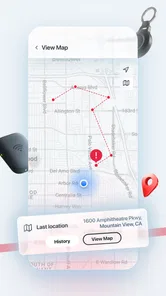
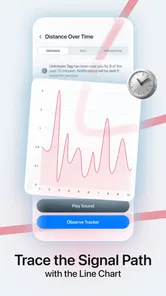
Air Tag Detector: Find & Track is designed to help you identify unknown Bluetooth trackers, such as AirTags and similar accessories, that may be traveling with you. After scanning nearby devices, it can display detectable tracker information and guide you through the next steps. It is mainly a privacy and personal-safety tool, not a guaranteed way to locate every tracking device in every situation.
How does the app detect an unknown AirTag or Bluetooth tracker?
The app uses your phone’s Bluetooth capabilities to scan for nearby compatible tracking devices. For the scan to work properly, Bluetooth and any requested permissions must be enabled, and you may need to move around because walls, vehicles, distance, and interference can affect detection. A result does not automatically prove malicious intent, since a tracker may belong to someone nearby or be attached to a legitimately shared item.
Does Air Tag Detector: Find & Track locate the owner or exact position of an AirTag?
No. The app cannot normally reveal the owner’s identity or provide the precise GPS location of an AirTag simply because it detects its Bluetooth signal. Its purpose is to alert you to potentially unfamiliar trackers in your surroundings. Detection accuracy can vary, so you should treat the information as an indication for further checking rather than definitive evidence about who placed the device or where it originated.
What permissions does the app require, and are they safe to grant?
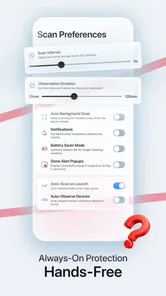
Depending on your device and operating-system version, Air Tag Detector: Find & Track may request Bluetooth, nearby-device, location, or notification permissions. Some mobile platforms associate Bluetooth scanning with location access, even when the app is not recording your GPS route. Before accepting, review the permission explanations and the app’s privacy policy. You can also revoke permissions later through your phone’s settings if they are no longer needed.
Pros
- Quickly scans nearby Bluetooth devices for possible trackers.
- Simple interface makes the main detection tools easy to access.
- Useful for checking unfamiliar tracking devices in public places.
- Can help users identify suspicious devices without technical knowledge.
- Provides an extra privacy check when traveling or visiting new locations.
Cons
- Bluetooth scans may detect many harmless devices
- causing confusing results.
- Detection accuracy can vary with distance
- walls
- and the tracker's battery level.
- Some features may require in-app purchases or a subscription.
- It cannot guarantee that every hidden tracker will be discovered.
- Frequent scanning may increase battery usage on your phone.









