Real Weather
- 248.00
- 4.2
- Installs
- 1.00M
- Price
- Free
Screenshots
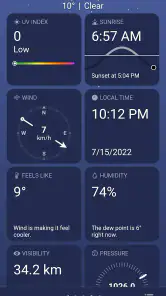
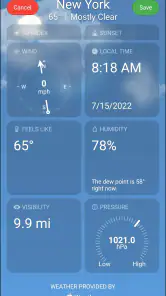
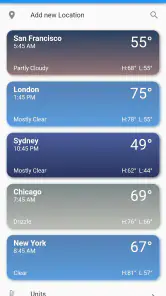
Analysis by Reviewed
Have you ever found yourself staring at the sky, wondering whether to grab that umbrella or leave it behind? Or perhaps you're planning a weekend getaway and need to know if you'll be basking in sunshine or dodging raindrops. Enter Real Weather, an app designed to make weather forecasting feel like a breeze.
Why the first week feels appealing
When I try a weather app, the first few checks are usually practical: Is it cold enough for a heavier coat, will rain overlap with my walk, and should I move an errand earlier? Real Weather’s visual presentation gives those everyday questions a clear starting point. I can scan the conditions, then look closer when a decision depends on timing rather than just the general outlook.
That first impression matters because a weather app has to earn a place in a daily routine, not just look appealing on the first check. I would start by treating its overview as a quick planning aid, then return later to see whether the details help with decisions I actually make. A forecast is most useful when it changes what I pack, when I leave, or whether I move an outdoor plan indoors.
Interface and User Experience
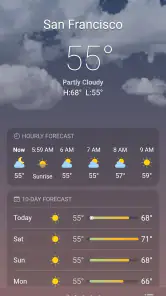
From the moment I launched Real Weather, I was impressed by its sleek and intuitive interface. The app greets you with a visually appealing layout, prioritizing ease of navigation. Everything is just a tap away, from current weather conditions to detailed forecasts for the week ahead. The colors used in the app are not just for aesthetics; they subtly indicate different weather patterns, making it easy to grasp the weather at a glance.
For a practical morning check, I would look at the current conditions first, then compare the hourly outlook with the time I expect to be outside. That small habit is more useful than repeatedly opening an app whenever the sky changes. If I am deciding whether to walk, cycle, or take a coat, a readable screen helps me make the call quickly rather than getting lost in numbers.
Features That Shine
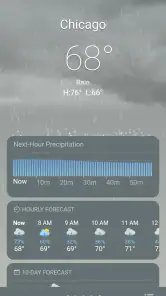
The app offers a plethora of features that cater to both casual users and weather enthusiasts. One of the standout features is the real-time updates. You can literally see the weather change as it happens, with minute-by-minute updates. This is incredibly useful for those spontaneous outings where weather can be unpredictable.
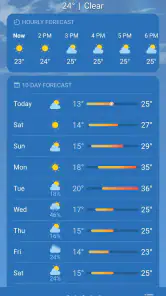
Another feature I found particularly useful is the detailed hourly forecast. It breaks down the day into easy-to-digest chunks, letting you plan your day with precision. Whether you're scheduling a picnic or a run, you can pick the perfect time to step outside.
A realistic use is checking the hours around a commute rather than treating the day’s forecast as one fixed answer. If rain is expected later, I can decide whether to run an errand before work or bring an umbrella for the return trip. For a weekend outing, I would check again closer to departure: forecasts are planning tools, not guarantees, and a fresh look can prevent overcommitting to an outdoor plan.
Compared with the basic weather panel built into a phone, this app’s appeal is the combination of a visual overview with more detail to inspect when timing matters. A simpler built-in option may be better if I only want a temperature at a glance and prefer not to maintain another app. Someone who needs specialist storm tracking or highly technical meteorological information should choose a service built around those needs instead of assuming a general forecast app will cover every edge case.
Making forecasts useful month after month
The first week is also a good time to test whether the hourly view fits my real schedule. I would compare the forecast with the windows when I actually travel, exercise, or take a dog out, rather than checking at random. The useful question is not whether I can keep scrolling through details, but whether those details help me choose between two realistic options.
For example, if I have an outdoor appointment after work, I can check the expected conditions for that period in the morning and again before leaving. If the outlook changes, I can carry a waterproof layer or adjust the plan; if it stays steady, I can stop checking. That second check is a small, practical workflow, and it avoids treating a forecast as a promise made hours earlier.
This kind of routine makes the app easier to judge than a quick novelty test. After several weeks, I would notice whether its presentation is quick enough for busy mornings and whether I still use the hourly breakdown when planning something beyond the next few hours. A forecast can look attractive without becoming useful; repeated decisions are what show whether the screen deserves a regular spot on my phone.
Customization and Personalization
Real Weather truly shines when it comes to personalization. You can customize the app to show only the information you care about. For instance, if you're not interested in humidity levels, you can toggle that off. This level of customization ensures that you’re not overwhelmed with information you don’t need.
Plus, the app supports multiple locations. So, if you’re a globetrotter or just someone with family across different regions, you can keep tabs on the weather in all your favorite places without any hassle.
Those options are most valuable when they reduce repeated work. I would keep the main view focused on the conditions I use to make everyday choices, then use saved places for a commute destination or relatives’ towns rather than searching for them each time. If several locations are added, it is worth checking the place name before acting on a forecast; a useful set of saved towns can still become confusing if I glance too quickly.
Keeping the routine light
Weather information can become cluttered when every available detail competes for attention. The ability to hide information I do not use is therefore more than a cosmetic preference: it can make a quick check genuinely quicker. I would start with a restrained display, then add a detail only when I have a repeated reason to consult it. That way, customization serves a habit instead of turning into a setup project that I forget about.
Saved locations also work best when they have a clear purpose. I might keep home and a place I visit often, but I would avoid adding every town I have ever searched for. A shorter list reduces the chance of checking the wrong place when I am in a hurry. For travel, I would confirm the selected destination before making packing or timing decisions, especially if several places have similar names.
For a low-maintenance routine, I would check the app at predictable decision points—before leaving home and before an outdoor commitment—instead of chasing every change. That approach also helps reveal whether the forecasts are useful for my own area over time. If I find myself opening it often but not changing any plans, I may be better served by a simpler display; the best setup is the one that makes a decision easier, not the one with the most information on screen.
Who will keep using it—and who may not
I think this app is most suited to people who make ordinary plans around the weather: commuters, walkers, casual runners, parents organizing outdoor time, and anyone who checks more than one location. The combination of a visual overview, hourly detail, and location saving is useful when the question is practical rather than scientific. It can help me decide when to leave, what to bring, or whether an outdoor plan needs a backup.
It is less compelling for someone who rarely checks a forecast and only wants a temperature in the phone’s existing weather panel. In that case, installing and maintaining another app may add little. It is also not the choice I would rely on as a specialist tool for severe-weather monitoring or detailed meteorological analysis. When the stakes are high, I would consult a service designed for that specific purpose and follow local official guidance rather than treating a general-purpose forecast as the whole answer.
Real Weather is a free weather app from developer ruivop, with optional in-app purchases priced from $0.99 to $9.99 per item. It is rated for Everyone, and its current version is 2.2.2 for Android 5.0 and later. Its 4.2 average from around 12,000 ratings and more than 1 million installs suggest that it has found a sizable audience, though popularity alone cannot tell me whether its presentation suits my habits. I would begin with the free experience and only consider a purchase if I had a clear reason to do so.
Where the experience can wear thin
A visually rich weather screen can be pleasant at first and still lose its appeal if I need to spend time interpreting it every morning. The best test is whether I can find the information I need quickly without repeatedly adjusting the display. If the colors or extra details stop helping me make a decision, I would simplify the view or return to a more basic alternative rather than keep checking out of habit.
There is also a natural limit to what any forecast can do. Conditions can shift, and a detailed hourly outlook should not be mistaken for certainty. I would use it to make a reasonable plan, leave room for a change, and refresh the forecast before an important outdoor commitment. For a casual walk, a broad indication may be enough; for a long trip or a weather-sensitive event, I would avoid relying on one early check.
The optional purchases are another reason to be deliberate. The app is free to try, so I would first see whether the everyday experience answers my questions. A purchase makes sense only if the available paid option addresses a need I have; there is no reason to spend simply because the option is present. That keeps the app’s long-term value tied to its usefulness rather than the novelty of customizing a new install.
Conclusion
In a world where weather apps are a dime a dozen, Real Weather stands out by offering a user-friendly experience paired with accurate and real-time data. Its level of customization and the clarity of its interface make it a go-to for anyone looking to stay ahead of the weather. Whether you're a planner or someone who loves spontaneous adventures, this app has got your back.
So, next time you find yourself checking the sky, remember, there's an app for that. And it's called Real Weather.
For me, the lasting question is whether I keep returning after the novelty of a polished screen wears off. A weather app earns its space when it fits a repeatable habit: check, make a decision, and get on with the day. If this one’s visual layout and adjustable information make that routine feel clearer, it is worth trying; if I mainly need a bare temperature or have more demanding forecasting needs, another option may suit me better. Its strongest case is for everyday planning, not for replacing judgment when conditions are changeable.
Real Weather Frequently Asked Questions
Is Real Weather free to download, and are there optional purchases?
Real Weather is free to download and use, so you can try its weather tools without an upfront purchase. The app also offers in-app purchases, priced from $0.99 to $9.99 per item. Check the purchase details in the app before buying, and remember that downloading it for free does not mean every optional item is included.
Who develops Real Weather, and is it suitable for all ages?
Real Weather is developed by ruivop and is rated Everyone, making it suitable for a general audience. It is a weather app focused on forecasts and local conditions rather than age-restricted entertainment. If you are choosing an app for a family device, the Everyone rating is a useful point to consider alongside the weather features you want.
What features does Real Weather offer?
Real Weather provides real-time weather updates, including temperature, humidity, wind speed, and atmospheric pressure. It also offers a 7-day weather forecast, severe weather alerts, and radar maps. Users can customize the app with widgets and receive notifications for weather changes specific to their location.
Is Real Weather available for both Android and iOS devices?
Yes, Real Weather is available for both Android and iOS devices. You can download it from the Google Play Store for Android or the Apple App Store for iOS. The app is designed to run smoothly on a variety of smartphones and tablets, ensuring a seamless user experience across different platforms.
Will Real Weather work on my Android phone?
Real Weather requires Android 5.0 or later, so check your phone’s operating system before downloading. It is a weather app for checking forecasts and local conditions, and its current version is 2.2.2. If your device meets the minimum requirement, you can install it and explore its features, including forecasts, alerts, radar maps, widgets, and location-based notifications.
Articles Related to Real Weather
Clash of Clans Is Won Between the Battles
Its raids are quick; its community is a long-term project of coordination, teaching, rivalry, and shared responsibility—with all the friction that entails.
Android Auto Makes the Case for Quieter Car Software
The car interface is no longer judged by how much it can do, but by how quietly it helps. Android Auto shows what drivers now expect—and what still gets in the way.
MobiOffice: Transforming Mobile Productivity with Seamless Integration
MobiOffice: Word, Sheets, PDF is redefining mobile productivity with a surprising blend of functionality and innovation.
EA SPORTS FC™ Mobile Soccer: Redefining Mobile Sports Gaming
Dive into EA SPORTS FC™ Mobile Soccer, where immersive gameplay and strategic depth transform mobile sports gaming.
Pros
- Accurate local weather updates
- User-friendly interface
- Customizable weather alerts
- Detailed hourly forecasts
- Real-time severe weather warnings
Cons
- In-app ads can be intrusive
- Battery consumption is high
- Requires internet for updates
- Limited free features
- Occasional data refresh lag
- Category
- Weather
- Version
- 2.2.2