Rain Alarm
- 1.39K
- 4.4
- Installs
- 10.00M
- Price
- Free
Screenshots
Analysis by Reviewed
I use Rain Alarm for a narrower job than I’d give an all-purpose weather app: deciding whether rain is close enough to change what I’m doing right now. That focus is useful when a daily forecast feels too broad to answer a practical question, such as whether to take a walk before lunch or bring washing indoors. It’s a free weather app from Michael Diener - Software, and its appeal is easy to understand: timely rain warnings can save me from making plans around a forecast that misses a sudden shower.
What free access means in practice
You can start using the app without paying, while in-app purchases are also offered, priced from $1.99 to $54.99 per item. I’d treat the free access as a chance to see whether rain-focused alerts suit your routine before considering any purchase. The available purchase range alone doesn’t tell me which option is worth paying for, so I wouldn’t assume that a paid item is necessary for the basic reason to try the app.
That distinction matters because Rain Alarm is not trying to replace every part of a weather service. Its value comes from keeping attention on approaching precipitation, rather than asking you to browse a broad forecast for temperature, wind, and the rest of the day’s conditions. If that specific question comes up often for you, the free starting point is practical. If it rarely does, even a focused app may not earn a place on your home screen.
Features That Stand Out
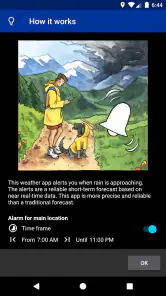
First things first, what does Rain Alarm bring to the table? It's not your average weather app; it specializes in real-time alerts for rain. This means you get notifications based on actual radar data, not just forecasts. This is a game-changer for those who live in areas where the weather is as unpredictable as a toddler's mood swings.
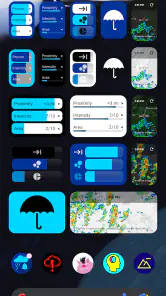
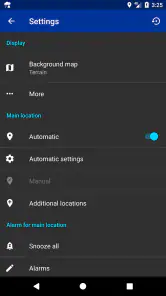
The interface is clean and intuitive, which makes it a breeze to navigate. With just a few taps, you can customize your notifications to ensure you're only alerted about the weather changes that matter most to you. Plus, the app covers a wide geographical range, so whether you're in the bustling city or out in the countryside, Rain Alarm has got you covered.
Using alerts without letting them run your day
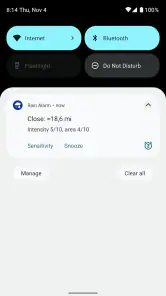
I’d begin with a simple routine: set up the alerts that matter, then check the radar when a notification could change a real decision. For example, if I’m planning a school pickup on foot, an alert is a cue to look at the precipitation’s movement and decide whether to leave earlier, take an umbrella, or choose another way to travel. That second look is useful; an alert should inform a choice, not make it automatically.
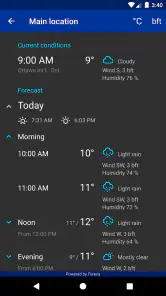
This is also where a rain-specialist app differs from the usual all-in-one forecast. A general weather app is often the better choice when I want a day’s temperatures or a wider overview. Rain Alarm makes more sense when the immediate question is whether precipitation is approaching. Keeping both kinds of information in mind helps avoid expecting one focused tool to answer every weather question.
More From Our News Desk

Weather by Xiaomi Review: Clear at a Glance, Less Clear Up Close

X Under Pressure: Can It Recover When Posting Goes Wrong?

Clash of Clans Is Won Between the Battles

Android Auto Makes the Case for Quieter Car Software

MobiOffice: Transforming Mobile Productivity with Seamless Integration

EA SPORTS FC™ Mobile Soccer: Redefining Mobile Sports Gaming
Why You'll Love It
One of my favorite things about Rain Alarm is how it seamlessly integrates into my daily routine. It sends out timely alerts that are not just accurate but also incredibly helpful. Imagine planning a picnic or a morning run, and just as you're about to step out, you get a gentle nudge from the app letting you know that rain is imminent. It's like having a personal weather assistant in your pocket!
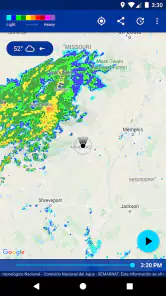
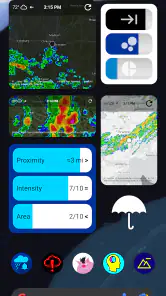
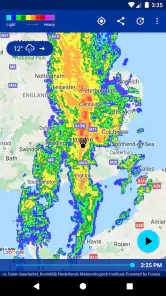
Moreover, the app isn't just about rain. It also provides information on snow and storms, making it a versatile tool for any weather condition. The radar animation feature is particularly engaging, allowing you to visualize the movement of precipitation. It's both informative and kind of fun to watch!
Where a focused radar tool has limits
Radar is most useful as a near-term aid, not a guarantee that every shower will arrive exactly where or when expected. Local conditions and changes in precipitation can make any alert less helpful, so I still leave room for judgement rather than treating a notification as certainty. When my decision depends on the whole day’s outlook, I’d check a broader forecast too.
There’s a trade-off in the app’s narrow purpose: people who want a single place for detailed information across many weather conditions may find a general forecast app more convenient. And if alerts become more distracting than useful, I’d adjust them to match the decisions I actually make instead of turning on every notification. A little restraint can make a focused warning feel helpful rather than noisy.
Making alerts useful on a regular route
A practical way to assess the app is to tie its warnings to one repeated decision rather than judging it from occasional checks. If I walk the same route to work, for example, I can notice whether an alert gives me enough reason to take a light jacket or change my departure time. That is a more useful test than opening the radar at random, because the app’s value is in helping me act, not simply giving me another screen to watch.
For cycling or walking, I’d also think about what I can realistically change once rain is nearby. A warning may help me delay leaving, choose a more sheltered route, or carry protection; it cannot make an outdoor trip risk-free. For a long outing far from shelter, I would use a broader forecast to plan ahead and treat a near-term rain alert as an extra check, not the entire plan.
Choosing between a rain alert and a full forecast
Compared with the standard weather app already on a phone, a dedicated rain tool earns its place when the immediate movement of precipitation matters more than a full set of daily conditions. The broader app is still the sensible first stop for deciding what to wear all day, comparing temperatures, or planning several days ahead. I see these as different jobs rather than competing versions of the same tool.
There is a small but important habit behind that comparison: don’t let a precise-looking radar view create more confidence than the situation deserves. I’d use the animation to understand whether rain appears to be moving toward my area, then combine that with what I can see outside and the consequences of being wrong. That makes the app more useful for flexible errands than for decisions where a missed shower would have serious consequences.
Who is likely to get the most from it?
I’d recommend trying it if you walk, cycle, exercise outdoors, commute without a car, or regularly plan errands around changing skies. Parents managing an outdoor school run may also appreciate a timely prompt, while someone who mostly drives between indoor locations may not gain much from another source of weather notifications. The key question is whether knowing that rain is moving in would change what you do.
The app is rated for Everyone, and it has an average rating of 4.4 from around 64,000 ratings, with roughly 1,400 written reviews and more than 10 million installs. Those figures suggest that many people have tried it, but they don’t tell me whether its alerts will suit a particular location or routine. I’d judge it by how useful its warnings are for my own regular routes and plans.
When I would skip it
I would not make this my main weather app if I mostly want a single dashboard for temperature, wind, and a longer-range outlook. The narrower purpose is an advantage only when rain timing affects choices often enough to justify another app and its notifications. If you usually check the weather once in the morning and then stay indoors or travel by car, a general forecast may already cover what you need with less switching.
It may also be a poor fit if alerts make you anxious or if you tend to react to every notification even when your plans cannot change. In that case, I’d keep the broader forecast you already use and check rain conditions only when an outdoor commitment makes it relevant. A useful warning should reduce uncertainty, not turn every passing cloud into a reason to interrupt the day.
Small habits that make the app more practical
I’d avoid enabling every alert before I know which ones matter. Start with the notifications that correspond to a real routine, then adjust them after seeing whether they arrive at useful moments or simply add noise. Checking the radar animation when a warning arrives can also help distinguish a brief passing patch from a situation that might affect a planned walk, while remembering that the display is guidance rather than a promise.
Another sensible habit is to check conditions again before a fixed outdoor plan, especially if the cost of getting caught out is more than mild inconvenience. For a quick trip to a nearby shop, a warning may be enough to grab an umbrella; for a long run or a day outside, I’d consider the wider forecast and make a more flexible plan. The app is strongest when it helps with a decision you can still change.
Final Thoughts
In a world where weather apps are a dime a dozen, Rain Alarm stands out by focusing on what truly matters—real-time, reliable alerts. It's perfect for anyone who wants to stay a step ahead of the weather without sifting through endless data. Whether you're an outdoor enthusiast, a parent planning school runs, or just someone who hates getting caught in the rain, this app is worth checking out.
To wrap it up, Rain Alarm is more than just a weather app; it's a handy companion that ensures you're never caught off guard by Mother Nature again. So go ahead, download it, and let those rain alerts keep you dry and smiling!
My buy-or-skip verdict
I’d try the free version if unexpected rain regularly disrupts plans, then decide whether it earns its alerts in day-to-day use. I wouldn’t pay simply because an in-app purchase is available; I’d first work out whether the free experience solves the problem and what a specific paid option adds. Skip it if you rarely need short-notice rain guidance or prefer one broad forecast for every weather question. For anyone who does want a dedicated precipitation heads-up, it’s a sensible app to test.
Rain Alarm Frequently Asked Questions
Does Rain Alarm need access to my location to provide useful alerts?
Location is central to Rain Alarm’s purpose because its warnings are meant to relate to rain approaching your area. The original description of the app says it uses GPS to determine your location and send alerts based on nearby rainfall. Before downloading, consider whether you are comfortable allowing location access so the app can make its warnings relevant to where you are.
Can I use Rain Alarm when I am travelling or away from home?
Rain Alarm is intended to warn you about approaching rain in your vicinity, which can be useful when your plans take you beyond your usual area. Its location-based approach is relevant for trips as well as everyday routines, such as commuting or spending time outdoors. Check that your location settings suit the way you want the app to provide alerts while you are away.
Is Rain Alarm a replacement for checking the weather forecast?
Rain Alarm is most directly focused on warning you when rain is approaching, so it can complement the broader forecasts you may use for planning. A rain alert can help with a near-term decision, such as whether to take an umbrella, while a general forecast is useful for looking at wider weather conditions. It is worth treating the app as a practical rain-warning tool rather than relying on one alert for every weather decision.
Does Rain Alarm have good ratings and many users?
Rain Alarm has more than 10 million installs and an average rating of 4.4 from around 64,000 ratings. It also has roughly 1,400 written reviews, giving prospective users a substantial body of public feedback to consider. Ratings and reviews can offer a useful impression of how others view the app, though your experience may depend on your location and alert preferences.
Is Rain Alarm free to download, and are there in-app purchases?
Rain Alarm is free to download, so you can try its rain-warning features without paying upfront. The app also offers in-app purchases, with items ranging from $1.99 to $54.99. Consider whether you want any optional extras before purchasing, and check the purchase details shown in your app store so you know what each item includes.
Pros
- Accurate precipitation alerts
- Customizable notification settings
- User-friendly interface
- Real-time weather updates
- Covers multiple regions
Cons
- Occasional false alarms
- Ads in free version
- Limited features without subscription
- Requires internet connection
- Battery consumption
- Category
- Weather
- Version
- Varies with device











