Piano - music & songs games
- 7.25K
- 4.7
- Installs
- 10.00M
- Price
- Free

Screenshots
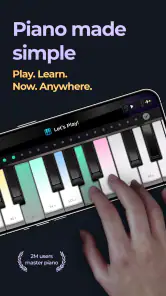

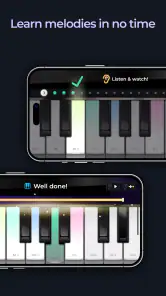
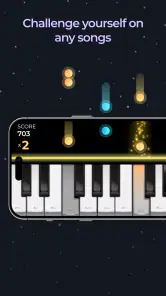
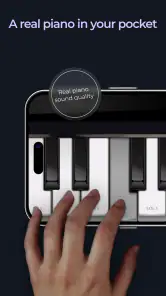
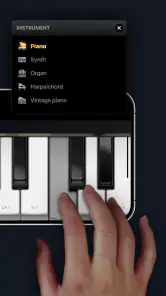
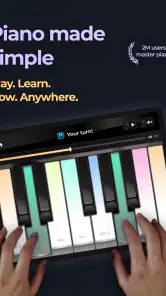
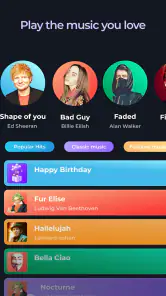
Analysis by Reviewed
I’d approach Piano - music & songs games as a convenient way to make short practice sessions feel approachable, rather than as a replacement for sitting at a real keyboard. It’s a music and audio app from MWM - AI Music and Creative Apps, and its game-like framing is useful when you want a nudge to practise without turning every session into formal study. With a 4.7 average from around 225,000 ratings and over 10 million installs, it has clearly found an audience among people who want piano practice on a phone.
A useful fit for short, casual sessions
The app makes the most sense when you want to try a song-based approach without first buying an instrument or planning a formal lesson. A realistic routine might be opening it while waiting for a family member, choosing a song you already know, and spending a few minutes on one awkward passage. That gives you a low-pressure way to see whether tapping through piano parts holds your interest before committing more time to learning.
It may also suit someone who wants a small musical activity between other tasks rather than another long course to keep up with. I’d think of it as a prompt to return to the keyboard regularly: a brief session can be easier to repeat than an ambitious practice plan that gets postponed. If you’re a parent considering it for a child, the Everyone age rating is reassuring, but I’d still check the in-app purchase options together and agree on whether purchases are allowed.
How it fits beside other ways to learn
Against notation-first learning apps, the song-and-game format puts the immediate experience of following music ahead of studying written notes. That can be a more inviting starting point if sheet music feels like a barrier. A notation-focused tool is likely a better match, though, if your main goal is reading scores or understanding musical symbols rather than getting familiar with song patterns.
A video lesson or live teacher offers a different kind of help: someone can demonstrate hand position, listen to your playing, and respond to a specific problem. This app is easier to pick up in a spare moment, but it cannot give that same personal correction. I’d use it to build interest and practise familiar patterns, then turn to a teacher or a real instrument when you want feedback on technique or a structured learning path.
Compared with simply playing songs on a physical keyboard, the phone version is more portable and needs less preparation. The trade-off is that a touchscreen gives you neither the resistance of keys nor the same room for both hands. That distinction matters less for an occasional music break than it does for someone trying to develop accurate, comfortable piano technique.
A simple routine works best
My most useful way to approach a piano-learning app is to keep a session small and repeatable: choose one song, work through a manageable passage, then return to the part that feels awkward. The virtual keyboard makes that kind of practice easy to fit into a spare moment. For example, you could spend a few minutes with it during a quiet break, then come back later and see whether the same notes feel more familiar. That’s a realistic strength of a phone-based tool: it lowers the effort needed to begin.
More From Our News Desk

Weather by Xiaomi Review: Clear at a Glance, Less Clear Up Close

X Under Pressure: Can It Recover When Posting Goes Wrong?

Clash of Clans Is Won Between the Battles

Android Auto Makes the Case for Quieter Car Software

MobiOffice: Transforming Mobile Productivity with Seamless Integration

EA SPORTS FC™ Mobile Soccer: Redefining Mobile Sports Gaming
For someone who has never played, the game structure can make those first attempts less intimidating. If you already play, it can instead offer a casual way to revisit songs or keep your fingers engaged when you’re away from an instrument. I’d treat progress as a reason to keep practising, not as proof that a short phone session has taught the same control and touch you get from a physical piano.
Getting Started with Piano - music & songs games
First things first, downloading and setting up Piano - music & songs games is a breeze. Available on both Android and iOS, it’s just a quick install away from turning your smartphone or tablet into a full-fledged piano. The interface is super user-friendly, with a sleek design that’s easy on the eyes and simple to navigate. Whether you’re young or just young at heart, you’ll find it intuitive and engaging.
The Fun Way to Learn
What sets this app apart is its gamified approach to learning. It combines traditional piano lessons with interactive gameplay, making it a blast to practice. The app guides you through various songs, from classical pieces to pop hits, using a virtual keyboard that feels surprisingly realistic. As you progress, you unlock more complex songs and challenges. It’s like leveling up in a game, but instead of just high scores, you gain real musical skills.
Features You’ll Love
One of the standout features is the song library. It’s extensive and regularly updated, so there’s always something new to learn. Plus, the app’s ability to slow down the tempo or repeat tricky sections is a lifesaver for mastering those tough parts. The feedback system is also top-notch, providing real-time advice on how to improve your play.
Settings and practice habits that help
When a passage trips me up, I’d resist the temptation to restart the entire song each time. Slowing the tempo and repeating the difficult section makes practice more focused: listen for the timing, play it carefully, and only speed up once the movement feels steady. This is more useful than chasing a high score while the same mistake keeps recurring. A short, deliberate loop can also help you notice whether the difficulty is rhythm, note recognition, or simply getting used to the touchscreen.
It’s worth checking how the controls feel on your particular device before settling into a longer session. A phone is easy to carry, but its compact screen can make precise tapping feel cramped; a tablet gives your hands more room to follow the virtual keyboard. If you have headphones handy, using them can make it easier to concentrate on the music in a noisy space. These are practical adjustments, not magic fixes: comfort and attention still matter more than squeezing in a longer session.
For a more repeatable routine, I’d start each visit by playing a short section slowly enough to notice where the timing slips. Then I’d repeat that same passage before moving on, rather than sampling several songs without giving any one of them attention. When returning later, try the passage once before slowing it down again. That quick check gives you a useful sense of what has stuck, while keeping the session focused instead of turning it into a test of memory.
There’s also a practical reason to choose a song you recognize: knowing how it should sound can help you notice when your timing feels off. It doesn’t replace careful listening, and a familiar melody can tempt you to rush, but it gives a beginner a more concrete target than an unfamiliar sequence. I’d switch to a less familiar piece once the app’s prompts begin to feel automatic, so you’re not relying only on recognition.
The app also includes a social feature where you can share your progress and even challenge friends. It’s perfect for keeping motivated and getting a little friendly competition going. Imagine having a mini concert with your pals, all from the comfort of your home!
Where a phone piano has limits
A virtual keyboard is handy for learning song patterns, but it doesn’t give the same physical experience as piano keys. If your goal is to build playing technique, develop even finger strength, or prepare for lessons on an acoustic or digital instrument, use the app as a supplement rather than your only practice method. The touchscreen can also make longer sessions tiring, especially if you’re trying to reach notes across a small display.
Compared with piano apps centred on notation drills, this one’s game-and-song approach is likely to feel more inviting when you want to learn by playing along. Compared with a full keyboard and a teacher, though, it offers less hands-on guidance and no substitute for direct feedback on posture or touch. I’d skip it if you need a structured course for serious exam preparation, or if you already own a piano and want detailed instruction tailored to your technique.
There’s a further trade-off in treating a phone session as practice: the app can make a short task easy to start, but the device itself can also compete for your attention. I’d silence unrelated notifications or choose a quiet moment if I wanted to concentrate on a tricky passage. If your hands feel cramped, keep the session brief or switch to a larger screen rather than forcing a long run on a phone. A comfortable setup is more useful than simply spending extra time tapping.
It’s also worth being clear about what “learning a song” means here. Following a guided part can help you become familiar with its sequence and rhythm, but that does not automatically mean you can reproduce it on a piano without prompts. If playing independently is your goal, use the app as one step in a broader routine and occasionally practise on actual keys, where spacing, hand movement, and touch are part of the task.
Choosing songs without losing momentum
For a beginner, it’s tempting to jump straight to a favourite tune, but a song that is far beyond your current comfort level can turn practice into repeated frustration. I’d alternate between a piece that feels achievable and one that stretches you a little. That gives you a quick sense of progress while still building patience with harder passages. If you’re practising with a friend, a challenge can add motivation, but comparing scores is less useful than noticing which section each of you has improved.
The app is free to download, with in-app purchases ranging from $0.99 to $89.99 per item. I’d explore the basic experience first and decide whether the way it fits your routine is worth paying for before making a purchase. It’s rated for Everyone, runs on Android 7.0 or later, and its current version is 3.54.01. Those details make it straightforward to check whether it suits your device and household before installing.
In practical terms, I wouldn’t make a purchase just because a song or challenge catches my eye during the first session. I’d first see whether I return to the app over several separate practice moments and whether the available material keeps me interested. That gives you a better basis for deciding what, if anything, is worth paying for than an initial burst of enthusiasm. Since the purchase range runs from small items to much higher-priced ones, checking the specific item and confirming the amount before authorizing it is sensible.
For a household sharing a device, I’d also decide in advance who is using the app and whether purchases need approval. That small boundary prevents a casual practice session from turning into an unexpected spending decision. The app’s free starting point makes it possible to judge its feel first, while its optional purchases mean it’s still worth treating each paid choice deliberately.
Who will get the most from it
I’d recommend it most readily to curious beginners, casual players, and people who want a music activity that fits into short gaps in the day. It can also be a handy companion for someone who already knows basic piano and wants to revisit song patterns away from an instrument. The combination of guided songs, repeatable sections, and a playful sense of progress gives those users a clear reason to come back without demanding a formal practice schedule.
I’d be more cautious if you’re choosing a single tool for serious study. Someone preparing for an exam, learning to read notation, or trying to correct hand technique will need more than a phone’s guided keyboard. A dedicated course, a physical digital piano, or a teacher is a better centrepiece for those goals. This app can still offer variety between lessons, but I wouldn’t treat its scores or song progress as a complete measure of musicianship.
Why It’s a Must-Try
In today’s fast-paced world, finding time to attend piano classes can be tough. But with this app, you can learn at your own pace, anytime and anywhere. It’s an affordable alternative to traditional lessons, without compromising on quality. Plus, the satisfaction of being able to play your favorite tunes is absolutely worth it.
In conclusion, whether you’re just starting out or looking to rekindle your love for piano, this app offers a delightful blend of learning and entertainment. It’s a fantastic tool that makes music accessible and enjoyable for everyone. So, go ahead, give it a try, and who knows? You might just discover your inner maestro!
Piano - music & songs games Frequently Asked Questions
What device requirements should I check before downloading Piano - music & songs games?
Before installing, check that your device runs Android 7.0 or later, which is the app’s minimum operating-system requirement. The current version is 3.54.01, so keeping the app updated can help you use its latest available release. It is a music and audio app, and its simple piano-game format is intended to make playing songs approachable on a mobile device.
Who makes Piano - music & songs games, and what is the app’s main idea?
Piano - music & songs games is made by MWM - AI Music and Creative Apps. Its short description is simply “Piano,” while its store summary presents it as a simple way to become a real maestro. The app focuses on a piano-based mobile experience, combining music and play for people interested in trying virtual piano games.
Is Piano - music & songs games free to download, and is it suitable for everyone?
Piano - music & songs games is free to download and has an Everyone content rating, so it is presented as suitable for a broad audience. You can try its core piano-game experience without paying upfront. Optional in-app purchases are available, so it is worth checking the purchase options in the app before children or other users start playing.
What is Piano - music & songs games and how does it work?
Piano - music & songs games is an interactive mobile app designed to teach and entertain users through piano-based games. It offers a wide range of songs and challenges, allowing users to play along to their favorite tunes while improving their musical skills. The app provides a virtual keyboard where users can tap the keys to match the notes of a song, thus enhancing hand-eye coordination and rhythm awareness.
Can I learn to play the piano using this app, even if I have no prior experience?
Yes, Piano - music & songs games is suitable for beginners with no prior piano experience. The app features a user-friendly interface with tutorials and step-by-step instructions that guide users through the basics of piano playing. Beginners can start with simple songs and gradually progress to more complex pieces, making it a great tool for learning and improving piano skills at their own pace.
Pros
- Engaging interactive gameplay
- Wide variety of songs available
- Suitable for all ages
- Enhances musical skills
- Offers offline mode
Cons
- In-app purchases can be pricey
- Some ads are intrusive
- Limited free content
- Occasional app crashes
- Requires frequent updates
- Category
- Music & Audio
- Version
- 3.54.01













