Beat Maker Pro - DJ Drum Pad
- 8.31K
- 4.6
- Installs
- 50.00M
- Price
- Free
Screenshots
Analysis by Reviewed
I often reach for a beat-making app when I have a rhythm in mind but no instrument nearby. Beat Maker Pro - DJ Drum Pad turns that impulse into a quick, hands-on music session: instead of opening a full production setup, I can tap pads and explore a groove right on my phone. It is a playful starting point, especially if you are curious about making beats but do not yet know your way around music software.
Starting with a small musical idea
For a first session, I would avoid trying to make a complete song. Pick a simple feeling—a steady pulse, a tense rhythm, or something loose enough to move to—and use the pads to see what sounds might fit. That approach gives the app a clear job: helping you test an idea through touch, rather than asking it to solve every part of production at once.
This is also a useful way to find out whether you enjoy making music by tapping. Some people would rather arrange notes on a timeline or play a keyboard; others think more clearly when they can hit a pad and hear an immediate response. If you are in the second group, a compact drum-pad app can make the first step feel less formal than opening a traditional studio interface.
A quick way to get an idea moving
For me, the strongest use case is sketching a rhythm during a short break, then deciding whether it is worth developing further. The pad format makes experimentation immediate: try a pattern, change what you tap, and listen to how the sounds sit together. That low-pressure approach suits beginners and anyone who wants a musical diversion without first learning a complicated interface.
It also fits a small everyday moment: I might be waiting for a friend and tap out a simple pulse, then save the idea if I want to return to it. That is a different job from producing a finished track. I would treat the app as a pocket-sized idea board, not assume that a quick performance automatically becomes a polished release.
What the workflow is good for
Beat Maker Pro is a free music-making app from MWM - AI Music and Creative Apps. It has a 4.6 average from around 493,000 ratings and over 50 million installs, which suggests it has found a broad audience among casual beat makers. It is rated for everyone, while in-app purchases range from $0.99 to $89.99 per item, so I would check what is included before spending. The app was released on August 20, 2018; version 4.11.00 requires Android 7.0 or later.
Compared with a conventional digital audio workstation, a drum-pad app puts playing ahead of detailed arrangement and editing. That can be a real advantage when you want to get a sound going quickly, but it is a trade-off if you need precise control over a complete song. If your main goal is detailed editing or a structured path from draft to final mix, a fuller music-production app is likely a better fit. If you want a friendly first step, the simpler format makes it easier to begin.
More From Our News Desk

Clash of Clans Is Won Between the Battles

Android Auto Makes the Case for Quieter Car Software

MobiOffice: Transforming Mobile Productivity with Seamless Integration

EA SPORTS FC™ Mobile Soccer: Redefining Mobile Sports Gaming

How Microsoft OneDrive Became a Mobile Productivity Giant

How Google Translate Breaks Language Barriers Effortlessly
Making a short session count
A realistic routine might be to open the app while taking a break, spend a few minutes trying combinations, and stop once one pattern feels promising. I would then listen back before adding anything else. The pause matters: when tapping in the moment, it is easy to mistake activity for progress. A quick replay helps me decide whether a new sound supports the groove or simply crowds it.
If you are using the app to share a seed of an idea with a bandmate, give the recording a little context when you send it. A rough beat can communicate energy or timing, but a listener may not know whether you mean it as a starting point or a finished arrangement. Being clear about that distinction makes a simple phone sketch much more useful in a real creative conversation.
Keeping the session useful
I get more out of a pad session when I start with one small goal, such as finding a pulse that feels right, rather than trying to invent an entire track at once. A useful habit is to pause after a promising pattern and listen back before adding more. That helps me notice whether extra taps improve the idea or just make it busier. It is also worth checking the available purchase options before building a routine around content that may sit behind an in-app purchase.
Unleashing Your Inner DJ
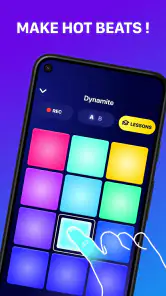
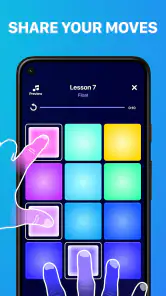
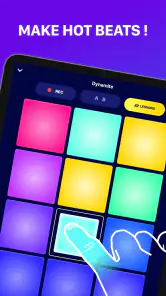
When I first opened Beat Maker Pro, I was greeted with a vibrant interface that screams creativity. The app is designed to make you feel like a professional DJ, even if you've never touched a drum pad before. It comes packed with colorful pads that are just begging to be tapped. Each pad represents a different sound, and trust me, it's as fun as it sounds!
A World of Sounds
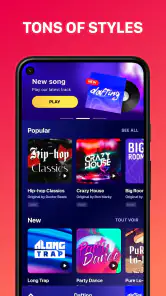
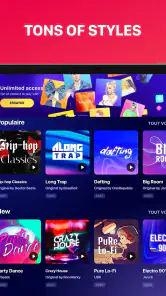
The app boasts a massive library of sounds, from bass-heavy beats to soft melodic tunes. I spent hours just exploring the different sound packs. Whether you're into hip-hop, EDM, or even rock, there's something here for every music lover. It’s like having a mini studio in your pocket. The quality of the sounds is top-notch, making every beat you create sound professional.
Ease of Use
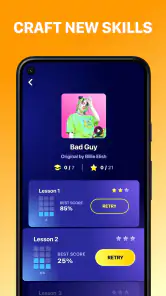
One of the things I loved about Beat Maker Pro is how user-friendly it is. The learning curve is almost non-existent. The app intuitively guides you through the process of creating your first beat. There's even a tutorial mode that helps newbies get the hang of it. I found myself creating complex beats in no time. It's perfect for both beginners and seasoned pros looking to experiment.
Features to Explore
Beyond just tapping away on the drum pads, the app offers a range of features to enhance your music-making experience. You can record your sessions, layer sounds, and even collaborate with friends. The app also regularly updates its sound packs, so there's always something new to try. The ability to save and share your creations adds a social element that I found quite engaging.
Choosing the right sounds for an idea
When I am exploring a set of sounds, I try to listen for their role rather than judging each one on its own. A bass-heavy hit might feel exciting in isolation but dominate a simple rhythm; a softer sound can leave space for the pulse to breathe. Testing sounds against the same basic pattern is a more reliable comparison than tapping each pad at random, because it reveals which choices actually work together.
That small discipline is especially helpful when the goal is to bring an idea elsewhere. I would keep the sketch focused on one defining quality—its bounce, weight, or mood—so a collaborator can understand what I am hearing. If I keep adding layers simply because they are available, the original idea can become harder to recognize. In a quick pad session, restraint is a creative tool.
From phone sketch to useful handoff
For a handoff, I would listen back to a saved idea and decide what it is meant to do before sharing it: a rough rhythm for feedback is different from a finished piece someone should use as-is. If you are evaluating it for a school-age beginner, the everyone rating makes it broadly approachable, but I would still help them understand that tapping pads is the fun part and that developing arrangement skills takes practice elsewhere.
That distinction also answers a practical question: is this the right place to finish a track? I would use it to capture a rhythmic direction or experiment with sounds, then move to a more detailed production environment if I needed fine edits, a carefully arranged song, or a final mix. The app’s strength is the speed of trying an idea, not replacing every stage between first spark and delivery.
Where it fits among music apps
The usual alternatives split into two broad groups. A full digital audio workstation gives you a more structured workspace for arranging and editing, but can feel like too much when all you want is to test a beat. A simple metronome or rhythm tool is quicker for keeping time, yet it does not offer the same playful sound exploration. Beat Maker Pro sits closer to the hands-on, exploratory end: I would choose it when I want to play with a groove, not when I need a precision editing desk.
It can also complement rather than replace other tools. A beginner might use it to discover whether they enjoy building rhythms, then learn arrangement in a fuller app. A songwriter might use it as a quick source of rhythmic inspiration before recording elsewhere. If you already have a workflow built around detailed sequencing, the pad format may feel limiting; if you are new to music software, that narrower focus can be an advantage.
Who should give it a try
I would recommend it to someone who wants immediate, tactile beat-making, or to a beginner who learns better by trying sounds than by reading about production. It is also useful for a musician who wants a casual sketching tool alongside a more capable setup. I would skip it if I needed reliable, detailed control over every part of a composition, or if I expected a phone session alone to deliver a finished, release-ready track.
It is a less natural fit for someone who wants to compose mainly with notation, record long takes from instruments, or make decisions by looking at a detailed timeline. Those jobs call for a different kind of music app. Before paying for optional content, I would first spend time with the basic experience and ask whether the sounds and tapping workflow suit the kind of ideas I actually make.
My take on its limits
There is a difference between a lively pad performance and a carefully edited arrangement. The former is where this format feels inviting; the latter calls for tools built around precise editing and a longer production workflow. I would also keep expectations realistic about the learning curve: an approachable interface can help someone start, but it does not replace practice in timing, arrangement, or mixing. The app makes experimenting easy, not every next step automatic.
Another trade-off is that quick play can produce a satisfying moment without leaving you with a clear plan for what to do next. I find it helps to name the purpose of a saved idea in plain language—perhaps “a pulse to build around” or “a heavier version of this groove.” That little note, even if kept outside the app, makes it easier to pick up the thought later instead of replaying it without knowing what I wanted to change.
Making room for a good first session
If you are deciding whether it belongs on your phone, try it with a clear, modest aim: explore a few sounds, find a rhythm you enjoy, and see whether tapping is how you like to compose. If you want deeper control, pair that curiosity with a full music-production tool; if you mainly want a quick creative outlet, the pad-based approach is the point. I see it as an inviting place to begin and play, with its best value in the ideas it helps you discover rather than promises of instant finished music.
My verdict is that this is most appealing when I treat it as a sketchbook with sound: open it, experiment, keep the useful idea, and hand it off to a more suitable tool if the project grows. Its free starting point lowers the barrier to trying that workflow, while optional purchases are worth considering carefully rather than assuming every sound or extra is included. For a curious beginner or a musician who wants a playful change of pace, I can see it earning a place on the phone. For detailed production, I would reach for a more comprehensive setup.
Beat Maker Pro - DJ Drum Pad Frequently Asked Questions
Can I make a beat with Beat Maker Pro without knowing how to play an instrument?
Yes. Beat Maker Pro - DJ Drum Pad centers on tapping virtual drum pads, giving you a direct way to experiment with sounds without needing to play a traditional instrument. Its beat-making approach can be approachable for first-time creators, while still leaving room to explore different rhythmic ideas. You can start by tapping along and see whether this hands-on style suits the way you want to create music.
Is Beat Maker Pro appropriate for children and families?
Beat Maker Pro is rated for Everyone, which makes its age rating suitable for a general audience. The app is focused on making beats with virtual drum pads, so families can consider whether that music-making activity fits their preferences. It is free to download, but optional in-app purchases are available, so it is sensible for parents or caregivers to review purchase settings before letting a child use the app independently.
Can I use Beat Maker Pro offline, or does it need an internet connection?
Beat Maker Pro - DJ Drum Pad is built around tapping virtual pads to make beats, so the basic creative idea is easy to understand wherever you are. If you plan to download or access additional content, check the app on your device for any connection requirements. The app is free to download, while optional in-app purchases are available, so an internet connection may be useful when browsing or buying those extras.
Is Beat Maker Pro free to download, and what should I know about optional costs?
Beat Maker Pro is free to download, so you can try the app without paying an upfront price. It also offers optional in-app purchases, with individual items ranging from $0.99 to $89.99. Consider checking the purchase details in the app before confirming anything, particularly if you are exploring extra content or features. The app is rated for Everyone, but that does not mean every optional item is included at no cost.
What is Beat Maker Pro - DJ Drum Pad and how does it work?
Beat Maker Pro - DJ Drum Pad is an intuitive music-making app designed for both beginners and experienced producers. It allows users to create beats and music tracks using a virtual drum pad interface. The app comes loaded with various sound packs, loops, and effects that can be easily integrated into your projects. Users can tap on the drum pads to trigger sounds, record their sessions, and edit tracks to produce high-quality music.
Pros
- User-friendly interface for beginners.
- Extensive sound library with diverse genres.
- Real-time recording and editing features.
- High-quality audio output.
- Supports MIDI controllers for enhanced play.
Cons
- In-app purchases for premium features.
- Requires internet for full functionality.
- Limited free sound packs.
- Occasional ads disrupt workflow.
- Can be resource-heavy on older devices.
- Category
- Music & Audio
- Version
- 4.11.00