Color Pop - Fun Coloring Games
- 8.13K
- 4.5
- Installs
- 10.00M
- Price
- Free

Screenshots


Analysis by Reviewed
I tend to judge coloring apps by what happens after the first burst of curiosity. A bright screen and a large gallery can make a good first impression, but they do not automatically make something I want to open again next week. Color Pop - Fun Coloring Games is an entertainment app from MWM - AI Music and Creative Apps, built around coloring pictures on a phone. Its appeal is straightforward: pick an image, add color, and spend a little time making it feel like yours. That simplicity is useful when I want a low-effort creative break, though it also means the app has to earn repeat visits through its artwork and the pleasure of the process.
The first week: an easy way to settle in
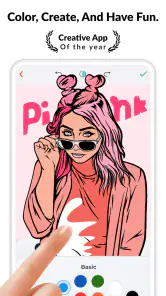
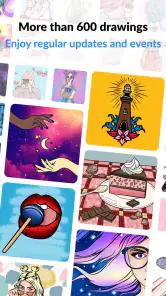
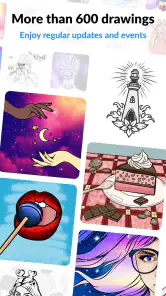
On an early visit, browsing matters almost as much as coloring. The app’s library is presented as a large collection, and the range of drawings, colors, and effects gives newcomers room to try different moods rather than committing to one style. I’d start by choosing a picture that looks inviting rather than the most complicated one. A simple design makes it easier to learn the controls and see whether coloring on a touchscreen feels satisfying to you.
The basic appeal is easy to understand even if you have never used a digital coloring book. You do not need drawing experience or a plan for what the finished image should look like. You can explore a palette, tap around, and make small decisions as you go. That lowers the barrier for adults who want a quiet pastime as well as children who enjoy choosing colors. The age rating is Everyone, and I see the broad appeal, though younger users may still benefit from an adult helping them navigate the app and any purchase prompts.
A practical first-session tip is to treat the first few pictures as experiments. Try a restrained palette on one image, then use bolder colors on another; notice which approach feels relaxing rather than turning every page into a test of artistic skill. If the app’s effects tempt you to decorate every open area, save them for a second pass. Starting simply can make the picture easier to finish and helps you decide whether you enjoy the coloring itself or mainly the novelty of the tools.
What keeps the coloring enjoyable
When I first opened Color Pop - Fun Coloring Games, I was immediately greeted by an array of colors and designs that just begged to be brought to life. The app is like a digital coloring book, packed with intricate patterns and fun images ready for you to personalize. Whether you enjoy coloring mandalas, cute animals, or intricate landscapes, this app has something for everyone.
How I would make it part of a routine
The best use for an app like this is not necessarily a long evening session. I can imagine opening it while waiting for an appointment, taking a short break between chores, or winding down before bed. A single picture gives that spare moment a beginning and an end, unlike scrolling through an endless feed. If you have a busy day, choosing the image before you have only a few minutes to spare can prevent the browsing stage from eating the whole break.
It can also work as a shared activity without turning into a competition. A parent and child could take turns choosing colors, or two friends could each color a similar kind of image and compare their different choices. The useful part is that there is no need to be “good” at art to join in. For a child, choosing between colors can prompt conversation; for an adult, the same small decisions can provide something absorbing to focus on for a while.
More From Our News Desk

Weather by Xiaomi Review: Clear at a Glance, Less Clear Up Close

X Under Pressure: Can It Recover When Posting Goes Wrong?

Clash of Clans Is Won Between the Battles

Android Auto Makes the Case for Quieter Car Software

MobiOffice: Transforming Mobile Productivity with Seamless Integration

EA SPORTS FC™ Mobile Soccer: Redefining Mobile Sports Gaming
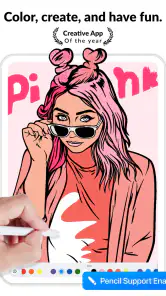
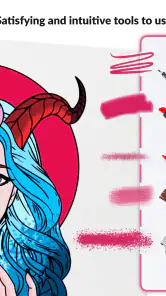
What I found incredibly appealing about Color Pop is its user-friendly interface. Navigating through the app is a breeze, even for the youngest users. The color palette is diverse, offering every shade you could possibly imagine. Plus, the app provides a variety of tools – from brushes of different sizes to unique textures – so you can truly make each piece your own. A cool feature is the 'magic brush' that fills in intricate patterns with just a touch. It’s perfect for those who want to see results quickly.
That quick-fill approach is a real trade-off rather than an automatic improvement. A fill tool can save effort on small, detailed areas, especially if you want a completed picture in a short session. But if the satisfaction for you comes from slowly coloring each part, using it everywhere could make the activity feel less personal. I’d reserve quick fills for repetitive sections and use the more hands-on tools where I want to control the look. That way, convenience supports the process without taking it over.
Month-to-month value: variety has to become a habit
The app’s library is described as holding more than 800 drawings, alongside colors and effects. That gives a returning user plenty to browse, but a large collection alone cannot guarantee lasting interest. In my experience, variety matters most when it helps you choose a different kind of session: a quick, simple picture when you are tired, or a more involved design when you have time to settle in. If you repeatedly spend longer selecting than coloring, the abundance can become its own small obstacle.
I’d make the habit easier by choosing a personal rule instead of setting an ambitious target. For example, open the app only when you genuinely want a screen-based creative break, and finish a picture over several visits if that suits you. There is no need to turn relaxation into a streak or a productivity goal. This also gives the app a fairer test: after the initial excitement, ask whether the act of coloring still feels pleasant, not whether you have completed a certain number of images.
For someone who already enjoys coloring on paper, the digital format offers a different kind of convenience. There is no need to lay out physical supplies or keep a partly finished page on a table, and trying a color combination is less consequential than marking a printed design. Paper is still the better choice if you love the feel of pencils, want a screen-free activity, or prefer making marks with your hand on a real surface. Color Pop makes more sense as a portable alternative than as a replacement for every traditional coloring session.
Sharing, saving, and keeping expectations sensible
Another fantastic aspect is the ability to save and share your creations. After spending time on your masterpiece, you can easily share it on social media or with friends directly from the app. It’s a fun way to showcase your work and maybe inspire others to join in on the coloring fun!
I’d treat sharing as an optional finishing touch, not the reason to color. A completed image can be something you keep for yourself; it does not have to become a post or a polished piece of art. If you do share, think about whether you are comfortable putting that creation on a social platform and check the destination before sending. The creative payoff can still be worthwhile even when nobody else sees the result.
One sensible workflow is to finish the picture before experimenting with every effect. First establish the main color choices, then use a texture or effect only where it adds something you actually like. This prevents the final image from becoming busy simply because extra tools are available. It also makes it easier to tell what you prefer: a clean, simple result or a more decorated one. That small pause is useful when a colorful interface encourages constant tweaking.
Costs, access, and practical limitations
The app is free to download, with in-app purchases ranging from $0.99 to $99.99 per item. That wide span makes it worth paying attention during setup and while browsing: free access does not mean every option is necessarily included at no cost. I would begin with the available free experience and decide whether I actually return to it before considering a purchase. If a child will use the app, I’d also discuss purchases in advance and make sure they understand that tapping a tempting item may involve spending money.
Color Pop is currently at version 1.86.06 and requires Android 7.0 or later. It has a 4.5 average from around 164,000 ratings, with more than 10 million installs. Those figures suggest that it has reached a substantial audience, but they cannot tell me whether its particular art styles or working rhythm will suit you. The most useful test is whether you enjoy browsing its pictures and coloring on your own device. Its Everyone age rating makes it broadly accessible, while the purchase range is a good reason for families to stay attentive.
There are limits to the digital format that are easy to overlook at first. Coloring on a phone can feel cramped for detailed work, and a finger or stylus will not feel exactly like a pencil on paper. A small screen may also make intricate designs tiring if you have to focus closely for long stretches. If you find yourself zooming or adjusting your grip more than enjoying the image, choose simpler artwork or switch to a larger-screen device if one is available. If that still feels awkward, a physical coloring book is probably the more comfortable choice.
Who will enjoy it, and who may prefer another option
I think the app suits people who want a casual creative activity with little setup: adults looking for a calm pause, children who like filling pictures with color, and anyone curious about digital coloring without needing to draw from scratch. It can be especially handy when you are away from home and would otherwise reach for a social feed. The experience is also forgiving for beginners, because you can explore colors and tools without needing traditional art materials or a practiced technique.
It is less suited to people who want a full drawing studio, precise control over original artwork, or a screen-free way to relax. A dedicated drawing app is a better match if your goal is to sketch from a blank canvas or build detailed illustrations. A paper coloring book is preferable if tactile materials are part of what you enjoy. And if you do not like choosing from ready-made images, a large gallery may not solve the main problem: this kind of app is about personalizing existing designs, not necessarily creating every element yourself.
When the novelty fades
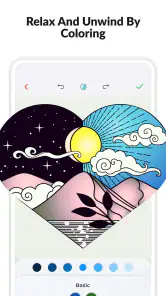
I have to say, the therapeutic nature of Color Pop - Fun Coloring Games cannot be overstated. It’s like a mini-vacation from the hustle and bustle of everyday life. The app provides a space to unwind and focus solely on the joy of creating something beautiful. It’s an excellent way to relieve stress, and who doesn’t need a bit of that?
I’d describe that benefit as a possibility rather than a promise. A focused coloring session can feel calming, but it will not land the same way every day. If you are already tired of screens, or if browsing the gallery starts to feel like another decision-heavy task, it may not be the break you need. I would close it and come back another time rather than trying to force a relaxing habit. Its strongest role is as one optional way to unwind, not as a cure-all for stress.
Fatigue can also come from repeating the same routine: choose a design, use familiar colors, finish, and move on. To keep it fresh, I’d change one thing at a time. Pick an image in a style you would normally skip, limit yourself to a small palette, or use a texture sparingly instead of applying effects everywhere. These are small experiments, not hidden modes or elaborate challenges, and they help you discover whether the app’s existing tools are enough to make a new session feel different.
Not only is it a great stress-reliever, but it’s also educational. It helps improve fine motor skills and color recognition for kids, making it a sneaky way to learn while having fun. Plus, it encourages creativity, which is always a win in my book.
Does it earn a lasting place?
For me, the strongest case for keeping this app around is convenience. When I want to color without preparing supplies, its collection and easy-to-start format make it a handy option. The weaker case is expecting an endless stream of novelty: a broad selection gives you choices, but your enjoyment still depends on whether you like coloring on a screen and returning to ready-made designs. I’d keep it if short sessions continue to feel restorative, and let it go if browsing becomes a chore or the phone format gets in the way.
A grounded long-term verdict
In conclusion, if you're looking for a fun, relaxing, and creative way to pass the time, Color Pop - Fun Coloring Games is definitely worth a download. Its wide selection of designs and easy-to-use tools make it a fantastic choice for artists of all ages. So, why not give it a try? Dive into the world of colors and let your creativity shine!
My more measured recommendation is to try it as a low-pressure pastime, not to expect it to replace drawing tools or the feel of a paper book. Start with a design you can finish comfortably, explore the controls at your own pace, and see whether you want to return once the first-week curiosity has passed. If you enjoy the process itself, it can earn a useful spot for quiet breaks. If you mainly enjoy the initial burst of colors and then stop opening it, that is a fair sign that this particular format is not for you.
Color Pop - Fun Coloring Games Frequently Asked Questions
What kinds of users might enjoy Color Pop - Fun Coloring Games?
Color Pop - Fun Coloring Games is a digital coloring app for people looking for a creative, relaxing activity. Its collection includes different drawings and creative options, so it can suit users who enjoy filling in designs as well as those interested in experimenting with colors and effects. The app is listed for everyone, making it an option for a broad audience.
Can I use Color Pop - Fun Coloring Games to create an adult coloring book?
Yes. Color Pop - Fun Coloring Games highlights AI-assisted creation of an adult coloring book, alongside its ready-to-color drawings, colors, and effects. This makes the app more than a place to color existing designs: it also offers a creative route for users who want to explore coloring-book ideas. The experience is digital, so you can create and color within the app.
Is Color Pop - Fun Coloring Games free to download, and are there optional purchases?
Color Pop - Fun Coloring Games is free to download, so you can try its coloring experience without paying upfront. It also offers in-app purchases, with prices ranging from $0.99 to $99.99 per item. If you prefer not to make purchases, check the available options before confirming any transaction and keep purchase controls in mind when children use the app.
What does Color Pop - Fun Coloring Games offer for creative coloring?
The app focuses on digital coloring and creative play, with more than 800 drawings, colors, and effects. Its store description also highlights AI-assisted creation of an adult coloring book. This gives users a mix of ready-to-color material and creative possibilities, whether they want a relaxing activity or an opportunity to experiment with different looks.
What is Color Pop - Fun Coloring Games?
Color Pop - Fun Coloring Games is an engaging and interactive coloring app designed for users of all ages. It provides a diverse range of coloring pages and themes, from intricate designs to simple shapes, allowing users to express their creativity and relax. The app features a user-friendly interface and a variety of tools, such as brushes and color palettes, to enhance the coloring experience.
Pros
- Intuitive interface for easy navigation
- Wide variety of color palettes available
- Regular updates with new content
- Supports offline play
- Suitable for all age groups
Cons
- Contains in-app ads that can be intrusive
- Some features require in-app purchases
- Limited free content for non-subscribers
- Occasional lag on older devices
- No option to import personal images for coloring
- Category
- Entertainment
- Version
- 1.86.06













