Guitar Tuner Pro: Music Tuning
- 1.33K
- 4.3
- Installs
- 5.00M
- Price
- Free

Screenshots

Analysis by Reviewed
Before I decide whether a phone tuner earns a place in my routine, I ask two practical questions: can I get a useful reading without fuss, and does it offer enough beyond tuning to justify opening it again? Guitar Tuner Pro: Music Tuning is a free music and audio app from MWM - AI Music and Creative Apps. It brings tuning and playing references together on a phone, which is appealing if I would rather not carry separate tools. In-app purchases range from $1.99 to $89.99 per item, so I’d try the free access first and check the details of any purchase before paying.
What free access can—and cannot—tell you
The app has a 4.3 average from around 55,000 ratings and more than 5 million installs. Those figures suggest it has reached plenty of musicians, but they don’t tell me whether a paid item is useful for my needs. I’d start with the free access and treat an upgrade as optional rather than assuming it is needed to tune. It is rated for Everyone, and its current version is 1.39.01.
That distinction matters when judging value. A free starting point lets me find out whether the tuner suits my instrument, room, and habits before spending anything. The purchase range is broad, so I wouldn’t infer that every item is necessary or that one particular purchase is the right one. I’d look at the in-app description and decide whether the specific extra addresses something I actually use, rather than paying simply because the app offers it.
Let’s Get Tuned!
First off, the installation of Guitar Tuner Pro is as smooth as a freshly polished fretboard. Available for both Android and iOS, all you need is a quick download and you’re ready to tune. The app's interface is user-friendly, even for those who think a capo is an exotic fruit. With its sleek design, you can easily navigate through its features without feeling like you're trying to decode an alien language.
How the tuner fits a real playing session
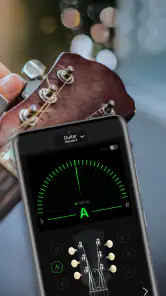
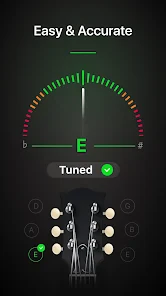
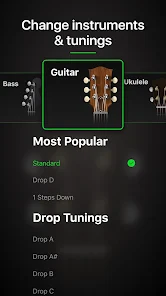
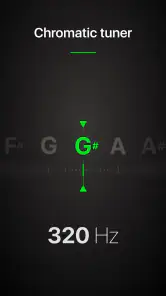
Once you've got it up and running, the app opens up a world of tuning possibilities. Whether you’re a beginner or a seasoned guitarist, the app caters to all. It offers a wide range of tuning options from standard EADGBE to drop D and even some exotic tunings that I didn’t even know existed. The app uses your smartphone’s microphone to detect the pitch, and it’s surprisingly accurate.
That microphone-based approach is convenient when I’m practicing alone, because the phone I already have can double as a tuner. It also means I need to give the app a fair chance to hear one string at a time. I’d mute strings I’m not checking, move away from a television or another player, and avoid turning a tuning peg while the reading is unstable. These small habits are more useful than repeatedly chasing a fluctuating display.
A realistic use case is getting home, setting the instrument down, and checking tuning before I start learning a new part. I can tune in a quieter room, look up a chord shape when I get stuck, and then put the phone aside so it doesn’t become a distraction. If I change rooms or pick the instrument up again later, a quick recheck is sensible; the app can help me notice a pitch shift, but it can’t prevent strings from moving or replace careful listening.
More From Our News Desk

Weather by Xiaomi Review: Clear at a Glance, Less Clear Up Close

X Under Pressure: Can It Recover When Posting Goes Wrong?

Clash of Clans Is Won Between the Battles

Android Auto Makes the Case for Quieter Car Software

MobiOffice: Transforming Mobile Productivity with Seamless Integration

EA SPORTS FC™ Mobile Soccer: Redefining Mobile Sports Gaming
Chord references and learning between songs
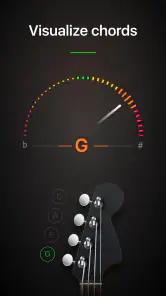
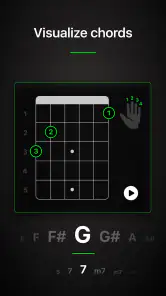
One feature that really stands out is the chord library. It’s like having a music teacher on call 24/7. You can look up any chord you need, and it even shows you different variations. It’s perfect for those moments when you’re trying to impress your friends with your vast musical knowledge.
For a learner, the practical benefit is having a reference close at hand when a chord chart contains a shape they don’t recognize. I’d use the variations as a way to compare possible fingerings, then check that the version I choose fits the music and feels comfortable on my instrument. A chord reference is helpful for getting unstuck, but it doesn’t explain every musical choice behind a progression, so it works best as a quick aid rather than a substitute for lessons or a full song tutorial.
Making it useful in a real practice routine
A practical way I’d use the tuner is to check each string in a quiet corner before rehearsal, then retune after moving rooms or changing strings. Phone-microphone tuners can be thrown off by nearby playing, so muting the other strings and getting closer to the instrument can make the reading easier to interpret. If the pitch keeps jumping, I’d pause rather than keep turning the peg; a noisy room can make a simple tune-up feel less reliable.
The chromatic approach is useful when a song calls for a pitch outside standard tuning, while a beginner may prefer a dedicated clip-on tuner if they want a device that stays attached to the instrument and is less affected by room sound. Compared with a basic tuner app, the attraction here is having tuning alongside chord reference and other practice tools. The trade-off is that a phone is not always as convenient as a small tuner when the room is loud or the instrument is being played with others.
There’s also a workflow trade-off that’s easy to overlook: using one phone for both tuning and practice references is tidy, but it means the screen and microphone need to be available at the same time. I’d set the phone on a stable surface where it can pick up the instrument, rather than balancing it somewhere precarious or holding it while tuning. If I’m sharing a room, I’d wait for a quiet moment instead of trying to read a pitch through other instruments.
Practice tools and realistic expectations
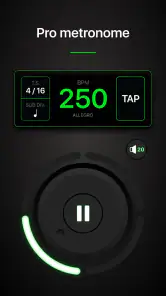
Guitar Tuner Pro isn’t just about tuning; it’s about enhancing your entire playing experience. The app includes a metronome feature which is a godsend for practicing those tricky pieces. Plus, the metronome is customizable, so whether you're practicing blues, rock, or jazz, you can set the tempo that suits your style.
I find a metronome most useful when I’m working on a small passage rather than trying to play an entire song perfectly from the start. I’d slow the pulse enough to make clean changes, repeat the difficult section, and raise the pace only when the notes feel controlled. The point is not to make practice sound impressive; it’s to reveal where timing slips. A phone-based metronome is convenient for that sort of focused session, though a musician who needs a dedicated, always-visible timing device may prefer separate equipment.
Another cool feature is the ear training exercises. It’s a fun way to train your ears to recognize different pitches and chords, which is invaluable for any musician looking to improve their skills. Before I knew it, I was identifying notes like a pro!
I’d treat ear exercises as a short complement to playing, not as proof that I can identify every note in a song. A useful routine is to tune first, spend a few minutes listening carefully, and then try to recognize sounds in the music I’m already learning. That connects the exercise to an instrument and makes it easier to notice whether listening practice is helping. Players who only want a fast pitch check may never use this part, which is one reason the app’s extra tools have different value for different people.
Who will get the most from it
I can see this being handy for a student who practices in short bursts: tune up, check a chord shape, set a practice pulse, then spend a few minutes listening more carefully to pitch. A guitarist who switches between instruments may also appreciate having guitar, ukulele, and bass in the same general toolkit rather than carrying separate tuning devices. For a quick everyday example, I’d use it at home before picking up a song, then put the phone aside and focus on playing instead of turning practice into a settings session.
It is less compelling if all you want is the simplest possible tuner and you already own a dependable clip-on, or if you need hands-free tuning in a noisy rehearsal. The phone has to be available and positioned where its microphone can hear the instrument, which is a real inconvenience when your hands are occupied. If you’re buying for a child or a new player, the Everyone rating is reassuring, but I’d still keep an eye on in-app purchase prompts and make sure any purchase is deliberate.
For a new guitarist, the combination of pitch checking and chord references can make a practice session feel less stop-and-start. For someone who already has a tuner they trust, the extra tools are the deciding factor: if chord lookup, a metronome, and ear practice are things they’ll open regularly, the app has a more convincing role. If they only tune before playing and never use the other tools, a basic tuner—especially a clip-on—may be the simpler choice.
It is also worth thinking about where you play. At home or in a quiet practice room, placing a phone near the instrument is usually a reasonable routine. At a busy rehearsal, on a stage, or anywhere I need to keep both hands free, I’d rather have a tuner attached to the instrument or another dedicated device. That is not a flaw unique to this app; it is the practical limit of relying on a phone microphone in an active space.
My buy-or-skip verdict
In my opinion, Guitar Tuner Pro: Music Tuning is a game-changer. It’s a handy tool that every guitarist should have in their arsenal. Whether you're tuning up for a gig or just strumming away at home, this app ensures you’re always in perfect harmony. It’s reliable, easy to use, and packed with features that cater to every guitarist’s needs. So, if you’re looking to keep your guitar sounding as sweet as a rock ballad, give this app a whirl. You won’t be disappointed!
My recommendation is more measured: try the free version if you want tuning plus extra practice references in one place, and decide from actual use whether a paid item adds enough value for you. The app was released on November 13, 2019, and its minimum Android requirement is 6.0. For a casual player or learner, that combination of a no-cost starting point and several music tools is appealing; for a working player who needs dependable, hands-free tuning in every setting, I’d keep a physical tuner as well.
In short, I’d try it if I wanted a convenient practice companion and was happy to tune in a reasonably quiet place. I’d skip it as my only tuner if I regularly play in noisy rooms, need hands-free operation, or already have a clip-on that does the job. The free access makes it easy to judge the fit for myself, while the purchase range is a reason to be selective: I’d spend only if a particular paid item clearly improves the way I practice.
Guitar Tuner Pro: Music Tuning Frequently Asked Questions
Can I use Guitar Tuner Pro: Music Tuning without an internet connection?
A phone’s built-in microphone is used to hear the instrument, so the tuning process is based on the sound reaching your device. Whether you can use every part of the app offline may depend on the feature you want to open. If you plan to tune somewhere without reliable internet, it is sensible to install the app and check the tuner beforehand, rather than waiting until you need it.
Which instruments can I tune with Guitar Tuner Pro: Music Tuning?
The app is designed for guitar, ukulele, and bass tuning, and its chromatic tuner can help with pitch adjustments. That makes it a practical option if you play more than one of those instruments and want a tuner on your phone. The advertised instrument range is worth keeping in mind when deciding whether it suits your setup.
Is Guitar Tuner Pro: Music Tuning available for both Android and iPhone?
Guitar Tuner Pro: Music Tuning is an app for mobile devices, and it is offered for Android and iOS. The installation requirements differ by platform, so check that your particular device is compatible before downloading. Android users need version 6.0 or later. The app is categorized as Music & Audio, making it aimed at instrument tuning and related musical use.
Who develops Guitar Tuner Pro: Music Tuning?
Guitar Tuner Pro: Music Tuning is developed by MWM - AI Music and Creative Apps. The app focuses on tuning guitar, ukulele, and bass, with a chromatic tuner and chord adjustment features. If you are comparing tuner apps, the developer name can help you identify the correct app when browsing or checking its app-store page.
Does Guitar Tuner Pro: Music Tuning need microphone access, and how should I use it?
The app tunes by listening to your instrument through your device's microphone, so microphone access is needed for that feature. Play one string at a time near the phone and follow the pitch guidance as you adjust it. A quiet spot and a clear signal make the process easier to follow, especially when you are getting used to tuning by ear.
Pros
- Easy-to-use interface for quick tuning
- Supports a wide range of instruments
- Accurate pitch detection technology
- Customizable tuning settings
- Offline mode available
Cons
- Contains ads in the free version
- Limited features without premium upgrade
- Some advanced tunings not supported
- Requires microphone access for tuning
- In-app purchases can be costly
- Category
- Music & Audio
- Version
- 1.39.01













