PDF Reader Zone
- 81.00
- 4.1
- Installs
- 5.00M
- Price
- Free
Screenshots

Analysis by Reviewed
PDFs tend to pile up at inconvenient moments: a form to check before leaving home, a handout to search during class, or a document someone has just sent while I’m away from my desk. I like having a reader ready for those small jobs, and PDF Reader Zone is aimed at making them less of a hassle. Its focus is practical rather than elaborate: open a document, find what matters, and carry on without turning a quick read into a project.
The small delays a dedicated reader can remove
The real test for a mobile PDF app is not whether it can display a page; most phones already have some way to do that. It is whether it saves the little bits of time spent reopening files, searching through long documents, and trying to remember where you left off. PDF Reader Zone makes the most sense when those interruptions happen often enough to become annoying, but not often enough to justify a complicated document-management system.
I would consider it for someone who receives course readings, work documents, travel confirmations, or household paperwork on a phone. It is less compelling for a person who opens a PDF only occasionally and is happy with the built-in viewer. The distinction is frequency: a few seconds saved on a file you revisit every week can matter more than a long list of tools you rarely touch.
Getting Started with PDF Reader Zone
First things first, downloading PDF Reader Zone is a breeze. Available for both Android and iOS, it’s just a quick click away on your respective app store. Once installed, you're greeted with a clean, user-friendly interface that doesn’t overload you with too many options right off the bat. Simple navigation is key here, folks, and this app nails it.
A reader for everyday document work
PDF Reader Zone is a free productivity app from P & L Studio. It has an average rating of about 4.1 from around 9,400 ratings, and more than 5 million installs. The age rating is Everyone, so it can suit a broad range of readers. It was released on August 28, 2024, and version 1.1.9 requires Android 6.0 or later. Those details give a sense of an established, accessible utility, but the best reason to try it is simpler: it brings common PDF tasks into one place.
For a first useful setup, I’d start with one file I expect to revisit rather than importing every PDF I own. A course reading or a current project document is enough to learn how the app handles finding and marking content. That small trial also helps answer a practical question: does the way it opens and presents my files fit how I actually work? If it does, I can bring in other recurring documents gradually instead of creating a second, cluttered filing system.
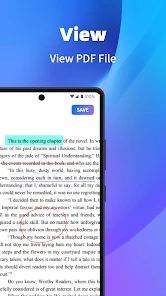
Now, let's dive into what makes this app tick. One of the standout features for me was the ability to annotate PDFs easily. Whether you're highlighting text, adding sticky notes, or drawing directly on the document, PDF Reader Zone makes it feel like a walk in the park. It’s a fantastic tool for students and professionals alike who need to mark up documents on the fly.
You May Like

Clash of Clans Is Won Between the Battles

Android Auto Makes the Case for Quieter Car Software

MobiOffice: Transforming Mobile Productivity with Seamless Integration

EA SPORTS FC™ Mobile Soccer: Redefining Mobile Sports Gaming

How Microsoft OneDrive Became a Mobile Productivity Giant

How Google Translate Breaks Language Barriers Effortlessly
Annotations are most useful when they help you act on a file, not just decorate it. I’d use highlights to flag a clause or key paragraph, then add a short note explaining what needs checking. That makes a document easier to revisit later, especially when you’re comparing several pages or preparing questions for a meeting. For shared or official paperwork, I’d still keep an untouched copy and treat annotations as working notes; that simple habit prevents your review marks from becoming confused with the original content.
A useful habit is to make each mark say something specific. A highlight can show what matters, while a note such as “ask about this date” or “compare with section two” records why I marked it. That is more helpful when I return to a file days later than a page full of color with no context. I’d also avoid using freehand drawing for precise edits: drawing on a page is a review aid, not the same thing as changing the underlying text.
Another nifty feature is the cloud integration. You can seamlessly sync your documents with Google Drive, Dropbox, or any other cloud service you fancy. This means your important files are always backed up and accessible from any device. It’s like having your own personal document assistant!
Where it saves time in a normal day
Imagine a student receives a long reading on the way to class. Rather than scroll page by page, they can search for a term, jump to the relevant passage, and mark the section to discuss. Later, cloud access can make the same document easier to pick up on another device. That kind of short, repeatable workflow is where a dedicated reader earns its place: less hunting through folders and less losing your spot between tasks.
The same pattern works for a busy afternoon of errands. I might receive a booking confirmation, open it while waiting in line, and look for the check-in time instead of paging through every section. If a document needs follow-up, a note can remind me what to ask when I have more time. The value is not that the app changes the document; it helps me get from “I should check this” to the relevant detail with fewer detours.
For someone handling several drafts, I’d make file naming part of the routine before relying on annotations. A clear subject and date in the filename make it easier to distinguish the copy I meant to review from an older version. This is a modest but useful safeguard: a reader can help me work with a file, but it cannot make confusing names or duplicate documents clear by itself.
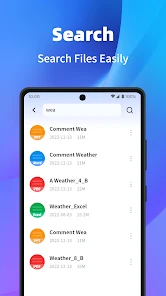
Performance-wise, this app holds its ground well. I’ve opened some pretty hefty PDFs, and not once did it lag or crash. The zoom function is smooth, and you can quickly jump to any page without waiting for ages. Plus, the search function within PDFs is super speedy, which is a lifesaver when you’re hunting for specific information.
Search is particularly helpful when you know a phrase but not its page number. I’d use it to locate a date in a travel document or a heading in course notes, then zoom in to read the surrounding context instead of relying on a search snippet alone. One practical caveat applies to PDFs made from scans: if the words are stored only as images, text search may not behave like it does in a text-based file. In that case, page navigation and zoom remain useful, but I wouldn’t make search the only way I plan to find something.
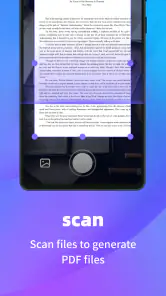
That distinction is worth checking early if searchable text is central to your workflow. Try a known word in one of your usual documents; if it cannot be found, the file may be an image-based scan rather than a text PDF. I would not assume a reader can search text that is not present in the file. For scanned receipts or forms where finding words matters, a tool designed to recognize text may be a better fit.
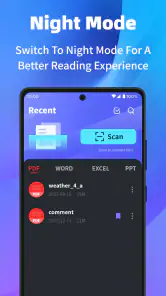
Usability is another area where PDF Reader Zone shines. The app supports a variety of viewing modes, adjustable to your preference, whether you’re reading a document in bed or during your daily commute. It's all about making your reading experience as comfortable as possible.
On a phone, comfortable viewing is also about choosing the right moment and approach. I’d use zoom and a suitable viewing mode for reading a few pages, but switch to a larger screen when a document needs careful side-by-side comparison or prolonged study. A mobile reader is handy precisely because it travels with me; that does not mean a phone is always the best place to inspect dense tables or tiny print.
How it compares, and who should choose it
Compared with opening a PDF in a browser or a basic file viewer, a dedicated app is more convenient when you regularly search, annotate, and return to documents. It also gives you a single place to read instead of relying on whichever app happens to open a file by default. On the other hand, if you only view an occasional attachment and never mark it up, the reader already built into your device may be enough. I’d choose this app for recurring study notes, work drafts, or personal paperwork, but not simply to open one file every few months.
Compared with full document-editing software, the trade-off is different. A focused reader is a better match when the job is to inspect, locate, and mark up pages, while an editor is the sensible choice when the actual wording, layout, or form fields need substantial changes. I would not choose a general reader as a replacement for a specialized work tool just because it can annotate. The right choice depends on whether I need to review a document or transform it.
It suits people who want a practical place to read and mark files without building an elaborate system around them. Students can use it to flag passages and jot down questions; employees can review a draft before a meeting; and anyone managing personal paperwork can quickly look up a detail on the move. People who need sophisticated collaboration, detailed publishing controls, or a tightly managed office workflow should compare apps designed specifically for those jobs.
It’s also worth thinking about how you organize files before syncing them. Keeping a clear folder structure in your cloud service makes it easier to find the right copy on a phone, especially if several versions of a document exist. I would avoid treating cloud syncing as a substitute for careful file naming: a short label with a date or subject can prevent the classic mistake of annotating an outdated draft. For sensitive paperwork, consider which cloud account you choose and who can access it.
Cloud access is most useful when I already have a dependable way to keep track of the source file. Before switching between devices, I’d check that I am opening the intended version and that any review marks are on the copy I plan to keep. This is especially important when another person is also working on the document: convenience does not remove the need to agree on which version is current. If my priority is keeping sensitive files entirely local, I would first decide whether this cloud-based workflow matches that preference.
Limits and a practical verdict
So, what’s the verdict? PDF Reader Zone is an impressive app that delivers on its promises. It’s user-friendly, packed with useful features, and performs admirably under pressure. If you’re someone who frequently deals with PDFs, this app is definitely worth checking out.
My recommendation depends on the job. For a reader who wants to mark up documents, search inside them, and keep files available through cloud services, it offers a useful everyday toolkit without demanding much effort to get started. If your work depends on specialized document editing, advanced form handling, or a strict business workflow, I’d compare dedicated tools built around those needs before settling on a general reader. The same goes for anyone who prefers to keep every document strictly local: check the storage workflow that suits you before moving files.
One other sensible expectation is to treat it as a reader rather than a complete paperwork system. It can make a file easier to inspect and revisit, but I would still keep important originals organized where I can identify them. For a one-off attachment, that extra step may be unnecessary; for paperwork I might need to refer to again, a clear original and a separate working copy are worth the small effort.
Just remember, like any app, it might not cater to everyone’s unique needs, but for the majority of us, it’s a handy tool that makes managing PDFs a whole lot easier. So go ahead, give it a whirl, and see how it fits into your digital life!
PDF Reader Zone Frequently Asked Questions
Is PDF Reader Zone free to download, and who is it designed for?
PDF Reader Zone is free to download and is positioned as a productivity app for people who want a mobile companion for PDF documents. Its content rating is Everyone, so its intended audience is broad. The app is developed by P & L Studio, and its simple PDF-focused purpose makes it relevant for everyday reading as well as document organization.
What features does PDF Reader Zone offer for reading PDFs?
PDF Reader Zone offers a robust set of features for reading and managing PDFs on your mobile device. It includes options to highlight text, add annotations, and bookmark pages for easy navigation. Additionally, it supports various viewing modes, such as single page and continuous scroll, ensuring a customizable reading experience.
Is PDF Reader Zone available on both Android and iOS platforms?
Yes, PDF Reader Zone is available for download on both Android and iOS platforms. Users can find it in the Google Play Store for Android devices and the Apple App Store for iOS devices. This cross-platform availability ensures that users can enjoy the app's features regardless of their device preference.
Does PDF Reader Zone support cloud storage integration?
PDF Reader Zone supports integration with popular cloud storage services such as Google Drive, Dropbox, and OneDrive. This allows users to easily access and manage their PDF files from any location, enhancing convenience and productivity. Users can sync their documents across devices seamlessly with this feature.
What are the system requirements to run PDF Reader Zone on my device?
To run PDF Reader Zone smoothly, your device should have at least 2GB of RAM and a modern processor equivalent to or better than a Snapdragon 450. Additionally, ensure that your operating system is updated to Android 8.0 or iOS 11.0 or later versions. These requirements help in delivering a smooth user experience.
Pros
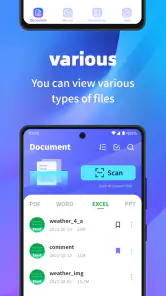
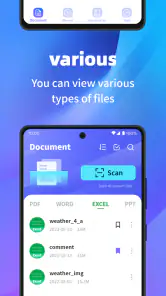
- Supports various file formats
- including PDF
- DOC
- and XLS.
- User-friendly interface with easy navigation.
- Allows text highlighting and annotation.
- Offline access to documents.
- Fast document loading and processing.
Cons
- Contains ads that can be intrusive.
- Limited free features
- many require a premium.
- Occasional crashes on older devices.
- Lack of advanced editing tools.
- Sync issues with cloud services.
- Category
- Productivity
- Version
- 1.1.9













