Location Share
- 342.00
- 3.8
- Installs
- 10.00M
- Price
- Free

Screenshots
Analysis by Reviewed
I find the most useful way to judge a location-sharing app is to ask one simple question: does it make coordinating a real meeting less fiddly? Location Share is built around sharing where you are, and that can be more practical than trying to describe a changing position by text. My view is that it works best as a tool for a specific, agreed-upon plan—not as a reason to keep checking where everyone is all day.
The value of sharing a changing position
What makes live location-sharing distinct from sending an address is that it can help when both people are moving. A pin tells someone where a place is; it does not show that you have crossed the street, changed entrances, or started walking toward them. When the destination is familiar and both people are stationary, a pin or a short message is usually enough. When the meeting is unfolding in real time, a changing reference can reduce the back-and-forth.
I would think of this as a coordination aid, not an all-purpose safety system. It can make it easier to find someone who has chosen to share their position, but it cannot replace a direct check-in, a agreed meeting point, or good judgment in a crowded or unfamiliar place. The distinction matters: the app is most useful when it answers a small practical question, such as “Which way are you coming from?” rather than carrying the whole responsibility for a plan.
A live location can replace a string of messages
When people are walking through a busy area, a written landmark can quickly become outdated. A shared live location gives the other person a clearer point of reference, which is especially helpful when neither of you knows the area well. It can also help when someone is approaching a meeting place and needs to adjust their route as they go. That is the practical benefit I would focus on: fewer rounds of “Where are you now?” and less guesswork about whether someone is nearby.
That convenience depends on both people being comfortable with the arrangement. I would agree on the purpose before sharing—meeting at a station, finding one another after a show, or coordinating a family outing—and stop sharing once that purpose has passed. Location information is personal, so a quick conversation about who can see it and when is a better habit than treating sharing as automatic.
How I would use it without making a mess
For a meetup, I would choose one person to share their location and have the other person use it to navigate toward the meeting point. That avoids several people sending overlapping updates and makes it easier to tell which location matters. If plans change, I would send a short message explaining the new destination rather than expecting the map alone to communicate the whole situation.
It is also worth checking that the intended contact is selected before sharing and that sharing is ended when it is no longer useful. Those small steps make the feature more predictable, particularly when a phone is being passed around or a group chat is busy. If someone does not want to share continuously, a conventional map pin or a plain description may suit that moment better.
More From Our News Desk

Weather by Xiaomi Review: Clear at a Glance, Less Clear Up Close

X Under Pressure: Can It Recover When Posting Goes Wrong?

Clash of Clans Is Won Between the Battles

Android Auto Makes the Case for Quieter Car Software

MobiOffice: Transforming Mobile Productivity with Seamless Integration

EA SPORTS FC™ Mobile Soccer: Redefining Mobile Sports Gaming
Make the handoff clear
A small, useful habit is to pair the location with one sentence of context. “I’m walking toward the north entrance” or “I’m staying by the ticket desk” gives the other person a reason to interpret the moving marker correctly. A map can show position, but it cannot reliably explain your intention. This matters most in places with several doors, levels, or nearby meeting spots that look alike.
I would also decide in advance who is doing the walking and who is watching the map. If both people keep changing direction based on each other’s movement, they can accidentally circle around one another. One person heading toward a fixed landmark while the other follows the shared position is often easier than trying to improvise together. The app helps with visibility; a simple plan supplies the missing coordination.
Making Connections Effortless
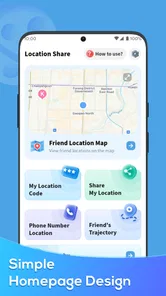
You know how it is, texting back and forth trying to explain your exact location to a friend. Well, Location Share obliterates those hassles by letting you share your real-time location with just a tap. I was genuinely surprised at how intuitive and easy the interface was. You open the app, select the contact you want to share your location with, and boom! They get a live feed of your whereabouts.
Privacy is a Priority
I know what you're thinking: "But what about my privacy?" Trust me, I had the same concern. Luckily, the app offers a robust set of privacy features. You can choose who sees your location, for how long, and even stop sharing whenever you want. It’s like having a personal GPS that only operates when you give it the green light.
That control is most useful when it becomes part of a clear routine: share for the journey or meetup, then stop when you arrive or plans end. I would not use live sharing as a substitute for checking in directly, and I would make sure the other person understands what is being shared. For a one-off rendezvous, a static map pin may reveal less and do the job just as well; live sharing earns its place when positions are changing.
Battery Life Concerns
Another pleasant surprise was how efficiently the app runs. Many similar apps tend to drain your battery faster than a kid with a new game, but not this one! I’ve used it on several outings and noticed no significant battery drop, which is a huge win for those of us who are always on the move.
For a long day out, I would still treat battery life as something to manage rather than assume away. Navigation and location use can coincide with other phone activity, so starting with a charged device and keeping a backup plan—such as agreeing on a fixed meeting point—makes sense. This is a practical precaution, not a reason to avoid sharing when it is genuinely helpful.
When Sharing is Caring
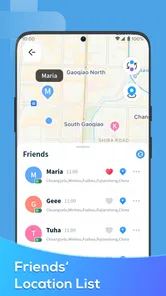
Let’s talk scenarios. Ever been lost in a crowded festival or a sprawling mall? With Location Share, you can easily find your group without the usual "I’m by the big tree next to the food truck" debacle. It's like having a digital breadcrumb trail that leads you straight to your pals.
A realistic example is meeting friends after a crowded event: one person can share their position while walking toward a pre-agreed exit, and the others can use that moving reference instead of guessing which entrance or landmark they mean. The app is less useful if everyone is stationary and already knows the exact place; in that case, a pin or a message is simpler. It is also not a replacement for turn-by-turn directions when the main task is planning a route rather than locating another person.
In addition, for parents, this app offers peace of mind. You can keep tabs on your kids’ locations when they’re out and about, ensuring they’re safe without intruding on their independence. I can see this being a game-changer for family outings and travel plans as well.
Keep family sharing consensual
For family use, I would introduce sharing as a practical agreement rather than a silent expectation. For example, a parent and teenager might use it to meet after an activity or to coordinate a pickup in a busy area, then end sharing once they are together. That keeps the purpose clear and makes it easier to talk about boundaries. It is not a substitute for trust, and it is not the right fit if one person feels pressured to keep their location visible.
There is also a useful distinction between checking a location and knowing someone is okay. A moving marker can help with a pickup, but it does not tell you why a person has stopped or whether they need help. If something feels wrong, a call or message is a better next step than repeatedly watching the map and guessing. I would keep that limitation in mind before relying on any location-sharing tool for reassurance.
A focused tool, not a full navigation suite
In the broader Maps & Navigation category, Location Share has a narrower job than a full map app: it helps people coordinate around each other’s positions. For route planning, traffic context, or exploring an unfamiliar neighborhood, I would reach for a dedicated navigation app. For a quick meetup or a moving group, sharing a live position is the more direct solution. The choice depends on whether I need directions to a destination or a clearer view of where another person is.
Compared with the usual alternatives, this is a focused choice. A standard map pin is simpler for a fixed location and gives the recipient a clear destination without tracking a changing journey. A phone call is better when the situation needs explanation, especially if a person has moved somewhere unexpected. A full navigation app is the stronger option for choosing roads or planning a route. Location-sharing earns its place between those options when the key information is another person’s current position.
That also means it may not be worth adding to someone’s routine if their existing messaging or map tools already handle occasional meetups comfortably. I would try it for a situation where messages have repeatedly failed—such as finding a moving friend outside a crowded venue—rather than asking everyone in a group to install another app for a single simple rendezvous. The best tool is the one the people involved are willing and able to use at the moment it matters.
The app is free, rated for Everyone, and developed by P & L Studio. Its average rating is 3.8 from around 13,000 ratings, with more than 10 million installs. It was released on May 31, 2023, and version 1.4.8 supports Android 6.0 and later. Those details make it accessible to a broad range of Android users, though I would still check that the person I plan to meet is happy to share before relying on it.
What to agree before relying on it
Before a first meetup, I would settle three things in a quick message: who is sharing, what place we are aiming for, and when sharing should end. This prevents the awkward situation where one person assumes the other can see their location while the other is waiting for a pin. It also avoids leaving the sharing arrangement open after the plan has finished. That little bit of coordination makes the feature feel deliberate rather than intrusive.
It is sensible to have a fallback if the map is not useful in the moment. A recognizable entrance, a named landmark, or a short call can bridge the gap if either person cannot interpret the location clearly. In a large venue, agreeing on a fixed spot first can be better than trying to chase a moving position through crowds. I see live sharing as a way to refine a workable plan, not a replacement for having one.
Who will get the most from it
I think Location Share makes the most sense for friends meeting in crowded places, families coordinating outings, and people who regularly need to find one another while moving. The key question is whether live position-sharing solves a recurring hassle for you. If you only need to send an address once in a while, an ordinary map pin is likely enough. If you want a detailed route planner or prefer not to share location at all, a different map tool—or a simple phone call—is a better fit.
It is particularly suitable for people who can agree on clear boundaries and who need occasional, purposeful coordination rather than constant monitoring. A group of friends arriving at different times, relatives meeting during a day out, or someone walking toward a pickup point can all benefit from a shared moving reference. By contrast, someone who dislikes location sharing on principle, or who expects route guidance and transit planning from one app, should choose another approach.
Final Thoughts
All in all, Location Share has proven to be a reliable and user-friendly app that fits seamlessly into my daily routine. Whether you’re coordinating a meet-up with friends or ensuring your family members are safe, this app is the perfect companion. It bridges the gap between convenience and security, making it a must-have on your smartphone. Give it a whirl, and you might find it becoming one of your go-to apps for every outing!
Location Share Frequently Asked Questions
Does Location Share work well for everyday navigation and meeting up?
Location Share is a Maps & Navigation app focused on sharing location with other people. Its main appeal is being able to let selected contacts see where you are, which can help when coordinating a meeting or keeping family and friends informed. It is not described as a turn-by-turn navigation tool, so consider whether location sharing is the feature you need before downloading.
What is Location Share and how does it work?
Location Share is a user-friendly app designed to facilitate seamless location sharing with family and friends. By utilizing GPS technology, the app allows users to share their real-time location with selected contacts, ensuring safety and connectivity. Users can choose to share their location temporarily or indefinitely, and the app provides options to customize privacy settings according to personal preferences.
Is Location Share available for both Android and iOS devices?
Yes, Location Share is available for download on both Android and iOS platforms. The app is designed to provide a consistent experience across devices, ensuring that users can easily connect and share their location regardless of the operating system. The app can be downloaded from the Google Play Store for Android devices and the Apple App Store for iOS devices. Android users should note that the current version is 1.4.8 and requires Android 6.0 or later.
How does Location Share ensure user privacy and data security?
Location Share prioritizes user privacy and data security by implementing robust encryption methods to protect user data. The app provides customizable privacy settings, allowing users to control who can view their location and for how long. Additionally, Location Share does not store location data on its servers, ensuring that users' information remains private and secure. Before sharing, review the selected contacts and duration so the sharing arrangement matches your comfort level.
Can I use Location Share without an internet connection?
Location Share requires an active internet connection to share and update location information in real-time. However, the app can store the last known location offline, which can be shared once the connection is restored. This feature ensures that users remain connected and their locations updated as soon as they regain internet access. For current updates, both GPS access and a working connection are important.
Pros
- Easy to share location with friends
- Real-time location updates
- User-friendly interface
- Secure data encryption
- Works offline with cached maps
Cons
- Consumes battery quickly
- Requires constant internet access
- Limited features in free version
- Occasional app crashes
- No dark mode available













