Notes Launcher: Notepad, To-do
- 6.98K
- 4.2
- Installs
- 1.00M
- Price
- Free

Screenshots

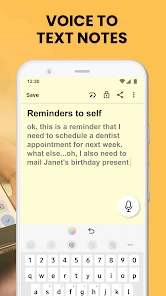
Analysis by Reviewed
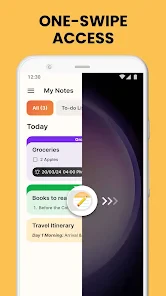
I judge a quick-capture tool less by how many options it packs in than by whether I can get a thought out of my head before the moment passes. That is the lens I bring to Notes Launcher: Notepad, To-do: a lightweight productivity app built around keeping notes and small tasks close at hand. Its launcher-first idea is appealing if you want fewer steps between remembering something and recording it, though it is not a replacement for every kind of planner.
Quick capture works best for small, active lists
I find the launcher approach most useful when a reminder needs to be visible before I forget it. For example, I can put a shopping list or a short work task where it is easy to reach, then check it while moving between other phone activities. That is a different habit from opening a dedicated planner, choosing a project, and filling in fields: the quick capture is the point. It suits brief, changing lists better than elaborate planning systems.
A practical way to keep it manageable is to give notes distinct purposes instead of saving every thought in one long page. I would keep errands separate from a work checklist, and use a clear label or color for anything that must be found quickly. This makes the search function more useful later, because a specific phrase is easier to locate when notes are not all variations of “things to do.”
How Notes Launcher fits into everyday productivity
I stumbled upon Notes Launcher: Notepad, To-do while searching for a productivity app that could help me streamline my never-ending list of tasks. With so many apps on the market, it’s hard to know which ones are worth your time. But something about this app caught my eye, maybe it was the clean and intuitive interface or perhaps the glowing reviews from other users.
The first impression: less setup, more jotting
Upon downloading, the first thing that struck me was how easy it was to navigate. The app doesn’t bombard you with unnecessary features or complicated setups. Instead, it offers a minimalist design that makes it incredibly straightforward to jot down notes or create to-do lists in seconds. I was able to personalize the layout to suit my needs, which was a nice touch.
Convenience across devices and on the launcher
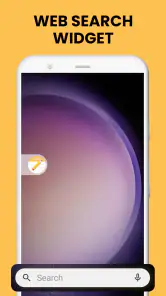
One of the standout features of this app is its synchronization capability. Whether I’m on my phone or tablet, my notes are always in sync. This is a game-changer for someone like me who constantly switches between devices. Additionally, it offers a variety of widgets to choose from, ensuring that my most important tasks are always front and center.
Another feature worth mentioning is the app’s search functionality. It’s incredibly efficient and makes finding specific notes a breeze, even if you have a mountain of them.
More From Our News Desk

Clash of Clans Is Won Between the Battles

Android Auto Makes the Case for Quieter Car Software

MobiOffice: Transforming Mobile Productivity with Seamless Integration

EA SPORTS FC™ Mobile Soccer: Redefining Mobile Sports Gaming

How Microsoft OneDrive Became a Mobile Productivity Giant

How Google Translate Breaks Language Barriers Effortlessly
Choosing it over a full planner
Compared with a traditional notes app, the launcher-centered idea makes quick access the main attraction. Compared with a calendar or project-management tool, it is a lighter place for informal tasks, not a substitute for scheduling a meeting or coordinating a complicated project. I would choose it for a grocery list, a few reminders, or notes I want close at hand; I would choose a more structured planner when deadlines, recurring work, or collaboration need to be tracked in detail.
That distinction matters if you are deciding whether to move all your planning into one app. A launcher can reduce the steps between remembering something and writing it down, but it cannot make a crowded list meaningful by itself. I get better results when I keep the most immediate items visible and move completed or stale thoughts out of the way rather than letting the home screen become another pile of digital scraps.
A realistic day with quick notes
Imagine I am heading out in the morning and remember that I need to pick up a few groceries, reply to a message at work, and bring a document home. A short list I can reach quickly is more practical than opening a full project planner for three unrelated reminders. During the day, I can check the list between other phone tasks and cross off what is done, leaving the remaining items easy to spot when I have a free moment.
The useful habit here is to treat the launcher as a landing strip, not a permanent archive. I would capture a thought immediately, then review the visible list at a natural pause—before leaving work or when I get home. Anything completed can be cleared, while a task that needs a date or several steps belongs in a calendar or a more structured system. This keeps quick access from turning into clutter.
Everyday Use
Incorporating Notes Launcher: Notepad, To-do into my daily routine was seamless. I found myself relying on it not just for work-related tasks, but also for personal reminders like grocery lists and appointment scheduling. It’s become a staple in my productivity arsenal.
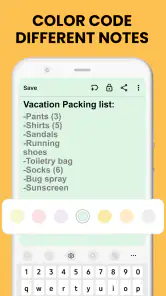
Moreover, the app’s ability to categorize and color-code notes adds an extra layer of organization that I never knew I needed. It’s like having a digital filing cabinet that you can access anytime, anywhere.
Small organization habits that make it work harder
One trade-off with visible notes is that the most convenient space can become the messiest one. I would use color as a quick visual cue—perhaps one shade for errands and another for work—rather than inventing a complicated code I would have to remember. Short titles also help: “buy rice” is easier to scan than a vague label such as “later,” especially when several reminders are competing for attention.
Search becomes more valuable when I write notes with retrieval in mind. A memorable keyword, such as the name of a shop or the subject of a task, gives me something specific to search for later. I would avoid using one note as a running dump for unrelated thoughts; separate notes keep the quick list readable and make old information easier to find without scrolling through a wall of text.
Who will appreciate it, and who may not
I think it is a good fit for someone who wants a low-friction place for short notes and to-do lists, especially if they like seeing useful items from the launcher instead of repeatedly opening a larger productivity suite. It can also help students keep a quick list of study tasks or households track small errands without building a complicated system around them.
On the other hand, I would not make it my only tool for sensitive information, shared team projects, or plans that depend on precise calendar scheduling. A dedicated calendar is clearer for appointments, while a collaborative task manager is better when several people need to assign and update work. If you mainly write long documents, a full-featured editor will be more comfortable than a notepad-style workflow.
When another kind of app is the better fit
The choice depends on what tends to go wrong in your routine. If you forget a thought because opening an app feels like too much friction, a launcher-oriented notepad has a clear advantage over a conventional notes app that you must seek out each time. If you instead need to plan a week by time, a calendar gives appointments and deadlines a more natural home. For work shared with other people, a task manager with ownership and status tracking is the more suitable tool.
I would also skip this style of app if I wanted a searchable library of long reference documents, extensive formatting, or a detailed project history. A quick note is excellent for capturing a thought, but that does not automatically make it a good place to draft a report or coordinate a multi-stage project. The best use is deliberately modest: keep the small, immediate things accessible, and let specialist apps handle the work they are built for.
What the app’s current stage means
Notes Launcher is a free productivity app from AtomApplications, with an Everyone age rating. It was released on January 5, 2024, and its current version is 2.10.2. The app has an average rating of 4.2 from around 16,000 ratings, alongside about 7,000 written reviews, and has passed 1 million installs. Those figures suggest it has found an audience, but I would treat them as context rather than proof that every workflow will suit me.
The version number tells me the app has moved beyond its first release, but it does not by itself show which features changed or how the experience has evolved. For an existing user, the sensible approach is to check what the current version offers on their own device and keep important notes in a way they can retrieve. I would especially watch for changes that affect quick access, widgets, or the way notes remain available across devices, since those are central to the app’s appeal.
Questions I would settle before relying on it
Could I use it without paying? Yes: it is free, which makes it easy to try as a companion to an existing notes or calendar app rather than forcing an all-or-nothing switch. Is it aimed at adults only? No; its age classification is Everyone. Those details make the barrier to trying it low, but I would still test the actual workflow on the device I use most before moving important routines into it.
Would I trust it with every appointment? I would not. I see it as a convenient place to capture a reminder, while a calendar remains the safer choice for time-specific commitments. Would it replace a shared task board? Not for my needs: the collaborative work described above calls for a tool designed around team coordination. Keeping those boundaries clear is more useful than expecting one small app to cover every planning situation.
What I would watch as it develops
For someone already using it, the practical question is not simply whether the version number rises, but whether changes preserve the quick path that makes the app worthwhile. I would pay attention to whether notes remain easy to reach, whether widgets continue to serve the tasks I actually check, and whether using it across devices stays straightforward. Those are the parts most likely to affect my everyday habit.
For a new user, I would start with a small test rather than importing every list at once. Keep one short shopping or work list in the app for a few days, see whether the launcher placement helps you remember it, and notice whether searching and organizing feel natural. If it saves effort without creating another pile to maintain, it is doing its job. If you find yourself wanting due-date logic, team assignment, or a calendar view, that is a sign to pair it with a more specialized tool.
Final Thoughts
If you’re in the market for a reliable and efficient notepad app, I’d highly recommend giving this one a try. It’s not just about taking notes, it’s about managing your life in a way that’s both simple and effective. With Notes Launcher: Notepad, To-do, I feel more organized and less stressed, which is exactly what I was hoping for.
So, if you’re tired of feeling overwhelmed by your to-do list, why not let this app lend a helping hand? Trust me, you won’t regret it.
Notes Launcher: Notepad, To-do Frequently Asked Questions
What kind of app is Notes Launcher: Notepad, To-do, and who develops it?
Notes Launcher: Notepad, To-do is a productivity app developed by AtomApplications. It is designed as a simple note-taking launcher, bringing notes, to-do lists, and reminders together in one place. That focus may appeal if you want quick access to everyday written notes and tasks without choosing a more elaborate planning system.
Is Notes Launcher: Notepad, To-do free, and what age group is it suitable for?
The app is free to download and has an Everyone content rating, so its stated audience is broad. It is intended for practical everyday organization, including notes, to-do lists, and reminders. Before installing, consider whether that focused set of tools suits your routine and whether your device meets the operating-system requirement.
Is Notes Launcher: Notepad, To-do suitable for everyday productivity?
Notes Launcher: Notepad, To-do is a productivity app for keeping notes, to-do lists, and reminders together. Its focus is straightforward: capture information and make tasks easier to keep track of. It may suit someone who wants a simple place for everyday planning rather than a more elaborate project-management setup. The app is free and is rated for Everyone.
What features does Notes Launcher: Notepad, To-do offer for organizing notes and tasks?
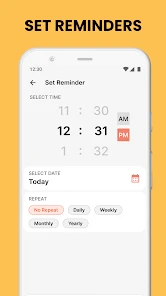
Notes Launcher: Notepad, To-do offers a comprehensive set of features to help users organize their notes and to-do lists efficiently. Users can categorize notes, set reminders, and prioritize tasks. The app also supports cloud synchronization, allowing access to notes across multiple devices. Additionally, it features a user-friendly interface that makes navigation and organization simple and intuitive.
Is Notes Launcher: Notepad, To-do available on both Android and iOS platforms?
Yes, Notes Launcher: Notepad, To-do is available for download on both Android and iOS platforms. This cross-platform availability ensures that users can access and manage their notes and tasks seamlessly, regardless of the device they are using. The app is designed to provide a consistent experience across different operating systems.
Pros
- Intuitive user interface
- Seamless to-do list integration
- Customizable themes
- Lightweight and fast
- Syncs across devices
Cons
- Limited collaboration features
- No offline access
- Ads in free version
- Limited widget options
- No advanced formatting tools

- Category
- Productivity
- Version
- 2.10.2













