2025 Calendar Launcher
- 1.54K
- 4.4
- Installs
- 500.00K
- Price
- Free
Screenshots
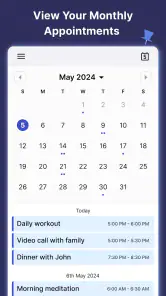
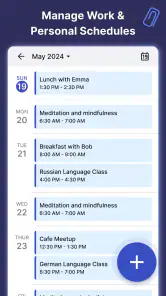
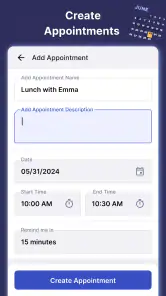
Analysis by Reviewed
I tend to judge a calendar app by what it helps me do in the middle of a busy day, not by how many options it can advertise. Calendar Launcher puts scheduling close at hand, which is appealing if I want to check plans and add a commitment without treating calendar upkeep as a separate task. It is a free productivity app from AtomApplications, and its straightforward focus makes it worth considering for people who want their schedule to feel more accessible.
What free access means here
The app is free to install, so trying it does not require an upfront purchase. That is a useful starting point if you are comparing calendar tools and do not yet know whether a launcher-style approach fits your routine. I would still separate free access from assumptions about every possible feature or future cost: the practical question is whether the everyday scheduling experience suits you.
It has an average rating of 4.4 from around 7,900 ratings, and has been installed over 500,000 times. It is rated for Everyone. Those figures suggest that it has found an audience, but they do not tell me whether its layout will suit your habits; that is best judged by trying the way you actually plan a week.
Where the time savings can come from
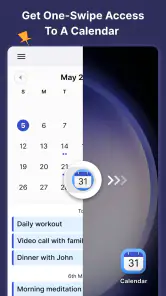
The most useful angle is convenience. If you often need to check what is next, a calendar launcher can make that action feel more immediate than opening a general-purpose calendar and navigating through several screens. I would use it as a quick planning surface: review the day, capture a new appointment promptly, then return to whatever I was doing.
A realistic example is a day with a work call, an errand, and a family commitment. Adding each item as soon as it is agreed helps prevent the mental juggling that happens when plans live in messages or memory. A brief check at the start of the day can also reveal whether the schedule is crowded, leaving time to move or prepare for something before it becomes urgent.
Trade-offs and the right fit
This approach is not automatically better than a standard calendar. If you mainly need shared scheduling, detailed project planning, or a familiar interface tied closely to a particular service, the calendar you already use may remain the better choice. A launcher emphasis is most valuable when quick access is the problem; it matters less if your existing setup already makes checking and entering events effortless.
I would also be deliberate about notification habits. Reminders are only useful when they help rather than add noise, so start with the alerts you genuinely need and adjust from there. Likewise, color choices can make a busy week easier to scan, but too many categories can turn a simple view into visual clutter. A restrained setup is often more practical than customizing everything at once.
More From Our News Desk

Clash of Clans Is Won Between the Battles

Android Auto Makes the Case for Quieter Car Software

MobiOffice: Transforming Mobile Productivity with Seamless Integration

EA SPORTS FC™ Mobile Soccer: Redefining Mobile Sports Gaming

How Microsoft OneDrive Became a Mobile Productivity Giant

How Google Translate Breaks Language Barriers Effortlessly
Getting Started with Calendar Launcher
First things first, let's talk about how easy it is to get started with Calendar Launcher. The installation process was super smooth, and within minutes, I had the app up and running on my phone. What struck me right away was the clean and intuitive interface. Everything is laid out in a way that makes sense, which is a big win in my book.
Features that Stand Out
One of the standout features of this app is its seamless integration with other calendar services. Whether you're using Google Calendar, Outlook, or any other platform, Calendar Launcher syncs effortlessly. This means no more double entries or missed appointments. Everything is in one place, just the way I like it.
Now, let's talk about the customization options. You can tailor the app to fit your personal style, which is pretty neat. From color-coding events to setting up personalized notifications, it feels like the app understands what I need to stay on top of things.
The User Experience
The user experience is where Calendar Launcher really shines. Navigating through the app is a breeze, thanks to its intuitive design. I found myself quickly adapting to the layout, and planning my week became a less daunting task. Plus, the app is super responsive, which is always a bonus.
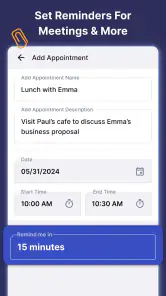
One feature I particularly enjoyed is the "quick add" functionality. With just a few taps, I can add events without having to go through a bunch of menus. It’s perfect for when I’m on the go and need to jot something down quickly.
Using quick entry without creating cleanup
Quick entry works best when I treat it as a capture step, not as permission to leave details vague. If someone gives me a time and place while I am walking between tasks, I can put the commitment in immediately, then check the entry later when I can focus. That second look is useful for catching an incorrect time or adding context that will make the event recognizable days later.
I would also use a consistent naming habit. “Dentist” may be enough for a familiar appointment, but “Dentist — bring forms” is more helpful if I need to remember a task alongside the event. The point is not to turn every calendar item into a note; it is to add just enough detail that the calendar can do its job without sending me back through old messages.
Making reminders useful rather than noisy
A reminder should change my behavior: leave earlier, prepare something, or stop accepting another commitment that overlaps. For a routine event that needs no preparation, repeated alerts can become background noise. I would begin with reminders for appointments where timing matters, then keep only the ones I notice and act on. That approach is more dependable than enabling every possible alert at once.
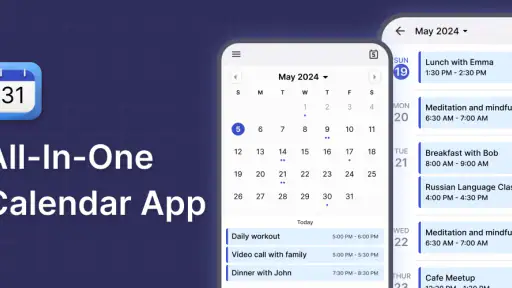
For a week with several kinds of commitments, color-coding can help distinguish work from personal plans at a glance. But I would keep the categories broad. If every project, person, and errand gets its own color, scanning the schedule becomes a decoding exercise. A small, stable set of visual cues is easier to maintain and less likely to lose meaning when plans get busy.
How it compares with a standard calendar
A conventional calendar is often the stronger choice when the main task is coordinating several people, keeping work and personal accounts separate, or relying on a service’s established sharing tools. A launcher-oriented calendar is appealing for a different reason: it puts everyday schedule checks and entries closer to the surface. Neither approach is universally better. I would choose based on the friction I actually feel, rather than switching simply because another calendar looks different.
If your current calendar already opens quickly and makes new events easy to enter, moving your routine may add work without solving a real problem. If you routinely forget to check the day or postpone entering appointments because the process feels like a detour, the launcher approach may be more useful. That is the key trade-off: convenience at the point of access matters most when access is what is getting in your way.
A practical first-week routine
On the first day, I would set up only the calendars and alerts I already know I need, then add a few real commitments rather than spending the session customizing every view. At the end of the day, I would check whether the next day’s schedule is clear and whether any event needs a useful reminder. This exposes practical problems early, such as an unclear event title or an alert that arrives at the wrong moment.
After a few days, I would look for omissions rather than aiming for a perfectly filled schedule. Some people need a calendar for appointments but prefer to keep flexible tasks on a separate list; others want a reminder for each small obligation. The better setup is the one that matches how you make decisions. Forcing every task into a calendar can make time-based plans harder to read.
Who is likely to get value
I can see this fitting someone who checks a phone often during a changing day and wants appointments within easy reach: a student balancing classes and errands, a parent tracking pickups, or a worker who needs to capture meetings as they are arranged. The practical benefit is not a complicated planning system; it is reducing the gap between hearing about a commitment and recording it somewhere dependable.
It is less compelling for someone who needs team-wide availability, elaborate project timelines, or a calendar that serves as a complete task-management system. Those needs are better handled by tools designed around collaboration or project work. It may also be unnecessary if you have a reliable calendar routine already. Free access makes trying it low-risk, but it does not make a change worthwhile unless the workflow improves your day.
Version, upkeep, and verdict
The app was released on April 5, 2024, and its current version is 2.6.1; it requires Android 10 or later. That gives Android users a practical compatibility check before they install. Since calendars are only dependable when they stay current, I would also make a habit of checking that the events I rely on appear as expected after setup, especially if I use more than one calendar service.
For a low-friction workflow, I would add an event while the details are fresh, choose only the reminder that will change what I do, and use a quick daily scan to catch clashes. That small routine is more valuable than filling the calendar with labels or alerts I will eventually ignore. If you prefer a powerful calendar for coordinating groups or managing complex projects, your established service may be a better fit. If you mainly want convenient access to appointments and a simpler way to keep daily plans visible, this free option is easy to consider.
Final Thoughts
In a nutshell, Calendar Launcher is a fantastic tool for anyone looking to streamline their scheduling process. It’s user-friendly, highly customizable, and integrates well with other services. While no app is perfect, this one comes pretty close in my opinion. If you're in the market for a reliable calendar app that doesn't overcomplicate things, give Calendar Launcher a shot. Trust me, your future self will thank you!
2025 Calendar Launcher Frequently Asked Questions
Is Calendar Launcher suitable for organizing a busy daily schedule?
Calendar Launcher is a productivity app centered on calendar access, reminders, event planning, and appointment scheduling. Its launcher-style approach is intended to make calendar tools readily available, while customizable widgets can provide quick access to useful information. If you want an app to help keep everyday plans visible and organized, these are the main aspects to consider before downloading.
Who develops Calendar Launcher, and is it suitable for general audiences?
Calendar Launcher is developed by AtomApplications and is rated Everyone, making it suitable for general audiences. The app focuses on practical productivity tasks such as viewing a calendar, planning events, and managing appointments. Its broad age rating may be reassuring for households with different users, though anyone choosing an app for a child should still review its features and privacy choices together.
What features does Calendar Launcher offer?
Calendar Launcher offers a comprehensive suite of features designed to enhance productivity, including seamless integration with various calendar platforms, customizable widgets for quick access, and intelligent reminders to keep you on track. It also provides a user-friendly interface that simplifies scheduling and enhances your overall calendar management experience.
Is Calendar Launcher compatible with both Android and iOS devices?
Yes, Calendar Launcher is designed to be compatible with both Android and iOS devices. This ensures that users can enjoy a consistent and seamless experience across different platforms. The app leverages the native capabilities of each operating system to provide optimal performance and functionality for its users.
Does Calendar Launcher require an internet connection to function?
While Calendar Launcher offers offline capabilities for certain features, an internet connection is required for syncing events and updates with other calendar platforms. This ensures that your data is always up-to-date and accessible whenever you need it. However, basic functions like viewing and editing events can still be performed offline.
Pros
- User-friendly interface for quick access.
- Integrates seamlessly with existing calendars.
- Customizable widget for home screen.
- Supports voice input for event creation.
- Low battery consumption.
Cons
- Limited customization options.
- No offline mode available.
- Occasional sync delays.
- Ads in the free version.
- No task management features.
- Category
- Productivity
- Version
- 2.6.1













