Clock Launcher: Set Alarms
- 2.70K
- 4.0
- Installs
- 1.00M
- Price
- Free
Screenshots

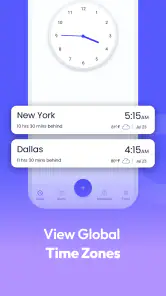
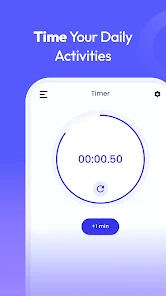
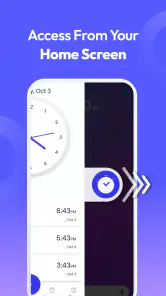
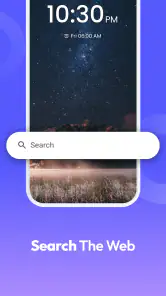
Analysis by Reviewed
I tend to trust an alarm app most when it keeps its job understandable: I should be able to see what I’ve scheduled, change it quickly, and know what will happen when the alarm goes off. Clock Launcher: Set Alarms is a free productivity app from AtomApplications that combines alarms with clock-focused tools. It has a 4.0 average from around 9,800 ratings, and more than a million installs suggest it has found an audience among people looking for an everyday timekeeping option.
What to check before relying on it
Alarms are unusually sensitive compared with casual productivity tools: a missed reminder can mean a late start, so I wouldn’t judge reliability from a pleasant interface alone. When trying any alarm app, I recommend setting a test alarm a few minutes ahead and checking that the sound, volume, and timing behave as you expect. Repeat that check after changing phone settings or updating the app. This is a sensible routine for Clock Launcher, too, especially before trusting it with an early flight or an important appointment.
The app is rated for Everyone and was released on January 17, 2023. Its current version is 3.10.2, and it requires Android 10 or later. Those details make it easier to decide whether it fits your device and household; they don’t replace checking how an alarm behaves on your own phone.
Keep control of reminders and attention
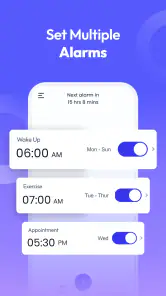
Labels can do more than explain why an alarm is set: I find them useful for separating a recurring wake-up from a one-off prompt, so I can review the list without having to remember the reason behind each time. If you use several alarms, descriptive labels are a low-effort way to reduce the chance of dismissing the wrong one. I’d also keep the schedule lean. Multiple alarms help when your routine genuinely changes, but a long stack can make it harder to tell which alert matters.
Clock Launcher’s mix of a home-screen clock, timer, and stopwatch may also suit someone who wants time tools gathered in one place. That convenience is a trade-off: if you already like your phone’s built-in clock and only need a basic alarm, adding another app may not improve your routine. I’d compare the two by trying the same simple task in each, then keeping the one that takes fewer steps and feels clearer to manage.
More than Just a Beep
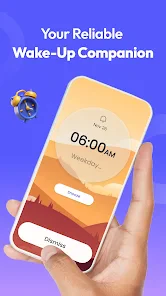
First off, let's talk about the variety it offers. With Clock Launcher: Set Alarms, you can customize your wake-up experience with different alarm tones, from soothing melodies to the more jarring sounds that are sure to get you out of bed. But the real game-changer? The app lets you set multiple alarms with just a few taps, which is perfect for those mornings when one alarm just won’t cut it.
Easy Peasy Setup
Setting up the app is as smooth as butter. The user interface is clean and intuitive, which means you won’t be fumbling around trying to figure out how to set your alarms. Simply open the app, navigate to the alarm tab, and you’re good to go. Plus, it has a neat feature where you can set labels for each alarm. This way, you know exactly why you’re getting up at 6 AM—be it for a morning jog or an important meeting.
More From Our News Desk

Clash of Clans Is Won Between the Battles

Android Auto Makes the Case for Quieter Car Software

MobiOffice: Transforming Mobile Productivity with Seamless Integration

EA SPORTS FC™ Mobile Soccer: Redefining Mobile Sports Gaming

How Microsoft OneDrive Became a Mobile Productivity Giant

How Google Translate Breaks Language Barriers Effortlessly
Beyond Alarms
What's really cool is that this app isn’t just about alarms. It also acts as a pretty nifty clock widget for your home screen. You can choose from different clock faces and styles, making your phone not only functional but also a tad more stylish. It’s all about having options, and this app sure delivers on that front.
Moreover, it includes a timer and stopwatch feature, which comes in handy when you need to time your workouts or cooking sessions. Having all these features bundled into one app makes it super convenient and reduces the clutter on my phone.
Personal Touch
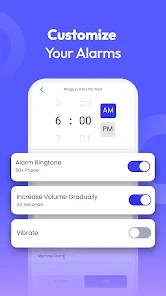
Another aspect I love is the app's focus on personalization. You can tweak the settings to your heart’s content—whether it’s adjusting the snooze duration or picking a theme that matches your mood. It’s these little touches that make a difference and make me feel like the app is tailored just for me.
One practical use is a weekday routine with a labeled wake-up alarm and a separate weekend schedule, alongside a timer for cooking or a workout. I’d use labels that describe the action, not just the time, and choose a tone that is noticeable without being unnecessarily startling. If you share a room, test the sound at a sensible volume before making it your regular alarm; the right choice depends on your sleeping habits and surroundings.
I also appreciate the app's reliability. No more missed alarms due to random app crashes, which is a lifesaver for someone as forgetful as I am. It’s like having a trusty friend who’s always got your back.
Make a routine that is easy to check
A useful way to try the app is to build one small routine rather than moving every reminder over at once. For example, I’d set a weekday wake-up alarm, label it with the reason I need to get up, and add a timer for one repeatable task such as steeping tea or getting ready to leave. After a few days, I’d check whether having those tools together actually saves effort. If it doesn’t, there’s little reason to change a setup that already works.
For rotating shifts or irregular mornings, I’d be careful about relying on a large collection of loosely named alarms. Before bed, check the next alarm’s time and label, then disable alerts that belong to a different day. The small cost is a deliberate check; the benefit is reducing the chance that an old schedule becomes an unexpected wake-up call. A calendar or dedicated shift-planning tool may be a better home for complicated schedules, while this app can still handle the immediate wake-up time.
Where it fits—and where it doesn’t
For someone who wants alarms, a customizable clock display, and basic timing tools together, the appeal is straightforward: fewer separate tools to open and a home-screen clock that can make time more visible. It may be especially handy if you use a timer while getting ready, then rely on a labeled alarm for a commute or shift. By contrast, people who need a shared family calendar, complex task planning, or a detailed reminder system should look to a dedicated app for those jobs rather than expecting a clock launcher to replace them.
Compared with a phone’s built-in clock, the main reason to choose this app is the combination of a styled home-screen clock and the timing tools alongside alarms. The built-in option is usually the more sensible choice if you value keeping your setup simple and already find its alarm controls clear. A separate calendar or task manager is better for reminders tied to dates, projects, and other people. I see Clock Launcher as a focused timekeeping companion, not a substitute for those systems.
It can also suit someone who wants to make time visible without opening an app repeatedly. A clock widget is useful at a glance, but it shouldn’t become the only place you verify a schedule: when an appointment changes, open the alarm list and confirm the actual alert. That distinction matters because a visible clock and an enabled alarm solve different problems. For a user who rarely uses widgets, the extra display may add little; for someone who checks the home screen constantly, it can make the time tools feel more accessible.
Small choices that affect trust
When I assess an alarm app, I separate what I can see and control from assumptions about what happens behind the scenes. In everyday use, the meaningful checks are whether I can inspect the alarms I’ve created, change or remove one, select a tone, and make sense of the settings that shape the alert. I’d review those choices before depending on any new alarm, rather than treating a clean interface as proof that every detail is set the way I intend.
Alarms also create a few data-sensitive moments simply because their labels can reveal personal routines. I’d keep labels practical and discreet: “leave for work” tells me what I need without putting unnecessary detail on a screen someone else might see. If you add sensitive notes to reminders, consider whether that information is actually needed there. This is a useful privacy habit regardless of which clock app you choose, and it lets the app remain a straightforward time tool rather than a store of personal context.
Before installing, I’d use the normal app-store permission screen as a decision point and read each request in plain terms. Grant only what makes sense for the features you plan to use, and revisit device settings if you later change your mind. I wouldn’t infer a particular data practice from the presence of alarms, a widget, or a timer alone; the practical approach is to make choices based on the permissions and controls visible on your own device.
Who will get the most from it
I think it makes the most sense for someone who wants more than a single wake-up alert but less than a full productivity suite: perhaps a student timing study breaks, a home cook using a timer, or a person with a regular commute who wants a labeled alarm and a clock on the home screen. It is also a reasonable option for anyone who likes adjusting how a clock looks and prefers keeping basic time tools close together.
I’d skip it if your priority is advanced scheduling, coordinating reminders with family, or managing tasks across a busy project. Those needs call for tools designed around calendars, sharing, or task lists. I’d also stick with the built-in clock if installing another app feels like unnecessary overhead or if its extra display and timing options would go unused. The free price removes a purchase decision, but it doesn’t remove the value of keeping your phone setup simple.
One question I’d ask before making it my only alarm is how it behaves with my actual phone settings. The answer is personal to the device and routine, so I’d test an alarm while the phone is in the state I normally use overnight, then repeat after any meaningful settings change. If the sound is too quiet, the wrong tone, or otherwise inconvenient, adjust it before trusting it with a high-stakes morning. For important travel or work, a backup alarm is a sensible precaution until the routine is proven.
Another practical question is whether the timer and stopwatch are enough for a particular task. For cooking, exercise intervals, or a short focus session, simple timing tools are often all I need. If I require a history of timed sessions, detailed workout tracking, or reminders that trigger according to a complex plan, I’d choose a specialized app instead. The advantage here is immediacy, not depth: the tools sit beside the alarm rather than turning the app into a full planning system.
One useful habit is to treat the clock widget as a quick glance, not as proof that an alarm is correctly scheduled. Open the alarm list when plans change, check the label and time, and remove one-off alerts once they’re no longer needed. This small bit of housekeeping keeps several alarms from becoming noise. If your phone’s own clock already handles your routine cleanly, there’s no need to switch just for the sake of having more options; the extra tools matter only if you’ll actually use them.
The app’s name may sound like a broad home-screen replacement, but the features I’d focus on are its alarms and clock-related tools. If you’re deciding whether it belongs on your phone, start with one recurring alarm and one practical timer task, then see whether the combined setup feels easier than your current arrangement. Anyone who depends on alarms for critical events should keep a backup plan until they have tested the app on their own device and routine.
A cautious recommendation
My overall view is positive but measured. The combination of alarms, clock display, timer, stopwatch, tones, labels, and customization gives it a clear role for people who want everyday timekeeping in one place. Its 4.0 average, based on around 9,800 ratings, and more than a million installs indicate that plenty of people have tried it, but popularity isn’t a substitute for checking whether it works well on your particular phone.
AtomApplications’ app is free, rated for Everyone, and currently at version 3.10.2 for Android 10 or later. I’d start with one low-stakes alarm, make sure its label and sound are right, and try the timer or widget only if they fit an existing habit. If that small trial makes your routine clearer, it is worth keeping; if the built-in clock already does the job, you can confidently skip the extra app.
In a nutshell, Clock Launcher: Set Alarms has transformed my mornings. It's packed with features that cater to all my timekeeping needs, wrapped up in a user-friendly package. Whether you're a heavy sleeper or someone who just wants a stylish clock on your home screen, this app is definitely worth checking out. Trust me, your mornings will never be the same again!
Clock Launcher: Set Alarms Frequently Asked Questions
Is Clock Launcher: Set Alarms free to download?
Clock Launcher: Set Alarms is free, so you can try its alarm and time-management tools without paying to download it. It is a productivity app from AtomApplications, intended to help users wake up and get tasks done by adding alarms and reminders. Its age rating is Everyone, making it suitable for a broad audience.
What features does Clock Launcher: Set Alarms offer?
Clock Launcher: Set Alarms is designed to be a versatile time management tool. It offers customizable alarm settings, multiple alarm tones, and snooze options. Additionally, it provides features like a timer, stopwatch, and world clock, allowing users to manage their time more effectively and stay organized throughout the day.
Is Clock Launcher: Set Alarms easy to use for beginners?
Yes, Clock Launcher: Set Alarms is designed with user-friendliness in mind. The interface is intuitive and easy to navigate, making it suitable for users of all ages and technical abilities. Beginners will find it easy to set up alarms, timers, and use other features without any hassle.
Can I customize alarm sounds and settings in Clock Launcher: Set Alarms?
Absolutely, Clock Launcher: Set Alarms offers a range of customization options, including choosing from a variety of alarm tones or using music from your device. Users can also set recurring alarms, adjust snooze durations, and customize the alarm volume, ensuring that alarms are tailored to individual preferences.
Does Clock Launcher: Set Alarms support multiple alarms?
Yes, Clock Launcher: Set Alarms supports setting multiple alarms simultaneously. This feature is particularly beneficial for users with complex schedules who need reminders at different times throughout the day. Each alarm can be customized with specific tones and settings to suit personal needs.
Pros
- Intuitive and user-friendly interface
- Customizable alarm tones and settings
- Syncs with calendar for reminders
- Low battery usage
- Supports multiple alarm profiles
Cons
- Limited free features
- Ads in free version
- No backup for alarm settings
- Occasional app crashes
- In-app purchases required for full features
- Category
- Productivity
- Version
- 3.10.2













