Brightest Flashlight Launcher
- 14.65K
- 4.3
- Installs
- 5.00M
- Price
- Free
Screenshots
Analysis by Reviewed
I like having a light ready on my phone for the small, awkward moments when reaching for a separate torch would be more trouble than it is worth. Brightest Flashlight Launcher is built around that simple job, with a camera flash for illumination and a launcher-focused approach intended to make the light quick to reach. It is a free tools app from AtomApplications, and its appeal is less about replacing dedicated outdoor equipment than about keeping a handy backup close by.
Choosing the right kind of quick access
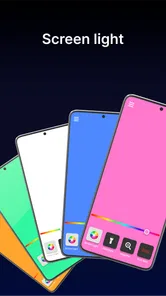
The main question for a potential user is whether a separate launcher feels easier than the flashlight control already on their phone. If I use a phone’s quick settings by habit, adding another route may not save much time. But if I want a flashlight-focused shortcut and the bundled compass and signaling options, the launcher gives those tools a shared place. I’d test the route I expect to use most, rather than assume that more options automatically mean faster access.
There is a useful distinction between “available quickly” and “ready without thought.” In a dark hallway, a familiar built-in control might be fastest; when I want to reach the app’s other tools, launching it can be worthwhile. I’d practice both while the lights are on, so I know which gesture or control works on my own phone and can avoid searching around when visibility is poor.
What “quick” means in everyday use
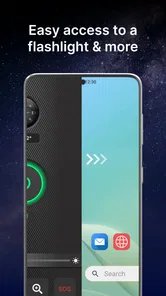
A phone flashlight is only useful in a hurry if I can get to it without fumbling through menus. This app’s lock-screen launch option is therefore its most practical promise: it aims to shorten the path from a dark room to usable light. I would still make sure I know how the shortcut works on my own device before relying on it outdoors, since lock-screen behavior can vary between phones and their settings. A quick test at home is a better plan than figuring it out beside a dark path.
For a brief search, the camera LED is a convenient source of direct light. It works well for checking a cupboard, finding something dropped beside a seat, or seeing a keyhole. It is not the same as a broad, adjustable room light, though, and holding a phone steadily while using it can be awkward. If I need both hands free or want to light a whole work area evenly, a dedicated lamp is the more comfortable tool.
Useful in a pinch, with sensible limits
The extra tools make the app more than a one-button torch, but I’d treat them as supporting options rather than a substitute for navigation or emergency preparation. A compass can help me orient myself, while a flashing signal may be useful for drawing attention. Neither removes the need to plan a route, carry suitable equipment, or contact emergency services when necessary. The strobe is also something I’d use thoughtfully: flashing light can be uncomfortable or unsafe for some people, so it is not a feature to switch on casually around others.
One practical tip is to check the light before leaving home, especially if I expect to use it for more than a moment. The phone’s flash is a small, close-range source, and longer use can put extra demand on the battery. I would also avoid leaving it on in a pocket or bag, where it can waste power and produce unwanted heat. The app is best understood as a convenient backup, not a replacement for a charged phone and a proper flashlight on a long outing.
More From Our News Desk

Weather by Xiaomi Review: Clear at a Glance, Less Clear Up Close

X Under Pressure: Can It Recover When Posting Goes Wrong?

Clash of Clans Is Won Between the Battles

Android Auto Makes the Case for Quieter Car Software

MobiOffice: Transforming Mobile Productivity with Seamless Integration

EA SPORTS FC™ Mobile Soccer: Redefining Mobile Sports Gaming
Shedding Light on the Features
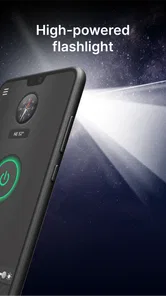
When I first downloaded the Brightest Flashlight Launcher, I was intrigued by its promise of the brightest light possible from my phone. Spoiler alert: it didn’t disappoint. The app transforms your phone into a powerful flashlight, using your camera's LED flash. But that’s not all. It also comes with a sleek user interface that is incredibly easy to navigate, which is a huge plus for those moments when you need light in a hurry.
One of the standout features is the app's ability to launch quickly from the lock screen. Imagine you’re walking your dog at night, and you suddenly hear a suspicious rustling in the bushes. With just a quick tap, your phone becomes a brilliant flashlight, ready to illuminate whatever might be lurking in the shadows.
More Than Just a Flashlight
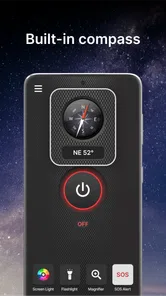
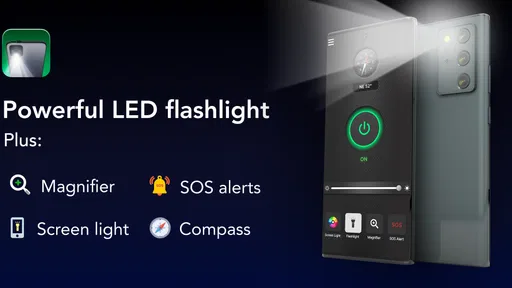
But wait, there’s more! This app isn't just about lighting up the night. It also includes a compass, which is a lifesaver if you ever find yourself lost on a hiking trail. Plus, it has an SOS mode that can send out a flashing distress signal, which is a reassuring feature for anyone who enjoys the great outdoors.
Another cool aspect is the built-in strobe light feature. It's perfect for emergencies, parties, or even just playing around with your pets. And let’s be honest, who doesn’t love a good strobe light every now and then?
Putting the extra tools to sensible use
I would treat the compass as a quick orientation aid, not as a replacement for a map or a planned route. On a walk, it may help me check which direction I’m facing before I continue, but I would not rely on a phone tool alone to make a difficult navigation decision. A useful habit is to check the compass in a safe, well-lit place first, then learn how it behaves in the places where I expect to use it.
The SOS mode is best thought of as a visible signal, not an automatic way to summon help. If I were walking with someone, I’d agree on what a flashing signal means before using it; otherwise, a bystander may not understand why it is flashing. I’d also avoid testing it near people who may be sensitive to strobing light. These small choices make the extra modes more responsible and practical.
How it fits different phones and habits
Unlike the flashlight toggle built into many phones, this app brings its launcher, compass, SOS signal, and strobe together in one place. That bundle may suit someone who wants those tools ready without installing separate utilities. If all I need is a basic light, though, the phone’s built-in control is usually the simpler choice; it avoids opening another app and keeps the routine familiar.
The app has an average rating of 4.2 from around 25,000 ratings, with about 11,000 written reviews and over a million installs. That suggests it has found a substantial audience, but popularity cannot tell me whether its shortcut or interface will feel convenient on a particular phone. I’d try the launcher at home, then decide whether it is genuinely faster than the built-in flashlight control I already use.
It is aimed at a broad audience and carries an Everyone age rating. The current version is 3.13.1, and it was released on October 17, 2023. It requires Android 10 or later, so an older Android phone may not be eligible. The listing identifies Android requirements; I would check the relevant app store and device compatibility before planning around it on another platform.
Battery Life and Performance
Now, let’s talk about battery life. One might think that such a powerful flashlight would drain your battery faster than you can say "charge," but surprisingly, it’s quite efficient. The developers have done a stellar job optimizing the app, ensuring that you won’t be left in the dark, literally or figuratively, due to a dead battery.
In terms of performance, the app runs smoothly on both Android and iOS, without any noticeable lag. It’s apparent that a lot of care and attention to detail went into its development, making it a reliable tool in any situation.
When the phone is already under pressure
A short flashlight task is one thing; using the light while navigating, making a call, or trying to preserve power for the trip home is another. In that situation, I would keep the session brief and make the most important phone task a priority. If I know I will need sustained light, bringing a separate torch means I’m not asking one device to illuminate the way and remain my only means of communication.
For ordinary household use, a practical workflow is to unlock or launch the light, point the rear flash toward the object rather than directly into someone’s eyes, and switch it off as soon as I’m finished. For a small repair, I’d prop the phone securely nearby only if it is stable and the light falls where needed; otherwise, a hands-free lamp is safer and less fiddly. The app makes the phone useful in a pinch, but it cannot change the physical limits of holding a phone as a light source.
When I would choose something else
For a quick walk from the car to the front door, I’d consider the phone light and launcher a useful convenience. For a long night walk, camping trip, or repair that needs both hands, I’d pack a dedicated flashlight or headlamp instead. Those options are designed for sustained use and can be easier to aim without holding a phone; this app is better suited to short tasks and a backup signal than to demanding outdoor work.
Heavy use also changes the trade-off. Running a flash for an extended stretch draws on the same phone I may need for calls, maps, or a ride home. I would keep the battery reserve in mind, use the light only when needed, and switch it off as soon as the task is done. The app’s extra modes are useful to have, but they do not make the phone’s battery unlimited or guarantee that a signal will be noticed.
Who will appreciate this setup
I think the app makes the most sense for someone who frequently wants a phone-based light for short, practical jobs and would actually use the compass or signaling modes. Someone who walks from a parking area after dark, checks a storage cupboard, or needs to find a dropped item may value having these options grouped together. The launcher is also more compelling if its lock-screen route proves convenient on that person’s device.
I would skip it if the built-in flashlight is already effortless to reach and I never use anything beyond steady light. I would also choose a physical torch for regular outdoor use, careful close-up work, or situations where I need to keep both hands available. A separate headlamp is especially sensible when aiming light where I look matters more than having a bright source pointed in the direction of the phone.
Final Thoughts
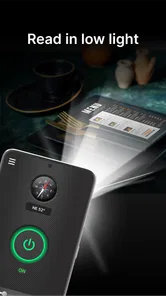
All in all, the Brightest Flashlight Launcher is more than just a flashlight app; it's a multifunctional tool that is as versatile as it is practical. Whether you’re trying to find your way through the woods, searching for your keys under the couch, or just need a light for reading in the dark, this app has got you covered.
So, if you're looking for an app that not only brightens up your day (and night) but also adds a layer of safety to your adventures, the Brightest Flashlight Launcher is definitely worth a download. Trust me, once you have it, you’ll wonder how you ever navigated the dark without it.
My overall verdict is that this is a sensible pick if you want a flashlight-centered tool with a few emergency-oriented extras, rather than a full outdoor safety kit. Its strongest case is convenience: quick access to the phone’s flash, plus a compass and signaling modes in the same app. Its weakest case is sustained or precision work, where battery concerns, phone handling, and the limits of a small light matter more. I’d recommend trying it if you often need brief bursts of light and want the added options; if your phone already gives you instant flashlight access and that is all you use, the built-in control may be enough.
Brightest Flashlight Launcher Frequently Asked Questions
Can Brightest Flashlight Launcher help in an emergency?
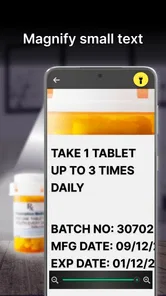
Brightest Flashlight Launcher is described as a flashlight and magnifying glass launcher intended to help users stay prepared for emergencies. The flashlight can provide a convenient source of light when you need to see in the dark, while the magnifying glass feature may help you inspect small details. As with any phone tool, its usefulness depends on your device and having enough battery power.
Does Brightest Flashlight Launcher include a magnifying glass?
Yes. Brightest Flashlight Launcher is described as including a magnifying glass launcher as well as a flashlight. That combination may be useful when you need both illumination and help viewing small details. The phone’s capabilities can affect how these tools work, so it is sensible to try them on your device after installation and see whether they suit the tasks you have in mind.
What phones can run Brightest Flashlight Launcher?
Brightest Flashlight Launcher is a Tools app for Android, and it requires Android 10 or later. Before downloading, check your device’s Android version in its system settings. If your phone meets that requirement, you can install the app and use its flashlight and magnifying glass features, with access depending on the capabilities of your device.
What is Brightest Flashlight Launcher and how does it work?
Brightest Flashlight Launcher is a mobile application designed to transform your smartphone into a powerful flashlight. By utilizing the phone’s camera LED, it provides a bright and reliable light source. The app features a user-friendly interface that allows quick access to the flashlight with just a tap, ensuring you have light whenever you need it. Its store description also highlights a magnifying glass launcher for staying prepared in emergencies.
Is Brightest Flashlight Launcher free to download and use?
Yes, Brightest Flashlight Launcher is free to download. However, the app may offer in-app purchases or display ads to support its development. Users can enjoy basic functionalities without any cost, but additional features might require a purchase.
Pros
- Extremely user-friendly interface.
- Quick launch with minimal delay.
- Compatible with most devices.
- Consumes low battery power.
- Bright light intensity settings.
Cons
- Contains ads in free version.
- Limited features in free version.
- Occasional app crashes reported.
- Lacks customization options.
- Requires access to device settings.