Nice Weather
- 451.00
- 4.4
- Installs
- 1.00M
- Price
- Free
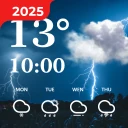
Screenshots
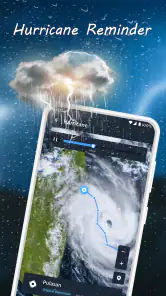
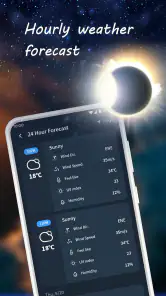
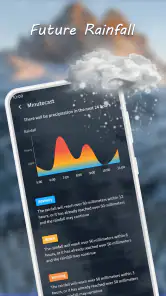
Analysis by Reviewed
When the weather affects more than one person’s plans, a quick forecast can be more useful than a long list of charts. I find Nice Weather most appealing as a shared household reference: one person can check the morning conditions, while someone else can look ahead before walking the dog, commuting, or deciding whether an outdoor plan still makes sense. It is a free weather app from Znd Digital, and its simple presentation makes it easy to approach without turning a routine check into a research session.
A useful reference for a shared day
Imagine checking the forecast before breakfast, then giving the family a heads-up about a wet school run or a windy afternoon. A home-screen widget can make that glance quicker, while the hourly view is more useful when the timing matters. I would treat the app as a common source of information, not as a household organizer: it can help people coordinate around conditions, but each person still needs to communicate plans directly.
That distinction matters on a shared phone or tablet. Multiple locations can help someone keep an eye on home and another city, but locations are not the same thing as separate user profiles. I would choose a sensible default location and avoid leaving a shared device on a view that could confuse the next person. If household members have different routines, a widget or a quick verbal check-in may be simpler than expecting everyone to manage the same settings.
Using Nice Weather around the household
For a household that mainly wants a readable forecast and a convenient way to check conditions, Nice Weather is an approachable option. The app is listed for Android and iOS, is rated for Everyone, and is free to use. It has an average rating of 4.4 from around 7,300 ratings, with more than a million installs. Those figures suggest that it has found an audience, though they do not tell me whether it will suit every household’s habits or local weather needs.
Setup choices and shared-device boundaries
I would start by setting the location that matters most, then add other places only if someone genuinely needs them. Keeping the main view focused makes a quick check easier, especially for a child or another household member who may not know which city is currently selected. Notifications deserve a little thought too: useful severe-weather alerts can become background noise if people switch on every available update without considering who will see them.
The app’s settings are described as straightforward, and the available widgets offer a way to keep weather visible without opening the app. That is convenient, but a widget also puts information on the home screen where anyone using the device may see it. I would pick a layout that shows the essentials rather than crowding a shared screen, and check that the displayed location is clear. A practical tip is to use the widget for routine awareness and open the app when the household needs more context, rather than treating a small glance as a complete forecast.
How it fits beside other weather options
Compared with a phone’s built-in weather panel, this app puts more emphasis on a dedicated forecast experience, including hourly and weekly views, alerts, a radar map, and customizable widgets. That can be handy if the built-in option feels too sparse or if a visual look at weather patterns helps with an outing. On the other hand, people who already get everything they need from their phone’s default forecast may not gain enough to justify adding another app to their routine.
More From Our News Desk

Weather by Xiaomi Review: Clear at a Glance, Less Clear Up Close

X Under Pressure: Can It Recover When Posting Goes Wrong?

Clash of Clans Is Won Between the Battles

Android Auto Makes the Case for Quieter Car Software

MobiOffice: Transforming Mobile Productivity with Seamless Integration

EA SPORTS FC™ Mobile Soccer: Redefining Mobile Sports Gaming
I would also be careful not to treat any forecast as a promise. A radar view can help me see changing patterns, but it is only one part of a decision about travel or outdoor plans. For a long drive, a time-sensitive event, or a situation where conditions could be hazardous, I would check the forecast again before leaving and use appropriate local guidance. The useful trade-off here is convenience: the app brings several kinds of weather information together, while the user still has to judge how much certainty a plan requires.
Age, trust, and everyday expectations
An Everyone age rating makes the app suitable for a broad audience, and its uncluttered approach may be easier for younger users or less confident phone users to navigate than a dense weather dashboard. I would still show a child how to confirm the selected location and understand that a forecast can change. The rating is not a substitute for an adult’s judgment when weather affects safety, and I would not rely on a simple app check alone for a serious weather decision.
The app is currently at version 1.3.5 and requires Android 6.0 or later on Android devices. It was released on November 26, 2024. Those details are useful when checking whether an older Android phone can run it, while iOS users can look for it in the relevant store. I would also consider the household’s preference for notifications: someone who wants a quiet phone may prefer to check manually, while another person may appreciate an alert when conditions change.
Who will get the most from it
I think it suits people who want a clear everyday forecast, like having hourly and weekly views together, or regularly check more than one location. It may be especially handy for households coordinating school trips, errands, dog walks, or weekend plans, provided everyone understands that it is a reference rather than a shared calendar. The widgets can make repeat checks less fiddly, and the radar map gives a different perspective from a plain temperature readout.
I would skip it if the default weather app already answers your questions, if you need a specialist forecasting tool, or if you want a family account with separate profiles and coordinated permissions. I would not assume that a shared device automatically creates a shared account boundary; household members should use their own device arrangements where privacy matters. The app’s value is in making weather checks accessible, not in managing who can see or change someone else’s information.
A balanced household verdict
In my experience, Nice Weather makes the most sense as a low-friction way to keep daily plans weather-aware. Its current conditions, forecast views, alerts, radar map, location support, and widgets give a household several convenient ways to check what is coming. The main limitation is not a flaw so much as a question of fit: people who want extensive specialist detail or built-in family coordination should look elsewhere, while people who prefer a quick, readable check may find it does enough.
For a shared household routine, I would keep one location prominent, use notifications selectively, and make sure everyone knows how to check the forecast for themselves. That small amount of setup avoids confusion without pretending the app can coordinate the family on its own. If those expectations match what you need, this free weather app from Znd Digital is worth trying; if your household already has a dependable, convenient forecast source, there may be little reason to switch.
Making a forecast useful in practice
A forecast earns its place in my routine when it changes a decision, not simply because it has plenty of screens. For example, on a morning when I have a walk and a later errand, I would use the hourly view to decide whether to go early or wait, then glance at the widget before heading out. If the radar suggests a changing pattern, I would open the app rather than rely on the widget alone. This layered habit keeps the quick check quick while reserving the fuller view for moments when timing matters.
For households, one small but useful habit is to say the location and time out loud when sharing what you saw: “home around lunchtime,” rather than simply “it looks clear.” That prevents a forecast for a saved travel destination being mistaken for local conditions. It is a human workaround, not a special sharing tool, but it makes multi-location support more useful when different people are checking the same device.
Where a dedicated app earns its space
Weather apps often compete by offering more layers, but extra detail is not automatically an advantage. Nice Weather’s mix of current conditions, hourly and weekly forecasts, alerts, radar, and widgets feels aimed at the person who wants more than a single temperature while still preferring a readable daily check. I would choose it over a basic built-in panel if I regularly need to compare parts of the day or look at a map; I would stay with the built-in option if opening another app adds no meaningful decision-making help.
Someone planning around specialized outdoor conditions may need a different source with the particular local detail they rely on. Likewise, if a forecast must support a safety-critical decision, I would cross-check it with relevant official guidance rather than letting one convenient screen settle the question. The practical strength here is bringing several everyday views together, not replacing every other source or guaranteeing that weather will unfold exactly as shown.
Keeping household checks clear
When several people use one device, it helps to agree on what the main location represents and who is likely to see alerts. A person checking before work may care about the commute, while another may be thinking about a school pickup; neither needs to change the shared setup every time. Keeping the default view stable and using other saved locations deliberately reduces the chance that someone acts on the wrong city’s forecast.
I would also avoid turning every available notification into a household announcement. Alerts can help when weather changes matter, but a stream of routine updates may make people ignore the one message they should notice. If only one person carries the shared device, that person can pass on anything relevant; if several people have their own devices, each can decide how much interruption suits their day. The app can inform those choices, but it does not replace a clear conversation.
What to expect from the app
The app’s rating of 4.4 from around 7,300 ratings offers a broad indication that many users find it worthwhile, and the more than one million installs show that it has reached a substantial audience. I would take those numbers as context, not as a guarantee of fit: a good experience still depends on whether the forecast presentation, location choices, and notification habits suit your own routine. The number of public reviews is also one reason I would judge it through ordinary use rather than assume every local need is covered.
It is free, which makes trying it a low-commitment way to see whether the dedicated views and widgets improve your day. I would give it a few ordinary situations to prove its value: checking before a walk, comparing morning and evening plans, and seeing whether the widget is clear at a glance. If those checks remain easy and useful, it has earned a place; if you keep returning to another weather source for the answers you need, there is little benefit in forcing a switch.
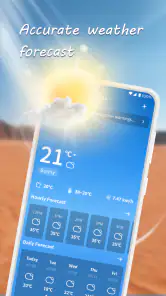
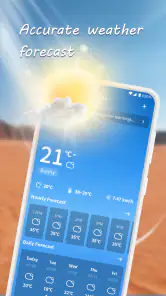
From the moment I downloaded Nice Weather, I was impressed by its sleek design and user-friendly interface. Navigating through the app is a breeze, with all the essential information readily accessible. The app opens with a beautiful and straightforward display of the current weather, including temperature, humidity, and wind speed. What I loved most is the minimalistic design that doesn’t overwhelm you with unnecessary information.
Features That Stand Out
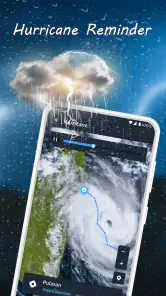
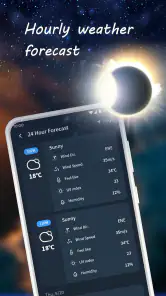
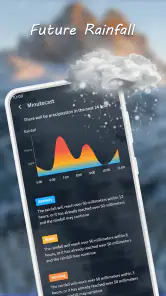
One of the standout features of Nice Weather is its detailed forecast options. You can easily view hourly and weekly forecasts, which are perfect for planning your day or week ahead. The app also provides weather alerts, which is a lifesaver for those unexpected weather changes. Another cool feature is the radar map, which gives you a visual representation of current weather patterns. This is particularly useful if you’re planning a road trip or outdoor activities.
Another feature that deserves mention is the customizable widgets. You can choose from different sizes and styles to fit your home screen perfectly. This personalization is something I really appreciate as it allows me to keep the weather updates visible without having to open the app constantly.
Using Nice Weather Daily
On a day-to-day basis, Nice Weather proves to be incredibly reliable. The weather data syncs quickly, ensuring that the information you receive is accurate and timely. I find myself checking the app multiple times a day, especially when I’m planning outdoor activities. The app’s ability to provide detailed weather information without draining my phone’s battery is a massive plus.
The app’s settings are easy to navigate, allowing you to set up notifications for severe weather alerts or daily forecasts. This feature is especially handy for those who live in areas prone to sudden weather changes. Additionally, the app supports multiple locations, which is great for frequent travelers or those who want to keep track of the weather in different cities.
Final Thoughts
Overall, Nice Weather is a must-have app for anyone who values accurate weather information delivered in a user-friendly package. Its combination of functionality, design, and reliability makes it stand out in a crowded market of weather apps. Whether you’re planning a weekend getaway or just trying to decide whether to bring an umbrella to work, this app has got you covered. Give it a try, and you might find yourself relying on it as much as I do!
Nice Weather Frequently Asked Questions
What should I know about Nice Weather before downloading it?
Nice Weather is a weather app from Znd Digital, with the short description “Nice Weather” and the promise “Precision Weather, Right at Your Fingertips.” It is free to download and is rated for Everyone. It has an average rating of 4.4 from around 7,300 ratings, offering a quick sense of how other users have responded to it.
Which devices can run Nice Weather, and is it suitable for all ages?
Nice Weather requires Android 6.0 or later, so check your device’s operating system before installing. Its Everyone content rating indicates that it is intended for a general audience. The app is listed as version 1.3.5, and its focus is weather information, making it a straightforward option to consider if you want a dedicated weather app.
What features does Nice Weather offer?
Nice Weather provides a comprehensive suite of features aimed at delivering accurate and timely weather information. Users can access real-time weather updates, weekly forecasts, and detailed radar maps. The app also includes customizable alerts for severe weather conditions, and an intuitive interface that makes it easy to navigate. Additionally, it offers detailed insights into humidity, wind speeds, and UV index levels.
Is Nice Weather free to use?
Yes, Nice Weather is free to download. It has an average rating of 4.4 from around 7,300 ratings, and its weather-focused purpose makes it an easy app to try if you want forecasts and weather information on your phone. Check the app’s current store page for the terms that apply when you install it.
How accurate is the weather data provided by Nice Weather?
Nice Weather prides itself on delivering highly accurate weather forecasts by leveraging multiple data sources and sophisticated algorithms. The app integrates data from reputable meteorological organizations and cross-references them to ensure reliability. Users generally report high levels of satisfaction with the precision of the forecasts, especially for short-term predictions.
Pros
- Intuitive user interface for easy navigation.
- Accurate and up-to-date weather forecasts.
- Customizable alerts for severe weather.
- Detailed hourly and weekly weather updates.
- Supports multiple locations for tracking.
Cons
- Contains ads that can be intrusive.
- Some features require in-app purchases.
- Occasional lag in loading data.
- Limited customization for widget display.
- Battery usage can be high with frequent updates.
- Category
- Weather
- Version
- 1.3.5











