MeteoSwiss
- 79.00
- 4.3
- Installs
- 1.00M
- Price
- Free
Screenshots
Analysis by Reviewed
I treat a weather app as a small planning tool, not just a place to glance at the temperature. When I need to decide whether to walk, cycle, or carry a rain jacket, the useful question is what may happen along the way. MeteoSwiss is built around Swiss weather information, and that makes it especially relevant if you live in Switzerland or regularly plan trips there. It is a free weather app from the Federal Office of Meteorology and Climatology, with a 4.3 average from around 39,000 ratings and over a million installs.
Start with the decision you need to make
My practical routine begins with a location and a simple question: do I need to change my plans? Rather than treating a forecast as a promise, I use it as a reason to check conditions again before leaving. That distinction matters with any forecast, but it is particularly useful when weather can affect a commute, a walk, or time outdoors. The app is aimed at everyday users as well as people who want more than a single sun-or-cloud symbol.
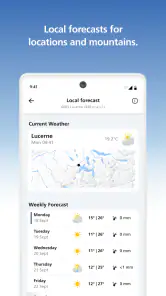
For instance, imagine I am getting ready for work and clouds are gathering. I can check the local outlook, then look at the radar animation to see how precipitation is moving before deciding whether to leave early or pack a waterproof layer. That is a more useful workflow than checking once in the morning and assuming the same conditions will hold all day. If the weather is changeable, I would check again before a later outdoor commitment.
Articles Related to MeteoSwiss
Choose a useful first check
For a new user, I would begin with the place that matters most today rather than trying to explore every part of the app at once. A home location is a natural starting point; for a day trip, the destination matters more than the weather outside the front door. This small choice prevents a common mistake: reading a perfectly relevant forecast for the wrong area while making plans somewhere else.
I would also separate “What is the day likely to feel like?” from “Is something changing soon?” The first question calls for the forecast; the second is where a radar view can add context. Keeping those questions distinct makes a quick check easier and reduces the temptation to treat every display as equally important.
Your Personal Weather Companion
First off, MeteoSwiss is more than just your average weather app. It’s like having a meteorologist right in your pocket. The app provides an incredibly detailed weather forecast that goes beyond the basics. You’re not just getting today’s temperature or tomorrow’s rain prediction; you’re getting insights into wind patterns, humidity levels, and even pollen counts. And let’s be honest, this kind of information can turn you into the go-to weather guru among your friends.
Follow the forecast through to your plans
The advantage of a detailed forecast is not that every number dictates what to do. It is that different conditions answer different practical questions. Wind can change how comfortable a bike ride feels; humidity can make an otherwise mild day feel less pleasant; pollen information may help someone who already pays attention to seasonal symptoms decide when to spend time outside. I would use these details as context, not as a substitute for personal judgement or health advice.
You May Like

How Microsoft OneDrive Became a Mobile Productivity Giant

How Google Translate Breaks Language Barriers Effortlessly

Why Google Sheets Is the Ultimate Mobile Productivity Tool

Unveiling the Dynamic World of My Talking Tom Friends

Free Fire MAX: Dominating the Battle Royale Arena

Free Fire: Winterlands – The Ultimate Winter Gaming Adventure
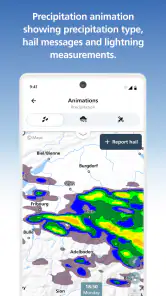
Radar is most helpful when I check it with a specific time-sensitive plan in mind. A moving animation can make the difference between “rain is somewhere nearby” and a better sense of whether the weather is approaching or clearing. It is not a guarantee that a brief shower will land exactly where the display suggests, so I would not use a single glance to make a high-stakes call. For a routine outing, though, it can help me choose between taking a jacket now and postponing a walk.
Features That Make You Go Wow
What sets this app apart from the usual suspects is its precision. The radar animation feature is particularly impressive, showing real-time data that can help you track storms and anticipate weather changes. It’s like watching a live weather channel, but on your phone. Plus, the app’s alerts are a lifesaver, especially if you’re planning outdoor activities. It gives you a heads-up on severe weather conditions and keeps you prepared for anything Mother Nature throws your way.
Alerts are most useful as a backup, rather than something I would rely on as my only source of awareness. If I have a hike, outdoor event, or other plan where conditions matter, I would check the forecast before setting off and keep an eye on updates as the time approaches. That second check is a simple habit, but it makes alerts and radar part of a more dependable decision process instead of a last-minute surprise.
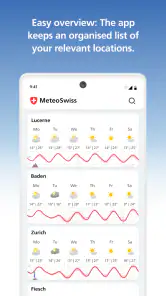
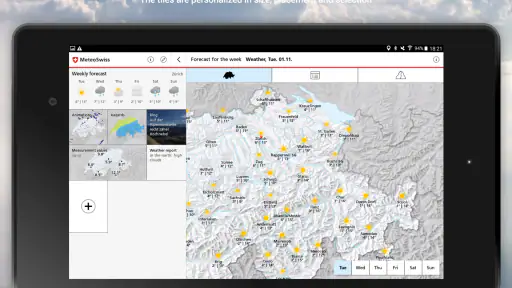
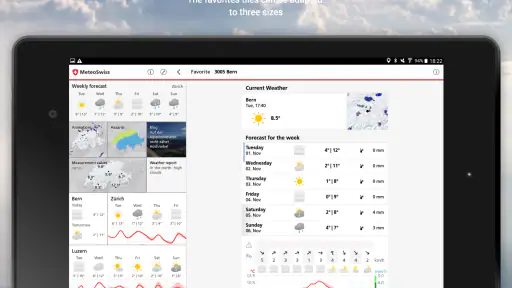
Another cool feature is the customizable dashboard. You can tailor it to show what matters most to you, whether it’s the UV index, sunrise and sunset times, or local weather news. It’s this level of personalization that makes the app feel like it’s truly yours.
Make the dashboard work for your routine
I would keep the dashboard focused on the information I actually use. Someone planning a midday walk may care more about UV conditions, while someone heading out early could find sunrise timing more useful. The trade-off is that customization takes a little thought: adding every available detail can make a quick check less quick. A compact setup makes it easier to answer the immediate question without turning a morning glance into a tour through the app.
A practical tip is to make one or two decisions the test for every dashboard item: does it change what I wear, when I leave, or whether I go? If not, it may be better left out of the first screen. That is especially helpful for people who open a weather app between other tasks and need the important information to be obvious without interpreting a crowded collection of indicators.
How it fits alongside other weather apps
Compared with a general-purpose weather app that prioritizes a broad, quick forecast, MeteoSwiss makes more sense when Swiss conditions and detailed local information are central to your plans. The usual phone weather widget may be faster for checking a temperature, and another service may suit someone who needs consistent forecasts across many countries. I would keep a simpler option for a fast glance if that is all I need, but use this app when radar, local warnings, or richer context can change my decision.
That does not mean I would automatically replace every other weather tool with it. A built-in forecast can be more convenient when I only want to know whether it is cold outside, while a travel-focused service can be easier to use when moving between countries. The useful distinction is the job at hand: MeteoSwiss is strongest in my routine when the Swiss location and the details around local conditions matter, not when I want one universal screen for every destination.
Easy on the Eyes and the Mind
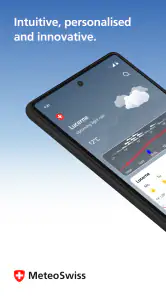
Now, let’s talk about the user interface. I’ve tried my fair share of apps that claim to be user-friendly, but MeteoSwiss truly delivers on that promise. The layout is clean, intuitive, and free of unnecessary clutter, which means you can find what you need without getting lost in a maze of menus. It’s designed in a way that even if you’re not tech-savvy, you can navigate through it with ease.
Moreover, the app’s graphics are visually appealing without being distracting. The color schemes are soothing, and the icons are easy to understand, making the entire experience pleasant and straightforward.
A realistic day from forecast to decision
Suppose I am planning to cycle to meet someone after work. In the morning, I would check the forecast for the destination and pay attention to the conditions that could affect the ride, rather than looking only at the temperature. If rain seems possible, I would use radar closer to departure to see whether the pattern appears to be moving toward or away from the route area. I would then make a practical choice—carry a layer, change my departure time, or choose another way to travel—without pretending the display can guarantee what will happen on every street.
The handoff from app to real life matters here. I still need to look outside, consider how long I will be exposed, and use my own judgement about the route. If conditions look uncertain, I can check again rather than treating the morning forecast as fixed. That makes the app useful without asking it to make the decision for me.
Who will get the most from it
I would recommend it most to people who live in Switzerland, travel there often, or make outdoor plans where changing conditions matter. It can also suit anyone who likes to understand more than the basic forecast, provided they are willing to check details rather than expect one screen to make the decision for them. It is rated for Everyone, so it is presented as suitable for a broad audience. The app first appeared on February 24, 2013, and has an established place among weather tools, though an older release date alone does not tell me how well it fits a particular phone or routine.
It is less compelling if you only want a bare temperature readout, need one familiar forecast interface for several countries, or rarely check weather before going out. In those cases, a built-in phone forecast or a service with a wider travel focus may be more convenient. The app is free to download, while in-app purchases are listed at $49.99 per item; I would check the purchase details in the app before making any decision, rather than assume they are needed for ordinary forecasts.
Deciding whether it belongs in your routine
If you are choosing a weather app for a household, the key question is whether anyone will use its extra context. A person who checks the forecast before school runs, outdoor work, or weekend walks may appreciate having more than a single daily summary. Someone who rarely changes plans based on weather may find that the default phone forecast already does enough. I would try MeteoSwiss for the Swiss locations I check most often and judge it by whether its information actually improves those decisions.
For visitors, it can make sense to use it specifically for the Swiss leg of a trip rather than forcing it into a broader itinerary. Save the habit of checking the relevant destination before setting out, then use a general travel-oriented option when the trip moves elsewhere. That approach avoids the frustration of expecting one regional specialist to be equally convenient across an entire international journey.
Where the routine can fall short
The main friction is that extra detail rewards extra attention. If I am rushing out the door, a radar animation and several forecast indicators can be more than I need; a quick glance at a basic forecast may be the better choice. Radar also helps me interpret changing precipitation, but it cannot remove uncertainty from local weather. For important outdoor plans, I would treat the app as a guide and remain ready to adjust, rather than take an alert or animation as a guarantee.
There is also a geographic trade-off: the app’s national weather-service identity is a strength for Swiss users, but someone seeking a single tool for a long international itinerary may prefer a broader service. I would still keep it for the Swiss part of a trip, then use whichever option gives me the clearest coverage elsewhere. That division of labour is more practical than expecting one app to be best for every location and every kind of forecast.
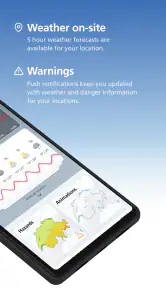
One other point is how alerts fit into a busy day. They can draw attention to severe weather, but I would not let notifications replace a deliberate check before an activity where the weather matters. If I am indoors and plans are flexible, an alert may be enough to prompt a fresh look. If I am already outside or heading somewhere exposed, I would check the current information directly and be prepared to change course.
Final Thoughts
In a world where weather apps are a dime a dozen, MeteoSwiss stands out with its comprehensive features and user-friendly design. Whether you’re a weather enthusiast or someone who just wants to avoid getting drenched on the way to work, this app has got you covered. It’s not just about checking the weather; it’s about understanding it and planning your day with confidence.
My recommendation is to use it as a planning companion: set up the dashboard around the details you care about, check radar when timing matters, and revisit the forecast before a weather-sensitive outing. If you want only the quickest possible glance, your phone’s basic forecast may be enough. But for Swiss weather decisions where warnings and local context are useful, I think this is a thoughtful option worth trying.
So, if you're tired of being at the mercy of unpredictable weather predictions, give MeteoSwiss a try. It might just change the way you look at the sky.
MeteoSwiss Frequently Asked Questions
Is MeteoSwiss intended for use outside Switzerland?
MeteoSwiss is the app of Switzerland’s national meteorological office, so its main purpose is to help users follow weather information and warnings connected with Switzerland. If you are travelling there, it can be useful for checking conditions and planning around changing weather. For locations elsewhere, consider whether a Swiss-focused weather service meets your needs alongside any local weather app you already use.
What should I check before relying on MeteoSwiss for a trip or outdoor plans?
MeteoSwiss brings weather information and warnings together, which can make it a handy reference before travelling or spending time outdoors. Check the forecast and any relevant alerts close to when you leave, since conditions can change. Keep in mind that forecasts are guidance rather than a guarantee, and use your judgment when making decisions about travel or activities in changing weather.
Who develops the MeteoSwiss app, and what is it for?
MeteoSwiss is a weather app developed by the Federal Office of Meteorology and Climatology. Its focus is practical weather information and warnings, helping users check conditions and plan around changing weather. If you are looking for a weather service associated with Switzerland’s national meteorological office, the app is designed for that purpose and brings forecasts and alerts together in one place.
What features does the MeteoSwiss app offer?
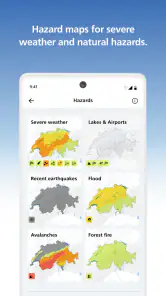
The MeteoSwiss app provides comprehensive weather forecasts, including real-time data on temperature, precipitation, wind speed, and humidity. It also offers severe weather warnings, radar animations, and detailed weather maps. Users can personalize their experience by setting alerts for specific weather conditions and saving favorite locations for quick access to localized forecasts.
Is the MeteoSwiss app available for free download?
Yes, MeteoSwiss is free to download on Android and iOS. It provides a range of features without an upfront cost, although an internet connection may be needed to access real-time updates and certain functionalities. The app also lists in-app purchases, so it is worth checking the purchase details on your platform before proceeding if you want to avoid optional charges.
Pros
- Accurate weather forecasts for Switzerland.
- Real-time weather updates and alerts.
- User-friendly interface and easy navigation.
- Detailed weather maps and radar images.
- Customizable notifications and alerts.
Cons
- Limited to Switzerland region only.
- Requires internet connection for updates.
- Some features need in-app purchases.
- Occasional app crashes reported.
- Limited language options available.
- Category
- Weather
- Version
- Varies with device