JBL PartyBox
- 1.84K
- 4.8
- Installs
- 5.00M
- Price
- Free

Screenshots
Analysis by Reviewed
I tend to think of the JBL PartyBox app less as a party starter on its own and more as a phone-based companion for adjusting a compatible speaker. That distinction matters: it is most useful when you already own a PartyBox and want to manage its sound and lighting without walking over to it. Harman Consumer, Inc. makes this free music and audio app, which is rated for Everyone. Its 4.8 average from around 127,000 ratings and more than five million installs suggest it has found a broad audience, though the practical value still depends on having a supported speaker.
Where connection can become the sticking point
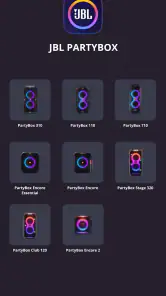
The first thing I would check is whether the speaker is one of the models the app supports: the 110, 310, 710, 120, 320, 520, Encore, Encore 2, or Encore Essential 2. If you have a different speaker, installing the app will not turn it into a PartyBox control hub. This is the main compatibility question to settle before spending time troubleshooting.
Pairing can also feel less straightforward when you are trying to get music playing at the same time. I find it helps to treat speaker connection and audio playback as separate steps: connect the phone to the speaker, confirm the app recognizes it, then choose how you want to play music. That way, if something does not work, you have a clearer idea of where the snag is rather than changing several settings at once.
That separation is especially useful when you are setting up in a hurry. I would first establish a stable connection with the speaker while the music is paused, then open the music app or other playback method you normally use. If the controls are available before playback begins, you can make basic sound and lighting choices without competing with a song starting, an incoming call, or someone else trying to connect. It is a small order-of-operations habit, but it makes a busy setup feel more deliberate.
Getting the Party Started
So, you've got your JBL PartyBox speaker set up, and you're ready to make some noise. The app is super intuitive, making it a breeze to connect and control your speaker right from your phone. Whether you're an Android or iOS user, you're in luck because this app plays nice with both. The installation process? Easy peasy. Just download, pair, and you're ready to rock.
For a first-time setup, I would keep the phone and speaker close together and avoid trying to configure several things at once. Once the app has found the speaker, take a moment to identify which controls you actually expect to use. A quick test of one sound adjustment and one lighting adjustment tells you more than tapping through every option. It also gives you a simple baseline to return to if the result feels wrong once the room fills up or the speaker moves outdoors.
A Symphony of Features
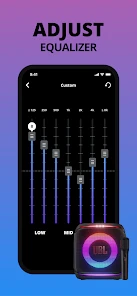
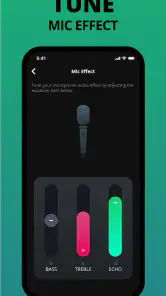
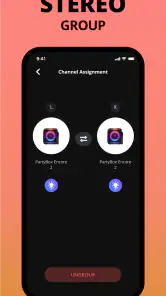
Let's talk features, because this app is packed with them. You can customize your audio experience to suit your mood, which is great because no two parties are the same, right? The app allows you to adjust bass, treble, and even create a custom sound profile. Feeling adventurous? You can sync multiple speakers for an epic surround sound experience. And yes, there's a karaoke mode. Who doesn't love a good sing-along?
More From Our News Desk

Weather by Xiaomi Review: Clear at a Glance, Less Clear Up Close

X Under Pressure: Can It Recover When Posting Goes Wrong?

Clash of Clans Is Won Between the Battles

Android Auto Makes the Case for Quieter Car Software

MobiOffice: Transforming Mobile Productivity with Seamless Integration

EA SPORTS FC™ Mobile Soccer: Redefining Mobile Sports Gaming
The best way to use sound adjustments, in my view, is to make them in response to the space rather than to a number on a slider. A room with hard surfaces can make bass feel heavier, while a large open area can make the same setting seem less prominent. I would change one control at a time and listen to a familiar track from the intended listening position. That makes it easier to decide whether a tweak genuinely improves the sound or simply makes it louder or more dramatic for a moment.
A custom profile is worth thinking of as a repeatable starting point, not a magic correction for every location. If you often use the speaker in two very different places, keeping a restrained setting for the smaller one can save time and prevent a sudden, boomy first song. For a new venue, I would still listen and adjust rather than assume the saved sound will translate exactly. The trade-off is convenience versus fine-tuning: profiles speed up familiar setups, but the room and placement still matter.
When several people are sharing music duties, I would agree on one person to handle app adjustments before the event starts. Otherwise, well-meant changes to bass or treble can undo a setting someone else has just settled on. This matters more than it sounds: a simple handoff avoids turning the phone into a control contest and keeps attention on the gathering rather than the speaker.
Use the controls with a little intention
For a backyard gathering, I would set the sound before guests arrive, then use the phone for small adjustments rather than constantly chasing a perfect mix. Bass that feels exciting outdoors can become overpowering in a small room, so I would start with modest changes and listen from where people will actually be standing. A custom profile is most useful when it solves a recurring situation, such as moving the speaker between a spacious patio and a compact living room.
When connecting more than one speaker, I would test the arrangement before the event instead of assuming that pairing them will automatically suit every space. Placement and distance affect how the sound comes together, and a layout that works in an open area may feel uneven indoors. The app is a practical control point, but it cannot compensate for speakers placed awkwardly or for a room that already amplifies bass.
A realistic use case is a small family gathering where the speaker starts in the kitchen and later moves to the patio. I would use the app to make a modest adjustment after the move, then walk to the table or seating area to judge the result instead of standing beside the speaker. If the same locations come up often, a saved sound profile can give me a familiar starting point; if the surroundings change, I would treat that profile as a shortcut rather than a fixed answer.
For a shared event, I would also decide in advance whether one phone will stay in charge of adjustments or whether the speaker will be left alone once the music is underway. The app is most useful when someone can make a deliberate change without interrupting the flow. It is less helpful if several guests keep taking turns changing settings without listening from the same spot, because each person may be reacting to a different position in the room.
Light Up the Night
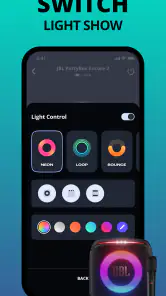
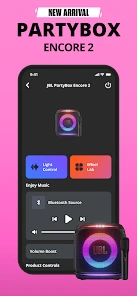
One of the coolest things about the JBL PartyBox app is the ability to control the light show on your speaker. You can choose from a variety of light patterns and colors to match the vibe of your party. Whether you're going for a chill hangout or a full-blown dance party, the app's got you covered.
I would treat lighting as a separate choice from the music, rather than assuming every gathering needs the brightest or busiest effect. A calmer setting can suit conversation, while a livelier pattern makes more sense when people are dancing. Checking the effect before guests arrive also avoids fiddling with the phone in the middle of a song. The app’s advantage over reaching for speaker controls is convenience; the limitation is that a phone setting cannot change where the speaker is placed or how visible its lights are from across the room.
When a control problem is not an app problem
If the app stops responding as expected, I would first check the simple things: make sure the speaker is powered on, keep the phone close while reconnecting, and try closing and reopening the app before changing multiple settings. If music plays but the app controls do not behave, reconnecting the phone and speaker is a more useful first test than changing the audio source at random. If the speaker itself is not producing sound, the issue may be with playback or the speaker setup rather than the app’s lighting or sound controls.
I would troubleshoot in small steps and test after each one. First, confirm that the phone is still connected to the intended speaker; then check whether the music source is actually playing through it. If the app has stopped reflecting the speaker’s state, closing and reopening it is a reasonable reset before trying to pair again. Avoid changing the playback method, speaker placement, and sound settings all at once: that makes it harder to tell which change helped.
If you are using more than one speaker, simplify the setup temporarily when diagnosing a problem. Test the phone and the speaker you want to control on their own, then rebuild the arrangement once the basic connection behaves as expected. This is a practical way to distinguish a pairing or layout snag from an issue with the music source, without assuming that the app itself is responsible for every interruption.
One question people often have is whether this can replace their usual music service. I would not plan around that: I use it as the speaker-control layer and keep choosing music through the playback method I already prefer. Another common uncertainty is whether the app is useful without a compatible PartyBox; in that case, it is not a general-purpose player, so it is unlikely to earn a place on the phone.
The same distinction helps when a song is silent or interrupted. The app can make adjustments to a supported speaker, but music still depends on the chosen source and the route from phone to speaker. I would check the playback app, selected output, and speaker connection before resetting sound settings. If controls work but audio does not, that points me toward playback checks; if audio works but controls do not, I would focus on reconnecting the companion app.
There is a useful trade-off here. A dedicated companion app can make speaker-specific adjustments easier than a general music player, but it is not a replacement for the music service or playback method you already use. If you only need to choose songs and adjust volume, your regular player may be enough. The companion app earns its place when you want to shape the PartyBox’s sound or lights from your phone.
Compared with relying only on the physical controls, a phone app is convenient when the speaker is across the room or when you want to make a quick lighting change without interrupting conversation. But the physical controls are still a sensible fallback if your phone is elsewhere, its battery is low, or the connection needs attention. I would not make the app the only way I know how to operate the speaker; learning the basic on-speaker controls keeps a gathering from depending on one phone.
Compared with a standard music app, this one has a narrower job. A music player is where I browse and select tracks; the PartyBox companion is where I manage supported speaker behavior. If you want an all-in-one library, streaming destination, and speaker remote, this division may feel less convenient. If you already use a preferred music app and want dedicated controls for a PartyBox, the split is logical and avoids expecting one tool to do two different jobs.
User Experience
I have to say, the user interface is sleek and straightforward. You won't find yourself fumbling through menus trying to find what you need. Everything is laid out nicely, and the controls are responsive. Not to mention, the app runs smoothly without any annoying lags or crashes, which is a big win in my book.
For occasional users, a simple interface matters because there may be weeks between setups. I would open the app before guests arrive, confirm that the speaker appears, and make one test change while there is still time to sort out a connection. That quick rehearsal is more useful than trying to learn the controls while people are waiting for music. The app is most forgiving when I treat setup as a short check rather than a last-minute rescue.
The current version is 3.12.20, and the minimum Android requirement is 7.0. Those details make it worth checking compatibility before installing on an older phone. On iOS, the app is available too, but I would still verify that the phone and speaker can connect in the way I intend before relying on it for an event. The release date was July 27, 2020, and the app has continued to serve PartyBox owners as a companion rather than becoming a standalone music destination.
That distinction also helps set expectations about who should skip it. If you do not own one of the supported models, if you mainly want a music player, or if you prefer to make every adjustment directly on the speaker, the app may add little to your routine. The 1.8 thousand reviews and 4.8 average point to strong satisfaction overall, but ratings cannot tell me whether a particular connection setup or personal workflow will suit me; compatibility and the controls I actually use matter more.
To wrap it all up, the JBL PartyBox app is your ultimate party companion. It's like having a personal DJ who also happens to be a lighting technician. If you're serious about your parties, this app is a no-brainer. So go on, give it a whirl, and let the good times roll!
I would recommend it to someone who already has a compatible PartyBox and wants quick access to sound and lighting adjustments, especially when setting up for a gathering. I would skip it if you do not own one of the supported speakers or simply want a standalone music player. The app is free, and its current version is 3.12.20; for me, its value comes from making the speaker easier to tailor, not from replacing the music apps people already use.
JBL PartyBox Frequently Asked Questions
Can JBL PartyBox control music playback, or does it only adjust the speaker?
JBL PartyBox is a companion app for managing supported PartyBox speakers, rather than a replacement for a music-streaming service. Its listed controls focus on speaker features such as sound and lighting, so you can tailor the setup from your phone. You can still use your preferred music source separately while enjoying the speaker’s playback.
What Android version do I need to install JBL PartyBox?
On Android, JBL PartyBox requires version 7.0 or later. Checking your phone’s operating system before downloading can help avoid installation problems, particularly if you use an older device. The app is free and is intended to work with selected PartyBox speakers, so make sure both your phone and speaker fit your setup before installing.
Can more than one PartyBox speaker be managed through the app?
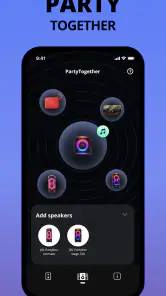
The app includes options for managing multiple PartyBox speakers, which can be useful when you want to create a broader listening setup. The exact experience depends on using compatible models, so check that each speaker belongs to the supported PartyBox range. Once connected, the app can help you adjust speaker features from your phone instead of relying only on physical controls.
What devices can I use to control my JBL PartyBox speaker?
JBL PartyBox is a Music & Audio app developed by Harman Consumer, Inc. It works with selected speakers in the PartyBox range, including the 110, 310, 710, 120, 320, 520, Encore, Encore 2, and Encore Essential 2. Check that your particular speaker model is on this list before downloading, so you can be confident the app is intended to work with your setup.
What are the main features of the JBL PartyBox app?
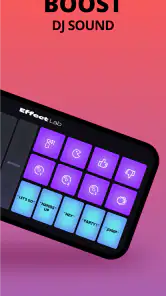
The JBL PartyBox app offers a range of features designed to enhance your audio experience. With this app, you can customize light shows that sync with your music, adjust the equalizer settings to suit your preferences, and even manage multiple PartyBox speakers for a more immersive sound experience. Additionally, the app provides options for karaoke settings, allowing users to control microphone and vocal effects seamlessly through their smartphones.
Pros
- Exceptional sound quality with deep bass
- User-friendly interface and controls
- Durable build for outdoor use
- Long battery life for extended parties
- Supports multiple connectivity options
Cons
- Quite bulky
- not easily portable
- Premium price may not fit all budgets
- Limited customization options for lights
- No built-in microphone for karaoke
- App can occasionally disconnect from speaker
- Category
- Music & Audio
- Version
- 3.12.20













