JBL Headphones
- 11.29K
- 4.6
- Installs
- 10.00M
- Price
- Free

Screenshots
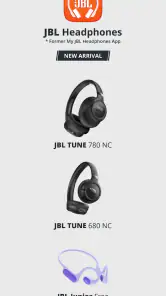
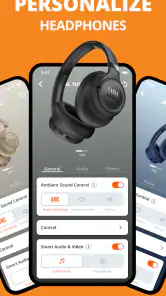
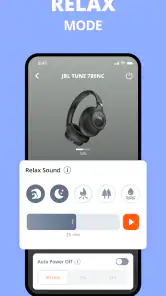
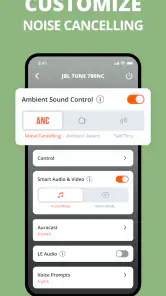
Analysis by Reviewed
I think the most useful way to judge JBL Headphones is as a companion for a household that shares rooms, routines, and sometimes audio gear. The app is free, sits in the Music & Audio category, and is made by Harman Consumer, Inc. Its purpose is to help you manage the experience around compatible JBL headphones, rather than replace a music player or a general-purpose Bluetooth settings screen. That distinction matters: if you want a control point for supported JBL gear, it can be handy; if you expect it to manage every brand of headset in the home, it is the wrong tool.
One app, several listening routines
Picture a weekday morning: one person listens to a podcast while getting ready, another takes a call, and someone else wants music during a commute. A headphone companion app is most useful when each listener can reach the settings that suit their own use, rather than repeatedly adjusting the same device by guesswork. In practice, I’d treat the app as a place to check and tailor the supported headphone experience, then leave the headphones’ everyday controls to whoever is wearing them.
That works best when the headphones and phone are treated as a personal pair. If several people use the same headphones, decide who will connect and adjust them before passing them along. A settings change made for one listener may not suit the next, especially if they have different preferences for calls, music, or quiet listening. I would not assume that the app provides separate household profiles or a way to coordinate several listeners; it is safer to regard it as an individual companion, not a family-management system.
Setup and handoffs need a little thought
For shared-device households, the practical question is not just whether the app is easy to open, but whose phone is paired and whose preferences are being changed. I’d start by connecting the headphones to the device used most often, then check the app with that setup before making it part of everyone’s routine. When another person borrows the headphones, a quick check of the active phone connection can prevent the familiar confusion of audio playing from the wrong device.
This is also where a companion app differs from a phone’s built-in Bluetooth menu. The system settings are the simpler choice for basic pairing and quick connection checks; JBL Headphones is more relevant when you want the controls and adjustments intended for supported JBL headphones in one place. If you only connect headphones occasionally and never change their setup, the extra app may not add enough value to justify keeping it in your routine.
Age, privacy, and household expectations
The app is rated for Everyone, which makes its stated age suitability broad, but that should not be confused with parental controls or individual account boundaries. I would not hand a child a shared phone on the assumption that the app separates settings by person. Instead, keep device access and headphone handoffs aligned with your household’s usual rules, and have an adult handle setup if the phone itself is shared.
For a teenager who already uses their own phone and compatible headphones, the app may be a straightforward way to manage that listening setup. For a younger child borrowing a parent’s headphones, the simpler arrangement may be to leave the configuration alone and use the headphones’ ordinary controls. That avoids turning every change in listener into a troubleshooting session.
More From Our News Desk

Weather by Xiaomi Review: Clear at a Glance, Less Clear Up Close

X Under Pressure: Can It Recover When Posting Goes Wrong?

Clash of Clans Is Won Between the Battles

Android Auto Makes the Case for Quieter Car Software

MobiOffice: Transforming Mobile Productivity with Seamless Integration

EA SPORTS FC™ Mobile Soccer: Redefining Mobile Sports Gaming
A Sonic Experience Like No Other
From the moment I popped these bad boys on, I was greeted with an impressive sound quality that's hard to beat. Whether you’re into bass-heavy tracks or prefer crystal-clear vocals, the JBL Headphones deliver a balanced audio profile that doesn't disappoint. I found myself nodding to the beats and catching nuances in my favorite songs that I hadn't noticed before. It's like discovering your playlist all over again!
Comfort Meets Style
Let’s talk comfort, because if you’re going to be wearing headphones for hours, they better feel like a gentle hug on your ears. These headphones are lightweight yet sturdy. The ear cushions are plush and breathable, which is a godsend during long listening sessions. Plus, the sleek design is a nice bonus; I got a few compliments wearing them out and about.
Battery Life That Keeps Up
One of the standout features is the battery life. Seriously, these things just keep going. I managed to get through an entire workday, plus some evening chill time, without needing to recharge. And when I did need to juice them up, the quick charge feature came to the rescue, getting me back to my tunes in no time. It's perfect for those of us who are always on the go and need headphones that can keep up with our hectic lives.
Another thing worth mentioning is the Bluetooth connectivity. It's seamless and reliable, which means no more frustrating dropouts or lag. You can move around freely without being tethered to your device. Freedom is bliss!
Perfect for Everyday Use
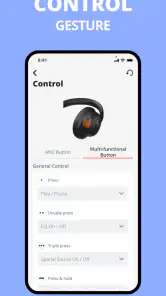
Whether you’re commuting, working from home, or hitting the gym, these headphones fit right into your daily routine. They’re versatile and durable, making them a great investment if you're looking for a reliable audio companion. Plus, they come with intuitive controls that are easy to master, so you won’t be fumbling around trying to adjust the volume or skip tracks.
There is one important distinction I would keep in mind before downloading: this is an app, not a pair of headphones. Its usefulness depends on having compatible JBL headphones to connect, so the sound, comfort, battery behavior, and controls you experience ultimately come from the particular headphones you own. The app does not turn an unsupported headset into a JBL device, and it is not a substitute for choosing headphones that fit your ears and listening habits.
Checking compatibility before you build a routine
If you’re wondering whether the app is worth installing before you buy anything, I’d make the headphone model the deciding factor. The app is intended for supported JBL headphones, so first check that the particular model you own or are considering works with it. That simple step matters more than downloading first and hoping the app will add controls to any Bluetooth headset. A headset may still connect through your phone’s Bluetooth settings without offering the same app-based experience.
There is also a useful distinction between an app being installed and it being useful in daily life. If your headphones already sound the way you like and you rarely change their setup, you may open the app once and then forget it. If you regularly move between listening situations or want the companion controls available when something needs adjusting, it has a clearer role. I’d treat it as an occasional tool, not another screen you need to check before every song.
Who will get the most from it?
I’d recommend it to someone who already owns compatible JBL headphones and wants a more convenient way to manage their listening setup than relying only on the phone’s basic Bluetooth controls. It makes particular sense if you switch between music, calls, commuting, and home listening and like having the headphone companion available when you need to revisit settings. The app has an average rating of 4.6 from around 594,000 ratings, and it has passed 10 million installs, suggesting that many listeners have found a reason to keep it around.
On the other hand, if you are still choosing headphones, I would compare the hardware first: fit, sound, and whether the model suits your everyday environment matter more than installing its companion app. If you use a different brand, or you are happy with simple pairing and never adjust anything, your phone’s built-in settings may be enough. For deeper music discovery, streaming services are the more relevant alternative; this app is about the headphone experience, not finding your next album.
A practical commute and a quieter handoff
Here’s a realistic routine where the app makes more sense: I connect my compatible headphones to my own phone before leaving home, check that the intended device is active, and use the headphones for a podcast on the way in. Later, I can use their normal controls for playback instead of opening the app every time I want to pause. If someone at home borrows the headphones afterward, they know which phone is likely to be connected and can avoid assuming the app has silently switched the listening setup for them.
That division of labor is a small but useful household habit. The app is for the owner or regular listener to review the headphone setup; the hardware controls and phone settings cover the quick, everyday actions. If audio seems to be coming from the wrong place, check the active connection before changing preferences. Otherwise, you can end up adjusting the headphone experience when the actual issue is simply that another device is still involved.
Small habits that make it easier
For a smoother routine, I’d check the app after the headphones are connected rather than opening it first and guessing whether the right device is active. If you share a phone, keep in mind that the person who can access that phone can also reach its connected-device setup; don’t assume the app creates separate logins or keeps household preferences apart. Before a commute or workout, it is worth confirming that audio is coming from the intended headphones, especially if another family member used the phone recently.
Those little checks are more useful than treating the app as something that needs constant attention. Once your preferred setup is in place, the headphones’ own controls can handle routine listening, while the app remains available when you want to review or change things. That balance keeps a shared home from turning a simple handoff into a series of unnecessary settings changes.
What to expect from the app rather than the headphones
A common point of confusion is whether installing a companion app will improve every part of the listening experience. I would separate the two jobs: the headphones determine physical comfort, battery behavior, and the sound you hear, while the app is a supporting way to interact with compatible gear. If the headphones feel uncomfortable after a long session, an app cannot fix the fit. If the underlying model is not right for your commute or calls, its companion software is not a substitute for choosing a better-matched pair.
That’s why I would not judge this download in isolation from the device it accompanies. Someone already happy with their JBL headphones may appreciate having a dedicated place for adjustments, while a prospective buyer should spend more time comparing the headphones themselves. For someone using several brands around the house, a brand-neutral Bluetooth menu is more convenient for basic connections, but it will not necessarily offer the same model-specific companion controls. The better option depends on whether you value simplicity across devices or focused support for compatible JBL gear.
Version, access, and my household verdict
JBL Headphones is free, is listed for Everyone, and its current version is 5.32.12, with Android 7.0 as the minimum operating-system requirement. It first appeared on November 6, 2015, and has accumulated around 11,000 written reviews. Those details make it an established option, though I would still check that the app works with the specific headphones and phone you plan to use before building a shared routine around it.
For a household, my verdict is practical rather than universal: it can be a useful companion when one person owns compatible JBL headphones and wants a dedicated place for their setup. It is less compelling as a shared family hub, because its role is headphone-focused, not household coordination. I’d install it for the listener who will actually use those headphones, keep setup decisions with that person, and rely on ordinary phone settings when all you need is a quick connection.
All in all, the JBL Headphones are a fantastic choice for anyone seeking quality and convenience without breaking the bank. They're a testament to JBL's commitment to providing stellar audio experiences. So, if you’re in the market for new headphones, do yourself a favor and check these out. You might just find your new favorite pair!
JBL Headphones Frequently Asked Questions
Does the JBL Headphones app play music on its own?
No. JBL Headphones is a companion app for supported JBL headphones, not a standalone music player. You use it to manage headphone-related settings and features, while music playback happens through your preferred audio app. If you are looking for a music library or streaming service, this app is not designed to replace one.
Who makes JBL Headphones, and what is the app intended to do?
JBL Headphones is developed by Harman Consumer, Inc. and is listed in the Music & Audio category. Its purpose is to help users manage supported JBL headphones and personalize aspects of the listening experience. The app’s short description is simply “JBL Headphones,” while its summary presents it as a way to redefine your music experience.
Is JBL Headphones available for free, and how recent is its current version?
JBL Headphones is free to download. Its current version is 5.32.12, and the app was released on November 6, 2015. Those details can help you recognize the app when you are checking its download page. Before installing, also make sure your phone meets the listed minimum operating-system requirement and that you choose the official app.
Is the JBL Headphones app free, and what devices can it run on?
JBL Headphones is a free Music & Audio app developed by Harman Consumer, Inc. It is intended for use on mobile devices, and its listed minimum operating-system requirement is version 7.0. Before downloading, check that your phone meets this requirement and that you are installing the official app, since the app’s usefulness depends on pairing it with compatible JBL headphones.
What features does the JBL Headphones app offer?
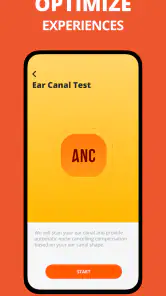
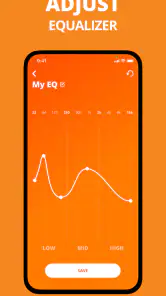
The JBL Headphones app offers a range of features designed to enhance your listening experience. These include customizable EQ settings, noise cancellation adjustments, and the ability to manage multiple JBL devices from a single interface. Users can also access firmware updates and personalized sound settings, making it a versatile tool for audio enthusiasts.
Pros
- Excellent sound quality and clarity.
- Comfortable fit for long use.
- Easy-to-use app interface.
- Customizable sound settings.
- Durable build quality.
Cons
- Battery life could be longer.
- App occasionally crashes.
- Limited noise cancellation.
- High price point.
- Not all features available on iOS.
- Category
- Music & Audio
- Version
- 5.32.12













