JBL One
- 478.00
- 4.6
- Installs
- 1.00M
- Price
- Free

Screenshots
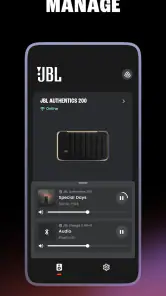
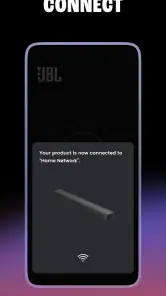
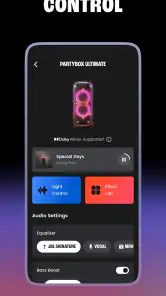
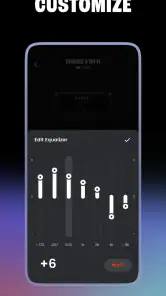
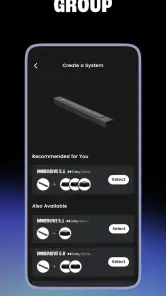
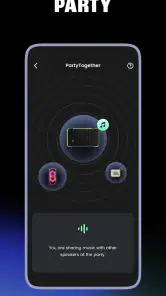
Analysis by Reviewed
I tend to judge a speaker-control app by what happens between choosing music and hearing it: whether setup feels clear, whether I can adjust things without interrupting the room, and whether the app remains useful when my phone changes networks. JBL One is built for people who own compatible JBL audio equipment, bringing controls for Wi-Fi and Bluetooth speakers, soundbars, PartyBox speakers and BandBox models into one mobile app. It is less compelling as a general music player than as a companion for managing JBL hardware.
That distinction matters. If you are deciding whether to install it, the main question is not whether it can replace every audio app on your phone; it is whether having your JBL controls in one place makes everyday listening easier. My view is that it can, especially when you use more than one compatible device, but the value depends on your speaker and how you listen.
A good fit starts with the right equipment
Before installing, I would identify the exact JBL product I want to control and check that it is among the compatible equipment. The app is not a general remote for every speaker, and the JBL name alone does not guarantee that a particular product will work with it. That small check can save the frustration of downloading a companion app only to discover that your everyday device still relies on its own buttons or ordinary phone controls.
It is particularly appealing if your home setup has more than one kind of compatible JBL product. Rather than treating a soundbar and a speaker as entirely separate phone tasks, you have a dedicated place to work with supported JBL equipment. That does not mean every product behaves identically; Wi-Fi and Bluetooth connections bring different expectations. I see the value less as “one app does everything” and more as “one familiar control point for the JBL gear I actually use.”
When the connection shapes the experience
I find the connection question most useful when treated as part of choosing the right JBL device, not as a test of the app alone. A phone can be a handy control point, but the route that works at home may not suit a quick session elsewhere, so I’d decide what you need the speaker to do before relying on one setup. That context makes the practical trade-offs easier to judge.
Network-connected listening has a different rhythm
Wi-Fi speakers and Bluetooth speakers suit different situations, and JBL One covers both kinds of equipment. In practical terms, that means the app is most useful when you want a phone-based control point for a compatible speaker or soundbar, rather than when you simply want to play audio through any device your phone can reach.
With a Wi-Fi speaker, your home network is part of the experience. That can be convenient when the speaker is intended to stay in one room and be controlled from a phone moving around the home. The trade-off is that setup and control are more sensitive to network changes than a basic Bluetooth connection. If a speaker does not appear as expected, checking that your phone and the device are connected to the intended home network is a sensible first step before assuming the hardware has failed.
More From Our News Desk

Weather by Xiaomi Review: Clear at a Glance, Less Clear Up Close

X Under Pressure: Can It Recover When Posting Goes Wrong?

Clash of Clans Is Won Between the Battles

Android Auto Makes the Case for Quieter Car Software

MobiOffice: Transforming Mobile Productivity with Seamless Integration

EA SPORTS FC™ Mobile Soccer: Redefining Mobile Sports Gaming
Bluetooth is generally the more straightforward choice for a quick, direct session: connect the phone to the speaker and start listening. JBL One’s usefulness here is as a dedicated companion for supported JBL models, not as a universal Bluetooth manager. If all you need is to pair an ordinary headset or control equipment from another brand, your phone’s built-in Bluetooth settings are likely the simpler tool.
One useful habit is to treat the app as a control layer and your chosen music service or audio source as a separate part of the setup. That makes troubleshooting less confusing. If the speaker is visible in JBL One but audio does not start, the problem may sit with the source or connection path rather than with the speaker controls themselves.
Moving between rooms and taking audio along
JBL One is a home-and-equipment companion, so its fit changes when you leave the room. A soundbar is naturally tied to a fixed entertainment setup; a PartyBox or BandBox may be used in more flexible settings. The app’s appeal is that compatible JBL gear can be managed through a phone, but a mobile control app does not make every speaker equally portable or remove the need to establish the connection that a particular device uses.
A realistic use case is getting ready for friends to arrive. You can use a compatible JBL speaker for background music, then adjust the setup from your phone rather than walking back to the unit every time someone asks for a change. For a soundbar, the more relevant moment might be settling in to watch something and wanting the supported system’s controls close at hand. These are different jobs, and the app is most worthwhile when it matches the role your JBL device already plays.
On the move, keep expectations modest. If you take a Bluetooth-capable speaker outside, direct pairing is often the practical approach. A Wi-Fi-oriented setup, by contrast, depends on the network environment available to the speaker. I would not choose this app on the assumption that it turns a home-network device into a seamless travel system; the exact experience depends on the model and connection in use.
This also affects who should skip it. If you own no compatible JBL equipment, there is little reason to install JBL One just to browse for music or manage unrelated audio products. If you have one JBL device and rarely adjust it after setup, the phone’s ordinary connection controls may already be enough.
What to try when a device disappears
Connection problems are where a control app either earns its place or becomes another thing to troubleshoot. When a compatible speaker is missing, I would work from the simplest checks outward: confirm that the speaker is powered on, check the phone’s active connection, and make sure the phone is using the network or Bluetooth route appropriate to that device. Then reopen the app and look again before changing multiple settings at once.
That order is useful because it separates discovery trouble from playback trouble. If the app cannot find a device, changing music settings is unlikely to help. If the device appears but a session does not behave as expected, test the audio source and connection independently. Making one change at a time also gives you a clearer sense of what actually fixed the issue, which is more helpful than repeatedly pairing and resetting everything.
Phones can move between a home Wi-Fi network and mobile data as you leave or return. That transition may affect how quickly a network-connected device is reachable, so I would check the phone’s current network before treating a brief delay as a broken speaker. When Bluetooth is the intended connection, verify that the phone is paired to the right device rather than assuming an app refresh will correct a pairing issue.
There is a limit to what one companion app can solve: it cannot make an incompatible JBL product compatible, nor can it remove the dependency of a network-based setup on the network itself. If you regularly use several JBL devices, having a single place to manage supported equipment is a genuine convenience. If your setup is one speaker that never needs adjustment, the extra app may feel like unnecessary overhead.
Keeping phone use and data in perspective
Because connectivity is central to the way different JBL devices are controlled, it is worth thinking about where the phone is connected before starting a session. At home, using the network you expect the speaker to be on can make discovery more predictable. Away from home, avoid assuming that a familiar device will appear in the same way it does in your living room; the connection available to the phone and speaker may be different.
If you are trying to limit mobile-data use, the practical point is to distinguish device control from the audio stream. A control app and a music source are not necessarily the same thing. Use the settings and connection choices available in the source you listen through, and be deliberate about whether your phone is on Wi-Fi or mobile data. I would not infer that controlling a speaker automatically makes the listening session data-free.
For a household with several listeners, it can also help to decide which phone is doing the controlling before music starts. That avoids the familiar confusion of one person attempting to change a device while another phone is connected or a different source is active. This is not a special trick so much as a useful way to keep the app, speaker and audio source from competing for attention.
How it compares with ordinary audio controls
Compared with a phone’s standard Bluetooth menu, JBL One is more relevant when you want a companion for supported JBL speakers, soundbars, PartyBox or BandBox equipment. The built-in menu is better for a one-off pairing or for devices from different manufacturers; JBL One makes more sense when you return to JBL hardware and want its controls together.
Compared with a general music-streaming app, it serves a different purpose. A streaming app is where you browse and choose listening; JBL One is about interacting with compatible JBL equipment. Keeping those roles separate makes the setup easier to understand and avoids expecting the JBL app to be a complete replacement for the service or source you already use.
The app is free, and it comes from Harman Consumer, Inc. Its audience is broad in age terms, with an Everyone content rating, but practical usefulness is still determined by compatible hardware. JBL One has a 4.6 average from around 33,000 ratings, and it has passed one million installs. Those figures suggest that many users have tried it, but they do not tell you whether it suits a particular model or household setup.
The app first appeared on June 13, 2022, and its current version is 2.7.9. It requires Android 10 or later. If you are choosing between installing it and relying on your phone’s standard controls, I would base that decision on the JBL device you own and the way you connect to it—not on the rating alone.
Who will get the most from it
I would recommend JBL One to someone who owns compatible JBL equipment and wants a dedicated way to manage it from a phone, especially if a Wi-Fi speaker and another supported JBL product are both part of the routine. It is also a reasonable choice for people who often adjust a soundbar or portable JBL speaker and would rather keep the relevant controls close at hand.
I would pass if you do not own compatible JBL hardware, if you only need basic Bluetooth pairing, or if you expect one app to control every brand and every audio source. It may also be more app than you need when a speaker is already configured and rarely changes. In those cases, the phone’s own connection settings—or the app for the service you use to play audio—may be the more direct option.
For a busy evening, I find the strongest case is not constant tinkering but fewer interruptions. Imagine moving from the kitchen to the living room while music is playing, then wanting to adjust a compatible JBL system without stopping to work out which device menu to open. A dedicated companion can make that moment simpler, provided the speaker is reachable over the connection it expects. If the phone has just switched networks, taking a moment to check that connection is more sensible than repeatedly tapping controls.
One practical trade-off is that installing a dedicated app adds another item to maintain and another place to look when something goes wrong. I would keep the music source and the speaker-control task mentally separate: first establish that the phone can reach the JBL device, then look at the app or source if playback still fails. That division is especially useful for less technical household members, because it avoids treating every audio hiccup as the same problem.
If you are choosing between JBL One and a general audio app, there is no real contest of purpose: the general app is usually better for finding and organizing music, while JBL One is the more relevant choice for supported JBL equipment. If you use multiple brands, relying on each manufacturer’s companion app can mean a more fragmented setup; the built-in Bluetooth controls are often less involved for occasional connections. I would choose the dedicated JBL option only when its device-specific role solves a recurring need.
My connectivity verdict: JBL One is most convincing when treated as a focused companion for compatible JBL equipment, not as a universal audio hub. The network and Bluetooth options make it relevant across different listening setups, but each still brings its own connection expectations. If you know which JBL device you want to control and are comfortable using the appropriate connection for it, the app can make everyday adjustments more convenient; if not, the built-in controls are likely enough.
JBL One Frequently Asked Questions
What is JBL One, and what can I use it for?
JBL One is JBL’s companion app for setting up and controlling compatible JBL Wi-Fi speakers and soundbars. Depending on your device, you can use it to connect the product to your home network, adjust audio settings, manage multi-room playback, and access supported music services. The available controls vary by model, so check your speaker or soundbar’s compatibility before downloading.
Which JBL speakers and soundbars work with the JBL One app?
JBL One is designed for selected JBL products, particularly compatible Wi-Fi speakers and soundbars; it does not necessarily support every JBL Bluetooth speaker or headphone. Compatibility can also differ by feature: a device may work for basic setup but not offer every app control. Before installing, check the product’s manual or JBL’s current compatibility information for your exact model and region.
How do I set up a JBL device with JBL One?
Typically, you connect your phone to the Wi-Fi network you want the JBL device to use, power on the speaker or soundbar, and follow the app’s on-screen setup steps. Keep Bluetooth and location or nearby-device permissions available if your phone requests them, since they may help the app find the product. Wi-Fi requirements and setup options can vary by model and router.
Can JBL One control music services and multi-room playback?
For supported products, JBL One can provide access to selected streaming services and let you group compatible JBL devices for playback in different rooms. Service availability depends on your country, account, device, and the options currently supported in the app. Some playback may instead be started through another music app or a casting feature, so review the available services and grouping controls after connecting your product.
Is JBL One free, and what permissions or internet access does it need?
The JBL One app is generally available to download without an app purchase, but streaming services may require their own paid subscriptions, and availability can vary by region. Internet access is needed for setup features, online music services, and updates. The app may request network, Bluetooth, or nearby-device permissions to discover and configure compatible equipment; review the permission prompts and privacy information for your device.
Pros
- Works with compatible JBL speakers and soundbars in one app.
- Offers room calibration on supported devices for more balanced sound.
- Lets you adjust EQ settings to suit different listening preferences.
- Supports music-service integration on compatible products.
- Can group compatible speakers for multi-room playback.
Cons
- Many features depend on owning a supported JBL device.
- Setup and available controls vary by product model.
- Some music services or functions may not be available in every region.
- Room calibration may require a compatible phone and suitable surroundings.
- Firmware updates and device setup require a reliable internet connection.
- Category
- Music & Audio
- Version
- 2.7.9













