- 4.56M
- 4.0
- Installs
- 5.00B
- Price
- Free

Screenshots


Analysis by Reviewed
I reach for Instagram when I want to keep up with people through small visual moments rather than a steady stream of messages. A friend’s snapshot from a weekend walk, a relative’s Story from a family gathering, or a creator’s quick demonstration can make a distant person feel a little closer. The app is less satisfying when I need a direct answer or a detailed exchange: its strength is letting people share what they are seeing, not keeping every conversation clear and orderly.
That difference affects the rhythm of communication. A post can be seen whenever someone opens the app, and a reaction may be all the response a moment needs. But a like or emoji does not necessarily mean someone has read a plan or understood a question. I treat Instagram as a useful social window, not as a dependable place to coordinate anything that needs a clear reply.
When visual updates are the point
The app suits people who enjoy sharing photos and short videos, following familiar faces, and discovering creators through visual posts. It can also help a small community keep a visible record of its activities, provided members are comfortable sharing in that format. I would be less likely to recommend it to someone who wants a quiet, chronological stream limited to close contacts, or who finds recommendation feeds hard to leave.
The Latest on Instagram
For instance, if I’m visiting a market with a friend, I might post a brief Story showing the stalls and send the meeting point separately in a direct message. The post lets other friends share the atmosphere; the message handles the practical detail. Keeping those jobs separate is a small habit, but it avoids assuming that everyone who sees a post has received the information they need.
That split is especially useful when the same moment has different audiences. I might want acquaintances to see a quick glimpse of a day out while only one person needs the exact time or location. Thinking about the audience before composing anything helps me decide whether the detail belongs in a broadly visible post, a smaller exchange, or nowhere online. It is a simple check, but it can prevent an informal update from carrying more personal information than intended.
Photo Sharing Like Never Before
Instagram's core feature is sharing photos and videos. It offers a plethora of filters and editing tools that even make my morning coffee look like a masterpiece. Seriously, with just a few taps, you can enhance your images to professional quality. The app’s intuitive design makes it super easy for anyone to pick up and start sharing their world.
One practical way I use that simplicity is to make a small sequence rather than trying to fit an entire outing into one polished post: a picture for the main moment, then a few casual updates for context. That keeps a shared memory feeling natural instead of turning it into a production. If you are sharing something mainly for a close circle, think about the audience before posting and check the account’s audience settings; a public-facing post and a private conversation serve different purposes.
More From Our News Desk

Clash of Clans Is Won Between the Battles

Android Auto Makes the Case for Quieter Car Software

MobiOffice: Transforming Mobile Productivity with Seamless Integration

EA SPORTS FC™ Mobile Soccer: Redefining Mobile Sports Gaming

How Microsoft OneDrive Became a Mobile Productivity Giant

How Google Translate Breaks Language Barriers Effortlessly
Stories and Reels
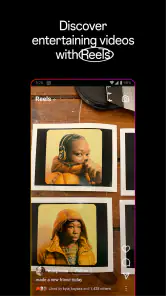
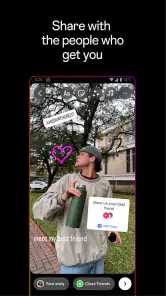
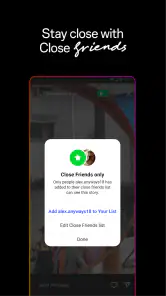
Now, let's talk about Instagram Stories and Reels. If you haven’t tried them yet, you’re missing out. Stories are perfect for those quick, in-the-moment posts that disappear after 24 hours. It’s like a mini daily vlog. Reels, on the other hand, are Instagram’s answer to TikTok, letting you create short, engaging videos that can be shared with a wider audience. They’re fun, addictive, and a great way to show off your creativity.
The formats also change how a conversation feels. A Story can invite a quick reaction without asking everyone to stop and read a long caption, while a Reel is better when movement, sound, or a brief demonstration carries the point. For example, I might use a Story to show friends the crowded café I found, then send a direct message with the address to the person meeting me. That small separation helps keep a post from becoming a substitute for clear plans.
For someone deciding whether to try it, the basics are free, but optional in-app purchases range from around twenty cents to ten thousand dollars per item, so I would check what a purchase covers before confirming anything. The app is rated for teens, which makes a conversation about audience, comments, and time spent worthwhile for families. Its scale is striking: it has over five billion installs and an average rating of four out of five from around 168 million ratings. Those figures suggest broad appeal, not that every feed or experience will suit every person.
For a first-time user, I would resist the urge to post immediately just because the app makes sharing look effortless. Spend a little time deciding whom you want to follow and what kind of updates you want to see. That gives the feed a more personal starting point and makes it easier to tell whether the app is helping you stay connected or simply filling pauses in the day. You can also use it mostly as a viewer; there is no need to make every visit a performance.
Engage with Your Community
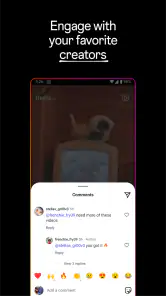
One of the coolest things about Instagram is the sense of community. You can follow friends, family, celebrities, and even your favorite meme pages. The app’s algorithm curates your feed based on your interests, so you’re always seeing content that matters to you. Plus, the comment section is a lively place where you can interact with others, share your thoughts, or just drop a few emojis.
That feed can make staying loosely in touch effortless, but it can also blur the line between catching up with people and consuming an endless stream of recommendations. I try to follow accounts for a reason and unfollow or mute ones that leave me feeling distracted; a smaller, more intentional feed is often more useful than a larger one. If you want a direct exchange, comments are public and can get lost in a busy thread, so a private message or another channel may be clearer.
Another feature worth mentioning is IGTV, where you can watch longer videos from your favorite creators. It's like having a mini YouTube within Instagram.
Compared with messaging-first alternatives, Instagram is stronger at showing a shared visual life than keeping practical conversations organized. Compared with TikTok, Reels sit inside a broader network of profiles, photos, and social connections, which is handy if you already follow the people you want to watch. For longer, structured viewing, a dedicated video service can be easier to browse; for private plans or sensitive details, a messaging app is usually the better fit.
The choice between these tools often comes down to what you expect a visit to accomplish. If I want to see what friends are doing, browse a creator’s visual work, and leave a quick reaction in one place, this app brings those activities together. If I need a clean record of decisions, searchable group discussion, or a message that will be hard to miss, I would move the conversation elsewhere. Using a separate channel is not a failure of the social app; it is a practical way to match the tool to the task.
Discover New Content
The Explore page is your gateway to discovering fresh content. Whether you're into travel, food, fashion, or fitness, Instagram personalizes this section to show you posts, hashtags, and profiles you might like. It’s a fantastic way to find inspiration or just kill time when you’re bored.
Explore is also where I notice the attention cost most: one search for a recipe can lead to unrelated suggestions, and a quick check can become a longer scroll than intended. I use it with a specific purpose—finding a place to visit, an account to follow, or an idea to save—then leave when I have what I came for. If you prefer a chronological, finite update list, this discovery-led style may feel less predictable than a simple feed of posts from chosen contacts.
A useful everyday routine is to give browsing a job. Before opening Explore, I might decide that I am looking for a dinner idea or want to find the account behind a recommendation from a friend. Once I have a few options, I can save or share what is useful and stop searching. Without that small intention, the app’s mix of familiar posts and new suggestions makes it easy to keep going without remembering what prompted me to open it.
And let’s not forget about hashtags, which are a powerful tool to expand your reach or discover niche communities.
For a small creator or local group, a focused hashtag can help people find related posts, but it is not a guarantee that the right audience will see them. I would treat it as a label that improves context, not as a substitute for sharing with the people who actually need the information. That distinction makes the app more useful for community discovery while keeping expectations realistic.
A Social App That Needs Boundaries
Instagram is free to download and was released on April 3, 2012. It has around 4.6 million written reviews, and its long history helps explain why so many friends, family members, and creators are already there. Still, popularity does not make it essential. If you dislike public-facing social spaces, algorithmic discovery, or the pressure to turn ordinary moments into content, you may be happier with a private group chat, a photo-sharing service with a smaller circle, or no social feed at all.
To keep it from taking over my day, I decide what I am opening it for before I tap the icon: replying to a friend, posting a moment, or looking up an account. I also avoid treating every reaction as a conversation that needs an immediate answer. Those habits preserve the good part—easy contact and visual sharing—without letting the app set the pace of my attention.
One boundary I find helpful is to avoid using a public post as a substitute for telling someone something directly. A friend may not see an update soon, and even a visible reaction does not confirm that a detail has registered. If a plan matters, I send it to the person who needs it and make the request explicit. That keeps social sharing relaxed instead of turning it into an unreliable notification system.
Choosing a useful routine
One question I would ask before installing it is whether the people I want to follow actually use it. If they do, Instagram can make casual contact feel effortless; if they mainly communicate elsewhere, the feed may add another inbox and another place to check without solving a real need. I would start by following a handful of people whose updates I genuinely want, rather than trying to build a complete social circle in one sitting.
For families, the teen content rating is a useful starting point for deciding whether the app fits, but it does not replace a conversation about what a young person shares, who can see it, and how comments affect them. I would look over audience choices together and agree on a simple rule: a public post is not the same as a private message. That distinction matters for photos from school events, location details, or anything that should reach only a small group.
A practical way to reduce friction is to separate browsing from replying. When I open the app to answer someone, I try to deal with that message first instead of letting the feed choose the next task. When I am looking for inspiration, I can browse without pretending that I am checking urgent messages. This does not make recommendations disappear, but it gives me a clearer reason to close the app once that reason is met.
It can also be a good fit for someone who shares a hobby through images: a cook showing a finished dish, a local group recording an event, or a friend trading travel ideas through short clips. In those cases, visual context does more than decorate the conversation; it is the thing people want to exchange. By contrast, someone who mostly needs long, private conversations or a tightly controlled reading list may find a chat service or a simpler feed more comfortable.
Instagram is a social app developed by Instagram, and it is free to install. Its average rating is four out of five, with around 168 million ratings, while its written reviews number around 4.6 million. The app has been available since April 3, 2012, and its scale means it is likely that friends, public figures, and niche communities already have a presence there. I see that reach as a practical advantage, not proof that every person will enjoy the way the feed works.
Instagram is more than just an app; it's a platform that lets you express yourself, connect with others, and discover new worlds. Whether you’re an aspiring influencer or just someone who loves sharing photos, Instagram has something for everyone. So go ahead, dive into the Instagram universe, and let your creativity run wild!
My honest recommendation is to try it if the people or creators you care about are already there, and to use its different formats with a clear purpose. It can make everyday communication warmer and more visual, but it is not the best place for every conversation, nor is it a tool I would open without boundaries. Used deliberately, it earns a place on my phone; if scrolling regularly leaves you less present than connected, stepping back or choosing a quieter alternative is a sensible choice.
Instagram Frequently Asked Questions
Do I need to use my real name on Instagram?
Instagram is built around profiles, but you can decide what personal details to include in yours. Before creating an account, consider how identifiable you want to be and what information you are comfortable sharing. You can also review profile, privacy, and interaction controls as you set up the account, then choose a presentation that suits how you plan to use the app.
Can I use Instagram for messaging as well as sharing posts?
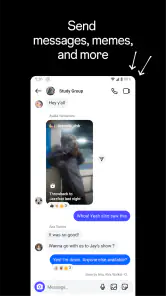
Instagram supports social interaction alongside its visual sharing features, including direct messages. This can make the app useful for keeping up with friends in more than one way, whether you are sharing photos, Stories, or Reels or communicating privately. As with public posts, think about who you contact and review your account and interaction settings to shape your experience.
Does Instagram help me discover accounts and content I might like?
Instagram includes ways to explore content beyond the people you already follow, alongside its profile-based social experience. This can be useful if you enjoy finding new photos and videos, but it also means your viewing habits may influence what you encounter in the app. Consider whether you want a platform that combines sharing with ongoing content discovery before downloading.
Can I use Instagram to keep in touch with friends without posting publicly?
Yes. Instagram is designed for social sharing, but you do not have to make every post visible to everyone. You can choose who follows a private profile and use the app to view and interact with content. Consider the audience you want before sharing, and review account and interaction controls as part of setting up your profile.
What should I know about Instagram Stories and Reels before downloading?
Stories and Reels are two of Instagram’s visual sharing formats. Stories are temporary posts, while Reels are short-form videos; both can be used to create and share content with friends. If you enjoy discovering and sharing photos and video, these formats are a central part of the experience. Your feed and viewing habits can also affect mobile data use.
Pros
- User-friendly interface for easy navigation.
- Wide range of filters and photo editing tools.
- Connect with a vast global community.
- Seamless integration with other social platforms.
- Regular updates with new features.
Cons
- High data usage can drain mobile plans.
- Privacy concerns with data sharing.
- Algorithm changes affect content visibility.
- Addictive nature may impact productivity.
- In-app ads can be intrusive.
- Category
- Social
- Version
- Varies with device