OK: Social Network
- 2.83K
- 4.3
- Installs
- 100.00M
- Price
- Free

Screenshots




Analysis by Reviewed
I judge a social app by whether it gives me a good reason to open it again tomorrow, not just by how many things it puts on one screen. OK: Social Network is built around keeping up with people and communities, while also offering video and film viewing and a place to share everyday moments. That mix can be convenient, though it also means the experience is broader than a simple friends-only feed.
What the free access means
OK is a free social app from VKL, and that makes it easy to try without committing to a purchase. The app also offers in-app purchases, with items priced from $0.49 to $17.99. I’d treat the free access as the starting point: you can decide whether its social and entertainment mix suits you before spending anything. The existence of paid items alone doesn’t tell me that a purchase is necessary for ordinary use, so I wouldn’t budget for one unless I found a specific item I wanted.
Its scale is notable: it has over 100 million installs, a 4.3 average from around 2.9 million ratings, and a Teen content rating. Those figures suggest a widely used service, but popularity won’t guarantee that your friends or the communities you care about are active there. For a social network, that personal fit matters more than a large audience number.
Getting Started with OK
First off, the setup process for OK: Social Network is as smooth as butter. Once you download the app, available for both Android and iOS, you're greeted with a simple and intuitive registration process. You can sign up using your email or phone number, or even connect through your existing social media accounts—super convenient!
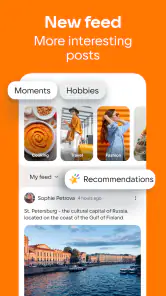
Once you're in, the app's layout is clean and user-friendly. You won't be overwhelmed with options, which is nice. The main feed is right there, waiting for you to dive in. You can start by adding friends or joining groups that catch your interest. It's like stepping into a digital lounge where you're encouraged to explore and engage.
Features that Stand Out
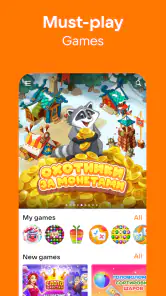
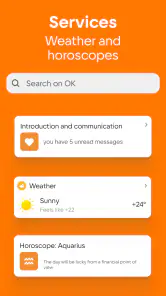
Alright, let's talk features. One thing that really impressed me was the variety of content you can interact with. From videos and music to games and news, there's something for everyone. It feels like the app is designed to cater to all your entertainment needs.
The app also has a neat feature called "Moments," which is kind of like an Instagram story. You can share snippets of your day and see what your friends are up to as well. It's a great way to stay connected without the pressure of permanent posts.
More From Our News Desk

Clash of Clans Is Won Between the Battles

Android Auto Makes the Case for Quieter Car Software

MobiOffice: Transforming Mobile Productivity with Seamless Integration

EA SPORTS FC™ Mobile Soccer: Redefining Mobile Sports Gaming

How Microsoft OneDrive Became a Mobile Productivity Giant

How Google Translate Breaks Language Barriers Effortlessly
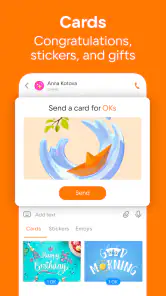
Another highlight is the integrated messaging system. You can chat with friends directly in the app, and the video call feature is a nice touch. It's perfect for catching up with friends or even making new ones!
Using groups without letting the feed take over
I find that a social network with several kinds of content works best when I give it a purpose. If I’m joining OK to follow a local interest or hobby, I’d start with a small number of groups and check whether their posts are useful and current before filling my feed with more. That simple approach helps separate conversations I actually want from the general stream of entertainment.
A practical routine is to open the app with one task in mind: reply to a friend, see what a group has shared, or watch something during a break. Then leave when that task is done. This is especially useful in a service that combines social updates and video, because browsing can easily turn into a longer session than intended.
Community Vibes
One of the things I love most about OK: Social Network is the community aspect. The app encourages you to join groups based on your interests, and it's a fantastic way to meet like-minded people. Whether you're into cooking, sports, or tech, there's a group for you.
The app also promotes user-generated content, so you can create and share your own posts, adding to the vibrant community vibe. It's not just about consuming content, but also contributing to it.
A realistic day-to-day fit
Imagine checking in after work to see what friends have shared, replying to a message, and then watching a film or video when you have a little time to unwind. OK can bring those activities together, so you don’t have to switch between a social app and a separate place for viewing. The trade-off is that someone who only wants private conversations may find the broader feed unnecessary, while a dedicated video service may be better for someone whose main goal is watching rather than interacting.
For keeping in touch with an established circle, the main question is whether those people already use OK. If they do, a shared network can make casual updates and group conversations feel natural. If your friends are mainly on another platform, maintaining a second social feed may be more effort than it is worth.
What Could Be Better?
Now, no app is without its quirks. While I enjoyed the overall experience, there were a few hiccups. Sometimes the app can be a bit slow if you're navigating through heavy content, but it's not a deal-breaker. Also, the notification settings could be more customizable, allowing users to better control what alerts they receive.
Another thing to keep an eye on is privacy settings. Make sure to tweak them to your liking, especially if you're sharing a lot of personal moments. The app provides options, but it's always good to double-check.
Those limitations shape how I’d use it. I would avoid treating a busy all-in-one feed as a reliable place for every important conversation; for time-sensitive plans, I’d confirm details directly with the people involved. And before sharing something personal, I’d review the audience and privacy choices rather than assume a post is meant only for close friends. These are ordinary habits, but they matter more when social updates and entertainment sit together.
Who is likely to get value from it?
OK is most appealing if you enjoy discovering communities, keeping up with friends, and having video or films available alongside social activity. It may also suit someone who wants to contribute posts rather than only scroll. The app has been available since March 20, 2012, and its current version is 26.5.28; it supports Android 7.0 and later. That makes the minimum system requirement clear for Android users, while the social fit still depends on the people and groups they want to find.
I’d skip it if you want a narrowly focused tool, dislike mixed-content feeds, or are trying to reduce the number of places competing for your attention. A messaging-first alternative may be simpler for private chats, and a dedicated video app may feel more direct for watching. OK’s advantage is having those social and viewing interests under one roof, not being the best specialist at every single task.
Making the first week useful
If I were trying OK for the first time, I wouldn’t judge it by the volume of the initial feed. I’d use the first few visits to test whether it solves a real social need: search for a community tied to a hobby, follow only a couple that look relevant, and see whether people are actually having conversations rather than posting material I would never return to. That gives a clearer signal than joining many groups at once and then trying to sort through a noisy stream.
I’d also treat friend discovery and community discovery as separate jobs. Friends make the app useful for familiar updates and direct contact; groups have to earn their place through relevant, recent discussion. If one side works and the other doesn’t, there is no need to force both into your routine. You can keep the useful part and ignore the rest, or decide that the combined app doesn’t justify another login in your life.
Choosing between an all-in-one feed and specialist apps
Compared with a messaging-first app, OK’s appeal is the surrounding social context: posts and groups sit alongside contact with friends, so it can be a better fit when you want to browse and participate, not just send a quick note. A dedicated messenger is usually the cleaner choice for a small group coordinating a plan, especially if nobody wants to maintain a public-facing feed. For that kind of practical exchange, I would choose the tool everyone already checks rather than ask people to move platforms.
The same distinction applies to watching. OK is useful when viewing is one part of a broader visit, such as checking in with friends and then choosing a video or film. If watching is the whole point, a specialist video service is likely to feel more focused. I see OK’s value in reducing app-switching for someone who genuinely wants social activity and entertainment together; I don’t see a reason to replace every specialist app just because this one combines several interests.
Keeping a better balance
Because the app brings several kinds of material into one place, I’d decide in advance what counts as a worthwhile visit. For example, I might check one community after dinner, respond to a message, and close the app rather than letting recommendations or unrelated posts dictate the session. This is not a special setting; it’s a simple habit that makes a mixed feed feel more intentional and helps keep casual browsing from displacing the conversations I opened it for.
Another useful trade-off to consider is how much you want to share. Moments can make everyday updates feel lighter than permanent posts, but they are still a form of social sharing. I’d keep the audience in mind and avoid posting anything that would be uncomfortable if it reached beyond the people I had in mind. If your preferred social life is deliberately private and tightly controlled, a smaller messaging circle may suit you better than a network built around both communities and public activity.
Questions worth settling before you spend
The practical question about paid items is not whether they exist, but whether you can name something you actually want from them. Since the app is free to try and the purchase range runs from $0.49 to $17.99 per item, I’d use it first and make no purchase until a specific item feels worthwhile. I wouldn’t assume that paying is required to see whether the people and groups you care about are there.
For Android users wondering whether their device is compatible, the minimum requirement is Android 7.0. The app is also available on iOS, so people can use it across those mobile platforms. As with any social network, the more important question after installation is whether your own contacts and chosen communities are active enough to make the app useful.
Parents and younger users should also notice that OK carries a Teen age rating. I would treat that as a prompt to think about how the app will be used, what gets shared, and which communities are followed, rather than as a substitute for personal judgement. The right choice depends on the individual’s habits and the kind of interaction they are comfortable with.
Final Thoughts
All in all, OK: Social Network is a solid choice if you're looking for a platform that combines social networking with entertainment. It's user-friendly, engaging, and offers a wide range of content that keeps things fresh. While it has a few areas that could use some polishing, the positives definitely outweigh the negatives.
So, if you're ready to explore a new social playground, give OK a shot. Who knows, you might just find your new favorite hangout spot in the digital world!
My practical verdict is to start with the free experience and see whether your friends or chosen groups give you a reason to return. I wouldn’t pay simply because paid items exist; I’d spend only if a particular purchase clearly adds something I personally want. If the groups feel active and the blend of conversation and viewing fits your habits, OK can earn a place in your routine. If not, choosing a more focused social or video app is a perfectly sensible call.
OK: Social Network Frequently Asked Questions
What is OK: Social Network, and what can I use it for?
OK: Social Network is a social app for finding friends in communities and groups, watching videos and films, and sharing moments. It may suit people who want to keep up with friends while also exploring interest-based spaces and entertainment in one app. If those are the activities you are looking for, its focus is easy to understand before you download.
Who develops OK: Social Network?
OK: Social Network is developed by VKL. Knowing the developer can help you identify the app when searching for it and distinguish it from other social networking apps with similar names. It is a social app centered on connecting with friends and communities, so its main appeal is bringing social discovery, group activity, and shared moments together rather than serving only one narrow purpose.
Is OK: Social Network available for Android and iOS?
OK: Social Network is offered as a mobile app, and the Android version supports devices running Android 7.0 or later. Before downloading on an Android phone or tablet, check that its operating system meets that requirement. If you use an iOS device, look for the app in the appropriate app store and confirm that the version offered there supports your device.
Is OK: Social Network free to download, and what should I know about purchases?
OK: Social Network is free to download, so you can try the app without paying upfront. It also offers optional in-app purchases, with prices ranging from $0.49 to $17.99 per item. Take a moment to check the purchase details before confirming anything, especially if someone else uses your device or account.
What age group is OK: Social Network intended for?
OK: Social Network is rated Teen, which makes it more suitable for teenagers and adults than for young children. Since it is a social app where people can share content and interact, families may want to review its privacy settings and discuss responsible online behavior before younger users create an account.
Pros
- User-friendly interface for smooth navigation.
- Strong privacy controls for user data.
- Diverse content formats to explore.
- Seamless integration with other platforms.
- Frequent updates with new features.
Cons
- Limited customization options for profiles.
- Occasional bugs and connectivity issues.
- Ad-supported
- can be intrusive at times.
- Content moderation needs improvement.
- Limited offline functionality.

- Category
- Social
- Version
- 26.5.28