Instants, an Instagram app
- 147.00
- 4.5
- Installs
- 5.00M
- Price
- Free

Screenshots
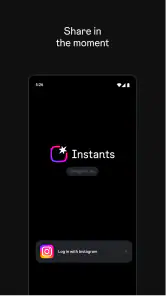
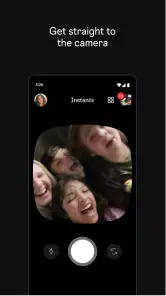
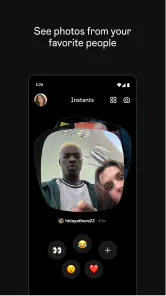
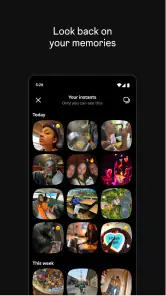
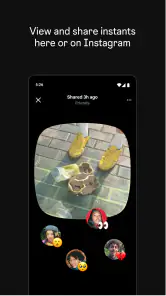
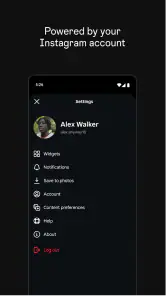
Analysis by Reviewed
The first thing I’d keep in mind about Instants is that it is a social app built around sharing in the moment, not a general-purpose tool for organizing every part of your online life. That distinction sounds simple, but it helps set expectations: it is most useful when you want to post and keep up with people, and less compelling if you are looking for a quiet, private space or a carefully managed archive.
Instants is an app from Instagram, listed in the social category and offered free of charge. Its Teen age rating makes it more appropriate for younger users than an app intended only for adults, but that does not remove the need to think about who can see what you share. I’d spend a little time understanding the audience and privacy controls before posting anything personal. The app’s central appeal is immediacy; the trade-off is that quick sharing can encourage you to decide what to publish before you have considered how it may be received.
Getting past the first points of friction
I’d use this section to make the first launch feel less like guesswork: check that the device meets the app’s system requirement, the installation has finished, and the account you opened is the one you mean to use. If anything seems stuck, I’d change one thing at a time—starting with the connection—so it’s easier to spot whether the snag is in setup or elsewhere. From there, the bigger question is how to make sharing fit naturally into the day.
Start by checking the basics
A social app can feel broken when the real issue is a setup mismatch. Before troubleshooting Instants, I would check that the app has finished installing, that the device can connect to the internet, and that I am using the account I intend to use. Those are simple checks, but they prevent a surprising amount of confusion—especially if a device is shared or several accounts are used for different audiences.
The current version is 450.0.0.50.106, and the minimum operating-system requirement is 9. If an older device cannot install or update the app, checking its system version is more useful than repeatedly trying the same download. If the app has just been updated, closing it and opening it again is a sensible first step before changing account settings or reinstalling anything.
I would also confirm that the phone has enough free space for an installation or update and that its connection is stable. A download that appears stalled may be waiting on the device or network rather than reflecting an issue with Instants itself. If other apps are also struggling to connect, deal with the general connection problem first instead of treating this one app as the cause.
Make your audience a deliberate choice
The most important setup decision for a social app is not cosmetic: it is deciding who you are comfortable sharing with. Before posting, take a moment to inspect the audience and account choices presented in the app. I would not assume that a post intended for friends is private just because its tone feels personal, or that every person following an account belongs in the intended audience.
More From Our News Desk

Weather by Xiaomi Review: Clear at a Glance, Less Clear Up Close

X Under Pressure: Can It Recover When Posting Goes Wrong?

Clash of Clans Is Won Between the Battles

Android Auto Makes the Case for Quieter Car Software

MobiOffice: Transforming Mobile Productivity with Seamless Integration

EA SPORTS FC™ Mobile Soccer: Redefining Mobile Sports Gaming
A useful habit is to separate a quick, casual update from something you would not want widely circulated. If a photo or thought would be uncomfortable outside its original context, pause before sharing it. This is especially worthwhile when a post includes other people, a recognizable location, or details about your routine. A momentary format does not make a post consequence-free.
Instants has an average rating of 4.5 from around 24,000 ratings, and it has more than 5 million installs. That level of uptake suggests that many people are willing to try it, but popularity does not guarantee it will suit your particular social circle. I would judge it by whether the people you actually want to reach are there and whether the app’s pace fits how you like to communicate.
When something does not appear to work
If a post will not go through, I would avoid tapping repeatedly and creating uncertainty about whether it was sent. First, check the connection, then look for any visible confirmation in the app before trying again. If the app seems unresponsive, close and reopen it. These steps are less disruptive than immediately signing out or removing the app, which can create extra account and setup work.
If the problem persists, note what you were doing when it happened: opening the app, preparing a post, or trying to view someone else’s content. That small detail makes troubleshooting more focused. You can then try the same action once after the connection is stable. If only one specific item causes trouble while other parts work, the issue may be limited to that item rather than the whole app.
I would treat reinstalling as a later step, not a reflex. Before doing it, make sure you know how to access the account again. Social apps are easy to remove but frustrating to recover if you have forgotten the sign-in details or are using the wrong account. A restart, a connection check, and an account check are better first moves.
Using it without making sharing feel like a chore
For me, a good routine is less about posting often and more about knowing why I opened the app: share a small moment, connect with the intended audience, then get back to what I was doing. A quick review of the image and audience before publishing can prevent avoidable second thoughts, especially when other people or recognizable places are involved. That kind of light-touch habit keeps immediacy useful without making every outing feel like content to produce.
A practical everyday workflow
Imagine you are out with friends and want to share a small moment without turning it into a polished project. Instants is most naturally suited to that kind of brief, timely interaction. I’d decide what I want to share, check the audience, publish once, and then return to the people I am with instead of spending the rest of the outing monitoring reactions. That keeps a social app from taking over the moment it was meant to capture.
For a recurring routine, such as sharing a quick update with a familiar group, consistency helps more than volume. Use the same account each time, keep the audience choice in mind, and avoid posting private details just because the app makes sharing feel immediate. If a post is meant for a limited group, make that intention explicit through the available audience controls rather than relying on a vague assumption about who will see it.
One non-obvious trade-off is that speed can make the app feel effortless while also making mistakes easier. A short pause before publishing gives you time to notice an unintended detail in a photo or rethink a caption. I find that especially useful when posting on the move: review the image once, confirm the audience, and only then share. It is a tiny check that can prevent an awkward correction later.
Another practical habit is to separate viewing from posting. If you open the app only to respond to a particular person, do that first and leave when you are done. If you are browsing without a specific purpose, decide in advance how much attention you want to give it. This is not a special feature; it is a way to keep a fast-moving social feed from turning a two-minute check into an unplanned stretch of screen time.
How it compares with familiar alternatives
Compared with a messaging app, Instants is a better fit when you want to share socially rather than send a direct, one-to-one note. Messaging is usually the clearer choice for sensitive details, coordination, or something that needs a direct reply. If the main goal is a private conversation, I would start with the messaging tool both people already use rather than posting and hoping the right person notices.
Compared with a general social network, Instants’ emphasis on sharing in the moment gives it a more immediate feel. That is useful when a quick update is the point, but it may be less satisfying if you want to spend time arranging a long-lived collection of posts or using one app as a comprehensive personal archive. For that kind of deliberate record-keeping, I would choose a tool designed around saving and organizing rather than assume that a social feed will serve both purposes equally well.
The best alternative therefore depends on the task. Choose direct messaging for private communication, a photo-storage tool for keeping a personal collection, and Instants when the value lies in sharing an experience with a social audience. Trying to make one app handle all three jobs can lead to misplaced expectations and unnecessary frustration.
When the app may not be the cause
If a post is not getting the response you hoped for, that does not automatically mean the app has failed. Your audience may not be online, may not have seen the post yet, or may simply prefer a different way of keeping in touch. I would not repeatedly repost the same thing to force a response; a direct message is usually more considerate if the information genuinely needs to reach someone.
Likewise, if an image looks different from what you expected, check the original photo on the device before concluding that Instants changed it. Lighting, the screen, and the way a photo was captured can all affect how it appears. If the original itself looks wrong, retaking or choosing another image is more useful than reinstalling the app.
When several apps fail in the same way, think beyond Instants. A device-wide connection issue, a phone that needs a restart, or an account mix-up can affect more than one service. Testing another app that uses the internet is a quick way to distinguish a wider problem from one limited to this social app.
Who I would recommend it to
I would recommend Instants to someone who enjoys brief social updates and wants a focused way to share what is happening now. It makes the most sense if your friends are already part of the relevant social circle and you are comfortable making audience choices before you post. The free price makes trying it straightforward, while the Teen rating gives families a clear reason to discuss sharing habits and boundaries together.
I would hesitate to recommend it to someone who dislikes social feeds, wants every interaction to remain strictly private, or is trying to cut down on spontaneous posting. Those users may be better served by direct messages, a private photo library, or simply taking pictures without publishing them. If you do try Instants, begin with low-stakes updates and learn how the audience options work before sharing anything personal.
Small habits that make the experience easier
One useful way to decide whether the app belongs in your routine is to give it a specific job. For example, you might use it for brief updates to people who already follow your social activity, while keeping practical arrangements in a message thread. That division makes it easier to tell whether you are opening Instants because you have something to share or simply out of habit. If you find yourself checking it without a reason, a deliberate stopping point can keep the app from competing with the people beside you.
It also helps to think about timing. A moment that feels worth sharing while you are in the middle of it may look different once you have had a little distance. If you are unsure, save the decision for later rather than posting just to keep up with the pace of a social app. That approach is especially sensible for group photos: make sure the people pictured are comfortable with being included, and consider whether the image reveals details they would rather keep to themselves.
For families, the Teen rating is a useful starting point for a conversation, not a substitute for one. I would talk through what counts as personal information, how to respond to unwanted attention, and why a post can travel beyond its original audience. Younger users may benefit from agreeing on a simple rule with a parent or guardian, such as checking before sharing a location or an image that includes someone else. The goal is not to make every post feel risky, but to build a pause into a format designed for speed.
Another question people often have is whether an app like this can replace their usual way of keeping in touch. I would not count on one social channel to reach everyone. Some friends may prefer a direct message, others may not check social updates regularly, and some may not be part of the same audience at all. If the message is time-sensitive or important, contact the person directly and treat a social post as a separate form of sharing rather than a delivery guarantee.
That distinction matters when deciding what to post, too. A casual snapshot can work well as a social update, while a detailed plan, a private announcement, or a record you will want to find months later deserves a more suitable destination. I would use a notes tool for information I need to retrieve, a photo library for personal memories, and messaging for a conversation that needs a clear reply. Instants is most satisfying when I let it do the social part without asking it to become a filing system.
A practical verdict
Instants has a clear role: quick social sharing, with the convenience and judgment calls that come with it. My practical advice is to check the account, connection, and audience before troubleshooting or posting; try simple recovery steps before reinstalling; and use another kind of app when privacy or long-term organization matters more than immediacy. For the right social circle, that makes Instants an easy app to understand and a useful one to keep within reach—provided you stay intentional about what you share.
There are 147 reviews alongside the broader ratings, and I would treat those as a useful snapshot of public reaction rather than a promise about how the app will fit your habits. The version number can also help when describing a problem to someone who is helping you troubleshoot, because it gives you a concrete detail to check before trying disruptive fixes. If you are deciding whether to install it, start with your actual use case: do you want to share small, current moments with a social audience, or do you need a more private and organized tool? That answer is more important than popularity.
For me, the strongest reason to try it is that it can make casual sharing feel simple without requiring every update to become a polished production. The main reason to skip it is equally clear: if you do not enjoy social posting, or if you want reliable privacy and long-term organization above all else, its central appeal may not be enough. I would give it a place in my routine only when sharing itself is the point, keep sensitive conversations elsewhere, and pause before publishing anything I might regret having circulated.
Instants, an Instagram app Frequently Asked Questions
What is Instants, and how does it differ from Instagram?
Instants is an Instagram-related app designed around sharing quick, casual photos with friends. Its focus is typically more immediate and less polished than a conventional Instagram post, encouraging users to capture and send moments rather than prepare content for a public profile. Features and availability can change, so check the current app-store listing to confirm exactly what the version you download supports.
Do I need an Instagram account to use Instants?
Instants is associated with Instagram, so access may depend on signing in with an Instagram account or connecting to Instagram’s services. The sign-in options and requirements can vary by version and region. Before downloading, review the store description and permissions, and make sure you are using the official app listing. Never enter your Instagram password into an unofficial website or third-party app.
Who can see the photos I share through Instants?
The intended audience for an instant-sharing app is generally a selected group of friends, but you should verify the audience controls in the current version before sending anything personal. Check who can view your content, whether recipients can save or capture it, and how blocking or reporting works. Treat shared photos as potentially reproducible, even if the app presents them as temporary or private.
Is Instants free to download, and does it include ads or in-app purchases?
The price, advertising, and in-app purchase details depend on the app’s current release and the country associated with your Apple App Store or Google Play account. Check the listing before installing, where stores display pricing and any available purchase information. Also review the developer’s privacy disclosures, since the app may process account, device, or usage data to provide its features.
Is Instants available on Android and iOS, and what should I check before installing it?
Availability can differ by platform, country, and time, and an app connected to Instagram may be renamed, updated, or discontinued. Search for Instants in the official Google Play Store or Apple App Store and confirm the developer, compatibility, and latest update details before downloading. Avoid third-party installation files unless you can independently verify their safety and source.
Pros
- Quickly captures and shares candid moments with friends.
- A simple interface makes posting feel fast and familiar.
- Instagram integration helps friends discover shared Instants.
- Useful for sharing everyday snapshots without polished editing.
- Familiar social features make it easy to connect with Instagram users.
Cons
- Requires an Instagram account to use its social features.
- Sharing photos with friends raises privacy considerations.
- The experience depends on having friends who use Instants.
- Limited editing tools may frustrate users seeking creative control.
- Availability and features may vary by region or device.
- Category
- Social
- Version
- 450.0.0.50.106













