Likee - Short Video Community
- 137.51K
- 4.4
- Installs
- 500.00M
- Price
- Free

Screenshots

Analysis by Reviewed
I judge a short-video app by more than how long it can hold my attention. I want to know whether the feed suits my interests, whether making a clip feels approachable, and whether the social side is worth joining. Likee - Short Video Community brings those activities together, with a particular emphasis on visual effects and quick entertainment. It is a free social app from Likeme Pte. Ltd., rated Teen. Its 4.4 average from around 11 million ratings shows broad appeal, but I would choose it for the experience I want, not its popularity alone.
Choosing a short-video routine
I use a short-video app more deliberately when I know what I want from it: a quick laugh, ideas for a clip, or a place to share one. That small choice helps me tell whether the feed and creative side suit my routine, rather than judging by how much content it can keep serving. It also gives me a fair starting point for deciding whether Likee belongs alongside the apps I already use.
When browsing turns into making
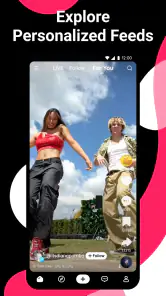
A useful way to test Likee is to begin with one specific interest instead of treating the feed as background noise. Watch a few clips you genuinely enjoy, then notice whether the recommendations keep you in that lane or pull you toward unrelated trends. This gives you a better feel for the feed than a long first session, and it helps you decide whether its stream suits your taste.
The Latest on Likee - Short Video Community
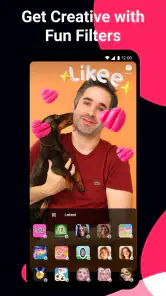
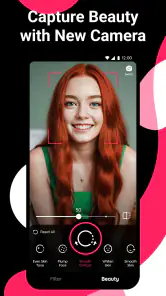
For a creator, the practical question is whether the editing tools make a simple idea easier to finish. Try recording a short clip with one effect and a clear beginning and ending before adding more. The trade-off is that effects can make an ordinary post look lively, but piling them on may distract from what you are trying to say. I would use them to support a joke, demonstration, or dance rather than assume more visual decoration means a better video.
A small everyday test
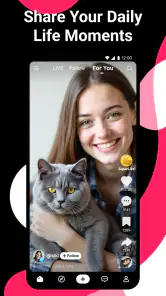
Imagine waiting for a friend at a café with ten minutes to spare. Likee can fill that gap with quick clips, and if an idea catches your eye, you can save the thought and make a short response or original post later when you have time to frame it properly. That split—browse briefly, create deliberately—helps keep the app from turning every spare moment into an unplanned scrolling session.
If you plan to post, think about audience before recording. A clip meant for friends may feel different from one intended for a wider community, and privacy controls are worth checking before you share anything personal. I would also review who can interact with a post and how comments affect the experience. Those small choices matter more than adding another effect when you are trying to make a comfortable space for yourself.
Where another kind of app may fit better
Compared with short-video services built mainly around a familiar, tightly curated feed, Likee’s appeal is its mix of effects, trends, and social interaction. That can suit someone who wants to experiment visually as well as watch. If your priority is keeping up with friends’ everyday updates, a conventional social network may be a more natural home. If you want longer explanations, tutorials, or carefully organized viewing, a video platform centered on longer material is likely the better fit.
More From Our News Desk

Android Auto Makes the Case for Quieter Car Software

MobiOffice: Transforming Mobile Productivity with Seamless Integration

EA SPORTS FC™ Mobile Soccer: Redefining Mobile Sports Gaming

How Microsoft OneDrive Became a Mobile Productivity Giant

How Google Translate Breaks Language Barriers Effortlessly

Why Google Sheets Is the Ultimate Mobile Productivity Tool
There is also a real attention cost. An endless supply of clips makes it easy to lose track of why you opened the app, while popular formats can start to feel repetitive if trends are not your thing. I would set a simple stopping point—one break or a small batch of clips—before opening it, and use the feed when you want lightweight entertainment rather than focused research or news.
What to expect before switching
Likee has over 500 million installs, but a large audience does not guarantee that your particular interests or friends will be active there. Switching is easiest if you treat it as an additional place to explore first, rather than moving every social habit at once. Follow topics and creators that genuinely interest you, then decide whether the community gives you enough reason to return. Its current version is 5.50.1, and it runs on Android 5.0 or later.
The app is free to download, with optional in-app purchases ranging from $0.11 to $120.00 per item. I would check purchase prompts carefully, especially if a younger person will use it, and remember that a Teen rating does not replace household rules about screen time or sharing. The app was released on July 26, 2017, and its 138,000 reviews offer additional user perspectives, though individual experiences can vary.
If you already use another short-video app, the main switching cost is not learning how to scroll; it is rebuilding a feed that feels relevant and deciding which community you want to participate in. Give Likee a short trial with a clear purpose: watch for a particular kind of entertainment, or make one simple video. If neither activity feels better than what you already use, there is little reason to force a move.
Who will get the most from it
I would recommend Likee most readily to someone who enjoys trying visual treatments, making short, expressive clips, and seeing how other people respond. It may also work well for a casual creator who wants to experiment without planning a polished, long-form production. A useful first project is a small before-and-after demonstration or a quick reaction to something you already enjoy: the idea stays clear, and you can judge whether the editing process adds something rather than simply decorating the footage.
It is less compelling if your main reason for joining is to keep up with a close circle of friends. A short-video community can be lively without containing the people you most want to hear from, so I would not assume that a large overall audience means your own corner will feel active. Likewise, if you prefer quiet, chronological updates or long, detailed explanations, a different kind of social or video platform may fit your routine better.
Make a first post with a purpose
For a low-pressure test, decide what the clip should communicate before opening the camera. Record a short take, add only the effect that supports the idea, and watch it once as if you were a stranger encountering it in a feed. That last check is helpful: it can reveal whether the opening makes sense quickly and whether an effect obscures the subject. If the clip needs several explanations in comments, it may be better to simplify it before sharing.
Creators should also separate experimentation from disclosure. A fun format does not require showing a home, school, workplace, routine, or other identifying detail. I would check the audience and interaction settings before posting, and revisit them if the kind of content I share changes. This is especially worth doing when a teen is using the app: agree on what stays private and how to handle uncomfortable comments before the first public post, rather than trying to work it out after a problem appears.
Enjoy the feed without letting it take over
One practical habit is to open the feed with a question in mind: am I looking for a laugh, a dance idea, or a creator whose style I want to study? That gives browsing a natural endpoint. When a clip inspires a project, jot down the idea and come back to it later instead of immediately starting a long chain of related videos. This works particularly well if you use short breaks for entertainment but want to keep your creative time intentional.
Another trade-off is that the formats that make a community easy to join can also make its output feel familiar. Trends give newcomers a common starting point, but copying a format without adding a personal angle may leave a post feeling interchangeable. I would treat a popular format as a prompt, not a requirement: borrow its basic setup if it helps, then add a specific point of view or a detail from your own experience.
How it differs from other viewing habits
Against a general social network, Likee is a better match when you want video-led discovery and creative play rather than a broad mix of personal updates. Against a platform centered on longer videos, it is more suited to quick entertainment and compact ideas than to following a detailed lesson from start to finish. And compared with short-video alternatives that may feel more focused on passive viewing, its creative-effects angle can be a reason to try it—provided you actually want to make clips, not just watch them.
I would not switch everything over on day one. Keep your usual app for the relationships and creators you already value, and give Likee a defined trial for one purpose. If you find a few accounts that make you want to return, or an editing workflow that helps you finish a clip, it may earn a place alongside your existing apps. If the feed feels off-topic or the community does not connect with your interests, leaving it as an occasional browsing option—or skipping it—is a reasonable choice.
Discovering New Content
The first thing that hits you when you open Likee is the sheer volume of content. It's like walking into a candy store where every shelf is stacked with something new and exciting. From funny skits to dance challenges, the app is a goldmine for anyone looking to kill a few hours. You can scroll endlessly, and there’s always something fresh to watch.
Create Your Own Magic
Now, if you’re more of a creator than a consumer, Likee has got you covered. The app boasts a plethora of editing tools that allow you to create videos that look professionally made. Think filters, effects, and music tracks that can turn a simple video into something special. It's like having a mini production studio in your pocket.
Engage and Connect
One of the standout features for me is the community aspect of the app. You’re not just posting videos into the void; there’s a vibrant community ready to engage. Whether it's through comments, likes, or shares, there's a real sense of interaction. You can even collaborate with other users, which adds another layer of creativity and fun.
Oh, and did I mention the live streaming feature? It’s a game-changer for those who love to connect with their audience in real-time. You can broadcast your life, chat with followers, and even receive virtual gifts. It’s like hosting your own TV show, minus the big budget.
Stay Safe and Secure
With all the fun and games, safety is always a concern, right? Well, the folks behind Likee seem to have thought this through. The app comes with various privacy settings that give you control over who gets to see your content. Plus, they’ve got a bunch of moderation tools to keep the platform safe for everyone.
Make the social side work for you
For me, a useful way to approach the community is to treat interaction as a choice rather than the price of admission. You can enjoy watching without making every visit about posting, and a new creator can take time to learn the tone of a community before joining in. If you do comment, a specific response to the clip is more likely to start a genuine exchange than a generic reaction. That small distinction helps the social side feel less like chasing attention and more like taking part.
Collaboration can be appealing when you already have an idea that benefits from another person’s style, but I would not make it the first test of the app. Start with a clip you can complete on your own, then decide whether interacting with other creators adds something you want. That keeps the learning curve manageable and makes it easier to tell whether the creative tools themselves suit you, separate from the energy of the community.
Questions worth settling before you post
People often wonder whether they need to publish to get value from Likee. I do not think so: if you mainly want quick entertainment, browsing can be the whole point. Posting makes more sense if you enjoy shaping a brief idea and are comfortable with the possibility of reactions from people beyond your immediate circle. You can try the viewing experience first and make the decision about sharing later.
Another practical question is whether the app is suitable for a younger user. Its Teen rating is a useful starting signal, not a substitute for a conversation about privacy, screen habits, purchases, and how to respond to unwanted contact. I would set expectations together, check the controls directly, and revisit them as the young person’s use changes. The same advice applies to adults who prefer a more limited audience: take a moment to understand the available interaction choices before uploading.
It is also fair to ask whether the free download means every part of the experience is free. The app can be installed without paying, while optional purchases are available; I would not buy anything simply to see whether the core feed or basic creation process works for me. A trial based on watching and making one simple clip is enough to judge the central appeal before deciding whether any purchase is relevant.
A sensible way to decide
When comparing Likee with other short-video choices, I would focus on three questions: do I like what the feed learns to show me, do the effects help me express an idea, and does the audience make interaction enjoyable? The answer can differ by person. Someone who values quick visual experimentation may find the mix rewarding, while someone who wants a quieter feed or a reliable place for close-friend updates may be happier elsewhere.
My own recommendation is a measured one. Try it when you want short-form entertainment and are curious about making expressive clips, but keep expectations realistic about discovering your specific community immediately. Give it a purposeful visit, check the sharing settings, and stop if the feed starts taking more time than the fun is worth. Likee is most convincing as an optional creative and viewing space, not a necessary replacement for every social app you already use.
In conclusion, if you're looking for a platform that's both entertaining and engaging, Likee - Short Video Community might just be your new favorite app. It's a vibrant mix of creativity, social interaction, and entertainment all rolled into one. Give it a try, and who knows? You might just become the next viral sensation!
Likee - Short Video Community Frequently Asked Questions
Is Likee easy to use for someone new to short-video apps?
Likee brings video discovery, creation, and social features together, so you can start by watching clips and explore the creative tools when you are ready. Its focus is short videos rather than long-form viewing, which makes browsing feel suited to quick sessions. If you are new to this format, you can take time to explore before deciding whether to post or interact.
What does the Teen content rating mean for Likee?
Likee has a Teen content rating, which is useful context for families considering the app. That rating does not replace individual judgment about social media: video content and interactions can vary across a community platform. Teens and parents may want to discuss what is appropriate to watch and share, and review the privacy and interaction settings before using the app.
Who makes Likee?
Likee is developed by Likeme Pte. Ltd. It is a social app centered on short videos, with tools for making and sharing clips alongside a community for discovering creators. Knowing the developer can help you identify the app when searching for it in an app store, especially if several apps have similar names or descriptions.
Is Likee available on both Android and iOS?
Likee is available for Android and iOS devices. Android users should check that their device runs version 5.0 or later, while Apple-device users can search for Likee in the App Store. Using the official store for your device is a straightforward way to find the appropriate app version and review compatibility before downloading.
How much storage space should I have before installing Likee?
It is sensible to check that your device has enough free storage before installing Likee, particularly if you expect to create or save videos. Video apps can involve more media activity than a basic text-based app, and space needs may change as you use one. You can check your device’s available storage and manage saved media if you need room.
Pros
- Vibrant and diverse video content community.
- Advanced video editing tools for creators.
- Regularly updated with trending challenges.
- In-app currency to reward content creators.
- User-friendly interface for easy navigation.
Cons
- Contains ads that can be intrusive.
- Some features require in-app purchases.
- Privacy concerns with data sharing.
- Content moderation can be inconsistent.
- Notifications can be overwhelming.
- Category
- Social
- Version
- 5.50.1