Moj: Free Short Drama & Reels
- 846.00
- 4.1
- Installs
- 100.00M
- Price
- Free

Screenshots

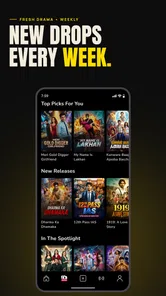
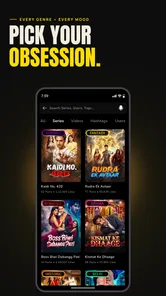

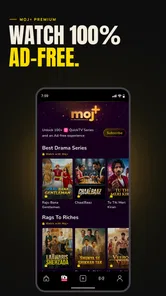

Analysis by Reviewed
I came to Moj: Short Videos & Reels for quick entertainment, but what makes a short-video app worthwhile is whether it can keep a casual browse enjoyable without demanding a big time commitment. Moj is a social app developed by ShareChat, and its focus on short clips makes it easy to dip in for a few minutes, whether I want comedy, dance, DIY ideas, or simply something light between tasks.
What a quick session feels like
The short-video format sets a fast pace: a clip ends, and I can move on with a swipe rather than choose a full-length video. That suits brief breaks, though it also makes it easy to keep scrolling longer than intended. I would treat the feed as a stream of suggestions, not a carefully organized library; if I want to revisit a particular idea, I need to pay attention to the creator or remember what I saw rather than assume every clip will be easy to find again.
How I judge speed before settling in
For a first impression, I would separate the app’s general responsiveness from the time it takes an individual clip to load. A short-video feed asks for frequent playback, so even small delays can stand out more than they would in an app where I open one page and read at my own pace. If the first few clips are slow, I would check whether the connection is steady before deciding that Moj itself is the problem.
There is also a difference between a quick opening session and a settled-in one. A brief browse may feel light because I am only watching a few clips; a longer stretch involves repeated loading and more time with video on screen. I would try the app during the kind of break when I expect to use it, rather than assume a short test tells me how it will feel during an extended scroll.
Discover Endless Creativity
The beauty of Moj: Short Videos & Reels lies in its capacity to showcase talent from all walks of life. Whether you're into dance, comedy, DIY hacks, or jaw-dropping stunts, this app has something for everyone. I was amazed at how each video seemed to bring something fresh to the table, making it impossible to get bored. The app’s algorithm smartly curates content that aligns with your interests, ensuring you’re always hooked on what you love.
User Interface & Experience
Navigating through Moj is a breeze. The user interface is sleek and intuitive, making it easy even for the not-so-tech-savvy folks to get the hang of it. I especially love how it doesn't overwhelm you with too many options. Everything is right where you’d expect it to be. You can effortlessly swipe through videos, follow creators, and even engage with content through likes and comments.
When I would use it—and when I wouldn’t
A realistic use is opening Moj during a short wait, watching a handful of clips, then following a creator whose style I want to see more often. Following is a more deliberate way to shape the experience than relying only on what the feed recommends. I also find short clips useful for casually discovering dance or DIY inspiration, but I would not treat a quick demonstration as complete instructions: for a repair or a recipe, I would look for fuller guidance before acting.
More From Our News Desk

 Gmail
Gmail in a Busy Inbox: Who Benefits Most?
From first account to crowded workday, Gmail earns its place through dependable search and flexible sorting—but its best fit depends on how much inbox maintenance you can tolerate.

 Prime Video
Switching to Prime Video: What Changes in Your Viewing Routine
Prime Video can make a compelling second home for streaming, but switching means learning a different catalog, rental layer, and route from browsing to playback.

 Universal TV Remote Control
 Works Best as a Reliable Backup
A phone remote earns its place through quick setup and reliable habits. Here is how to get more from Universal TV Remote Control—and where its limits show.

 Weather - By Xiaomi
Weather by Xiaomi Review: Clear at a Glance, Less Clear Up Close
Xiaomi’s weather app makes everyday forecasts quick to scan, but its calm surface can leave useful details and recovery paths harder to find than they should be.

 X
X Under Pressure: Can It Recover When Posting Goes Wrong?
A resilience-focused review of X, examining setup, mistaken posts, interruptions, weak connections, and the gaps that matter when recovery needs to be dependable.

 Clash of Clans
 Is Won Between the Battles
Its raids are quick; its community is a long-term project of coordination, teaching, rivalry, and shared responsibility—with all the friction that entails.
Latest News



Compared with general video platforms, Moj is better suited to quick, swipe-through entertainment and creator discovery than to searching for long explanations or a specific, dependable tutorial. Other short-video feeds may feel more convenient if most of the people you follow already use them. Moj makes more sense when its mix of creators and clips is what you want. If you prefer a chronological list, long-form viewing, or a feed with little personalized discovery, this style may not be for you.
That distinction matters when deciding whether to keep it. If I want a quick laugh or a glimpse of different creators, a short-video feed is a natural fit. If I need an answer I can check, compare, and return to later, a search-led video service or a written guide is usually more useful. I would use Moj for discovery, then move elsewhere when accuracy, depth, or a reliable sequence of steps matters.
Creating Your Own Magic
Feeling inspired to create your own content? Moj makes it easy with its range of creative tools. From filters to music tracks, you have everything at your disposal to make your videos pop. I tried my hand at making a few dance reels, and let me tell you, the process was as fun as the final product! Plus, the community is incredibly supportive, so don't be surprised if your first video garners a lot of love.
A more thoughtful way to browse and create
For a better first session, I would spend a little time liking clips that genuinely match my interests and following a few creators rather than judging the feed after only a couple of swipes. When I make a video, I would also watch it through once before sharing and think about whether the background, people, or location reveal anything I would rather keep private. Those small habits help make browsing and posting feel more intentional, without turning a casual app into a chore.
One useful habit is to decide what I want from a session before opening the feed: a quick break, ideas for a hobby, or a chance to check in with creators I already enjoy. That gives me a natural stopping point and makes it easier to notice when the recommendations are drifting away from my interests. For inspiration, I would save the creator or the key idea in my own notes while it is fresh, rather than counting on a fast-moving feed to serve the same clip again.
For someone who is mainly watching, the trade-off is convenience versus control. Swiping makes discovery effortless, but it is less deliberate than choosing a specific video from a search result or a subscription list. For someone posting, the trade-off is reach versus comfort: making a clip is approachable, but sharing should still be a considered choice. I would start with something low-stakes and avoid including details that identify my routine or private surroundings.
Privacy & Safety
In today’s digital age, privacy is paramount, and Moj doesn’t take this lightly. The app provides robust safety measures to ensure a secure environment for its users. You have control over your privacy settings, which I find reassuring. It's comforting to know that while you enjoy the app, your personal information stays protected.
Because this is a social platform, I would still be selective about what I share and how I interact. A public-facing clip can travel beyond the small circle I had in mind, so I would avoid including personal details in a video or its caption. Teen is the app’s content rating, which makes it especially sensible for families to talk about sharing and screen-time habits rather than assuming a rating replaces that conversation.
For parents or younger viewers, I would treat the content rating as a starting point for a conversation, not a substitute for checking how the app fits the household. It can help to agree on what is appropriate to post, how to respond to comments, and when to put the phone away. Those choices are especially relevant in a format built around a steady stream of new clips, where one video can quickly lead to another.
Speed, stability, and device fit
In ordinary use, short clips make it easy to move quickly from one video to the next, but the actual smoothness of playback can depend on the phone and connection. I would not judge the app by a single slow-loading moment; checking again on a steadier connection is a practical first step. During a longer session, repeated video playback and creation can also feel more demanding than a brief browse, so I would close other heavy tasks if my device starts feeling sluggish.
Moj is free to install, has an average rating of 4.2 from around two million ratings, and has been installed over 100 million times. It was released on November 8, 2020, and version 2025.28.3 supports Android 6.0 and later. Optional in-app purchases range from a few cents to nearly three hundred dollars per item, so I would check the purchase details before confirming anything. Those figures give a sense of its reach, but they do not guarantee the same feed or performance on every phone.
If clips pause or the app feels unresponsive, I would first check the connection, then close and reopen the app; if the trouble persists, restarting the phone is a reasonable next step. I would also keep the app updated where practical, while remembering that performance depends on the device as well as the software. The main trade-off is inherent to the format: quick playback is engaging, but frequent loading and extended scrolling are not ideal when I want to conserve attention, data, or battery.
On an older or less capable phone, I would keep expectations practical. The minimum Android support is version 6.0, but meeting that requirement does not by itself promise equally smooth playback across devices. Video-heavy browsing can be more demanding than reading text, and making clips adds another kind of activity beyond simply watching. If the phone becomes warm, sluggish, or inconvenient during a long session, shorter visits are a sensible adjustment; if performance remains frustrating, a lighter way to follow creators may suit better.
When a session does not recover after a simple restart, I would avoid repeatedly tapping through the same slow screen. I would pause, check the connection, and return later rather than spend a break troubleshooting. This is a practical distinction for a casual entertainment app: reliability matters, but it is not worth turning a few minutes of downtime into a longer struggle. If the issue happens only while streaming, connection quality is an especially useful thing to check first.
Who will get the most from it
I would recommend Moj to someone who enjoys Indian short-video entertainment, likes finding emerging creators, or wants an easy way to watch and make brief clips. It is less compelling for anyone seeking a tightly curated learning resource, a private archive of favorite videos, or a calm feed that does not encourage one-more-swipe browsing. Its 4.2 average across around two million ratings suggests broad appeal, while the best test is whether its recommendations settle into topics and creators you actually want to spend time with.
It is also a better fit for someone comfortable with discovery than for someone who wants every session to be predictable. A viewer who enjoys seeing unfamiliar faces and changing subjects may appreciate the feed’s variety. Someone who mainly wants updates from a fixed group should lean on followed creators and decide whether that experience is enough; if not, a platform organized more clearly around subscriptions may feel easier to manage.
For a typical day, I can imagine opening Moj while waiting for a ride, watching a few light clips, and following a creator who shares a hobby I enjoy. I would close it when the wait ends instead of expecting to turn that brief session into a learning plan. Later, if one clip prompts a real project, I would seek a more complete source before trying it. That is where the app works best for me: an easy spark for entertainment or curiosity, not the final word on a subject.
The free install lowers the barrier to trying it, but optional purchases still deserve attention. I would look closely at the amount shown on any purchase confirmation and avoid treating in-app spending as necessary to enjoy the basic act of browsing. If I am setting up the app for someone else, I would make that distinction clear: free access and optional paid items can coexist, so it is worth checking before approving a transaction.
My performance verdict
For its intended quick-browse role, Moj makes the most sense when it opens promptly, the connection can keep clips moving, and I am happy to let recommendations introduce me to creators. I would not judge its usefulness only by a benchmark-style idea of speed: whether the feed feels enjoyable, whether I can find people I want to follow, and whether the app fits my phone and habits matter just as much. The strongest case for it is casual discovery; its weaker case is anything that needs careful filing, extended instruction, or uninterrupted viewing.
So, if you're on the lookout for a platform that combines entertainment, creativity, and community, I'd say give Moj: Short Videos & Reels a try. It's more than just a video app; it's a vibrant community of creators and viewers, connecting through the universal language of short videos. Who knows, it might just inspire you to unleash your own creativity!
Moj: Free Short Drama & Reels Frequently Asked Questions
Can Moj be used for watching videos without creating an account?
Moj is built around browsing and sharing short videos, so it can appeal both to people who mainly want to watch and to those who want to create. Before downloading, consider whether you want a passive viewing experience or plan to interact with creators and publish content. Social features are part of the app’s appeal, and your preferences will shape how you use it.
Does Moj work on older Android phones?
Moj supports Android devices running version 6.0 or later, which makes it an option for a range of older as well as newer phones. If you use Android, check your device’s system version before installing. The app is also available on iOS, giving users on both major mobile platforms a way to access its short-video experience.
Is Moj free to download, and are there any in-app purchases?
Moj is free to download, so you can try browsing short videos and exploring the app without an upfront purchase. It also offers in-app purchases, with prices ranging from a few cents to nearly three hundred dollars per item. Check purchase details before confirming anything, particularly if you share your device or payment method with someone else.
What age group is Moj intended for?
Moj has a Teen content rating, so it is intended for teen audiences and older users rather than young children. Its short-video feed includes different kinds of material created and shared by users, so families may want to discuss online interactions and set suitable device or account boundaries before a teen uses the app.
What is Moj: Short Videos & Reels and how does it work?
Moj: Short Videos & Reels is an engaging platform where users can create and share short video content, similar to TikTok. It allows users to explore a wide variety of videos across genres such as dance, comedy, education, and more. Creators can leverage a range of editing tools, effects, and music tracks to enhance their video presentations, making it an ideal platform for showcasing creativity in a vibrant community.
Pros
- User-friendly interface
- Diverse content categories
- Fast video loading
- Interactive user community
- Regular updates
Cons
- High data consumption
- Occasional app crashes
- Limited editing tools
- Ads can be intrusive
- Requires constant internet